
1. הקדמה
The Xprinter XP-C300H is a high-speed thermal receipt printer designed for various business environments. It features robust construction with water, oil, and dust resistance, ensuring durability and reliable performance. This printer offers versatile connectivity options including USB, Serial, and LAN, making it compatible with a wide range of operating systems. With a printing speed of 300mm per second, it efficiently handles high-volume printing tasks. This manual provides detailed instructions for setting up, operating, and maintaining your XP-C300H printer.
2. זיכערקייַט אינפֿאָרמאַציע
- שטענדיק פֿאַרבינדן דעם דרוקער צו אַ געערדטער עלעקטרישער אַוטלעט.
- שטעלט נישט אויס דעם דרוקער צו וואַסער אָדער צו פיל הומידיטי.
- פֿאַרמײַדט צו שטעלן דעם דרוקער אין דירעקטער זון אָדער לעבן היץ־קוואַלן.
- ניצט נאָר דעם ספּעציפֿירטן מאַכט אַדאַפּטער און אַקסעסאָריעס.
- האַלטן אויס פון דערגרייכן פון קינדער.
- Do not attempt to disassemble or repair the printer yourself. Contact qualified service personnel for assistance.
3. פּעקל אינהאַלט
Please check the package contents upon unpacking. If any items are missing or damaged, contact your vendor.
- Xprinter XP-C300H Thermal Receipt Printer
- מאַכט קאַבלע
- USB Cable (may vary by model/region)
- Thermal Paper Roll (for initial testing)
4. פּראָדוקט איבערview
Familiarize yourself with the components of your XP-C300H printer.
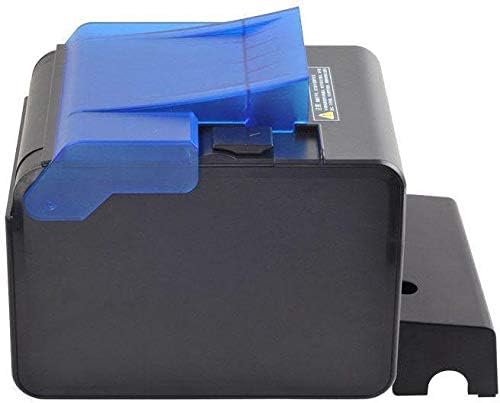
פיגורע 4.1: זייַט view of the XP-C300H printer. This image shows the compact design and the blue transparent cover for the paper compartment.
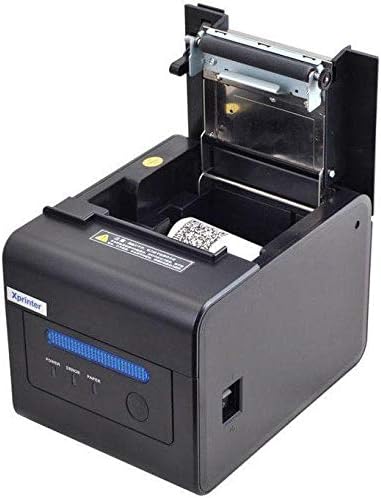
פיגורע 4.2: אויבן-פראנט view of the XP-C300H printer with the paper cover open. This reveals the thermal print head mechanism and the area for loading the thermal paper roll. Status indicator lights (Power, Error, Paper) are visible on the front panel.
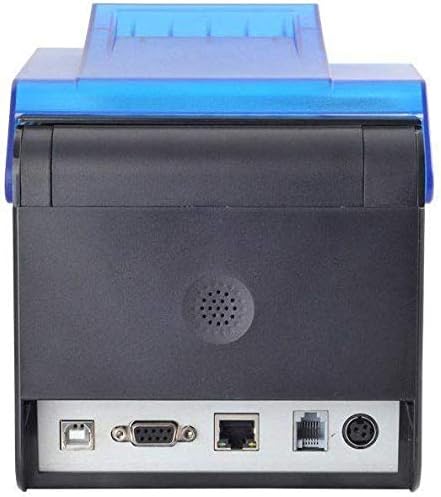
פיגורע 4.3: דערציען view of the XP-C300H printer. This image highlights the multiple connectivity ports including USB, Serial (DB9), LAN (Ethernet), and the power input port, offering flexible integration options.
5. סעטאַפּ
5.1 פֿאַרבינדן דעם מאַכט אַדאַפּטער
- מאַכן זיכער אַז די דרוקער איז אויסגעדרייט אַוועק.
- פאַרבינדן די מאַכט קאַבלע צו די מאַכט אַדאַפּטער.
- Plug the power adapter into the printer's power input port (refer to Figure 4.3).
- שטעקט אריין דעם אנדערן עק פונעם עלעקטרישן קאבל אין א געערדטן עלעקטרישן אויסגאנג.
5.2 לאָדן טערמיש פּאַפּיר
- Open the printer's top cover by pressing the release latch (refer to Figure 4.2).
- Insert a new thermal paper roll into the compartment, ensuring the paper feeds from the bottom and the leading edge is straight.
- ציעט ארויס א קליינע מאסע פאפיר פארביי דעם שניידער.
- Close the top cover firmly until it latches.
5.3 קאַנעקטינג צו אַ קאָמפּיוטער
The XP-C300H supports USB, Serial, and LAN connections.
- USB קשר: פֿאַרבינדט איין עק פֿון דעם USB קאַבל צום דרוקער'ס USB פּאָרט און דעם אַנדערן עק צו אייער קאָמפּיוטער.
- סיריאַל קשר: Connect a serial cable (DB9) from the printer's serial port to your computer's serial port.
- לאַן קאַנעקשאַן: פֿאַרבינדט אַן עטערנעט קאַבל פֿון דעם דרוקער'ס לאַן פּאָרט צו אייער נעץ ראַוטער אָדער סוויטש.
5.4 דרייווער ינסטאַלירונג
After connecting the printer, you may need to install the appropriate drivers for your operating system (Windows, Linux, etc.). Drivers are typically provided on a CD with the printer or can be downloaded from the Xprinter official website. Follow the on-screen instructions for driver installation.
6. אַפּערייטינג ינסטרוקטיאָנס
6.1 פּאַוערינג אויף / אַוועק
Press the power switch located on the printer to turn it on or off. The 'Power' indicator light will illuminate when the printer is on.
6.2 סטאַטוס ינדיקאַטאָרס
The printer features indicator lights on the front panel:
- מאַכט: ווײַזט אָן אַז דער דרוקער איז אנגעצינדן.
- טעות: Illuminates or flashes to indicate an error condition (e.g., paper out, print head overheat, cover open).
- פאפיר: Illuminates when paper is present, flashes when paper is low, or off when paper is out.
6.3 דרוקן
Once the printer is connected and drivers are installed, you can print receipts or other documents from your POS software or application. The printer supports EPSON ESC/POS command sets for various printing functions.
6.4 אַוטאָ קאַטער
The XP-C300H features an auto-cutter that can perform full or partial cuts of the thermal paper, depending on the software commands sent to the printer.
7. וישאַלט
7.1 רייניקן דעם דרוק קאָפּ
Regular cleaning of the print head ensures optimal print quality. Turn off the printer and disconnect the power cable before cleaning. Use a soft cloth dampened with isopropyl alcohol to gently wipe the thermal elements on the print head. Allow it to dry completely before use.
7.2 רייניקונג פון די אויסערליכע זייט
Wipe the exterior of the printer with a soft, dry cloth. For stubborn dirt, use a cloth lightly dampened with water and mild detergent. Do not use strong solvents or abrasive cleaners.
7.3 אויסטוישן די פאפיר ראָל
When the 'Paper' indicator shows low paper or is off, replace the paper roll following the steps in Section 5.2.
8. טראָובלעשאָאָטינג
| פּראָבלעם | מעגלעך סיבה | לייזונג |
|---|---|---|
| דרוקער גייט נישט אן | שטראָם קאַבל נישט פארבונדן; שטראָם אַוטלעט דעפעקט | קאָנטראָלירט די פֿאַרבינדונג פֿון עלעקטרישן קאַבל; פּרוּווט אַן אַנדער אַוטלעט |
| קיין דרוקן נישט | Paper out; Printer cover open; Incorrect driver/connection; Error state | Load paper; Close cover; Verify driver installation and cable connection; Check error indicator |
| נעבעך דרוק קוואַליטעט | Print head dirty; Low quality thermal paper | Clean print head (Section 7.1); Use recommended thermal paper |
| פּאַפּיר קלעם | Improper paper loading; Foreign object | Open cover and clear jammed paper; Reload paper correctly (Section 5.2) |
אויב די פראבלעם בלייבט נאך פרובירן די לייזונגען, ביטע קאנטאקטירט טעכנישע שטיצע.
9. ספּעסאַפאַקיישאַנז
| שטריך | באַשרייַבונג |
|---|---|
| מאָדעל | XP-C300H |
| דרוק מעטאָד | דירעקט טערמאַל |
| דרוק ספּיד | 300 מם / סעקונדע |
| צובינד | USB, Serial (RS232), LAN (Ethernet) |
| פּאַפּיר ברייט | מאַקסימום 198 מם (Note: Standard receipt printers typically use 80mm or 58mm width. Please verify actual supported paper width with product documentation.) |
| אַוטאָ קאַטער | Full/Partial Cut |
| רילייאַבילאַטי | Water, Oil, and Dust Resistant |
| באַפֿעלן באַשטעטיקט | קאַמפּאַטאַבאַל מיט EPSON ESC/POS |
| אַפּערייטינג סיסטעם שטיצן | Windows, Linux, various others |
| דימענשאַנז (די רענטגענ וו x ה) | 198 X 148 X 138 מם |
| וואָג | 1.78 קג |
| קאָליר | שוואַרץ |
| אַרייַנגערעכנט קאַמפּאָונאַנץ | Printer, Power Cable |
| דרוק מידיאַ | לאַבעלס (Primary media for receipt printers is typically thermal paper rolls) |
| דופּלעקס פּרינטינג | יא (Note: This feature is generally not applicable to thermal receipt printers. Please refer to official product documentation for clarification.) |
10. וואָראַנטי און שטיצן
For detailed warranty information, technical support, and service inquiries, please refer to the documentation included with your purchase or visit the official Xprinter website. You may also contact your local dealer or distributor for assistance.
האַלט אייער קויף קוויטל ווי אַ באַווייַז פון קויפן פֿאַר וואָראַנטי קליימז.