
הקדמה
The Seagate Expansion Portable Hard Drive provides an easy-to-use solution for instantly adding storage to your computer. This portable hard drive is designed for simple drag-and-drop file saving and offers automatic recognition with both Windows and Mac computers. It features a sleek, compact design, making it ideal for carrying your photos, movies, music, and other important files on the go. The device connects via USB 3.0, ensuring fast data transfer speeds and power directly from the USB port.
וואָס איז אַרייַנגערעכנט
באַשטעטיקן אַז אַלע זאכן זענען פאַראַן אין פּעקל:
- Seagate Expansion portable hard drive
- 18-אינטש (45.72 קם) וסב 3.0 קאַבלע
- שנעל אָנהייב פירער
- Limited Warranty: APAC - 3 years
- Rescue Data Recovery Services information
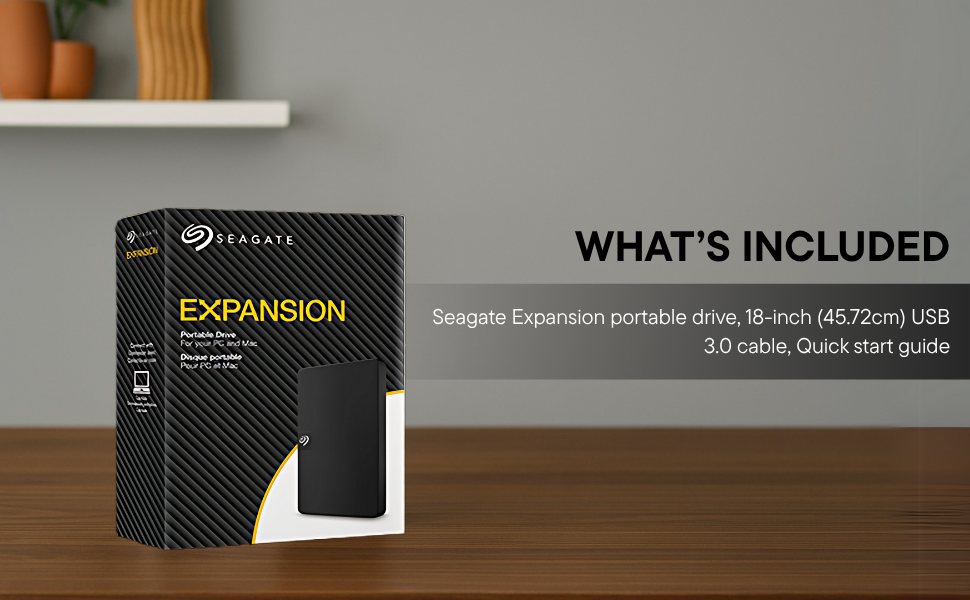
Image: Contents of the Seagate Expansion portable hard drive package, including the drive, USB cable, and documentation.
סעטאַפּ
- פאַרבינדן די וסב קאַבלע: Plug the small end of the included USB 3.0 cable into the Seagate Expansion portable hard drive.
- פאַרבינדן צו קאָמפּיוטער: Plug the larger end of the USB 3.0 cable into an available USB port on your computer. The drive is USB 3.0 powered, so no external power adapter is needed.
- אָטאַמאַטיק דערקענונג: The drive will be automatically recognized by your Windows or Mac operating system. No software installation is typically required for basic functionality.
- For Mac Users (Time Machine): If you intend to use the drive with Apple Time Machine for backups, reformatting the drive is required. Refer to your Mac's documentation for instructions on how to reformat and set up Time Machine.

Image: A Seagate Expansion portable hard drive connected to a laptop via a USB cable, demonstrating the plug-and-play setup.

Image: A hand holding the Seagate Expansion drive, with Windows and Mac compatibility logos displayed next to it.
אַפּערייטינג ינסטראַקשאַנז
Once connected, the Seagate Expansion drive functions like any other external storage device on your computer.
- צוטריט צום דרייוו: On Windows, the drive will appear under 'This PC' or 'My Computer'. On Mac, it will appear on the desktop or in Finder under 'Locations'.
- שפּאָרן Files: צו ראַטעווען files, simply drag and drop them from your computer's internal storage to the Seagate Expansion drive's icon or open folder. You can also use the 'Copy' and 'Paste' functions.
- אָרגאַנייזינג Files: Create folders on the drive to organize your data efficiently.
- Safely Ejecting: Always safely eject the drive before disconnecting it to prevent data corruption. On Windows, right-click the drive icon in the system tray and select 'Eject'. On Mac, drag the drive icon to the Trash or click the Eject button next to the drive in Finder.

Image: A hand demonstrating the drag-and-drop method to transfer files from a laptop to the Seagate Expansion portable hard drive.
וישאַלט
Proper maintenance ensures the longevity and optimal performance of your Seagate Expansion drive.
- פיזישע זאָרג: Handle the drive with care. Avoid dropping it or exposing it to extreme temperatures, moisture, or strong magnetic fields.
- רייניקונג: ניצט אַ ווייכע, טרוקענע, לינט-פֿרייע שטאָף צו רייניקן די אויסערלעכע זייט פֿון דעם דרייוו. ניצט נישט קיין פֿליסיקע רייניגער אָדער סאָלווענטן.
- דאַטאַ באַקקופּ: While the drive is designed for storage, it is always recommended to maintain backups of critical data on multiple devices or cloud services.
- Firmware דערהייַנטיקונגען: טשעקט פּעריִאָדיש די סיגייט שטיצע webזייטל פֿאַר אַלע בנימצא פירמווער דערהייַנטיקונגען פֿאַר דיין מאָדעל צו ענשור אָפּטימאַל פאָרשטעלונג און קאַמפּאַטאַבילאַטי.
טראָובלעשאָאָטינג
If you encounter issues with your Seagate Expansion drive, consider the following steps:
- דרייוו נישט דעטעקטירט:
- זייט זיכער אז דער USB קאַבל איז זיכער פארבונדן סיי צום דרייוו און סיי צום קאָמפּיוטער.
- פרובירט צו קאנעקטן דעם דרייוו צו אן אנדערן USB פארט אויף אייער קאמפיוטער.
- פּרובירט דעם דרייוו מיט אַן אַנדער USB קאַבל, אויב פֿאַראַן.
- ריסטאַרט דיין קאָמפּיוטער.
- פּאַמעלעך פאָרשטעלונג:
- Ensure you are using a USB 3.0 port for optimal speeds. USB 2.0 ports will result in slower transfers.
- שליסט צו אלע אומנייטיקע אפליקאציעס וואס לויפן אין הינטערגרונט.
- Check your computer's disk management or disk utility to ensure the drive is healthy.
- אַקסעסינג Files: אויב איר קענען נישט צוטריט files, ensure the drive is properly mounted and not in use by another application.
פֿאַר מער דעטאַלירטע פּראָבלעם־לייזונג, ביטע זעט די באַאַמטער Seagate Troubleshooting Guide (PDF).
ספּעסאַפאַקיישאַנז
| מאָדעל נומער | STKM1000400 |
| דיגיטאַל סטאָרידזש קאַפּאַציטעט | 1 טב |
| שווער דיסק צובינד | וסב 2.0/3.0 |
| קאַנעקטיוויטי טעכנאָלאָגיע | וסב |
| סאָרט | Seagate |
| ספּעציעלע שטריך | Data Recovery Service, Portable |
| שווער דיסק פאָרם פאַקטאָר | 2.5 אינטשעס |
| שווער דיסק באַשרייַבונג | מעטשאַניקאַל שווער דיסק |
| קאַמפּאַטאַבאַל דעוויסעס | דעסקטאָפּ, לאַפּטאָפּ |
| ייַנמאָנטירונג טיפּ | פונדרויסנדיק האַרד דרייוו |
| קאָליר | שוואַרץ |
| שווער דיסק ראָוטיישאַנאַל ספּיד | 5400 רפּם |
| לייענען ספּיד | 120 מעגאבייט פּער סעקונדע |
| Item Dimensions L x W x Thickness | 11.7L x 8W x 1.5Th Centimeters |
| פּונקט וואָג | 0.4 פונט |
| אָפּצוימונג מאַטעריאַל | פּלאַסטיק |
וואָראַנטי און שטיצן
Your Seagate Expansion portable hard drive comes with comprehensive support and warranty coverage.
- לימיטעד וואָראַנטי: The product includes a 3-year limited warranty. This covers device replacement or repair for manufacturing defects.
- רעסקיו דאַטן אָפּזוך באַדינונגען: For added peace of mind, your purchase includes 3 years of Rescue Data Recovery Services. This service covers data loss due to accidents, mechanical errors, or natural disasters, providing a chance to recover your valuable data.

Image: The 'Rescue Services' logo, indicating the inclusion of 3 years of data recovery services.
קאָנטאַקט אינפֿאָרמאַציע
For warranty claims, technical support, or inquiries regarding Rescue Data Recovery Services, please contact Seagate Customer Care:
- Seagate Technology (Thailand) Limited. India Customer Care No: 18003092525
Please have your product model number (STKM1000400) and proof of purchase ready when contacting support.