
1. הקדמה
א דאנק פארן קויפןasing the Trevi CMP 588 DAB Portable Stereo System. This manual provides essential information for the safe and correct operation of your device. Please read it thoroughly before use and retain it for future reference.
The Trevi CMP 588 DAB is a versatile portable stereo system featuring DAB/DAB+ and FM radio with RDS, a CD/MP3 player, USB input, AUX-in, Bluetooth connectivity, and a headphone jack, all designed for an enhanced audio experience.
2. זיכערקייַט אינפֿאָרמאַציע
- מאַכט מקור: ניצט נאָר דעם ספּעציפֿירטן מאַכט אַדאַפּטער אָדער באַטעריעס. זיכערט זיך אַז דער וואָלומען איזtage פּאַסט צו די באדערפענישן פון דער איינהייט.
- וואַסער און נעץ: Do not expose the unit to rain, moisture, or immerse it in water. Avoid placing objects filled with liquids, such as vases, on the unit.
- ווענטילאַטיאָן: זיכער מאַכן אַז עס איז דאָ גענוג ווענטילאַציע. נישט פֿאַרשטאָפּן די ווענטילאַציע עפענונגען.
- היץ: האַלט דעם אַפּאַראַט אַוועק פֿון היץ־קוואַלן ווי ראַדיאַטאָרן, היץ־רעגיסטערס, אויוון, אָדער אַנדערע אַפּאַראַטן (אַרייַנגערעכנט ampליפיערס) וואָס פּראָדוצירן היץ.
- רייניקונג: נעמט ארויס דעם אַפּאַראַט פֿון דער וואַנט־ווענטיל איידער איר רייניקט. ניצט אַ ווייכן, טרוקענעם שטאָף. ניצט נישט קיין פֿליסיקע רייניגער אָדער אַעראָזאָל־רייניגער.
- סערוויס: דו זאלסט נישט פּרווון צו דינען דעם פּראָדוקט זיך. קאָנטאַקט אַלע קוואַלאַפייד סערוויס פּערסאַנעל.
- קאָמפּאַקטדיסק שפּילער: קיינמאָל קוק גלייַך אין די לאַזער שטראַל.
3. פּעקל אינהאַלט
באַשטעטיקן אַז אַלע זאכן זענען פאַראַן און אין גוטן צושטאַנד:
- Trevi CMP 588 DAB Portable Stereo System
- אַק מאַכט קאַבלע
- ווייַט קאָנטראָל
- באַניצער מאַנואַל (דעם דאָקומענט)
4. פּראָדוקט פֿעיִקייטן
- DAB/DAB+ and FM Radio with RDS
- High Readability Dot Matrix Display
- CD Player (supports CD-DA, MP3)
- USB Input for MP3 Playback
- AUX-in for external audio devices
- בלועטאָאָטה קאַנעקטיוויטי
- כעדפאָון דזשאַק
- פּאָרטאַטיוו פּלאַן מיט פירן שעפּן
- ווייַט קאָנטראָל אַרייַנגערעכנט
5. קאָנטראָלס און קאַנעקשאַנז

פיגורע 1: פראָנט view of the Trevi CMP 588 DAB, showing speakers, display, and main controls.
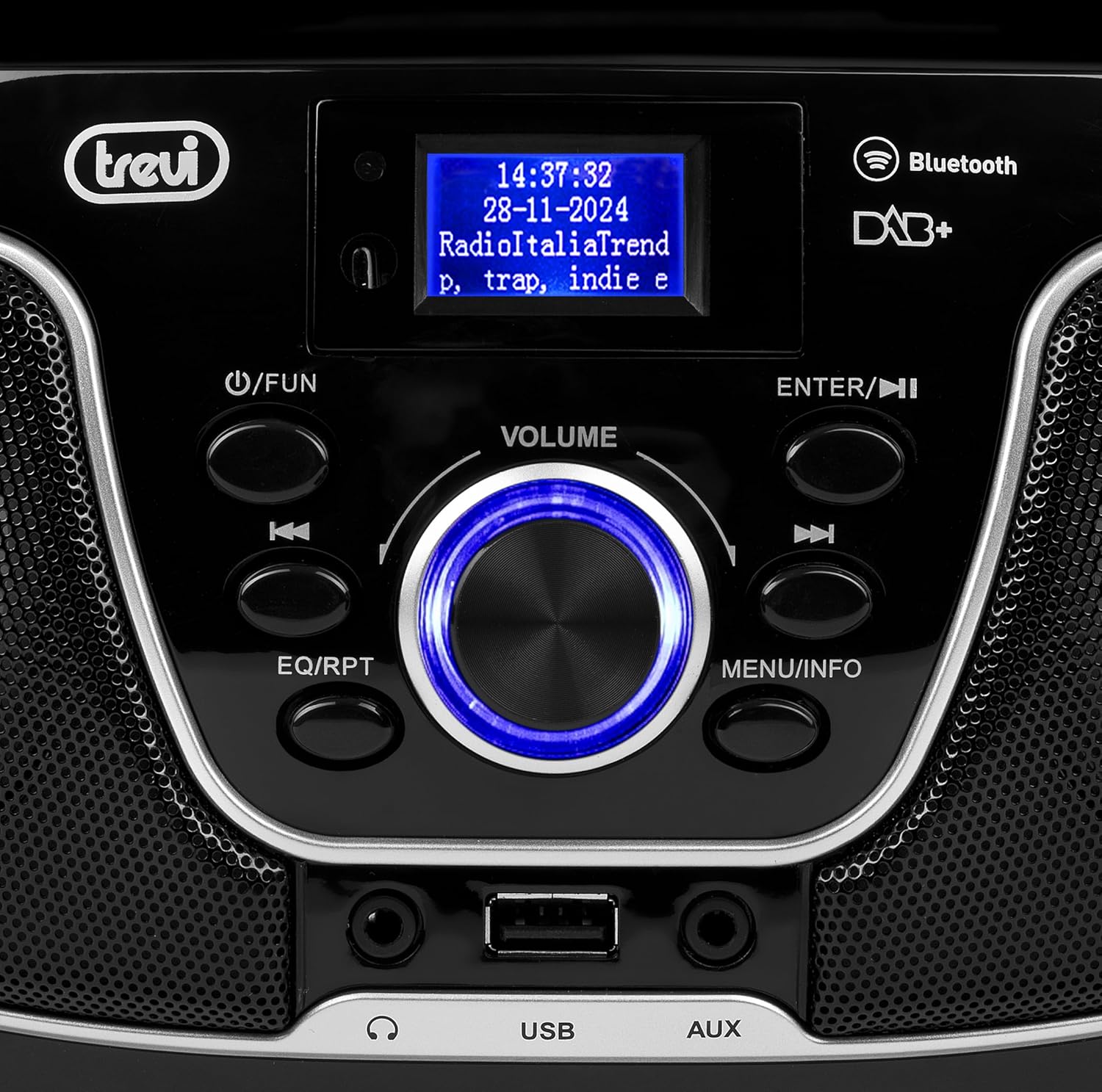
פיגורע 2: דעטאַילעד view of the control panel, including power, function, volume knob, and navigation buttons.
פראָנט פּאַנעל קאָנטראָלס:
- POWER / FUN button: Press to turn on/off, press to switch functions (CD/USB/DAB/FM/Bluetooth/AUX).
- VOLUME קנופּ: Rotate to adjust volume. Press to confirm selections.
- ENTER / ►►I button: Confirm selection / Skip to next track/station.
- I▼▼ / EQ/RPT button: Skip to previous track/station / Equalizer settings / Repeat mode.
- MENU / INFO button: Access menu / Display information.
- וסב פּאָרט: Connect USB storage devices for MP3 playback.
- AUX-אין דזשעק: פאַרבינדן פונדרויסנדיק אַודיאָ דעוויסעס.
- כעדפאָון דזשאַק: פאַרבינדן כעדפאָונז פֿאַר פּריוואַט צוגעהערט.

פיגורע 3: דערציען view of the Trevi CMP 588 DAB, showing the power input and telescopic antenna.
דערציען פּאַנעל קאַנעקשאַנז:
- אַק מאַכט אַרייַנשרייַב: פאַרבינדן די סאַפּלייד אַק מאַכט קאַבלע.
- טעלאַסקאָפּיק אַנטענע: פֿאַרלענגערן פֿאַר אָפּטימאַלער ראַדיאָ אָפּנאַם.

Figure 4: Remote control for the Trevi CMP 588 DAB, showing various function buttons.
רימאָוט קאָנטראָל פאַנגקשאַנז:
- סטאַנדביי: מאַכט אויף / אַוועק.
- FUNC: Switch between modes (CD, USB, DAB, FM, Bluetooth, AUX).
- שטיל: שטום/אויף שטום אודיאָ.
- RPT: איבערחזרן פּלייבאַק מאָדע.
- יבערקוקן: Auto scan for radio stations.
- F+/CH+, F-/CH-: Navigate folders/channels.
- EQ: עקוואַלייזער סעטטינגס.
- PLAY/PAUSE (►II): שפּיל / פּויזע פּלייבאַק.
- PREV/TUN- (▼▼): Previous track/tune down.
- NEXT/TUN+ (►►): Next track/tune up.
- שטאָפּ (■): האַלטן פּלייבאַק.
- מעניו: אַקסעס מעניו.
- אינפֿאָרמאַציע: ווייַז אינפֿאָרמאַציע.
- פּראָג: Program tracks/stations.
- VOL+ / VOL-: סטרויערן די באַנד.
6. סעטאַפּ
6.1 מאַכט קאַנעקשאַן
- AC מאַכט: Connect the supplied AC power cable to the AC power input on the rear of the unit, then plug the other end into a wall outlet.
- Battery Operation (Optional): For portable use, insert 6 x C-size batteries (not included) into the battery compartment on the bottom of the unit. Ensure correct polarity.
6.2 ערשט מאַכט אויף
דרוק די POWER / FUN קנעפּל אויף די אַפּאַראַט אָדער סטאַנדביי button on the remote control to turn on the system. The display will light up.
6.3 Setting Up the Antenna
For optimal radio reception, fully extend the telescopic antenna located at the rear of the unit. Adjust its position for the best signal.
7. אַפּערייטינג ינסטרוקטיאָנס
7.1 DAB/DAB+ ראַדיאָ אָפּעראַציע
- דרוק די POWER / FUN button repeatedly until "DAB" mode is selected.
- The unit will automatically scan for available DAB/DAB+ stations on first use. To perform a manual scan, press the MENU button, navigate to "Full Scan" and press אַרייַן.
- אַמאָל סקאַנינג איז גאַנץ, נוצן די ▼▼ or ► ► buttons to browse through the available stations. Press אַרייַן צו סעלעקטירן אַ סטאַנציע.
- דרוק די INFO button to cycle through different information displays (e.g., program type, signal strength, time).
7.2 FM ראַדיאָ אָפּעראַציע
- דרוק די POWER / FUN קנעפּל עטלעכע מאָל ביז "FM" מאָדע איז אויסגעקליבן.
- To auto-scan and store stations, press the יבערקוקן button on the remote. The unit will scan and save strong signals.
- צו מאַנועל טונען, דריק און האַלט די ▼▼ or ► ► buttons to search for the next available station. Press briefly to fine-tune the frequency.
- The RDS function will display station information (if available).
7.3 סי-די/MP3 שפּיל

פיגורע 5: שפּיץ view of the Trevi CMP 588 DAB with the CD compartment open, ready for disc insertion.
- עפֿנט דעם דעקל פֿונעם סי-די אָפּטייל.
- Place a CD (CD-DA or MP3 CD) onto the spindle with the label side facing up.
- נאָענט די קאָמפּאַקטדיסק אָפּטייל דעקן.
- דרוק די POWER / FUN קנעפּל עטלעכע מאָל ביז "CD" מאָדע איז אויסגעקליבן.
- The unit will read the disc. Press PLAY/PAUSE (►II) צו אָנהייבן פּלייבאַק.
- ניצן ▼▼ or ► ► to skip tracks. Press and hold to fast forward/rewind.
- דרוק שטאָפּ (■) צו האַלטן פּלייבאַק.
7.4 יו-עס-בי פּלייבּעק
- אַרייַנלייגן אַ וסב בליץ פאָר מיט mp3 fileס אין די וסב פּאָרט.
- דרוק די POWER / FUN button repeatedly until "USB" mode is selected.
- די אַפּאַראַט וועט אויטאָמאַטיש דעטעקטירן און אָנהייבן שפּילן MP3 files.
- ניצן ▼▼ or ► ► צו איבערשפרינגען לידער.
7.5 Bluetooth Pairing and Playback
- דרוק די POWER / FUN button repeatedly until "Bluetooth" mode is selected. The display will show "BT" or "PAIRING".
- אַקטיווירן בלועטוט אויף אייער מאָביל מיטל (סמאַרטפאָן, טאַבלעט, אאז"וו).
- זוכן פֿאַר available devices and select "TREVI CMP 588 DAB" from the list.
- אַמאָל פּערד, קענט איר שפּילן אַודיאָ פֿון אייער מיטל דורך די סטערעאָ סיסטעם.
- Use the controls on your mobile device or the stereo system to manage playback.
7.6 AUX-אין אָפּעראַציע
- Connect an external audio device (e.g., MP3 player, smartphone) to the AUX-in jack using a 3.5mm audio cable (not included).
- דרוק די POWER / FUN קנעפּל עטלעכע מאָל ביז "AUX" מאָדע איז אויסגעקליבן.
- Play audio from your connected device. The volume can be controlled via both the stereo system and the external device.
8. וישאַלט
8.1 רייניקונג די אַפּאַראַט
Wipe the exterior of the unit with a soft, dry cloth. Do not use abrasive cleaners, waxes, or solvents as they may damage the finish. Ensure the unit is unplugged before cleaning.
8.2 CD Lens Care
If the CD player experiences reading errors, the lens may be dirty. Use a commercially available CD lens cleaner to clean the lens. Do not touch the lens with your fingers.
8.3 סטאָרידזש
If the unit will not be used for an extended period, remove the batteries (if applicable) and unplug the power cable. Store the unit in a cool, dry place away from direct sunlight and extreme temperatures.
9. טראָובלעשאָאָטינג
| פּראָבלעם | מעגלעך סיבה | לייזונג |
|---|---|---|
| קיין מאַכט | שטראָם קאַבל נישט פארבונדן; באַטעריעס אויסגעשעפּט אָדער נישט ריכטיק אַרײַנגעשטעלט. | Check power cable connection; Replace batteries or ensure correct polarity. |
| קיין געזונט | Volume too low; Mute function active; Incorrect source selected. | Increase volume; Deactivate mute; Select correct function (CD, USB, DAB, FM, BT, AUX). |
| נעבעך ראַדיאָ אָפּטראָג | Antenna not extended or positioned incorrectly; Weak signal area. | פֿולשטענדיק אויסציען און צופּאַסן די טעלעסקאָפּישע אַנטענע; פּרוּווט צו באַוועגן דעם אַפּאַראַט צו אַן אַנדער אָרט. |
| סי-די/יו-עס-בי שפּילט נישט | Disc dirty/scratched; Incorrect file format on USB; USB drive not properly inserted. | Clean or replace disc; Ensure MP3 format for USB; Reinsert USB drive. |
| בלועטאָאָטה פּערינג ניט אַנדערש | Device too far; Bluetooth not enabled on source device; Unit not in pairing mode. | Move devices closer; Enable Bluetooth on source device; Ensure unit is in Bluetooth mode and searching. |
10. ספּעסאַפאַקיישאַנז
- מאָדעל: CM 588 DAB
- מאַכט מקור: AC 230V ~ 50Hz or 6 x C-size batteries (not included)
- מאַכט קאַנסאַמשאַן: 15 וואטס
- רעדנער טיפּ: Stereo (2 speakers)
- קאַנעקטיוויטי: Bluetooth, USB, AUX-in
- שטיצט אַודיאָ פֿאָרמאַטירונגען: CD audio (CD-DA), MP3
- ראַדיאָ פריקוואַנסיז: DAB/DAB+, FM מיט RDS
- דימענשאַנז (L x W x H): 50 x 50 x 28 ס״מ (אומגעפער)
- וואָג: 1.5 קילאָגראַם (אומגעפער)
- קאָליר: שוואַרץ
11. וואָראַנטי און שטיצן
This product is covered by a standard manufacturer's warranty. Please refer to the warranty card included in your package for specific terms and conditions, including the warranty period and coverage details.
For technical support, service, or warranty claims, please contact your retailer or the official Trevi customer service. Contact information can typically be found on the Trevi webפּלאַץ אָדער אין די פּראָדוקט פּאַקקאַגינג.
Please retain your proof of purchase (receipt) for any warranty-related inquiries.