
1. הקדמה
Thank you for choosing the OSSURET Quad-Core Android 10 GPS Navigation System. This manual provides essential information for the proper installation, operation, and maintenance of your new car multimedia system. Please read this manual thoroughly before using the product to ensure optimal performance and safety. This unit is designed for Mitsubishi Lancer models manufactured between 2007 and 2017.
2. זיכערקייַט אינפֿאָרמאַציע
- שטענדיק נוצן דעם מיטל פאַראַנטוואָרטלעך און לויט די לאָקאַלע פאַרקער געזעצן. דיסטראַקטעד דרייווינג קען פירן צו אַקסאַדאַנץ.
- Do not attempt to install or repair the unit yourself if you are not qualified. Improper installation can cause damage to the vehicle's electrical system or the unit itself. Professional installation is recommended.
- Ensure all wiring connections are secure to prevent short circuits or electrical fires.
- האַלט דעם עקראַן ריין און פריי פון שטערונגען צו האַלטן קלאָרע זעאונג.
- פֿאַרמײַדט אויסשטעלן דעם אַפּאַראַט צו עקסטרעמע טעמפּעראַטורן, דירעקטע זונשײַן פֿאַר פֿאַרלענגערטע פּעריאָדן, אָדער איבערגעטריבענע פֿײַכטקייט.
3. פּראָדוקט איבערview
3.1 שליסל פֿעיִקייטן
- אַפּערייטינג סיסטעם: אַנדרויד 10
- פּראַסעסער: Quad-Core ARM A7 4*1.2GHz
- זכּרון: 1GB RAM, 16GB Flash Storage
- ווייַז: 10.1-inch Capacitive Touchscreen, 1024x600 Resolution
- נאַוויגאַציע: Built-in GPS, supports offline maps, Google Maps, Waze, and other Android navigation apps.
- קאַנעקטיוויטי: Integrated WiFi, Bluetooth (Hands-free calling, A2DP music streaming), USB.
- מולטימעדיאַ: Supports 1080P video decoding, various audio and video formats (MP4, AVI, MP3, WMA, JPEG, etc.).
- אַוואַנסירטע פאַנגקשאַנז: Split Screen, Steering Wheel Control, Mirror Link (AirPlay for iOS, Easy-Connect for Android), Rearview Camera Input support, Android Market access.
3.2 Package Contents (Accessories)
The package includes the main head unit and various cables and adapters necessary for installation and functionality. Please verify all components are present upon unboxing.

בילד: Various wiring harnesses, USB cables, and adapters included with the OSSURET car multimedia system.
4. סעטאַפּ און ייַנמאָנטירונג
4.1 פאָרמיטל קאָמפּאַטאַביליטי
This unit is specifically designed for Mitsubishi Lancer models from 2007 to 2017. It is intended for left-hand drive vehicles. Always confirm the center console of your vehicle matches the product's design before installation.

בילד: This image shows the dashboard of a Mitsubishi Lancer before and after the installation of the OSSURET Android head unit, demonstrating the integrated fit.
4.2 אינסטאַלאַציע טריט (פּראָפעסיאָנעלע אינסטאַלאַציע רעקאָמענדירט)
- צוגרייטונג: Disconnect the vehicle's battery to prevent electrical damage.
- אַראָפּנעמען אָריגינעלע איינהייט: פֿאָרזיכטיק אַראָפּנעמען די עקזיסטירנדיקע אויטאָ סטערעאָ און טרים פּאַנאַלז.
- פאַרבינדן וויירינג: Connect the provided wiring harnesses to the vehicle's existing connectors. Ensure all connections are secure.
- גפּס אַנטענע: Install the GPS antenna in a location with a clear view פון הימל, טיפּיש אויף די דאַשבאָרד אָדער אונטער די ווינטשויב.
- וסב קאַבלעס: Route the USB cables to an accessible location, such as the glove compartment.
- טעסט פאַנגקשאַנאַליטי: Before fully reassembling the dashboard, reconnect the battery and power on the unit to test basic functions (power, audio, touchscreen, GPS signal).
- זיכערע איינהייט: Mount the new head unit securely into the dashboard opening.
- ריאַסעמבאַל: Reinstall all trim panels and ensure a neat finish.
4.3 ערשטע איינשטראָם און אויפשטעל
After installation, power on the unit. The system will boot into the Android 10 interface. Follow any on-screen prompts for initial setup, such as language selection and time zone. Connect to a Wi-Fi network to enable online features and app downloads.
5. אַפּערייטינג ינסטרוקטיאָנס
5.1 יקערדיק נאַוויגאַציע
- טאָוטשסקרעען: The unit features a responsive touchscreen for all interactions. Tap to select, swipe to scroll, and pinch to zoom.
- היים פאַרשטעלן: The main interface provides access to frequently used applications and widgets.
- אַפּ שופלאָד: Swipe up from the bottom of the screen or tap the app icon to access all installed applications.
5.2 גפּס נאַוויגאַציע
The system comes with pre-loaded offline map data. It also supports online navigation applications like Google Maps and Waze when connected to the internet.
- Starting Navigation: Tap the 'Navigation' or 'Maps' icon on the home screen or app drawer.
- Entering Destination: Use the on-screen keyboard to enter your destination address or select from saved locations.
- קול גיידאַנס: The system provides voice-guided turn-by-turn directions.
- 2D/3D Map Views: וועקסל צווישן 2D און 3D מאַפּע views as preferred.
- צווייענדיק זאָנע פֿונקציע: Navigate while listening to music or other audio sources simultaneously.
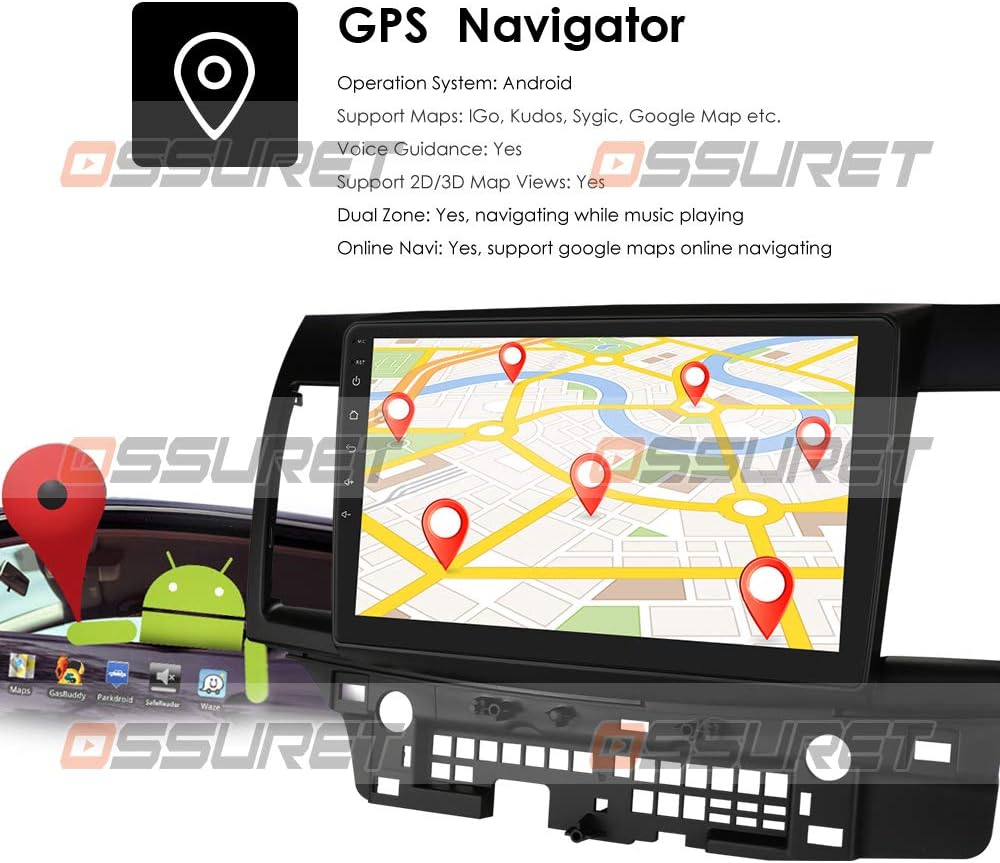
בילד: A visual representation of the GPS navigation interface, showing a map with route markers and an Android robot icon, indicating Android OS functionality.
5.3 ראַדיאָ (FM/DAB+)
- עפעם ראַדיאָ: Access the FM radio application to scan for stations, save presets, and adjust settings. The FM frequency range is 87.5-108MHz.
- DAB/DAB+ (Optional): If a DAB+ box is connected (sold separately), you can enjoy digital audio broadcasting with higher sound quality and more channels. Connect the DAB+ box via a USB port.

בילד: This image illustrates the connection of an optional DAB+ box via USB and provides a table comparing the advantages of DAB+ over traditional FM radio, such as CD-like quality and robust signal reception.
5.4 בלועטאָאָטה פֿונקציע
פֿאַרבינדט אייער סמאַרטפאָון דורך בלועטוט פֿאַר הענט-פֿרײַ רופן און אַודיאָ סטרימינג.
- פּאָרינג: Go to Bluetooth settings on the unit and your phone, search for available devices, and pair with the OSSURET unit.
- הענט-פריי קאַללס: Make and receive calls directly from the unit's screen. The built-in microphone allows for clear communication.
- בלועטוט מוזיק (A2DP): Stream audio from your phone to the car speakers. Control playback (play/pause, next/previous) from the unit.
- טעלעפון בוך: Download your phone's contacts to the unit for easy access and searching.
- רופן לאָגס: View dialed, received, and missed calls.

בילד: This image displays the Bluetooth interface for phone calls, showing a dial pad on the car stereo screen and a smartphone displaying a similar interface, highlighting hands-free calling capability.
5.5 מולטימעדיאַ ווידערשפּיל
The unit supports various media formats for music, video, and images.
- מוזיק שפּילער: Supports MP3, WMA, AAC, RM, FLAC, etc.
- ווידעא שפּילער: Supports MPEG-1/2/4, H264, H263, VC1, RV, RMVB, DivX, VP8, AVS Stream, etc., with 1080P video decoding.
- בילד Viewער: Supports JPS, BMP, PNG, GIF formats.
5.6 שפּאַלטן פאַרשטעלן פונקציע
Perform two tasks simultaneously by running two applications side-by-side on the screen. For example, navigate with Google Maps while listening to music or browsing a web בלאַט.
5.7 סטירינג ראָד קאָנטראָל
The unit supports your vehicle's original steering wheel controls, allowing you to manage music playback and volume without taking your hands off the wheel, enhancing driving safety.
5.8 שפּיגל לינק
Mirror your smartphone's screen onto the head unit's display.
- For Apple iPhones (AirPin PRO): Connect your iPhone via Wi-Fi. The unit can create a Wi-Fi hotspot. זוכן פֿאַר this hotspot on your iPhone and connect. You can then mirror your iPhone's display, including the main menu, photos, videos, and online navigation maps.
- For Android Phones (Easy-Connect): Connect your Android phone using a USB charging cable. You can mirror the connected Android smartphone display, including the main menu, photos, videos, and online navigation maps.

בילד: This image demonstrates the Mirror Link feature, showing an iPhone connected wirelessly via Wi-Fi (AirPlay) and an Android phone connected via USB (Easy-Connect), both mirroring their screens to the car stereo.
5.9 דערציעןview אַפּאַראַט אַרייַנשרייַב
The system supports a rearview camera input (camera sold separately). When the vehicle is in reverse, the display automatically switches to the camera feed, providing a clear view of the area behind the car and assisting with parking and avoiding obstacles.

בילד: דאָס בילד ווײַזט די הינטערשטע זײַטview camera input feature, showing a car backing up with a visual overlay of parking guidelines on the screen, indicating support for a backup camera system.
5.10 Android Market and App Installation
Access the Android Market (Google Play Store) to download and install a wide variety of applications, games, and utilities. The unit supports Android Package (APK) installer for manual app installation.

בילד: This image depicts the Android Market feature, showing various app icons floating around a tablet-like device, symbolizing access to a wide range of applications. It also highlights the 16GB ROM and support for APK installation.
6. וישאַלט
- סקרין רייניקונג: Use a soft, lint-free cloth to clean the touchscreen. For stubborn smudges, lightly dampווישט דעם שטאָף מיט וואַסער אָדער אַ פאַרשטעלן-זיכער רייניגער. פֿאַרמייַדט שטרענגע כעמיקאַלן.
- ווייכווארג דערהייַנטיקונגען: Periodically check for system software updates to ensure optimal performance and access to new features. Updates can usually be found in the system settings menu.
- דאַטאַ באַקקופּ: Regularly back up important data or settings if applicable.
7. טראָובלעשאָאָטינג
| פּראָבלעם | מעגלעך סיבה | לייזונג |
|---|---|---|
| דער אַפּאַראַט טוט נישט מאַכט אויף | לויזער מאַכט פֿאַרבינדונג, צעבראָכענע פיוז, פּראָבלעם מיט פֿאָרמיטל באַטעריע. | Check power cables and fuse. Ensure vehicle battery is charged. Consult a professional if needed. |
| קיין געזונט | די וואָלומען איז צו נידעריק, שטום אַקטיוויזירט, פּראָבלעם מיט די רעדנער-וויירינג. | Increase volume, check mute status. Verify speaker connections. |
| דזשי-פי-עס סיגנאַל פאַרלוירן אָדער נישט ריכטיק | GPS antenna obstructed, poor satellite reception. | זיכער מאַכן אַז די GPS אַנטענע האָט אַ קלאָרע view פון הימל. גיי אריבער צו אן אפענעם ארט. |
| בלועטאָאָטה איז נישט קאַנעקטינג | Bluetooth off on unit or phone, device not in pairing mode. | Ensure Bluetooth is enabled on both devices. Put phone in pairing mode. Restart both devices. |
| טאָוטשסקרעען ניט ריספּאַנדאַבאַל | סיסטעם איינפרירן, צייטווייליגע ווייכווארג פראבלעם. | Restart the unit. If issue persists, perform a factory reset (refer to system settings). |
8. ספּעסאַפאַקיישאַנז
| שטריך | דעטאַל |
|---|---|
| אָפּערייטינג סיסטעם | אַנדרויד 10 |
| קפּו | Quad-Core ARM A7 4*1.2GHz |
| באַראַן | 1 גיגאבייט |
| פלאַש זכּרון | 16 גיגאבייט |
| פאַרשטעלן גרייס | 10.1 אינטשעס |
| האַכלאָטע | 1024 X 600 |
| ווידעא דיקאָודינג | 1080P HD H.265 2160p, Multi-format FHD video decoding |
| עפעם פרעקווענסי קייט | 87.5-108MHz (EU/US) |
| WiFi | געבויט-אין |
| בלועטאָאָטה | Hands-free calls, A2DP music, Phonebook download |
| גפּס | Offline maps pre-loaded, supports Google Maps/Waze |
| קאַנעקטיוויטי | וסב |
| אַודיאָ רעזולטאַט מאָדע | סטערעאָ |
| ייַנמאָנטירונג טיפּ | Dashboard Mount or Windshield Mount |
| פּראָדוקט דימענשאַנז | 17.78 X 10.16 X 3.05 סענטימעטער |
| Manufacturer Reference | T1MTLC101001B |
9. וואָראַנטי און שטיצן
OSSURET provides a איין יאָר וואָראַנטי and technical support for this car stereo system. If you have any questions regarding installation or the product itself, please contact us via message. We aim to respond within 24 hours to assist you.