
הקדמה
This manual provides detailed instructions for the Monoprice Blackbird 4K 5x1 HDMI 2.0 Switch, Model 42270. This device allows you to connect up to five HDMI video source devices to a single HDMI display. It supports 4K@60Hz video resolution with YCbCr 4:4:4 color space, 18Gbps video bandwidth, and all HDMI 3D video modes. The switch complies with HDMI 2.0 and HDCP 2.2 standards, supporting advanced video technologies such as HDR, HDR10, Dolby Vision, and Hybrid Log-Gamma (HLG). Control options include a top panel button and an included IR remote control.
פּעקל אינהאַלט
ביטע זיכער מאַכן אַז אַלע די זאכן וואָס זענען אויסגערעכנט אונטן זענען פאַראַן אין אייער פּעקל:
- 1x Monoprice Blackbird 4K 5x1 HDMI 2.0 Switch (Model 42270)
- 1 קס יר רימאָוט קאָנטראָל
- 1 קס וסב מאַכט קאַבלע
- 1x IR ופנעמער קאַבלע
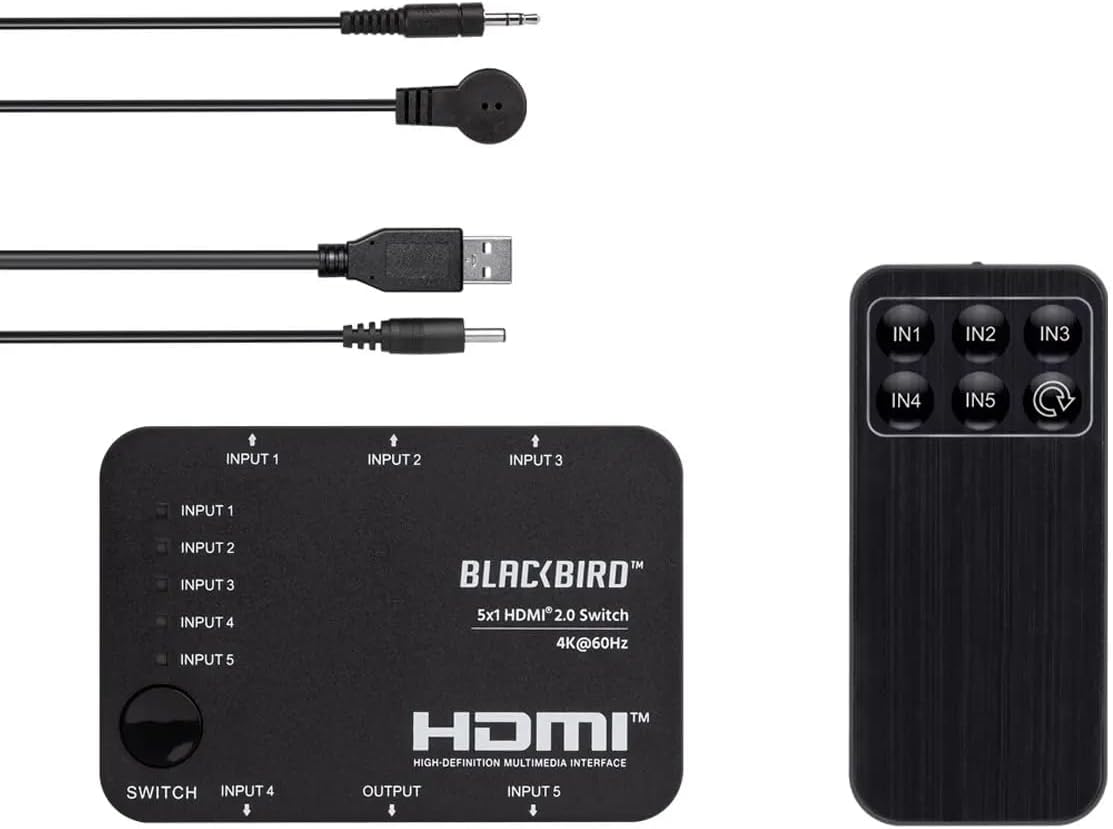
Image: The Monoprice Blackbird 4K 5x1 HDMI 2.0 Switch, its IR remote control, USB power cable, and IR receiver cable.
פּראָדוקט פֿעיִקייטן
The Monoprice Blackbird 4K 5x1 HDMI 2.0 Switch offers the following key features:
- Supports video resolutions up to 4K@60Hz YCbCr 4:4:4.
- Compatible with all HDMI 3D video modes.
- Features 5 HDMI video inputs and 1 HDMI video output.
- Supports up to 18Gbps video bandwidth.
- Complies with HDMI 2.0, HDCP 2.2/1.x, and DVI 1.0 specifications.
- Supports High Dynamic Range (HDR), HDR10, Dolby Vision, and Hybrid Log-Gamma (HLG).
- USB powered with low power consumption.
- Includes an IR remote control for convenient switching.
סעטאַפּ אינסטרוקציעס
Follow these steps to set up your HDMI switch:
- פאַרבינדן HDMI מקור דעוויסעס: Connect up to five HDMI source devices (e.g., Blu-ray player, game console, streaming box) to the HDMI INPUT 1-5 ports on the switch.
- קאָננעקט HDMI ווייַז: Connect your HDMI display (e.g., TV, monitor, projector) to the HDMI OUTPUT port on the switch.
- פאַרבינדן IR ופנעמער (אפציאָנעל): If you plan to use the IR remote control, connect the IR Receiver Cable to the "IR" port on the switch. Position the IR receiver in a location where it has a clear line of sight to your remote control.
- פאַרבינדן מאַכט: Connect the USB Power Cable to the "DC 5V" port on the switch and then to a USB power source (e.g., a USB wall adapter, a USB port on your TV, or a computer). The switch is USB powered.
- מאַכט אויף דיווייסאַז: Power on your HDMI source devices and your HDMI display. The switch will power on automatically when connected to a power source.

בילד: הינטערשטע view of the switch, highlighting the HDMI input ports (Input 4, Input 5), HDMI output port, DC 5V power input, and IR receiver port.

בילד: פראָנט view of the switch, showing HDMI input ports (Input 1, Input 2, Input 3) and the manual switch button with corresponding LED indicators.
אַפּערייטינג ינסטראַקשאַנז
You can switch between HDMI input sources using two methods:
מאַנואַל סוויטשינג
- דרוק די "SWITCH" button located on the top panel of the device to cycle through the HDMI input sources (Input 1, Input 2, Input 3, Input 4, Input 5).
- The corresponding LED indicator for the active input will illuminate.
Remote Control Switching
- Ensure the IR Receiver Cable is connected and positioned correctly.
- Point the IR Remote Control towards the IR receiver.
- Press the desired input button (IN1, IN2, IN3, IN4, אָדער IN5) on the remote control to directly select an HDMI source.
- Alternatively, press the cycle button (often labeled with a circular arrow) on the remote to cycle through inputs sequentially.

בילד: אויבן view of the switch, showing the manual "SWITCH" button and LED indicators for each input (Input 1-5).
Image: The IR remote control with buttons for direct input selection (IN1-IN5) and a cycle button.
וישאַלט
To ensure the longevity and optimal performance of your HDMI switch, follow these maintenance guidelines:
- רייניקונג: Use a soft, dry cloth to clean the exterior of the device. Do not use liquid cleaners or aerosol sprays, as they may damage the unit.
- ווענטילאַטיאָן: זיכער מאַכן אַז דער סוויטש איז געשטעלט אין אַ גוט-ווענטילירטן אָרט צו פאַרמייַדן איבערהיצונג. פאַרשטאָפּט נישט קיין ווענטילאַציע עפענונגען.
- סטאָרידזש: When not in use for extended periods, store the switch in a cool, dry place away from direct sunlight and extreme temperatures.
- קאַבלע פאַרוואַלטונג: Avoid bending or kinking HDMI and power cables excessively, as this can lead to damage and signal loss.
טראָובלעשאָאָטינג
If you encounter issues with your Monoprice Blackbird 4K 5x1 HDMI 2.0 Switch, refer to the following common problems and solutions:
- קיין ווידעא/אודיאָ אויסגאַנג:
- זיכער מאַכן אַז אַלע HDMI קייבלס זענען זיכער פארבונדן צו ביידע די קוואַל דעוויסעס, דעם סוויטש און דעם דיספּליי.
- Verify that the correct input source is selected on the switch (check the LED indicators).
- Confirm that the switch is receiving power via the USB power cable.
- Try connecting the HDMI source directly to the display to rule out issues with the source device or display.
- Test with different HDMI cables, especially if using long cables or cables not rated for 4K@60Hz.
- רימאָוט קאָנטראָל ניט ריספּאַנדינג:
- Ensure the IR Receiver Cable is properly connected to the switch's "IR" port.
- Verify that the IR receiver has a clear line of sight to the remote control and is not obstructed.
- קוק צי די באַטעריע פֿון דער ווײַטקאָנטראָל דאַרף ווערן געטוישט.
- Intermittent Signal or Flickering:
- Ensure all HDMI cables are high-quality and rated for the resolution and bandwidth you are using (e.g., High-Speed HDMI with Ethernet for 4K@60Hz).
- Reduce cable lengths if possible.
- קאָנטראָלירט פֿאַר עלעקטראָמאַגנעטישע שטערונגען פֿון אַנדערע עלעקטראָנישע דעוויסעס.
- מאַכן זיכער אַז די מאַכט צושטעלן איז סטאַביל.
ספּעסאַפאַקיישאַנז
Detailed technical specifications for the Monoprice Blackbird 4K 5x1 HDMI 2.0 Switch:
| מאָדעל נומער | 42270 |
| סאָרט | מאָנאָפּריסע |
| קאַנעקטער טיפּ | HDMI, DVI (via adapter) |
| נומער פון פּאָרץ | 5 Inputs, 1 Output |
| ווידעא האַכלאָטע שטיצן | ביז 4K@60Hz YCbCr 4:4:4 |
| ווידעא באַנדווידט | 18 גבפּס |
| HDMI העסקעם | HDMI 2.0 |
| HDCP קאָמפּליאַנסע | הדקפּ 2.2/1.קס |
| HDR שטיצן | HDR, HDR10, Dolby Vision, Hybrid Log-Gamma (HLG) |
| מאַכט צושטעלן | USB Powered (DC 5V) |
| קאָנטראָל מעטהאָדס | Manual button, IR Remote Control |
| פּונקט וואָג | 0.4 פונט |
| UPC | 889028165706 |
וואָראַנטי אינפֿאָרמאַציע
This Monoprice Blackbird 4K 5x1 HDMI 2.0 Switch is covered by a 1 יאָר וואָראַנטי from the date of purchase. This warranty covers defects in materials and workmanship under normal use. For warranty claims or further details, please contact Monoprice customer support.
קונה שטיצן
For technical assistance, troubleshooting, or general inquiries regarding your Monoprice Blackbird 4K 5x1 HDMI 2.0 Switch, please visit the official Monoprice website or contact their customer support team. You can typically find contact information, FAQs, and additional resources on their support pages.
Monoprice Official Webפּלאַץ: www.monoprice.com