
1. הקדמה
א דאנק פארן קויפןasing the QFX E-B3 Bluetooth Professional High-Power Speaker. This manual provides essential information for the safe and efficient operation of your speaker. Please read it thoroughly before use and retain it for future reference.
The QFX E-B3 is designed to deliver powerful audio with features including Bluetooth connectivity, FM radio, USB/SD card playback, LED party lights, and a 250W power amplifier. It also supports True Wireless System (TWS) for stereo pairing with another compatible speaker.
2. זיכערקייַט אינפֿאָרמאַציע
- מאַכט מקור: Connect the speaker only to the specified power supply as indicated on the unit.
- ווענטילאַטיאָן: זאָרגט פֿאַר גענוגיקע ווענטילאַציע אַרום דעם רעדנער. פֿאַרשטאָפּט נישט קיין ווענטילאַציע עפענונגען.
- וואַסער און נעץ: This speaker is not waterproof. Do not expose it to rain, moisture, or any liquids to prevent electric shock or fire.
- היץ: Keep the speaker away from heat sources such as radiators, heat registers, stoves, or other apparatus that produce heat.
- רייניקונג: Unplug the speaker from the power outlet before cleaning. Use a dry cloth for cleaning. Do not use liquid cleaners or aerosol cleaners.
- סערוויס: דו זאלסט נישט פּרווון צו דינען דעם פּראָדוקט זיך. קאָנטאַקט אַלע קוואַלאַפייד סערוויס פּערסאַנעל.
- אָרט: שטעלט דעם רעדנער אויף אַ סטאַבילער, גלאַטער ייבערפלאַך כּדי צו פאַרהיטן אַז ער זאָל נישט פאַלן.
3. פּעקל אינהאַלט
באַשטעטיקן אַז אַלע זאכן זענען פאַראַן אין פּעקל:
- QFX E-B3 High-Power Speaker
- מיקראָפאָן
- ווייַט קאָנטראָל
- אַק מאַכט קאַבלע
- באַניצער מאַנואַל (דעם דאָקומענט)
4. פּראָדוקט איבערview
The QFX E-B3 speaker features dual 15-inch woofers and a 1-inch tweeter, protected by a metal grill. It includes integrated handles and wheels for portability.

פיגורע 4.1: פראָנט view of the QFX E-B3 Speaker.
Rear Panel Controls and Ports
The rear panel houses all input/output connections and control knobs.
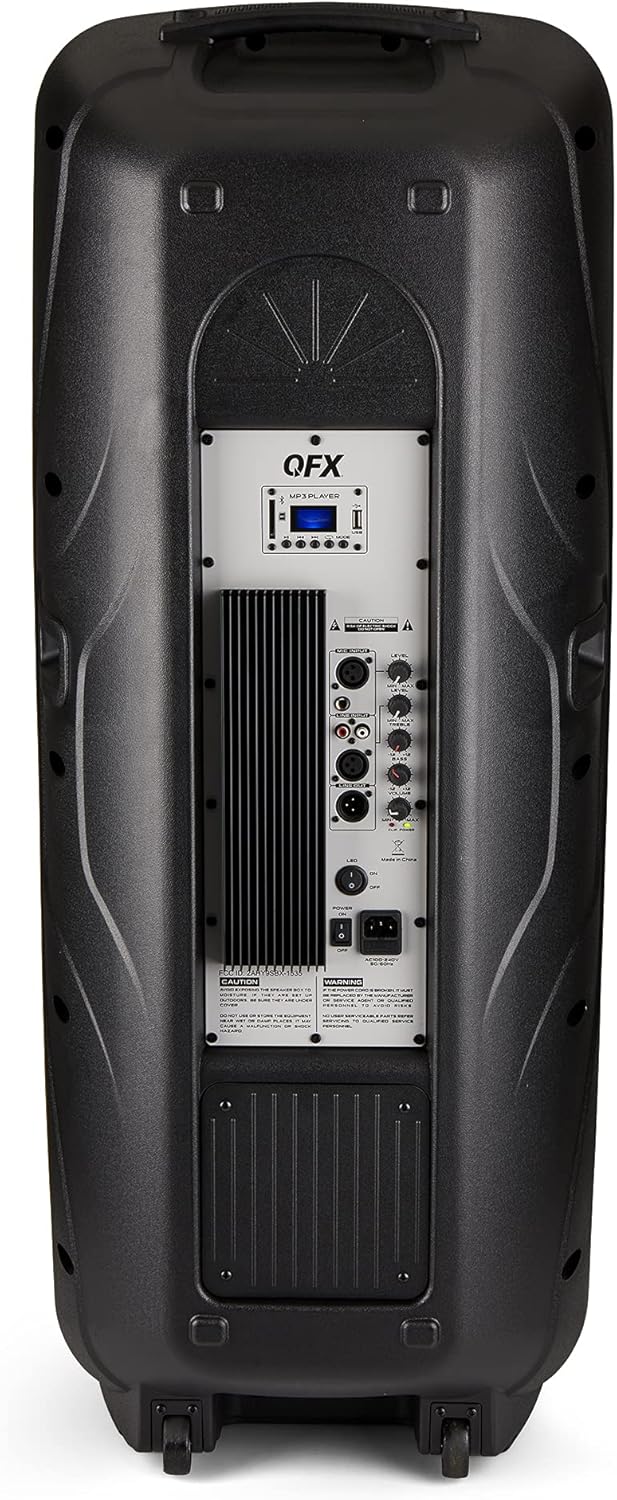
Figure 4.2: Rear panel with controls and ports.
- מאַכט סוויטש: טוט אן/אויס דעם רעדנער.
- AC אַרייַנשרייַב: פֿאַרבינדט דעם AC מאַכט קאַבל.
- USB/SD Card Ports: פֿאַר שפּילן אַודיאָ files from USB drives or SD cards.
- ווייַז פאַרשטעלן: ווײַזט איצטיקן מאָדע און טראַק אינפֿאָרמאַציע.
- מאָדע קנעפּל: Switches between input modes (Bluetooth, FM, USB, SD, RCA).
- שפּיל / פּויזע קנעפּל: Controls playback for USB/SD/Bluetooth.
- פרייַערדיק / ווייַטער שפּור קנעפּלעך: נאַוויגירט לידער אדער FM סטאַנציעס.
- בעל באנד קנופּ: אַדזשאַסץ די קוילעלדיק באַנד.
- Bass/Treble Control Knobs: Adjusts low and high frequencies.
- XLR מיקראָפאָן אַרייַנשרייַב: Connects a wired microphone.
- מיקראָפאָן וואָלומען/עקאָ קנעפּלעך: Adjusts microphone volume and echo effect.
- RCA אריינגאנג (L/R): Connects external audio devices via RCA cables.
- XLR Line Input/Output: For connecting to other audio equipment.
5. סעטאַפּ
ערשטע פּלאַצירונג
Place the speaker on a stable, flat surface. For optimal sound, position it in a central location within the listening area. The integrated wheels and handle allow for easy transport.

Figure 5.1: Speaker being moved with handle and wheels.
מאַכט קאַנעקשאַן
- Ensure the speaker's power switch is in the OFF position.
- Connect the AC power cable to the AC input on the rear panel of the speaker.
- שטעקט אריין דעם אנדערן עק פונעם AC שטראָם קאַבל אין א נאָרמאַלן וואַנט אַוטלעט.
- Flip the power switch to the ON position. The display screen will illuminate.
6. אַפּערייטינג ינסטרוקטיאָנס
בלועטאָאָטה פּערינג
- Turn on the QFX E-B3 speaker.
- דרוק די מאָדע button on the speaker or remote control until "BLUE" appears on the display screen, indicating Bluetooth mode.
- אַקטיווירן בלועטוט אויף אייער מאָביל מיטל (סמאַרטפאָן, טאַבלעט, אאז"וו).
- זוכן פֿאַר available Bluetooth devices and select "QFX E-B3" from the list.
- אַמאָל פּערד, וועט דער רעדנער אַרויסלאָזן אַ באַשטעטיקונגס-קלאַנג. איר קענט איצט שפּילן אַודיאָ פֿון אייער דעווייס דורך דעם רעדנער.
אמתע ווירעלעס סיסטעם (TWS) פּערינג
TWS allows two QFX E-B3 speakers to connect wirelessly for a stereo sound experience. This feature works only in Bluetooth mode.
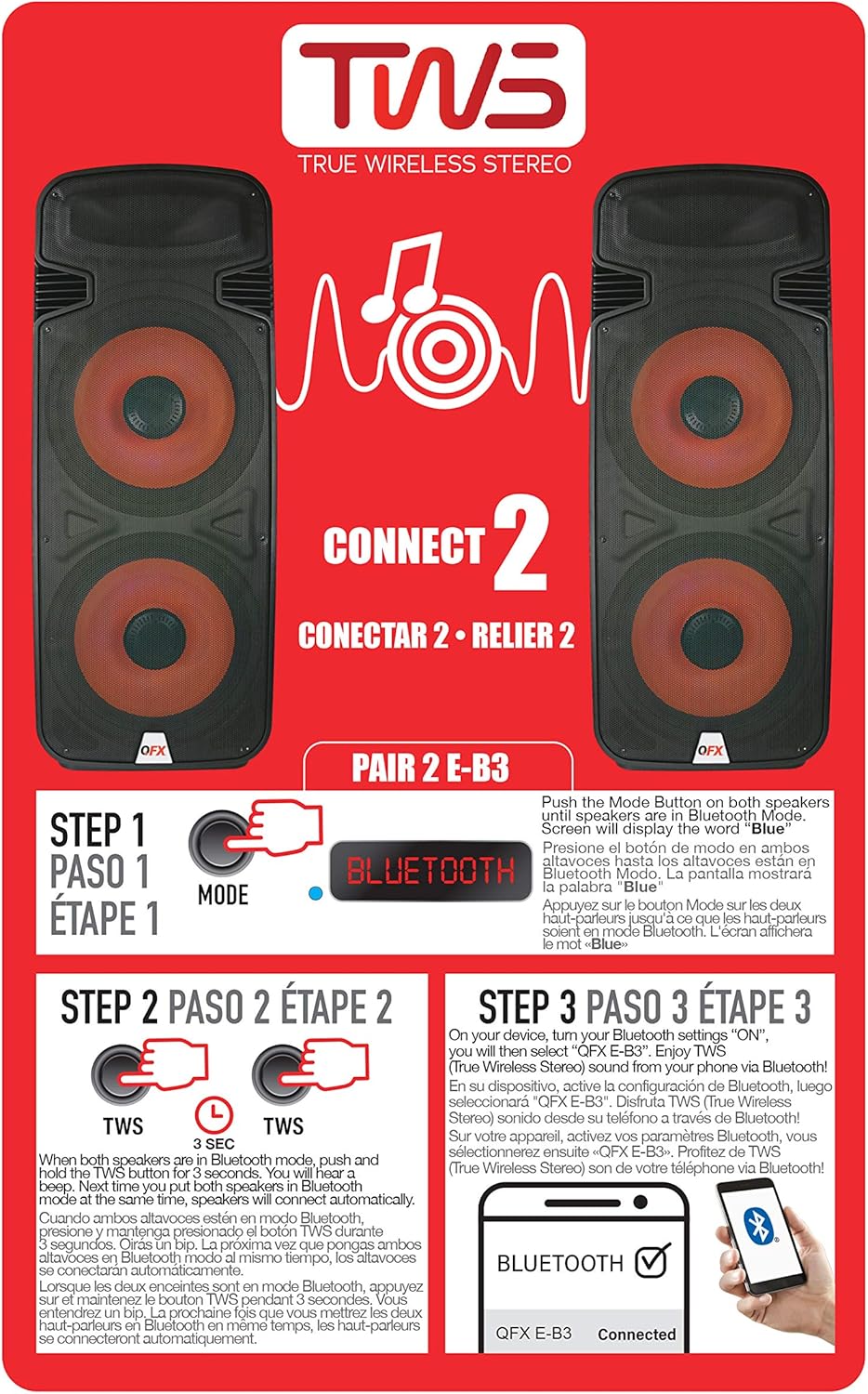
Figure 6.1: TWS Pairing Instructions.
- Ensure both QFX E-B3 speakers are powered on and in Bluetooth mode. The display on both speakers should show "BLUE".
- אויף איינעם פון די רעדנערס (דאָס וועט זיין אייער הויפּט רעדנער), דריק און האַלט די TWS button for approximately 3 seconds. The speakers will attempt to connect to each other.
- Once successfully paired, you will hear a confirmation sound, and the display on the primary speaker will show "BLUE" while the secondary speaker will show "BLUE" as well.
- On your Bluetooth-enabled device, search for and select "QFX E-B3". The two speakers will now play audio in stereo.
עפעם ראַדיאָ אָפּעראַציע
- דרוק די מאָדע button to switch to FM radio mode. The display will show the FM frequency.
- דריקן און האַלטן די שפּיל / פּויזע button to initiate an automatic scan for FM stations. The speaker will save all found stations.
- ניצן די פֿריִערדיקע/ווייַטער טראַק buttons to navigate through the saved FM stations.
וסב / סד קאָרט פּלייבאַק
- אַרײַנשטעלן אַ USB פֿלעש דרייוו אָדער SD קאַרטל (מיט קאָמפּאַטיבלע אַודיאָ files) into the respective port on the rear panel.
- The speaker will automatically switch to USB/SD mode and begin playing the audio fileס. אויב נישט, דריק די מאָדע button to select USB or SD mode.
- ניצן די שפּיל / פּויזע און פֿריִערדיקע/ווייַטער טראַק קנעפּלעך צו קאָנטראָלירן פּלייבאַק.
מיקראָפאָן אַרייַנשרייַב
- Connect a microphone to the XLR Microphone Input on the rear panel.
- Adjust the Microphone Volume and Echo knobs to achieve the desired sound.
RCA ינפּוט
- Connect an external audio source (e.g., CD player, mixer) to the RCA Input (L/R) ports using appropriate RCA cables.
- דרוק די מאָדע button to select RCA input mode.
- Adjust the master volume on the speaker and the volume on your external audio source.
געפירט פארטיי ליגהץ
The speaker features integrated LED party lights that activate automatically when the speaker is powered on. There are no specific controls for the LED lights mentioned; they are designed to enhance the audio experience.
7. וישאַלט
רייניקונג
- Always unplug the speaker before cleaning.
- ניצט אַ ווייכן, טרוקענעם שטאָף צו ווישן די אויסערלעכע ייבערפלאַכן פון דעם רעדנער.
- ניצט נישט קיין שרײַבנדיקע רייניגער, וואַקסן אדער סאָלווענטן, ווײַל זיי קענען שאַטן די ענדיקונג.
- האַלט די ווענטילאַציע עפענונגען ריין פון שטויב און שמוץ.
סטאָרידזש
When not in use for extended periods, store the speaker in a cool, dry place, away from direct sunlight and extreme temperatures. Cover the speaker to protect it from dust.
8. טראָובלעשאָאָטינג
If you encounter issues with your QFX E-B3 speaker, refer to the following common problems and solutions:
| פּראָבלעם | מעגלעך סיבה | לייזונג |
|---|---|---|
| קיין מאַכט | Power cable not connected; Power outlet not active; Speaker power switch off. | Ensure AC cable is securely connected to speaker and outlet. Check if outlet is working. Turn speaker power switch ON. |
| קיין געזונט | Volume too low; Incorrect input mode selected; Audio source not playing. | Increase master volume. Press MODE button to select correct input. Ensure audio source is playing and its volume is up. |
| בלועטאָאָטה איז נישט קאַנעקטינג | Speaker not in Bluetooth mode; Device Bluetooth off; Speaker already paired to another device; Device too far. | Ensure speaker is in Bluetooth mode ("BLUE" on display). Turn on device Bluetooth. Disconnect from other devices. Move device closer to speaker (within 30 feet). |
| TWS פּערינג ניט אַנדערש | Speakers not in Bluetooth mode; TWS button not held long enough. | Ensure both speakers are in Bluetooth mode. Press and hold the TWS button on one speaker for 3 seconds. |
| USB/SD ווידערשפּיל אַרבעט נישט | Incorrect mode; Incompatible file format; Corrupted USB/SD card. | Press MODE to select USB/SD. Ensure audio files are in a compatible format (e.g., MP3). Try a different USB/SD card. |
9. ספּעסאַפאַקיישאַנז
| שטריך | באַשרייַבונג |
|---|---|
| סאָרט | קפקס |
| מאָדעל נומער | E-B3 |
| רעדנער מאַקסימום רעזולטאַט מאַכט | 250 וואטס |
| קאַנעקטיוויטי טעכנאָלאָגיע | וסב, בלועטאָאָטה |
| אַודיאָ רעזולטאַט מאָדע | סטערעאָ |
| מאַונטינג טיפּ | Plug Mount, Wheel Mount |
| רעדנער טיפּ | Woofer (Dual 15 Inches) |
| קאָנטראָללער טיפּ | ווייַט קאָנטראָל |
| קאָליר | Party LED |
| איז וואָטערפּרוף | פאַלש |
| קאָנטראָל מעטאָד | ווייַט |
| וואָאָפער דיאַמעטער | 15 אינטשעס |
| נומער פון אַודיאָ טשאַנאַלז | 2.0 |
| ווירעלעסס טעכנאָלאָגיע | בלועטאָאָטה |
| קאַנעקטיוויטי פּראָטאָקאָל | בלועטאָאָטה |
| מאַכט מקור | קאָרדעד עלעקטריק |
| אַודיאָ דרייווער טיפּ | דינאַמיש דרייווער |
| אַודיאָ דרייווער גרייס | 15 אינטשעס |
| נומער דימענשאַנז (ד רענטגענ וו רענטגענ ה) | 16.77"ד רענטגענ 13.98"וו רענטגענ 23.74"ה |
| פּונקט וואָג | 13.2 פונט |
| קאַמפּאַטאַבאַל דעוויסעס | לאַפּטאָפּ, MP3 שפּילער, סמאַרטפאָון, טאַבלעט, טעלעוויזיע |
| UPC | 606540039618 |
10. וואָראַנטי אינפֿאָרמאַציע
This product is covered by a limited warranty. For specific details regarding warranty coverage and terms, please refer to the warranty information provided at the point of purchase or contact QFX customer support directly. The warranty is typically per contract with the retailer.
11. שטיצן
For technical assistance, troubleshooting beyond this manual, or inquiries about your QFX E-B3 speaker, please contact QFX customer support or your retailer. Contact information can usually be found on the manufacturer's webוועבזייטל אדער אויף אייער קויף קוויטל.