
1. הקדמה
Thank you for choosing the Lenco SCD-720 Boombox. This versatile audio system offers a wide range of playback options, including DAB+ and FM radio, Bluetooth 5.0 connectivity, a CD/MP3 player, a cassette player, and a USB port for digital audio files. It features 2 x 6W RMS audio output with Bass Reflex for enhanced sound and comes with a remote control for convenient operation. This manual provides essential information for setting up, operating, and maintaining your device.
2. וויכטיק סאַפעטי אינפֿאָרמאַציע
- לייענען אַלע ינסטראַקשאַנז קערפאַלי איידער איר נוצן די מיטל.
- האַלטן דעם מאַנואַל פֿאַר צוקונפֿט רעפֿערענץ.
- שטעלט נישט אויס דעם אַפּאַראַט צו רעגן אָדער פייכטקייט כּדי צו פאַרמייַדן פייער אָדער עלעקטרישע קלאַפּן.
- זיכער מאַכן אַז עס איז דאָ געהעריקע ווענטילאַציע. נישט פֿאַרשטאָפּן קיין ווענטילאַציע עפענונגען.
- שטעלט נישט דעם אַפּאַראַט לעבן היץ־קוואַלן ווי ראַדיאַטאָרן, היץ־רעגיסטערס, אויוון, אדער אַנדערע אַפּאַראַטן (אַרייַנגערעכנט ampליפיערס) וואָס פּראָדוצירן היץ.
- באַשיצן די מאַכט שנור פון גיין אויף אָדער פּינטשט, ספּעציעל אין די פּלאַגז, קאַנוויניאַנס רעסאַפּיז און די פונט ווו זיי אַרויסגיין פון די אַפּאַראַט.
- נאָר נוצן אַטאַטשמאַנץ / אַקסעסעריז ספּעסיפיעד דורך דער פאַבריקאַנט.
- אָפּשטויסן דעם אַפּאַראַט בעשאַס בליץ סטאָרמז אָדער ווען אַניוזד פֿאַר לאַנג פּיריאַדז.
- אָפּשיקן אַלע סערוויסעס צו קוואַלאַפייד סערוויס פּערסאַנעל. סערוויס איז פארלאנגט ווען דער אַפּאַראַט איז דאַמידזשד אין קיין וועג, אַזאַ ווי מאַכט צושטעלן שנור אָדער צאַפּן איז דאַמידזשד, פליסיק איז ספּילד אָדער אַבדזשעקץ זענען געפאלן אין די אַפּאַראַט, דער אַפּאַראַט איז יקספּאָוזד צו רעגן אָדער נעץ, אַרבעט נישט נאָרמאַלי , אָדער האט שוין דראַפּט.
3. פּראָדוקט איבערview
Familiarize yourself with the main components and controls of your Lenco SCD-720 Boombox.
פראָנט View מיט וסב פּאָרט

This image shows the front of the Lenco SCD-720 Boombox, highlighting the main control panel, speakers, and a USB stick inserted into the USB port on the top left.
פראָנט View with CD Compartment Open

This image displays the Lenco SCD-720 Boombox from the front, with the top-loading CD compartment lid open, ready for CD insertion.
דערציען View
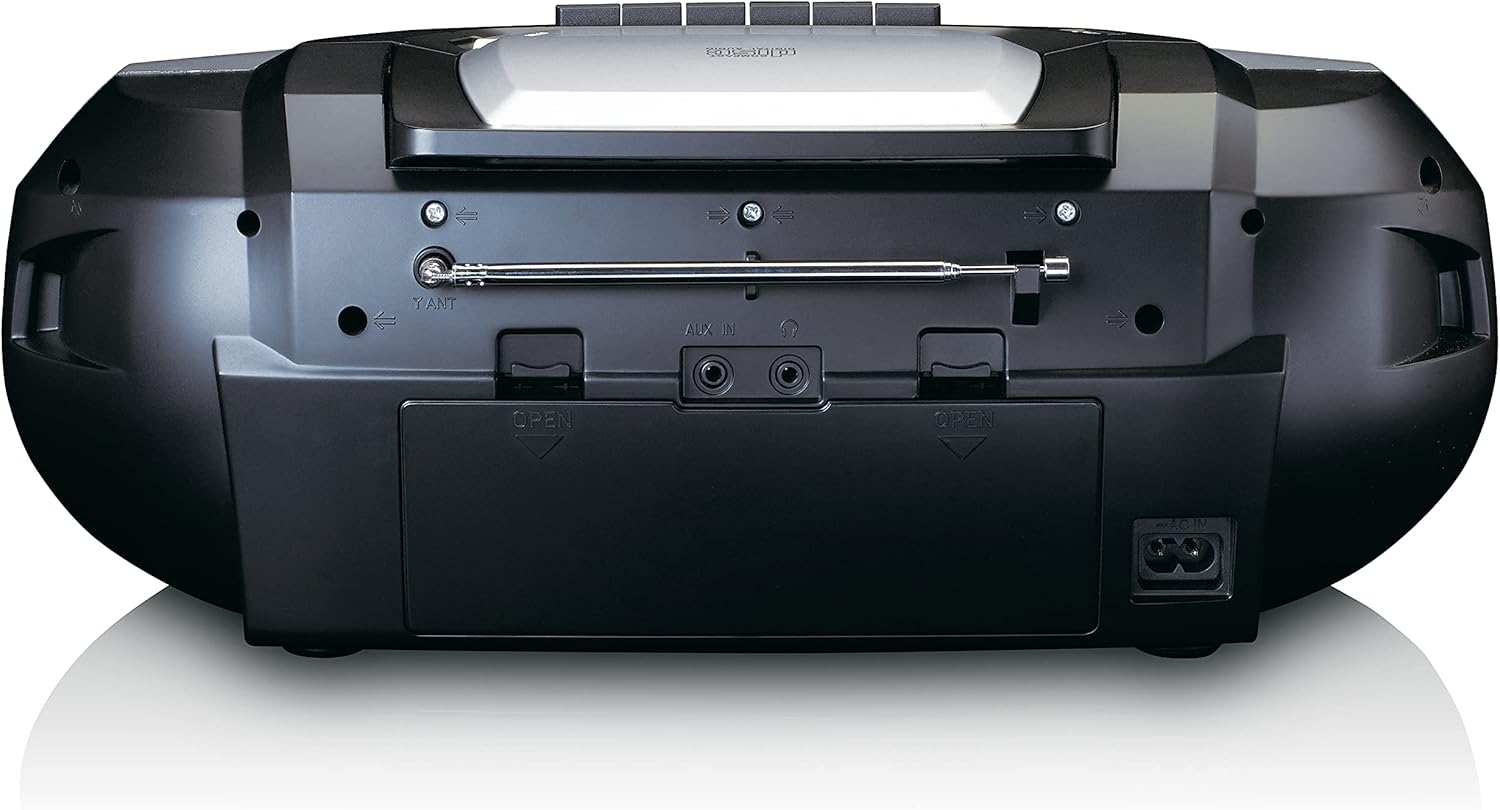
This image shows the back of the Lenco SCD-720 Boombox, featuring the telescopic antenna, AUX input, headphone jack, and the AC power input socket.
Control Panel Close-up

א דיטיילד view of the Lenco SCD-720 Boombox's central control panel, including the digital display, source selection buttons, tuning/navigation buttons, and the illuminated volume knob.
Boombox with Remote Control
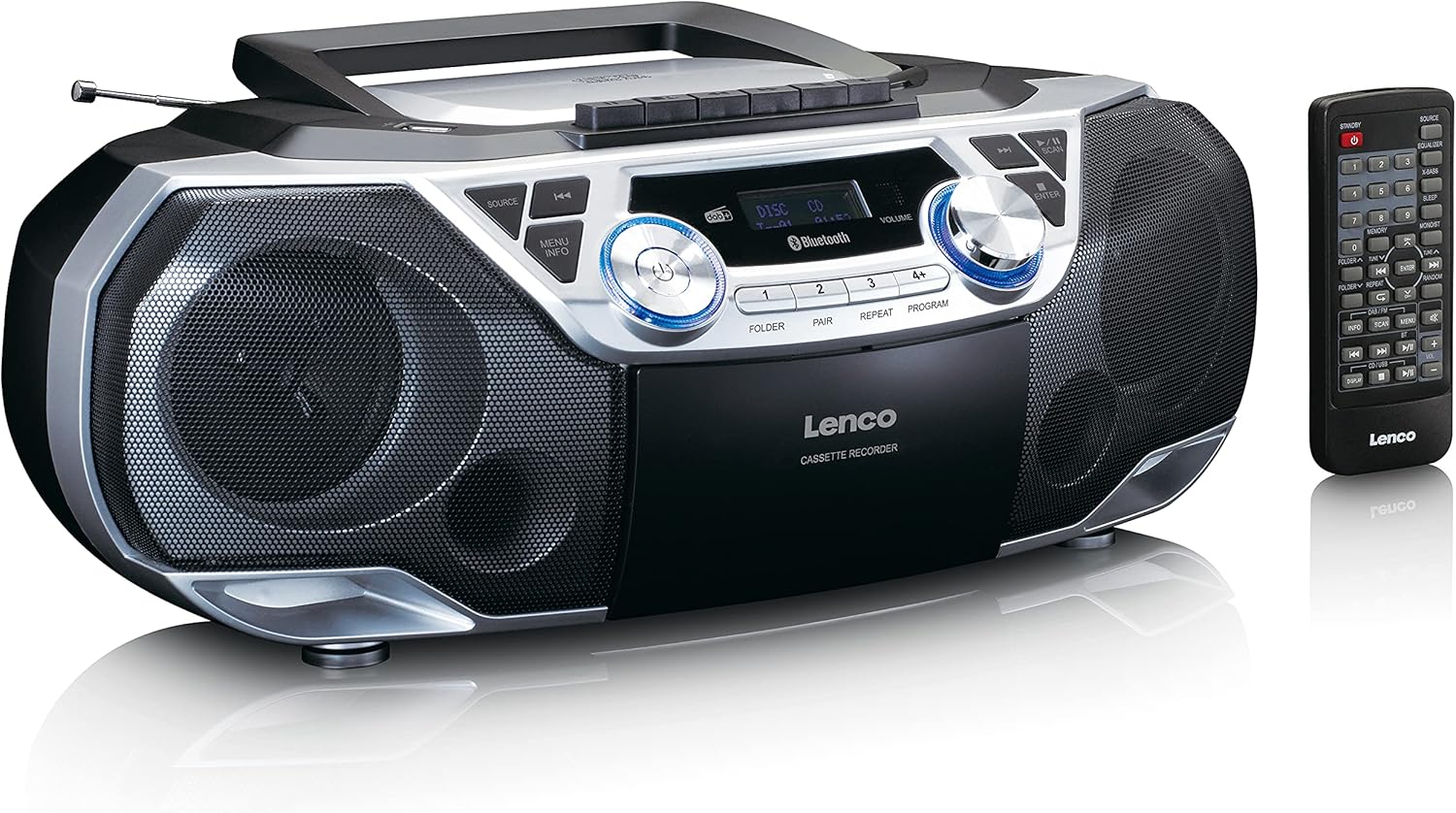
The Lenco SCD-720 Boombox is displayed next to its included remote control, illustrating the complete package.
רימאָוט קאָנטראָל אויסלייג

A close-up image of the remote control for the Lenco SCD-720 Boombox, showing all buttons for power, source selection, playback, tuning, and other functions.
4. סעטאַפּ
4.1 מאַכט קאַנעקשאַן
The Lenco SCD-720 Boombox can be powered by AC mains or batteries.
- AC מאַכט: Connect the supplied AC power cord to the AC IN socket on the rear of the unit and then to a standard wall outlet.
- באַטערי אָפּעראַציע: For portable use, open the battery compartment on the rear of the unit and insert 8 x 'C' type batteries (not included), ensuring correct polarity. Close the compartment securely.
4.2 אַנטענע אַדזשאַסטמענט
For optimal radio reception, extend the telescopic antenna fully. Adjust its position and angle to achieve the best signal quality for both DAB+ and FM broadcasts.
4.3 ערשט מאַכט אויף
דרוק די מאַכט button on the unit or remote control to turn on the boombox. The display will light up, and the unit will typically start in the last used mode.
5. אַפּערייטינג ינסטרוקטיאָנס
5.1 אַלגעמיינע קאָנטראָלן
- מאַכט אויף / אַוועק: דרוק די מאַכט קנעפּל.
- באַנד קאָנטראָל: דרייען די באַנד קנעפּל אויף דער איינהייט אדער ניצט דעם באַנד + / - קנעפּלעך אויף די ווייַט קאָנטראָל.
- מקור סעלעקציע: דרוק די מקור button on the unit or the dedicated source buttons (DAB/FM, CD/USB, BT) on the remote to switch between modes (DAB+, FM, CD, USB, Bluetooth, AUX).
5.2 ראַדיאָ אָפּעראַציע (DAB+/FM)
- אויסקלייַבן מאָדע: דרוק די מקור button until DAB+ or FM mode is selected.
- אַוטאָ סקאַן: In DAB+ or FM mode, press the יבערקוקן button to automatically search for and store available stations.
- מאַנואַל טונינג: ניצן די TUNE < / > קנעפּלעך צו מאַנועל סטרויערן די אָפטקייט.
- פּריסעט סטיישאַנז: The unit allows you to save your favorite stations. Press and hold one of the numbered preset buttons (1-4) to store the current station. Briefly press a preset button to recall a stored station.
- DAB+ Information: אין DAB + מאָדע, דריקן די INFO button to cycle through various information such as program type, signal strength, time, and date.
5.3 סי-די/MP3 שפּיל
- Load CD: Open the CD compartment lid by pressing the עפענען button. Place a CD or MP3 CD with the label side facing up. Close the lid securely.
- פּלייבאַק: The CD will start playing automatically. If not, press the שפּיל / פּויזע קנעפּל.
- קאָנטראָלס: ניצן SKIP << / >> buttons to skip tracks. Press and hold to fast forward/rewind.
- איבערחזרן: דרוק איבערחזרן צו איבערחזרן דעם איצטיקן טרעק אדער אלע טרעקס.
- פּראָגראַם: דרוק פּראָגראַם to create a custom playback order for tracks.
5.4 קאַסעטע ווידערשפּיל און רעקאָרדירונג
- Load Cassette: Open the cassette compartment. Insert a cassette tape.
- פּלייבאַק: דרוק די שפּיל קנעפּל.
- רעקאָרדינג: To record from Radio, CD, USB, or AUX, select the desired source. Insert a blank cassette. Press the רעקאָרד button (usually red) along with the שפּיל קנעפּל סיימאַלטייניאַסלי.
- קאָנטראָלס: ניצן שנעל פאָרויס און ריוויינד קנעפּלעך. דרוק האַלטן / אַרויסוואַרפן to stop playback and open the compartment.
5.5 בלועטוט 5.0 קאָנעקטיוויטי
- אַרייַן בלועטאָאָטה מאָדע: דרוק די מקור button until 'BT' or 'Bluetooth' appears on the display. The unit will enter pairing mode, indicated by a flashing Bluetooth icon.
- פּאָרינג: On your smartphone or tablet, enable Bluetooth and search for available devices. Select 'Lenco SCD-720' from the list. Once paired, the Bluetooth icon will stop flashing.
- פּלייבאַק: Start playing audio on your connected device. The sound will be streamed to the boombox.
5.6 יו-עס-בי פּלייבּעק
- Insert USB: אַרייַנלייגן אַ וסב בליץ פאָר מיט mp3 fileס אין די וסב פּאָרט.
- אויסקלייבן USB מאָדע: דרוק די מקור button until 'USB' appears. The unit will automatically scan and begin playing MP3 files.
- קאָנטראָלס: ניצט די פּלייבאַק קאָנטראָל קנעפּלעך (PLAY/PAUSE, SKIP << / >>) to manage your music.
5.7 AUX אַרייַנשרייַב
Connect external audio devices (e.g., MP3 players, smartphones without Bluetooth) to the AUX IN jack on the rear of the unit using a 3.5mm audio cable (not included). Select AUX mode via the מקור קנעפּל.
5.8 כעדפאָון רעזולטאַט
פֿאַר פּריוואַט צוהערן, פֿאַרבינדט קאָפּהערער צו די כעדפאָון jack on the rear of the unit. The main speakers will be muted automatically.
5.9 רימאָוט קאָנטראָל
The included remote control provides full functionality for the boombox, allowing you to control power, source, volume, playback, tuning, and other settings from a distance. Ensure the remote has working batteries and is pointed towards the front of the boombox.
6. וישאַלט
6.1 רייניקונג די אַפּאַראַט
Wipe the exterior of the boombox with a soft, dry cloth. Do not use abrasive cleaners, waxes, or solvents as they may damage the finish. For stubborn stains, a slightly damp א שטאָף קען גענוצט ווערן, און דערנאך א טרוקענעם שטאָף.
6.2 CD Lens Care
If CD playback becomes erratic, the CD lens may need cleaning. Use a commercially available CD lens cleaner disc. Do not touch the lens directly.
6.3 Cassette Head Cleaning
רייניקט רעגולער די קאַסעטע קעפּ, פּינטש ראָולערס, און קאַפּסטאַנס מיט אַ וואַטע שטעכל לייכט נאַס מיט יסאָפּראָפּיל אַלקאָהאָל צו ענשור אָפּטימאַל קלאַנג קוואַליטעט און פאַרמייַדן טייפּ שעדיקן.
6.4 באַטערי פאַרבייַט
If the unit is powered by batteries and performance degrades, replace all 8 'C' type batteries with new ones, ensuring correct polarity. Do not mix old and new batteries or different types of batteries.
7. טראָובלעשאָאָטינג
| פּראָבלעם | מעגלעך סיבה | לייזונג |
|---|---|---|
| קיין מאַכט | עלעקטרישע שנור נישט פארבונדן; באַטעריעס אויסגעשעפט אדער נישט ריכטיג אריינגעשטעלט. | קאָנטראָלירט די AC שנור פֿאַרבינדונג; פֿאַרבייטן די באַטעריעס, זיכער מאַכנדיג די ריכטיקע פּאָלאַריטעט. |
| קיין געזונט | קול צו נידעריג; אומרעכטע מקור אויסגעקליבן; כעדפאָונז פארבונדן. | Increase volume; Select correct source; Disconnect headphones. |
| נעבעך ראַדיאָ אָפּטראָג | Antenna not extended or positioned correctly; Weak signal. | Extend and adjust the telescopic antenna; Try moving the unit to a different location. |
| סי-די/יו-עס-בי שפּילט נישט | Disc dirty/scratched; USB format not supported; Incorrect mode. | Clean or replace disc; Ensure USB contains MP3 files; Select CD or USB mode. |
| בלועטאָאָטה פּערינג ניט אַנדערש | Boombox not in pairing mode; Device too far; Bluetooth off on device. | Ensure boombox is in BT pairing mode; Move device closer; Enable Bluetooth on your device. |
| Cassette recording issues | Incorrect source selected; Cassette write-protect tab engaged. | Select the desired recording source; Ensure the write-protect tab on the cassette is not broken off. |
8. ספּעסאַפאַקיישאַנז
- מאָדעל: SCD-720SI
- סאָרט: Lenco
- קאַנעקטיוויטי: DAB+, FM Radio, Bluetooth 5.0, CD/MP3 Player, Cassette Player, USB Playback, AUX Input, Headphone Output
- אַודיאָ רעזולטאַט: 2 קס 6 וו רמס
- מאַכט מקור: AC 230V ~ 50Hz or 8 x 'C' type batteries (DC 12V)
- שטיצט אַודיאָ פֿאָרמאַטירונגען: CD, CD-R/RW, MP3 (from CD/USB)
- ספּעציעלע פֿעיִקייטן: Bass Reflex, Remote Control
- דימענשאַנז (L x W x H): אומגעפער 38.5 ס״מ x 23.5 ס״מ x 14.5 ס״מ
- קאָליר: זילבער
- פאַבריקאַנט: Lenco GmbH
- לאַנד פון אָריגין: כינע
9. וואָראַנטי און שטיצן
Lenco products are covered by a warranty in accordance with European law. For specific warranty terms and conditions, please refer to the warranty card included with your product or visit the official Lenco website. For technical support, service, or spare parts information, please contact Lenco customer service or your local dealer. Please have your model number (SCD-720SI) and purchase details ready when contacting support.
Information regarding software updates and spare parts availability is not provided at this time.