
Sharp HP-TW30(BK)
Sharp HP-TW30 True Wireless Noise Cancelling Earphones
Model: HP-TW30(BK)
פּראָדוקט איבערview
The Sharp HP-TW30 True Wireless Noise Cancelling Earphones are designed for an immersive audio experience with enhanced comfort and durability. Featuring active noise cancellation, these earphones reduce background noise, making them ideal for various environments. They offer wireless charging, Bluetooth 5.0 connectivity, and are splashproof for active lifestyles.
שליסל פֿעיִקייטן:
- אַקטיוו ראַש קאַנסאַליישאַן: Reduces ambient noise by 22dB for improved focus and enjoyment.
- ווירעלעסס טשאַרדזשינג: Convenient charging with the included case, providing up to 4 full charges.
- בלועטאָאָטה 5.0: Ensures stable and efficient wireless connectivity with a range of up to 33 feet.
- IPX4 שפּריץ-זיכער: Resistant to splashes, sweat, and light rain, suitable for workouts and outdoor activities.
- ריר קאָנטראָלס: Intuitive controls for managing playback, calls, and voice assistants.
- קול קאָנטראָל: Full integration with Apple Siri and Google Assistant for hands-free operation.
- לאנג שפּיל צייט: ביז 6 שעה פון אַודיאָ ווידערשפּיל אויף איין אָפּצאָל.

Figure 1: Sharp HP-TW30 True Wireless Earphones (Black)
פּעקל אינהאַלט
איידער איר הייבט אן, ביטע זיכער מאכן אז אלע זאכן זענען פאראן אין פעקל:
- שאַרפּ HP-TW30 עכט וויירלעס אויערפאָונז (לינקס און רעכטס)
- טשאַרדזשינג קאַסע
- USB Type-C Charging Cable (not explicitly listed in 'whats_in_the_box' but implied by 'Charging Port: USB Type C')
- Small, Medium, and Large Ultra-comfortable Ear Tips (3 sizes)
- ינסטרוקטיאָן מאַנואַל (דעם דאָקומענט)
סעטאַפּ
1. אויפלאָדן די אויערפאָונז און קעסטל
For first-time use, fully charge the earphones and the charging case. The charging case provides approximately 4 full charges for the earphones.
- Place both earphones into their respective slots in the charging case. Ensure they are seated correctly.
- פֿאַרבינדט דעם USB טיפּ-C טשאַרדזשינג קאַבל צום טשאַרדזשינג פּאָרט אויף דער קעיס און דעם אַנדערן עק צו אַ USB מאַכט מקור (למשל, וואַנט אַדאַפּטער, קאָמפּיוטער USB פּאָרט).
- The LED indicators on the case will show charging status. Charging time for the case and earphones is approximately 2 hours.
- אַמאָל גאָר באפוילן, דיסקאַנעקט די טשאַרדזשינג קאַבלע.
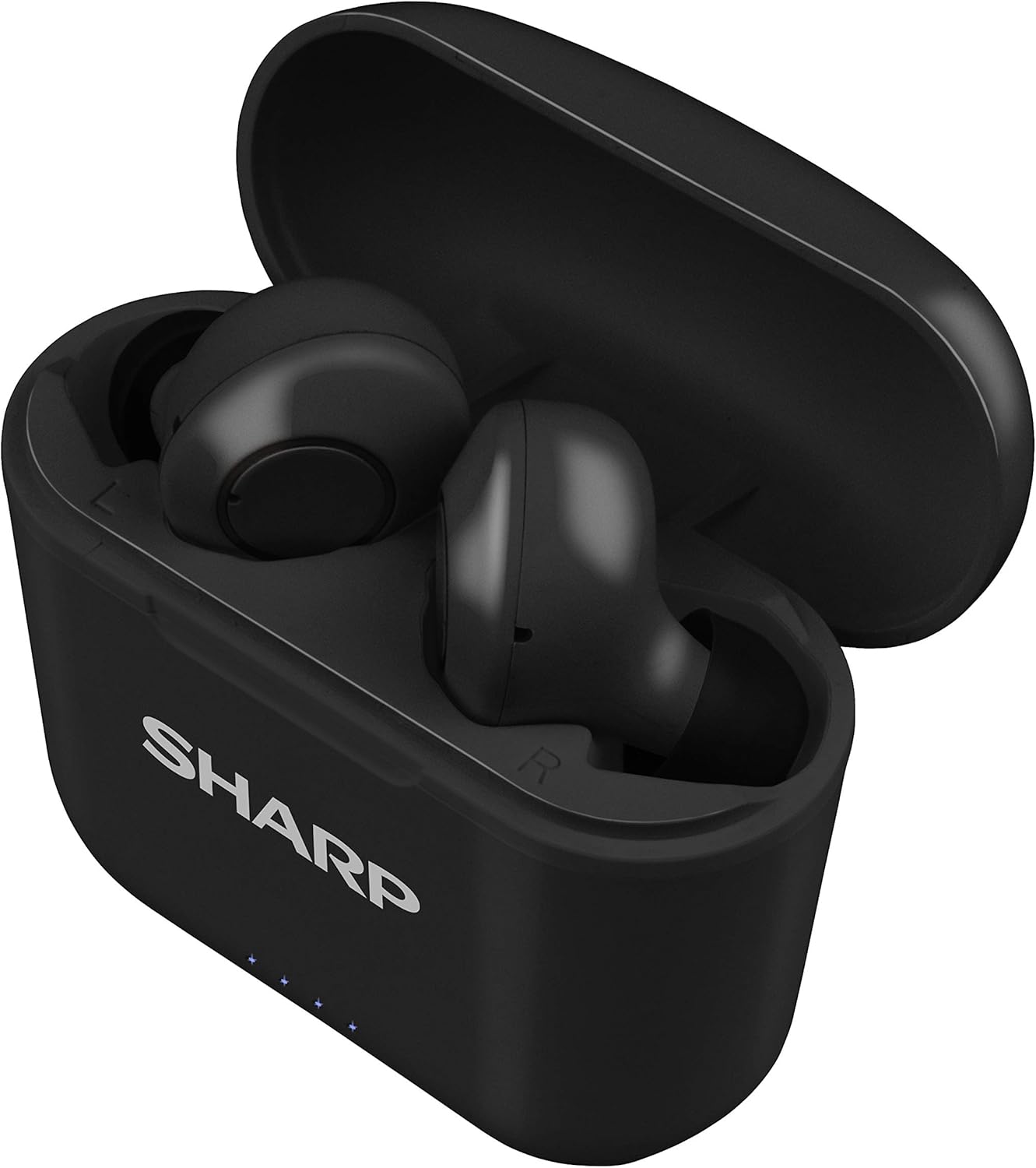
Figure 2: Earphones in Charging Case
2. פּערינג מיט דיין מיטל
The HP-TW30 earphones feature auto-pairing for effortless setup.
- עפֿנט דעם טשאַרדזשינג קעסטל. די אויערפֿאָנען וועלן זיך אויטאָמאַטיש אָנצינדן און אַרײַן אין פּערינג מאָדע.
- אויף אייער סמאַרטפאָון, טאַבלעט, אָדער אַנדער בלוטוט-ענייבאַלד מיטל, גייט צו די בלוטוט סעטטינגס.
- זוכן פֿאַר available devices and select "HP-TW30" from the list.
- אַמאָל פארבונדן, וועט אַ קול פּראָמפּט באַשטעטיקן די געראָטן פּאָרינג.
- די אויערפאָונז וועלן זיך אויטאָמאַטיש ווידער פֿאַרבינדן צום לעצטן פֿאַרבונדענעם מיטל ווען מען נעמט זיי אַרויס פֿון קעסטל, אויב בלועטוט איז אַקטיוויזירט אויפֿן מיטל.
אַפּערייטינג ינסטראַקשאַנז
ריר קאָנטראָלס
The HP-TW30 earphones utilize touch-sensitive controls on each earbud for various functions:
- שפּיל / פּויזע: איין צאַפּן אויף יעדער עאַרבוד.
- ווייַטער שפּור: צאַפּ צוויי מאָל אויף די רעכטע אויערקנעפּל.
- פֿריִערדיקע שפּור: צאַפּ צוויי מאָל אויף די לינקע אויערקנעפּל.
- ענטפֿערן / סוף רופן: איין צאַפּ אויף יעדן אויערקנעפּל בעת אַן אינקאַמינג רוף.
- אָפּוואַרפן רופן: דריק און האלט איינע פון די אויערקנעפל פאר 2 סעקונדעס בעת אן אנקומענדיקן רוף.
- Activate Voice Assistant (Siri/Google Assist): טרייפאַך צאַפּן אויף יעדן אויערקנעפּעל.
- Active Noise Cancellation (ANC) On/Off: דריקן און האַלטן די רעכט עאַרבוד פֿאַר 2 סעקונדעס.
אַקטיוו ראַש קאַנסאַליישאַן (ANC)
The ANC feature reduces ambient background noise, providing a more focused listening experience. Activate or deactivate ANC using the touch control as described above.
וואַסער קעגנשטעל (IPX4)
The earphones are rated IPX4 splashproof, meaning they are resistant to water splashes from any direction. This makes them suitable for light rain, sweat, and gym use. Do not submerge the earphones in water.
וישאַלט
געהעריקע אויפהאלטונג גאראנטירט די לאנגעוויטי און אפטימאלע פאָרשטעלונג פון אייערע אויערפאָונז.
- רייניקונג: Regularly clean the earphones and charging case with a soft, dry, lint-free cloth. Do not use abrasive cleaners or solvents.
- אויער עצות: Remove and clean the ear tips periodically with a damp שטאָף און מילד זייף, און דערנאָך טרוקן גוט איידער איר צוריק צוטשעפּען.
- סטאָרידזש: ווען נישט אין באַנוץ, לייגט די אויערפאָונז אין זייער טשאַרדזשינג קעסטל צו באַשיצן זיי פון שטויב און שעדיקן.
- טעמפּעראַטור: פֿאַרמײַדט אויסשטעלן די אויערפֿאָנען צו עקסטרעמע טעמפּעראַטורן (הייס אָדער קאַלט) אָדער הויכער פֿײַכטקייט.
- טשאַרדזשינג קאָנטאַקטן: זיכער מאַכן אַז די טשאַרדזשינג קאָנטאַקטן אויף ביידע די אויערפאָונז און אינעווייניק פון די קעסטל זענען ריין און פריי פון שמוץ צו האַלטן געהעריק טשאַרדזשינג.
טראָובלעשאָאָטינג
If you encounter issues with your Sharp HP-TW30 earphones, try the following solutions:
- אויערפאָונז נישט פּערינג/פאַרבינדן זיך:
- זיכער מאַכן אַז ביידע אויערפאָונז זענען גאָר אויפגעלאָדן.
- אויסלעשן בלועטוט אויף אייער דעווייס, און דערנאך עס צוריק אנצינדן.
- Forget/delete "HP-TW30" from your device's Bluetooth list and attempt to re-pair.
- Place both earphones back into the charging case, close the lid for 5 seconds, then open it again to reset.
- נאָר איין אויערקנעפּל שפּילט געזונט:
- מאַכן זיכער אַז ביידע עאַרבודז זענען באפוילן.
- לייגט צוריק ביידע אויערן-קנעפּלעך אין דעם טשאַרדזשינג קעסטל, מאַכט צו דעם דעקל, און עפנט עס ווידער. דאָס סינקראָניזירט זיי אָפט ווידער.
- רייניקט די טשאַרדזשינג קאָנטאַקטן אויף ביידע אויערקנעפּלעך און אינעווייניק פון די קעסטל.
- Try resetting and re-pairing the earphones as described above.
- נידעריקע קול אדער שלעכטע געזונט קוואַליטעט:
- אַדזשאַסטירן די באַנד אויף ביידע דיין מיטל און די אויערפאָונז.
- Ensure the ear tips are the correct size for a snug fit and are clean.
- Check for any obstructions in the earbud nozzles.
- אויערפאָונז לאָדן זיך נישט אויף:
- זיכער מאַכן אַז דער טשאַרדזשינג קאַבל איז זיכער פארבונדן צו ביידע דעם קעסטל און די מאַכט מקור.
- פרובירט אן אנדערן USB טיפ-C קאבל און מאכט אדאפטער.
- רייניקט די טשאַרדזשינג קאָנטאַקטן אויף די אויערפאָונז און אינעווייניק פון דער קעסטל.
ספּעסאַפאַקיישאַנז
| מאָדעל נאָמען | HP-TW30(BK) |
| קאַנעקטיוויטי טעכנאָלאָגיע | ווירעלעסס (בלועטאָאָטה) |
| בלועטאָאָטה ווערסיע | 5.0 |
| בלועטאָאָטה קייט | אַרויף צו 33 פֿיס (10 מעטער) |
| ראַש קאָנטראָל | Active Noise Cancellation (22dB reduction) |
| פּלייַטימע | בעערעך. 6 שעה |
| סטאַנדביי צייט | בעערעך. 90 שעה |
| טשאַרדזשינג צייט | Approx. 2 hours (earphones and case) |
| טשאַרדזשינג פּאָרט | וסב טיפּ-C |
| וואַסער קעגנשטעל | IPX4 ספּלאַשפּראָאָף |
| קאָנטראָל טיפּ | ריר קאָנטראָל |
| קול קאָנטראָל | Apple Siri, Google Assistant |
| אַרייַנגערעכנט קאַמפּאָונאַנץ | Small, Medium, and Large Ultra-comfortable Ear tips |
| מאַטעריאַל | סיליקאָן (אויער שפּיץ) |
| פּונקט וואָג | 7.9 אונסעס |
וואָראַנטי און שטיצן
Sharp products are manufactured to the highest quality standards. For warranty information, technical support, or service inquiries, please refer to the warranty card included with your purchase or visit the official Sharp support website. Please have your model number (HP-TW30(BK)) and proof of purchase ready when contacting support.
For further assistance, you may visit the Sharp Store on Amazon: Sharp Official Store
Ask a question about this manual
Ask about setup, troubleshooting, compatibility, parts, safety, or missing instructions. Manuals+ will review the question and use this page’s manual context to help answer it.