
1. פּראָדוקט איבערview
The KUIDAMOS DSO FNIRSI PRO is a portable digital oscilloscope designed for various measurement tasks. It features a 2.4-inch LCD display, a real-time sampling rate of up to 20MS/s, and an analog bandwidth of 5MHz. This device is equipped with a built-in 1200mAh rechargeable lithium battery, offering approximately 3 hours of continuous operation. It supports waveform storage and management, making it suitable for both maintenance and research and development applications.
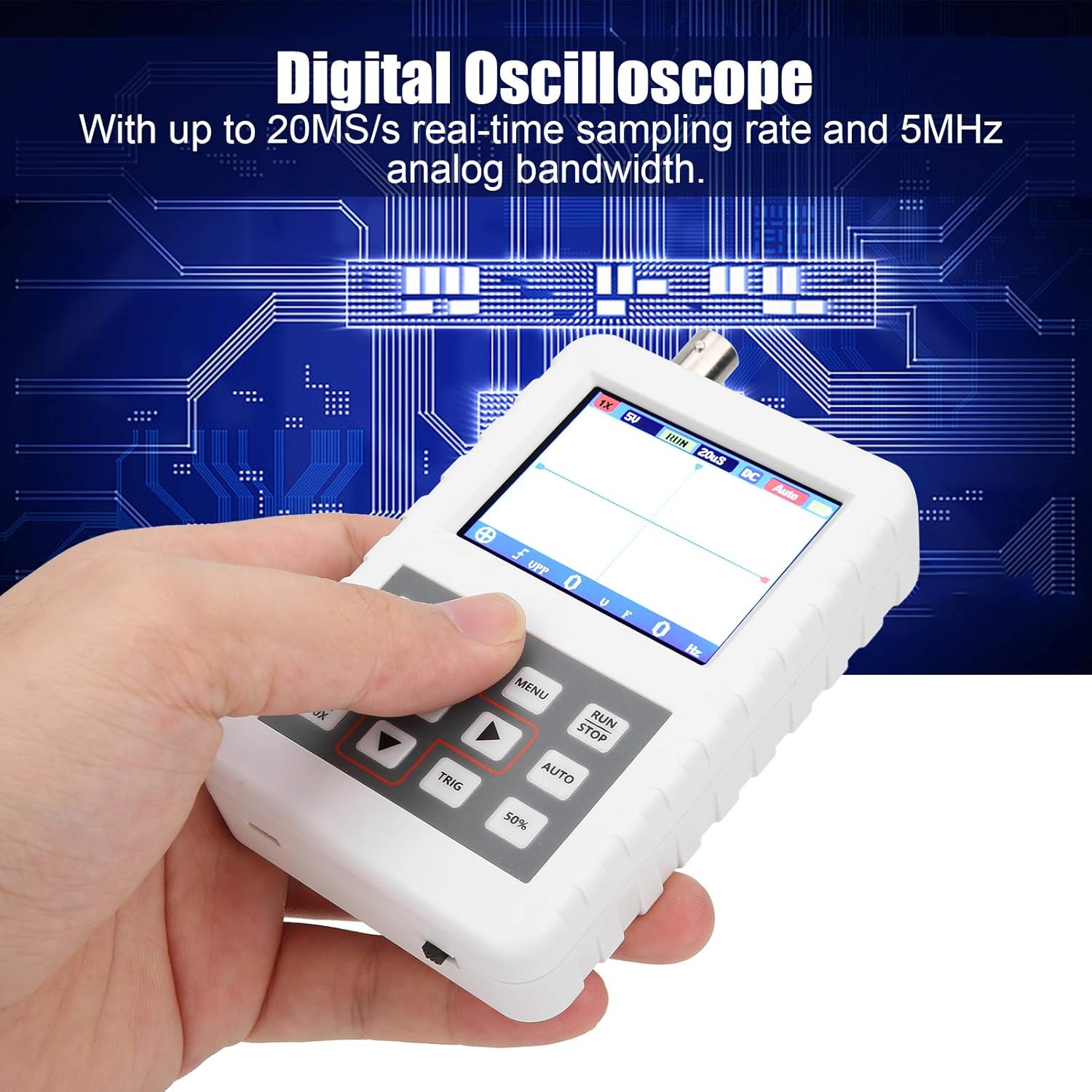
Image 1.1: The DSO FNIRSI PRO Digital Oscilloscope, highlighting its 20MS/s sampling rate and 5MHz analog bandwidth.

Image 1.2: The oscilloscope's 2.4-inch HD LCD screen with 320 x 240 resolution for clear waveform display.

בילד 1.3: פאָרנט און הינטן views of the DSO FNIRSI PRO, illustrating its physical layout.
2. פּעקל אינהאַלט
באַשטעטיקט אַז אַלע זאכן וואָס זענען אויסגערעכנט אונטן זענען אַרייַנגערעכנט אין אייער פּעקל:
- 1 x DSO FNIRSI PRO Digital Oscilloscope
- 1 x Matching Probe
- 1 x USB Data Line
- 1 x באַניצער מאַנואַל (דאָס דאָקומענט)
3. ערשט סעטאַפּ
3.1 טשאַרדזשינג די מיטל
Before first use, fully charge the oscilloscope. Connect the provided USB data line to the device's charging port and to a 5V/1A, 2A, 3A, or 4A USB power adapter. The built-in 1200mAh lithium battery can be charged continuously for approximately 3 hours.
3.2 קאַנעקטינג די זאָנד
Connect the matching probe to the BNC connector on the top of the oscilloscope. Ensure a secure connection by twisting the probe connector clockwise until it locks into place.
3.3 פּאַוערינג אויף / אַוועק
To power on the device, press and hold the power button (usually located on the side or bottom) for a few seconds until the screen illuminates. To power off, press and hold the power button again until the device shuts down.
4. אַפּערייטינג ינסטרוקטיאָנס
4.1 קאָנטראָלן און צובינד
The oscilloscope features a user-friendly interface with several buttons for navigation and function control.

Image 4.1: Operating the DSO FNIRSI PRO, showing the placement of control buttons.
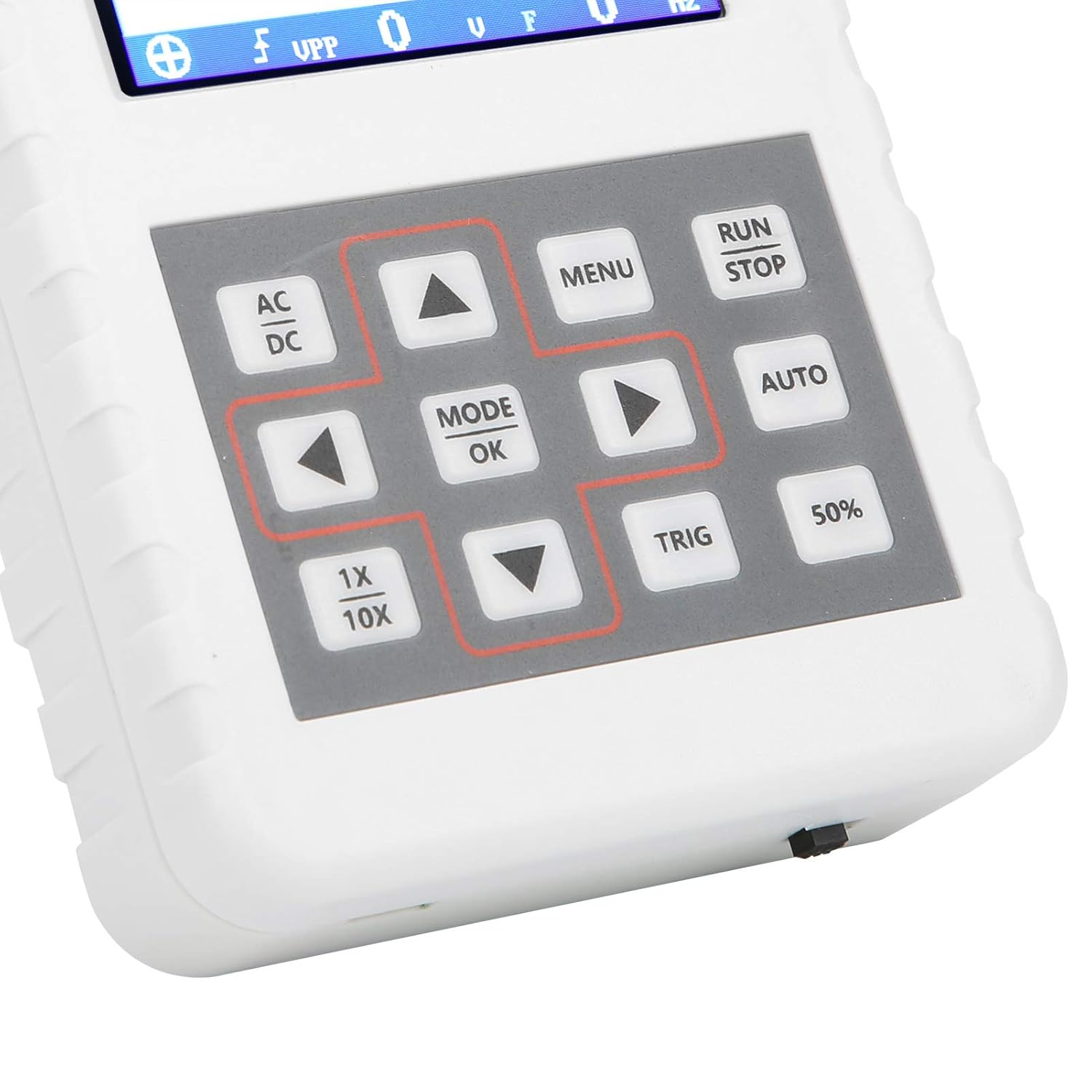
בילד 4.2: דעטאַלירט view of the oscilloscope's control panel.
- מעניו: גייט אריין אין הויפּט מעניו פֿאַר סעטטינגס און פונקציעס.
- לויפן / האַלטן: Starts or pauses waveform acquisition.
- אָטאַמאַטיק: Automatically adjusts settings for optimal waveform display.
- טריג: אַדזשאַסטירט טריגער לעוועל.
- 50%: Sets the trigger level to 50% of the waveform ampליטוד.
- AC/DC: Toggles between AC and DC coupling modes.
- 1X/10X: Sets the oscilloscope's input attenuation to match the probe's setting.
- מאָדוס/אקעי: Confirms selections or changes modes.
- פײַל קנעפּלעך (אַרויף, אַראָפּ, לינקס, רעכטס): נאַוויגירן מעניוז און סטרויערן פּאַראַמעטערס.
4.2 Probe Attenuation Settings
It is critical to match the probe's attenuation setting with the oscilloscope's input setting to ensure accurate measurements.
- פֿאַר 1X measurement (0-40V): Set both the physical switch on the probe and the 1X/10X button on the oscilloscope to the 1X שטעלע.
- פֿאַר 10X measurement (40-800V): Set both the physical switch on the probe and the 1X/10X button on the oscilloscope to the 10X שטעלע.
4.3 Measurement Modes and Triggering
The oscilloscope supports various trigger modes to stabilize waveform display:
- סינגלע: Captures a single waveform event and then stops.
- נאָרמאַל: Captures a waveform only when a trigger condition is met.
- אַוטאָ: Continuously acquires waveforms, even without a trigger, but will trigger if a signal is present.
ניצן די TRIG button and arrow keys to adjust the trigger level, which determines the voltage point at which the oscilloscope begins to acquire data.
4.4 Waveform Storage and Management
The device includes 16MB of built-in storage, capable of storing up to 500 waveform images. Use the file manager function to browse, view, and manage saved waveforms. This includes viewing detailed information, flipping through images, and deleting unwanted files.

בילד 4.3: עקס.amples of sine wave measurements at various frequencies.

בילד 4.4: עקס.amples of square, triangular, and sawtooth wave measurements.
5. קער און וישאַלט
5.1 רייניקונג
ווישט אָפּ דאָס אַפּאַראַט מיט אַ ווייכן, טרוקענעם שטאָף. ניצט נישט קיין שרײַבנדיקע רייניגער אָדער סאָלווענטן, ווײַל זיי קענען שאַטן דאָס אַפּאַראַט.asinג אדער עקראַן. זיכער מאַכן אַז די דעוויס איז אויסגעלאָשן און אָפּגעטיילט פֿון יעדער מאַכט מקור איידער רייניקונג.
5.2 באַטערי קער
To prolong battery life, avoid fully discharging the battery frequently. If storing the device for an extended period, charge it to approximately 50% and recharge every few months.
5.3 סטאָרידזש
Store the oscilloscope in a cool, dry place, away from direct sunlight, extreme temperatures, and high humidity. Keep it protected from dust and physical impact.
6. טראָובלעשאָאָטינג
- Issue: Abnormal measured data.
לייזונג: Check the probe's attenuation switch (1X or 10X) and ensure it matches the setting on the oscilloscope (using the 1X/10X button). If the probe is set to 10X and the oscilloscope is set to 1X, the device will not be damaged, but the data displayed will be incorrect. - Issue: Device does not power on.
לייזונג: Ensure the battery is sufficiently charged. Connect the device to a power source using the USB data line and allow it to charge for at least 30 minutes before attempting to power it on again. - Issue: Screen is blank or frozen.
לייזונג: Try performing a soft reset by pressing and holding the power button for an extended period (e.g., 10-15 seconds) until the device powers off, then power it back on. If the issue persists, ensure the battery is charged.
7. טעכניש ספּעסאַפאַקיישאַנז
| שטריך | באַשרייַבונג |
|---|---|
| פּראָדוקט מאָדעל | DSO FNIRSI PRO |
| פּראָדוקט מאַטעריאַל | ABS |
| נומער פון טשאַנאַלז | 1 |
| פאַרשטעלן גרייס | בעערעך. 6.1cm / 2.4in |
| פאַרשטעלן האַכלאָטע | 320 X 240 |
| ווייַז טיפּ | לקד פאַרשטעלן |
| אַנאַלאָג באַנדווידט | 5 מהז |
| מאַקסימום זampלינג קורס | 20MSps |
| צינגל מאָדע | Single/Normal/Auto |
| כוואַליעפאָרם סטאָרידזש | 16MB (up to 500 waveform pictures) |
| געבויט-אין באַטערי | ליטהיום באַטאַרייע 1200 מאַה |
| סטאַנדביי צייט | 3 שעה |
| טשאַרדזשינג אַרייַנשרייַב | 5V/1A/2A/3A/4A |
| פאַבריקאַנט | KUIDAMOS |
| לאַנד פון אָריגין | USA |
| נומער טייל נומער | KUIDAMOStgaix9hwck |
8. גאַראַנטיע און קונה שטיצע
For warranty information, technical support, or service inquiries, please refer to the documentation provided with your purchase or contact the seller directly. Keep your purchase receipt as proof of purchase for any warranty claims.