
1. הקדמה
This user manual provides detailed instructions for the proper use and maintenance of your Zebra DS8178 Wireless 2D/1D Barcode Scanner. Please read this manual thoroughly before operating the device to ensure optimal performance and safety. The DS8178 is designed for efficient and reliable barcode scanning in various environments, offering both 1D and 2D barcode reading capabilities with wireless connectivity.
2. זיכערקייַט אינפֿאָרמאַציע
אָבסערווירן די פאלגענדע זיכערהייט מיטלען צו פאַרמייַדן שאָדן אָדער שעדיקן צו די מיטל:
- Do not expose the scanner or cradle to extreme temperatures, moisture, or corrosive substances.
- Avoid direct eye exposure to the scanner's light source.
- Use only the specified power adapter and USB cable for charging.
- פרובירט נישט צו צענעמען אדער מאדיפיצירן דעם אפאראט. לאָזט איבער אלע סערוויסעס צו קוואַליפֿיצירטע פּערסאָנעל.
- האַלטן די מיטל אַוועק פון שטאַרק מאַגנעטיק פעלדער.
3. פּעקל אינהאַלט
באַשטעטיקן אַז אַלע זאכן זענען פאַראַן אין דיין פּעקל:
- Zebra DS8178 Wireless Barcode Scanner
- USB Communication/Charging Cradle
- וסב קאַבלע
- שנעלע אָנהייב גייד (נישט אַרייַנגערעכנט אין דעם מאַנואַל)
4. פּראָדוקט איבערview
Familiarize yourself with the components of your Zebra DS8178 scanner and its cradle.

פיגורע 4.1: זייַט view of the Zebra DS8178 Wireless Barcode Scanner, showing its ergonomic design.

פיגורע 4.2: פראָנט view of the Zebra DS8178 Wireless Barcode Scanner, highlighting the scanning window and trigger button.

פיגורע 4.3: פראָנט view of the USB Communication/Charging Cradle, featuring the pairing button.
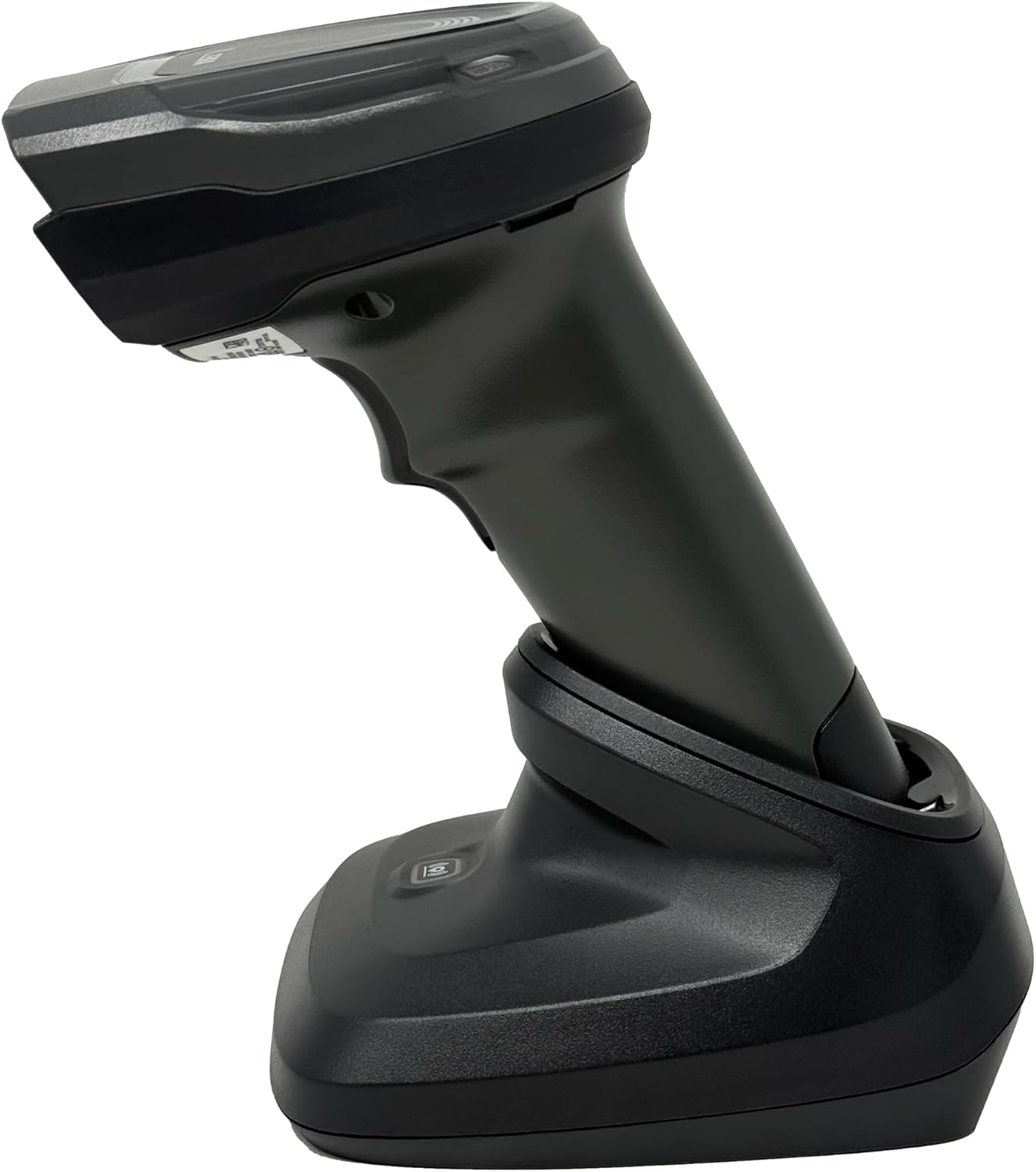
פיגורע 4.4: The Zebra DS8178 scanner securely docked in its USB cradle, ready for charging or communication.
4.1 Scanner Components
- סקאַן פֿענצטער: Area through which barcodes are read.
- טריגער: אַקטיוויזירט דעם סקאַנינג שטראַל.
- LED ינדיקאַטאָרס: Provide status feedback (e.g., battery, scan success).
- באַטערי אָפּטייל: Houses the removable/rechargeable battery.
4.2 Cradle Components
- Scanner Slot: Where the scanner docks for charging and communication.
- וסב פּאָרט: Connects the cradle to a host device (PC, laptop).
- פּערינג קנעפּל: Initiates Bluetooth pairing with the scanner.
- LED ינדיקאַטאָרס: Show cradle status (e.g., power, connection).
5. סעטאַפּ
5.1 אויפלאָדן דעם סקאַנער
- Connect the USB cable to the cradle's USB port.
- פֿאַרבינדט דעם אַנדערן עק פֿונעם USB קאַבל צו אַ פּאַוערד USB פּאָרט אויף אייער קאָמפּיוטער אָדער אַ USB וואַנט אַדאַפּטער.
- Place the DS8178 scanner into the cradle. Ensure it is seated correctly.
- The scanner's LED indicator will show charging status. A full charge typically takes approximately 3-4 hours.
5.2 Connecting the Cradle to a Host Device
The cradle connects to your computer via a standard USB cable.
- Plug the USB cable into the USB port on the back of the cradle.
- Connect the other end of the USB cable to an available USB port on your desktop or laptop computer.
- די אָפּערייטינג סיסטעם זאָל אויטאָמאַטיש דעטעקטירן און אינסטאַלירן די נייטיקע דרייווערס.
5.3 בלועטאָאָטה פּערינג
The DS8178 offers two primary Bluetooth pairing methods: via the cradle or direct to a host device.
5.3.1 Pairing via Cradle (Recommended for PC/Laptop)
- Ensure the cradle is connected to your host device (PC/Laptop) via USB.
- Place the DS8178 scanner into the cradle.
- The scanner will automatically pair with the cradle. Once paired, the scanner can be removed from the cradle and will communicate wirelessly with the host device through the cradle.
- A successful connection is indicated by a specific LED pattern on both the scanner and cradle (refer to the scanner's LED guide for details).
5.3.2 Direct Bluetooth Pairing (for Phones/Tablets or PC/Laptop without cradle)
- Power on the DS8178 scanner.
- Scan the "Pairing Barcode" (usually found in a quick start guide or on the scanner itself) to put the scanner into discoverable mode. Alternatively, press and hold the Bluetooth pairing button on the scanner (if available) or scan a specific Bluetooth pairing configuration barcode.
- On your phone, tablet, or computer, navigate to the Bluetooth settings.
- זוכן פֿאַר available devices. The DS8178 should appear in the list (e.g., "Zebra DS8178").
- Select the scanner to initiate pairing. You may be prompted to confirm a passkey or scan a pairing barcode displayed on your screen.
- Once paired, the scanner's LED will indicate a successful connection.
6. אָפּעראַציע
6.1 סקענען באַרקאָדס
- Point the scan window of the DS8178 scanner at the barcode you wish to read.
- Press and hold the trigger button. A red aiming pattern will appear.
- Center the aiming pattern over the barcode. For 1D barcodes, the aiming line should cross the entire barcode. For 2D barcodes, the aiming pattern should encompass the entire code.
- Once the barcode is successfully read, the scanner will emit an audible beep and/or the LED indicator will flash green.
- לאָזן די צינגל.
6.2 Cordless Range
The Zebra DS8178 offers a cordless range of up to 330 feet (100 meters) from its cradle or directly paired host device, depending on environmental conditions and line of sight. Obstructions such as walls or other electronic devices may reduce the effective range.
6.3 סקענען מאָדעס
- טריגער מאָדע: The scanner reads a barcode only when the trigger is pressed.
- Presentation Mode (Hands-Free): When placed in the presentation cradle, the scanner can be configured to automatically detect and read barcodes placed within its field of view without requiring a trigger press. This mode is ideal for high-volume scanning applications.
7. וישאַלט
7.1 רייניקן דעם סקאַנער
To maintain optimal scanning performance, keep the scan window clean.
- ניצט אַ ווייכע, ריינע, לינט-פֿרייע שטאָףampened with water or a mild cleaning solution (e.g., isopropyl alcohol).
- Gently wipe the scan window and the exterior of the scanner.
- ניצט נישט קיין שאַרפע רייניקונגס-מיטלען, סאָלווענטן אדער שטרענגע כעמיקאַלן.
- Ensure the scanner is powered off before cleaning.
7.2 באַטערי קער
The DS8178 features a 2500mAh removable and rechargeable battery. Proper battery care extends its lifespan.
- באַשולדיקן די באַטאַרייע גאָר איידער ערשטער נוצן.
- Avoid completely discharging the battery regularly.
- האַלט דעם סקאַנער אין אַ קיל, טרוקן אָרט ווען עס איז נישט אין באַנוץ פֿאַר לענגערע פּעריאָדן.
- If the battery performance significantly degrades, it may need replacement. Contact support for genuine replacement batteries.
8. טראָובלעשאָאָטינג
| פּראָבלעם | מעגלעך סיבה | לייזונג |
|---|---|---|
| סקאַנער גייט נישט אָן. | נידעריגע אדער אויסגעשעפטע באַטעריע. | Charge the scanner using the USB cradle and cable. |
| סקאַנער פֿאַרבינדט זיך נישט דורך בלוטוט. | נישט אין פּערינג מאָדע; אויסער ראַנגע; שטערונג; באַלעבאָס מיטל בלועטוט אויסגעלאָשן. | Ensure scanner is in pairing mode. Check host device Bluetooth settings. Move closer to the host device. Reduce interference. |
| סקאַנער לייענט נישט באַרקאָודז. | Barcode damaged/poor quality; scan window dirty; incorrect symbology enabled; scanner not aimed correctly. | Try scanning a different barcode. Clean the scan window. Ensure correct aiming. Check scanner configuration for enabled symbologies. |
| קיין דאַטן נישט טראַנסמיטירט צום האָסט. | Not paired; application not in focus; incorrect interface settings. | Confirm successful Bluetooth pairing. Ensure the target application (e.g., text editor, POS software) is active and ready to receive input. |
9. ספּעסאַפאַקיישאַנז
| שטריך | דעטאַל |
|---|---|
| מאָדעל | DS8178 |
| סאָרט | Zebra (formerly Symbol) |
| קאַנעקטיוויטי טעכנאָלאָגיע | Bluetooth, USB Cable, Wireless |
| קאַמפּאַטאַבאַל דעוויסעס | Desktop, Laptop, Phones, Tablets |
| מאַכט מקור | Battery Powered, Corded Electric, Rechargeable |
| באַטאַרייע קאַפּאַציטעט | 2500mAh (Removable/Rechargeable) |
| שנורלאָזער קייט | אַרויף צו 330 פֿיס (100 מעטער) |
| סקאַנינג פיייקייט | 1D און 2D באַרקאָדס |
| פאַקטיש ווינקל פון View | 17 דיגריז |
| UPC / GTIN | 649661651499 |
10. וואָראַנטי און שטיצן
This Zebra DS8178 Barcode Scanner comes with a 90-טאָג לימיטעד וואָראַנטי. This warranty covers defects in materials and workmanship under normal use. It does not cover damage caused by misuse, accidents, unauthorized modifications, or external causes.
For technical support, warranty claims, or to purchase genuine replacement parts (such as batteries), please contact your reseller or visit the official Zebra support website. Please have your model number (DS8178) and any purchase information ready when contacting support.