
1. הקדמה
The Tycon TPSC2440NMPPT is an advanced Maximum Power Point Tracking (MPPT) solar charge controller designed for efficient battery charging from solar panels. It automatically adjusts to 12V or 24V battery systems and supports various battery types including Flooded, AGM, GEL, and Lithium, with a customizable USER setting. This controller features an integral LCD display for monitoring key system parameters.
2. זיכערקייַט אינסטרוקציעס
Please read and understand all instructions before installation and operation. Failure to follow these instructions may result in electric shock, fire, or severe injury.
- זיכער מאַכן אַז אַלע וויירינג איז ריכטיק פּאָלאַריזירט און זיכער פארבונדן.
- נעמט נישט אויס דעם קאָנטראָללער און פּרוּווט נישט צו פאַרריכטן אים. ווענדט זיך צו קוואַליפֿיצירטע סערוויס פּערסאָנעל.
- אינסטאַלירט דעם קאָנטראָללער אין אַ גוט-ווענטילירטן אָרט, אַוועק פון ברענענדיקע מאַטעריאַלן און קאָראָזיווע גאַזן.
- Always disconnect the battery and solar panel before installing or moving the controller.
- טראָגט פּאַסיקע פּערזענלעכע שוץ-עקוויפּמענט (PPE) בעת דער אינסטאַלאַציע.
- The controller is designed for indoor use or protected outdoor environments (IP32 rating). Avoid direct exposure to water.
3. פּראָדוקט איבערview
The TPSC2440NMPPT controller is equipped with several features to optimize solar charging and battery management:
- MPPT טעכנאָלאָגיע: מאַקסאַמייזיז מאַכט שניט פון זונ פּאַנאַלז.
- Auto-Ranging Voltage: Compatible with 12V or 24V battery arrays.
- Multimode Load Operation: Offers 5 selectable modes for load control.
- Soft Start Load Output: Powers high capacitive loads safely.
- Automatic Battery Equalization: Performs 30-day equalization for optimal battery health.
- Conformal Coated Electronics: Provides environmental protection.
- TVS Lightning Protection: Enhances durability against electrical surges.
- Integral LCD Display: שאָוז באַטערי וואָלtage, Capacity, Charging Capacity, Temperature, Load Current, and Solar Current.
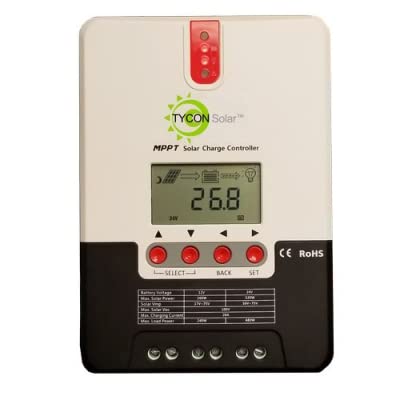
פיגורע 1: פראָנט view of the Tycon TPSC2440NMPPT Solar MPPT Battery Charging Controller, showing the LCD display and connection terminals.
4. סעטאַפּ און ייַנמאָנטירונג
גיי די סטעפּס פֿאַר געהעריק ינסטאַלירונג:
- מאָונטינג: Choose a suitable location for mounting the controller. Ensure good ventilation and protection from direct sunlight and moisture.
- באַטערי קשר: Connect the battery to the controller's battery terminals first. Ensure correct polarity (+ to + and - to -). The controller will automatically detect the battery voltagE (12 וו אָדער 24 וו).
- סאָלאַר פּאַנעל קאַנעקשאַן: Connect the solar panel array to the controller's solar input terminals. Observe correct polarity. Ensure the open-circuit voltage of the solar array does not exceed the controller's maximum input voltage (110V at 25°C).
- לאָדן פֿאַרבינדונג (אָפּציאָנעל): If using the load output, connect your DC loads to the controller's load terminals. Do not exceed the rated load current (20A Max).
- טעמפּעראַטור סענסאָר: Connect the included battery temperature probe cable to the designated port on the controller. Place the sensor near the battery for accurate temperature compensation.
- מאַכט אויף: Once all connections are secure, the controller will power on and begin operation.
5. אַפּערייטינג ינסטרוקטיאָנס
The integral LCD display provides real-time information about your solar charging system. Use the buttons (if present, assuming standard UP/DOWN/SET) to navigate through the display menus and adjust settings.
5.1 על-סי-די דיספּלעי אינפֿאָרמאַציע
- באַטערי וואָלtage: קראַנט וולtagE פון די פארבונדן באַטאַרייע.
- באַטאַרייע קאַפּאַציטעט: Estimated state of charge.
- טשאַרדזשינג קאַפּאַציטעט: Current power being delivered to the battery.
- באַטערי טעמפּעראַטור: Temperature measured by the external probe.
- מאַסע קראַנט: Current being drawn by connected DC loads.
- Solar Current: Current being generated by the solar panels.
5.2 Battery Type Settings
The controller supports Flooded, AGM, GEL, and Lithium battery types. A USER setting allows for custom charge parameters. Refer to the on-screen menu for selecting and configuring the battery type.
5.3 Load Operation Modes
The controller offers 5 selectable load operation modes. Consult the device's menu for details on each mode and how to select them, typically involving timed operation or dusk-to-dawn control.
6. וישאַלט
רעגולערע וישאַלט גאַראַנטירט אָפּטימאַלע פאָרשטעלונג און לאָנדזשעוואַטי פון דיין זונ - טשאַרדזש קאָנטראָללער.
- דורכקוקן קאַנעקשאַנז: קאָנטראָלירט פּעריִאָדיש אַלע וויירינג פֿאַרבינדונגען פֿאַר שטרענגקייט און קעראָוזשאַן.
- ריין קאָנטראָללער: Keep the controller clean and free of dust. Use a dry cloth for cleaning. Do not use liquids.
- באַטערי געזונט: מאָניטאָר באַטאַרייע וואָלtage and capacity on the LCD. Ensure batteries are properly maintained according to their manufacturer's guidelines.
- ווענטילאַטיאָן: Ensure the installation area remains well-ventilated to prevent overheating.
7. טראָובלעשאָאָטינג
| פּראָבלעם | מעגלעך סיבה | לייזונג |
|---|---|---|
| קיין דיספּלעי/קיין מאַכט | לויזע באַטעריע פֿאַרבינדונג; באַטעריע באַנדtage too low; Blown fuse (external, if applicable). | Check battery connections and polarity. Charge battery if voltage is below operating threshold. Check and replace any external fuses. |
| קיין זונ טשאַרדזשינג | Solar panel not connected; Incorrect polarity; Insufficient sunlight; Damaged solar panel/wiring. | Verify solar panel connections and polarity. Ensure panels are receiving adequate sunlight. Inspect panels and wiring for damage. |
| לאָדן אַרבעט נישט | Load disconnected; Overload; Short circuit; Battery voltagE צו נידעריק. | Check load connections. Reduce load if exceeding 20A. Check for short circuits. Ensure battery is sufficiently charged. |
| ומפּינקטלעך רידינגז | Loose connections; Faulty sensor. | Check all wiring connections. Ensure temperature sensor is properly connected and placed. |
8. ספּעסאַפאַקיישאַנז
- מאָדעל: TPSC2440NMPPT
- אַוטאָ וואָלtage: 12V/24V (System)
- Ampער: 40 א
- רייטאַד לאָדן קראַנט: 20A מאַקס
- מאַקסימום קאַפּאַסיטיווע מאַסע: 10,000uF
- מאַקס זונ ינפּוט וואָלtage: 110V (25°C), 90V (25°C)
- Max Power Point Range: 2VDC to 75VDC (Battery Volts)
- קאַנווערזשאַן עפעקטיווקייַט: 96% טיפּ.
- MPPT Tracking Efficiency: 99%
- זעלבסט-קאַנסאַמשאַן: 1W
- טעמפּעראַטור פאַרגיטיקונג: -3.0מוו/°C/צעל
- מאַקסימום דראָט גרייס: 8 AWG
- Voltage and Current Accuracy: +/-2%
- גראָונדינג: נעגאַטיוו גראָונד
- ענוויראָנמענטאַל שוץ: IP32
- פּראָדוקט דימענשאַנז: 12 X 9 X 6 אינטשעס
- נומער וואָג: 5.16 פונט
- ווייַז טיפּ: לקד