
הקדמה
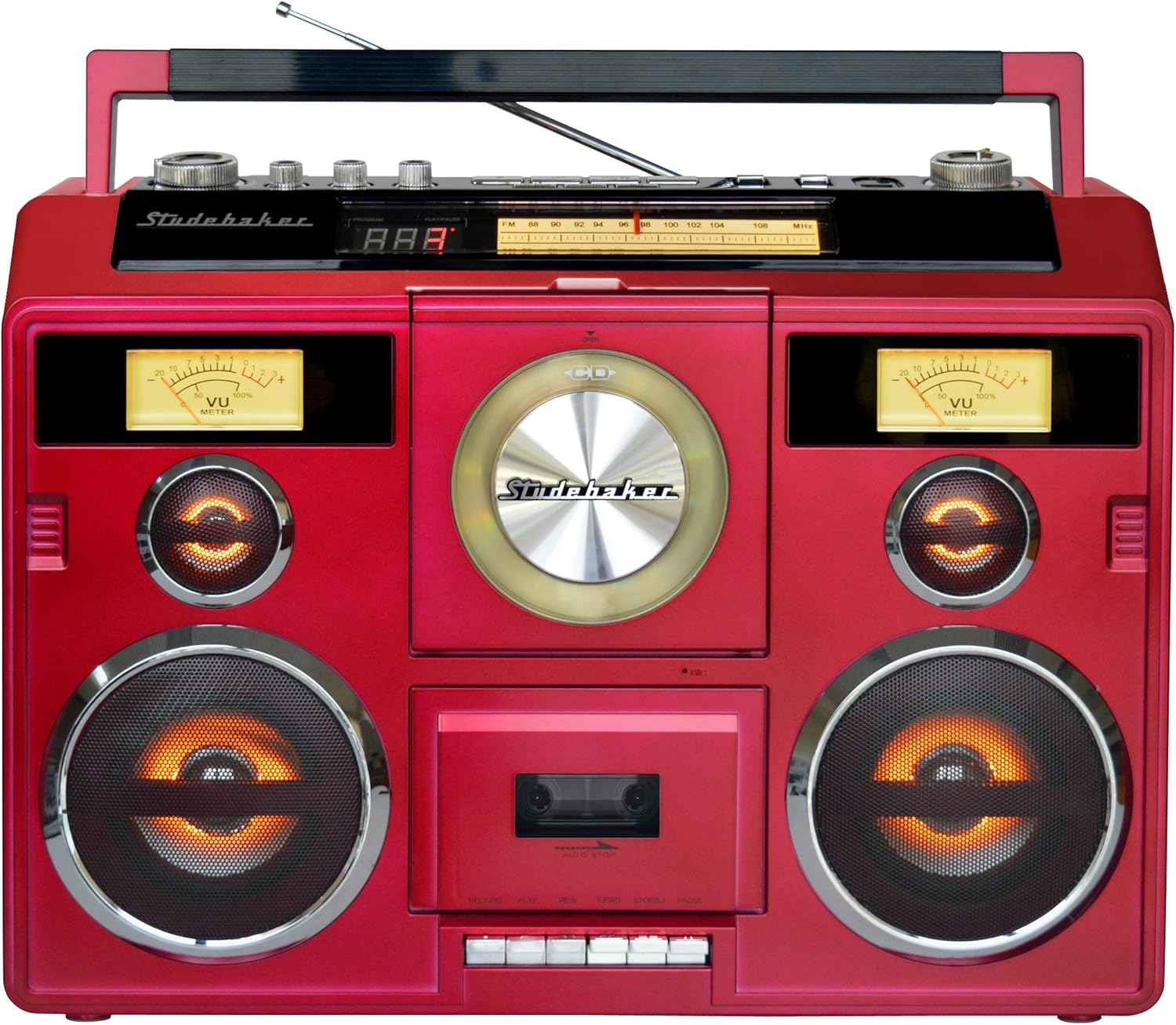
א דאנק פארן קויפןasing the Studebaker Sound Station Portable Stereo Boombox, Model SB2140R. This versatile audio system combines classic design with modern functionality, offering multiple ways to enjoy your music. Please read this manual thoroughly before operating the unit to ensure proper use and to maximize your listening experience.

פיגורע 1: פראָנט view of the Studebaker Sound Station Portable Stereo Boombox.
וויכטיק סאַפעטי אינפֿאָרמאַציע
To reduce the risk of electric shock, fire, or injury, always follow basic safety precautions when using this product. Keep these instructions for future reference.
- דו זאלסט נישט ויסשטעלן דעם אַפּפּליאַנסע צו רעגן אָדער נעץ.
- דו זאלסט נישט פאַרשפּאַרן קיין ווענטאַליישאַן אָופּאַנינגז.
- דו זאלסט נישט ינסטאַלירן לעבן קיין היץ קוואלן אַזאַ ווי ראַדיאַטאָרס, היץ רעדזשיסטערז, סטאָוווז אָדער אנדערע אַפּאַראַט (אַרייַנגערעכנט ampליפיערס) וואָס פּראָדוצירן היץ.
- באַשיצן די מאַכט שנור פון גיין אויף אָדער פּינטשעד.
- נאָר נוצן אַטאַטשמאַנץ / אַקסעסעריז ספּעסיפיעד דורך דער פאַבריקאַנט.
- אָפּשטויסן דעם אַפּאַראַט בעשאַס בליץ סטאָרמז אָדער ווען אַניוזד פֿאַר לאַנג פּיריאַדז.
שליסל פֿעיִקייטן
- בלועטאָאָטה קאַנעקטיוויטי: Stream audio wirelessly from compatible devices or transmit to Bluetooth headphones.
- קאָמפּאַקטדיסק שפּילער: Front-loading CD/MP3 player for your compact disc collection.
- Cassette Recorder: Play and record cassette tapes from various sources including built-in microphone, radio, CD, USB, or auxiliary input.
- AM/FM Stereo Radio: Enjoy your favorite radio stations with clear reception.
- וסב פּאָרט: פֿאַר פּלייבאַק פון אַודיאָ fileס פון אַ בליץ פאָר.
- אַגזיליערי אַרייַנשרייַב דזשאַק: פאַרבינדן פונדרויסנדיק אַודיאָ דעוויסעס.
- כעדפאָון דזשאַק: פֿאַר פּריוואַט צוגעהערט.
- געבויט-אין סטערעאָ ספּיקערז: Delivers 5W x 2 RMS output power.
- VU מעטער: Two functional VU meters for visual audio level indication.
- ליכט ווירקונג: Speaker and tweeter lights synchronize with music.
- מאַכט אָפּציעס: AC/DC power with a built-in rechargeable battery for portability.
סעטאַפּ
מאַכט די אַפּאַראַט
The Sound Station can be powered by either AC power or its built-in rechargeable battery.
- AC מאַכט: Connect the supplied AC adapter to the DC IN jack on the back of the unit and plug the other end into a standard AC wall outlet.
- קריקאָנלאָדלעך באַטערי: The unit features a built-in rechargeable battery. To charge, connect the AC adapter as described above. The CHARGE indicator will illuminate. A full charge typically takes several hours. Once charged, the unit can be operated portably.
פיגור 2: ווינקלדיק view of the boombox, highlighting the portable design.
Antenna Setup for Radio
For optimal FM reception, extend the telescopic antenna fully. For AM reception, the unit has a built-in ferrite bar antenna, which is directional. You may need to rotate the unit for the best AM signal.
אַפּערייטינג ינסטראַקשאַנז
אַלגעמיינע קאָנטראָלס
- בעל באַנד: Rotate the MASTER VOLUME knob to adjust the overall sound level.
- Treble/Bass/Balance: Use the TREBLE, BASS, and BALANCE knobs to fine-tune the audio output to your preference.
- פונקציע באַשטימען: Use the FUNCTION switch to select between POWER OFF, TAPE, CD/USB/AUX, and RADIO modes.
- ליכט ווייַזן: Press the LIGHT SHOW button to activate or deactivate the speaker and tweeter light effects.
ווידעא 1: אן איבערview of the Sound Station Boombox features, including CD, cassette, radio, and Bluetooth functionality.
קאָמפּאַקטדיסק שפּילער אָפּעראַציע
- Set the FUNCTION switch to CD/USB/AUX.
- Open the CD compartment door by pressing the OPEN/CLOSE button.
- לייגט אַ סי-די מיט דער עטיקעט זײַט אַרויף אויף דער צענטראַלער שפּינדל.
- Close the CD compartment door. The display will show the total number of tracks.
- דריקן די PLAY/PAUSE קנעפּל צו אָנהייבן פּלייבאַק.
- Use the SKIP FORWARD/BACKWARD buttons to navigate tracks.
- דרוק דעם STOP קנעפּל צו האַלטן פּלייבאַק.
Cassette Recorder Operation
- Set the FUNCTION switch to TAPE.
- עפֿנט די קאַסעטע אָפּטייל טיר.
- Insert a cassette tape with the exposed tape facing downwards.
- פֿאַרמאַכט די טיר פֿון קאַסעטע אָפּטייל.
- פּלייבאַק: דריקן די PLAY קנעפּל צו אָנהייבן פּלייבאַק.
- רעקאָרדינג: To record from the radio, CD, USB, or AUX, select the desired source first. Then, press the RECORD button on the cassette deck. To record from the built-in microphone, simply press the RECORD button in TAPE mode.
- Use the FAST FORWARD (FFWD) and REWIND (REW) buttons to navigate the tape.
- Press the STOP/EJECT button to stop playback/recording and eject the tape.
AM / FM ראַדיאָ אָפּעראַציע
- Set the FUNCTION switch to RADIO.
- Select the desired band (AM, FM, or FM ST) using the BAND switch.
- Rotate the TUNING knob to find your desired radio station.
- Adjust the telescopic antenna for FM or reposition the unit for AM to improve reception.
בלועטאָאָטה קאַנעקטיוויטי
The unit supports both Bluetooth Receive (in) and Transmit (out).
- Bluetooth Receive (Streaming to Boombox):
- Set the FUNCTION switch to CD/USB/AUX.
- Press the BLUETOOTH PAIR button. The Bluetooth indicator will flash.
- On your Bluetooth-enabled device (e.g., smartphone), search for "SB2140R" and pair.
- Once paired, the indicator will glow solid, and you can stream audio to the boombox.
- Bluetooth Transmit (Streaming from Boombox to Headphones):
- Ensure your Bluetooth headphones are in pairing mode.
- Press the BLUETOOTH OUT button on the boombox. The indicator will flash.
- The boombox will search for and connect to your headphones. Once connected, audio from the boombox (CD, Tape, Radio, USB, AUX) will play through your headphones.
Video 2: A detailed demonstration of the portable stereo boombox, highlighting its various functions and connectivity options.
וסב פּלייַבאַקק
- Set the FUNCTION switch to CD/USB/AUX.
- אַרײַנשטעלן אַ USB בליץ דרייוו אין דעם USB פּאָרט.
- די איינהייט וועט אויטאמאטיש דעטעקטירן און אנהייבן שפילן קאמפאטיבלע אודיא fileס (למשל, MP3).
- Use the playback control buttons (PLAY/PAUSE, SKIP FORWARD/BACKWARD, STOP) to manage your music.
אַגזיליערי אַרייַנשרייַב
- Set the FUNCTION switch to CD/USB/AUX.
- Connect an external audio device (e.g., smartphone, MP3 player) to the AUX IN jack using a 3.5mm audio cable (not supplied).
- קאָנטראָל פּלייבאַק פון דיין פונדרויסנדיק מיטל.
וישאַלט
רייניקונג די אַפּאַראַט
ווישן די יקסטיריער פון די אַפּאַראַט מיט אַ ווייך, דamp cloth. Do not use abrasive cleaners or solvents. For the CD lens, use a specialized CD lens cleaner. For the cassette deck, regularly clean the tape heads and pinch rollers with a cotton swab lightly dampמיט יסאָפּראָפּיל אַלקאָהאָל.
באַטערי קער
To prolong the life of the built-in rechargeable battery, avoid fully discharging it frequently. Recharge the unit regularly, even if not in constant use. If storing the unit for an extended period, ensure the battery is partially charged (around 50%) and recharge every few months.
טראָובלעשאָאָטינג
- קיין מאַכט: Ensure the AC adapter is securely connected or the internal battery is charged.
- קיין קול: Check the volume level. Ensure the correct function mode (CD, TAPE, RADIO, USB, AUX, Bluetooth) is selected. If using headphones, ensure they are properly connected or paired.
- CD ניט פּלייַינג: Ensure the CD is clean and free of scratches. Make sure the CD is inserted correctly with the label side up.
- שלעכטע ראַדיאָ אָפּנאַם: Extend the FM telescopic antenna fully. For AM, rotate the unit for better signal. Try moving the unit to a different location.
- בלועטאָאָטה פּערינג ישוז: Ensure the unit is in Bluetooth pairing mode (indicator flashing). Make sure your external device's Bluetooth is enabled and within range. Try unpairing and re-pairing the device.
- Cassette Playback/Recording Issues: Ensure the tape is inserted correctly. Clean the tape heads. Check if the tape is tangled or damaged.
- Speaker Lights Buzzing: Some users have reported a slight buzzing when speaker lights are active. If this is disruptive, you may choose to deactivate the light show feature.
ספּעסאַפאַקיישאַנז
| מאָדעל נומער | SB2140R |
| פּראָדוקט דימענשאַנז (L x W x H) | 19.3 X 6.26 X 13.8 אינטשעס |
| פּונקט וואָג | 11.79 פונט |
| מאַכט מקור | AC/DC (Built-in rechargeable battery) |
| רעדנער רעזולטאַט מאַכט | 5 וו רמס 2 רמס |
| קאַנעקטיוויטי | בלועטאָאָטה, אַגזיליערי, וסב |
| ראַדיאָ באַנדס | AM/FM סטערעאָ |
וואָראַנטי און שטיצן
For warranty information or technical support, please refer to the documentation included with your purchase or visit the official Studebaker webזייטל. האַלט דיין קויפן באַווייַז פֿאַר קיין וואָראַנטי קליימז.