
1. פּראָדוקט איבערview
The Radiolink PRM-03 is a compact telemetry module designed to provide real-time flight data directly to your compatible Radiolink RC transmitter screen. It supports various flight controllers and offers essential information for monitoring your model's status during operation.
2. שליסל פֿעיִקייטן
- Flight Data Telemetry: Telemetering model's voltage, speed, climb, throttle, longitude, latitude, altitude, GPS, RSSI, flight mode, yaw, roll, pitch, and distance when connecting with Mini Pix/ PIXHAWK/ Crossflight/ APM flight controller. Get real-time information to know the model's flight data clearly.
- אַעראָפּלאַן וואָלtagטעלעמעטרי: Telemetering the remaining voltage of the model on the Radiolink's Transmitter AT10II/AT10/AT9S Pro/AT9S/AT9 screen when it connects with the receiver R9DS or R12DS. Get real-time information to avoid battery over-discharge.
- Micro Dimension: Only 1.06" * 0.51" and lightweight of 0.21oz make PRM-03 won't become your model's burden.
- Configurable Alarms: Special Feature: Configurable Alarms and Dual Working Modes.
3. פּעקל אינהאַלט
The Radiolink PRM-03 package includes the following items:
- 1* PRM-03+Battery Cable
- 1* Receiver Connect Cable
- 1* Mini Pix Connect Cable
- 1* APM Connect Cable
- 1* PIXHAWK Connect Cable

Image: All items included in the Radiolink PRM-03 package.
4. ספּעסאַפאַקיישאַנז
| אַטריביוט | ווערט |
|---|---|
| פּונקט וואָג | 0.21 אונסעס |
| פּראָדוקט דימענשאַנז | 1.1 X 0.5 X 0.05 אינטשעס |
| נומער מאָדעל נומער | PRM-03 |
| ווייַז גרייס | 1.06 אינטשעס |
| קאַנעקטיוויטי טעכנאָלאָגיע | ווייערד |
| פאָרמיטל סערוויס טיפּ | דראָון |

Image: The compact size of the PRM-03 module, measuring 1.1 x 0.5 inches.
5. סעטאַפּ און ייַנמאָנטירונג
5.1 חלקtage טעלעמעטריע פֿאַרבינדונג
To monitor the remaining voltage of your model on your Radiolink transmitter screen, connect the PRM-03 module with your receiver (R9DS or R12DS) and the model's battery.

Image: Diagram showing how to connect the PRM-03 for voltage telemetry with R9DS or R12DS receivers.
5.2 Flight Data Telemetry Connection
For comprehensive flight data telemetry (GPS, RSSI, speed, etc.), connect the PRM-03 module to a compatible flight controller such as Mini Pix, PIXHAWK, Crossflight, or APM.
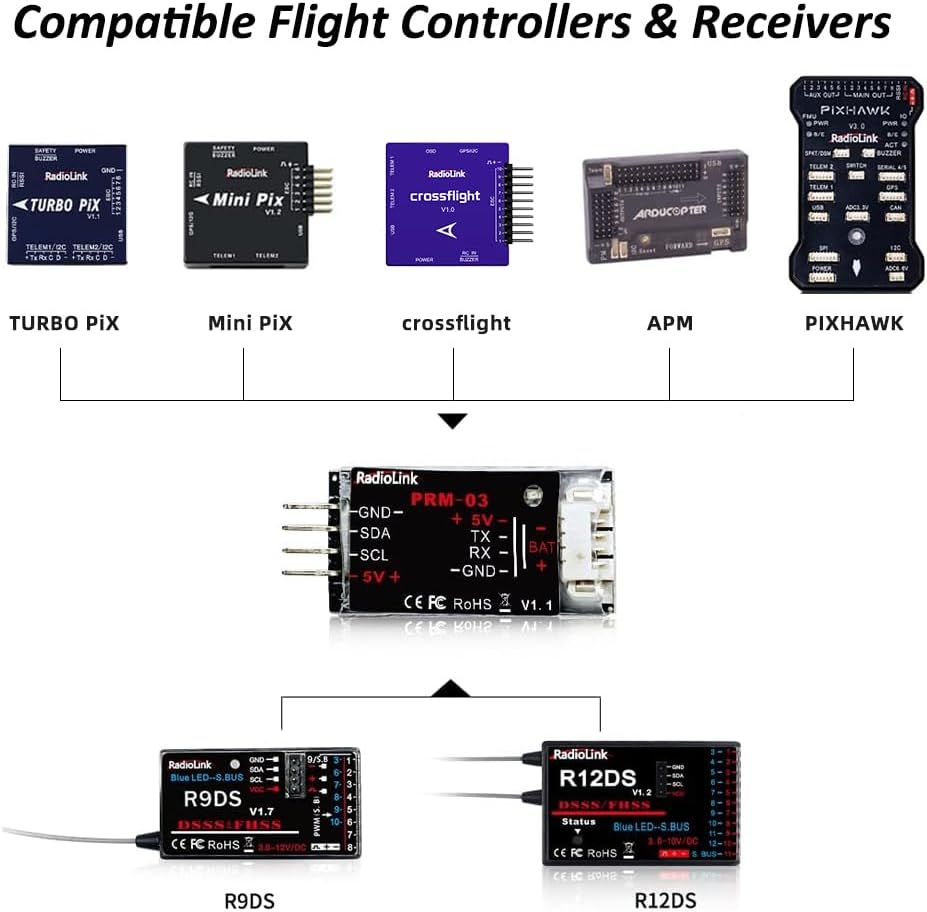
בילד: איבערview of compatible flight controllers (Turbo Pix, Mini Pix, Crossflight, APM, PIXHAWK) and receivers (R9DS, R12DS) for the PRM-03 module.
5.3 Video Guide: Connecting the Telemetry Module
Video: This official Radiolink video demonstrates the step-by-step process of connecting the PRM-03 Telemetry Module to your RC system.
6. אַפּערייטינג ינסטרוקטיאָנס
Once connected, the PRM-03 module transmits real-time data to your compatible Radiolink transmitter screen. This allows you to monitor critical flight parameters without needing an FPV OSD system.
6.1 Viewing Telemetry Data
Telemetry data such as voltage, RSSI, GPS coordinates, and flight mode will be displayed directly on the screen of your AT9, AT9S, AT9S Pro, AT10, or AT10II transmitter.

בילד: עקסamples of telemetry data displayed on Radiolink AT9/AT9S Pro and AT10/AT10II transmitter screens.
6.2 Monitoring Battery Voltage
The module provides real-time battery voltage readings, helping you prevent over-discharge and manage flight times effectively.
Video: This official Radiolink video demonstrates how to view airplane battery voltage telemetry on the AT9S Pro transmitter screen.
7. קאַמפּאַטאַבילאַטי
The PRM-03 module is designed for broad compatibility within the Radiolink ecosystem and with popular flight controllers.
- קאָמפּאַטיבלע טראַנסמיטערז: AT10II, AT10, AT9S Pro, AT9S, AT9
- קאָמפּאַטיבלע ראַסיווערז: R12DS, R9DS (also compatible with older versions: R10DS, R10D, R9D)
- Compatible Flight Controllers: Mini Pix, PIXHAWK, Crossflight, APM
8. טראָובלעשאָאָטינג
If you encounter issues with your PRM-03 module, please check the following:
- Ensure all connections are secure and correctly oriented (positive to positive, negative to negative).
- Verify that your transmitter and receiver firmware are up to date. Refer to the Radiolink official webוועבזייטל פֿאַר די לעצטע פירמווער און דערהייַנטיקונג אינסטרוקציעס.
- Confirm that your transmitter is set to display telemetry data. Consult your transmitter's user manual for specific settings.
- קוק די וואָלtage of your model's battery. If it's too low, the module may not function correctly.
9. וואָראַנטי און שטיצן
Radiolink products typically come with a limited warranty against manufacturing defects. For specific warranty terms, technical support, or service inquiries, please visit the official Radiolink webזייטל אדער קאנטאקט זייער קאסטומער סערוויס גלייך.
באַאַמטער Webפּלאַץ: www.radiolink.com