
הקדמה
This manual provides detailed instructions for the installation, operation, and maintenance of your EKEN V7 HD 1080P Smart WiFi Video Doorbell. Please read this manual thoroughly before using the product to ensure proper functionality and safety. Keep this manual for future reference.
פּעקל אינהאַלט
באַשטעטיקט אַז אַלע זאכן וואָס זענען אויסגערעכנט אונטן זענען אַרייַנגערעכנט אין אייער פּעקל. אויב עפּעס פעלנדיק אָדער צעבראָכן, ביטע קאָנטאַקטירט קונה שטיצע.

Image: The EKEN V7 Video Doorbell, two blue rechargeable batteries, and a dual-slot battery charger. These are the primary components included in the package.
- EKEN V7 HD 1080P Smart WiFi Video Doorbell
- Rechargeable Batteries (2 pcs)
- באַטערי טשאַרדזשער
- מאָונטינג קלאַמער
- מאָנטירונג שרויפן און וואַנט אַנקערס
- באַניצער מאַנואַל (דעם דאָקומענט)
פּראָדוקט איבערview
The EKEN V7 Video Doorbell is a smart security device designed to provide real-time video monitoring and two-way audio communication with visitors at your door. It features 1080P Full HD resolution, night vision, and a wide-angle lens for comprehensive coverage.

בילד: פראָנט view of the EKEN V7 Video Doorbell, showing the camera lens, motion sensor, and illuminated doorbell button.
שליסל פֿעיִקייטן:
- 1080P פול HD ווידעא: Clear video streaming and recording.
- 166° Wide-angle Lens: Broad field of view to cover your entryway.
- נאַכט זעאונג: Infrared LEDs for clear visibility in low-light conditions.
- צוויי-וועג אַודיאָ: Speak and listen to visitors remotely via the mobile app.
- PIR באַוועגונג דעטעקשאַן: Alerts you to movement at your door.
- וועטער קעגנשטעל: דיזיינד צו וויטסטאַנד פאַרשידן וועטער טנאָים.
- 2.4G WiFi קאַנעקטיוויטי: Connects to your home network for remote access.
- לאנג באַטאַרייע לעבן: Efficient power consumption for extended use.
- וואָלקן סטאָרידזש: Optional cloud service for video recording storage.

Image: An infographic highlighting the key features of the EKEN V7 Video Doorbell, such as 1080P Full HD, PIR Motion Detection, Night Vision, 166° Wide-angle Camera Lens, Long Battery Life, and 7 Days Free Cloud Service.

Image: A visual representation comparing the doorbell's view during the day (color) and at night (monochrome infrared), demonstrating the 166-degree wide-angle lens.
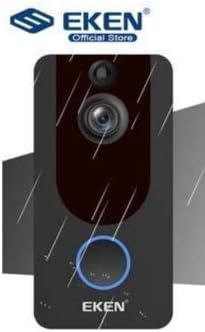
Image: The EKEN V7 Video Doorbell depicted with rain effects, illustrating its weather-resistant design suitable for outdoor installation.
סעטאַפּ
1. טשאַרדזשינג די באַטעריז
- Insert the two rechargeable batteries into the provided battery charger.
- פאַרבינדן די טשאַרדזשער צו אַ מאַכט מקור.
- Allow the batteries to charge fully before first use. The indicator light on the charger will change when charging is complete.
2. Installing the Doorbell
- Choose a suitable location near your door, ensuring a clear view און א גוטן Wi-Fi סיגנאַל.
- Use the mounting bracket as a template to mark drill holes on the wall.
- בויער האָלעס און אַרייַנלייגן וואַנט אַנגקערז אויב נייטיק.
- באַפֿעסטיקן די מאַונטינג קלאַמער צו דער וואַנט מיט די צוגעשטעלטע שרויפֿן.
- Insert the charged batteries into the doorbell unit.
- Attach the doorbell unit to the mounting bracket, ensuring it clicks securely into place.
3. פֿאַרבינדן זיך צו Wi-Fi און אַפּ סעטאַפּ
- Download the official EKEN doorbell app from your smartphone's app store (iOS or Android).
- עפֿנט די אַפּ און שאַפֿט אַן אַקאַונט אָדער לאָגט זיך איין.
- Follow the in-app instructions to add your new doorbell device. This typically involves scanning a QR code on the doorbell or manually entering its ID.
- Connect the doorbell to your 2.4GHz Wi-Fi network. Ensure your phone is also connected to the same 2.4GHz network during setup.
- אַמאָל פארבונדן, וועט איר קענען view live video, receive notifications, and adjust settings through the app.
אַפּערייטינג ינסטראַקשאַנז
לעבן View און צוויי-וועג אַודיאָ
- Open the EKEN app on your smartphone.
- Select your doorbell from the device list to access the live video feed.
- To speak to a visitor, tap the microphone icon in the app. To listen, ensure the speaker icon is enabled.

Image: A user communicating with a delivery person at their door using the EKEN V7 Video Doorbell's two-way audio feature through the mobile application.
באַוועגונג דעטעקשאַן אַלערץ
- When motion is detected, the doorbell will send a push notification to your smartphone.
- צאַפּן די אָנזאָג צו view דער לייוו פיד אדער רעקארדירטער געשעעניש.
- Adjust motion sensitivity settings within the app to minimize false alerts.
ווידעא רעקאָרדינג און פּלייבאַק
- The doorbell automatically records video when motion is detected or the doorbell button is pressed.
- Recorded videos are stored in the cloud (subscription may be required after initial free period) or on a local SD card (if supported and installed).
- Access and playback recorded events through the app's history or event log.

Image: The EKEN V7 Video Doorbell shown next to a smartphone displaying a live 1080P Full HD video feed, illustrating remote monitoring capabilities.
וישאַלט
- רייניקונג: Gently wipe the camera lens and doorbell surface with a soft, damp שטאָף. פֿאַרמײַדט אַברייסיוו רייניגער אָדער סאָלווענטן.
- באַטערי פאַרוואַלטונג: Recharge batteries when the app indicates low power. For optimal performance, consider having a spare set of charged batteries.
- Firmware דערהייַנטיקונגען: Regularly check the app for available firmware updates for your doorbell. Updates can improve performance and add new features.
- Wi-Fi קאַנעקשאַן: Ensure your Wi-Fi router is functioning correctly and the doorbell has a strong signal for uninterrupted operation.
טראָובלעשאָאָטינג
- טיר-גלאָק פֿאַרבינדט זיך נישט צו Wi-Fi:
- Ensure your Wi-Fi network is 2.4GHz. The doorbell does not support 5GHz networks. Check Wi-Fi password and signal strength. Try resetting the doorbell and your router.
- No motion detection alerts:
- Verify that motion detection is enabled in the app settings. Adjust sensitivity levels. Ensure the doorbell's view איז נישט פארמאכט.
- שלעכטע ווידעא קוואַליטעט אָדער פאַרהאַלטונג:
- Check your Wi-Fi signal strength at the doorbell's location. Move the router closer or consider a Wi-Fi extender. Ensure your internet connection is stable.
- צוויי-וועג אודיאָ אַרבעט נישט:
- Check microphone and speaker permissions for the app on your smartphone. Ensure the doorbell's microphone and speaker are not obstructed.
- טיר-גלאָק גייט נישט אָן:
- Ensure batteries are fully charged and correctly inserted. If using wired power, check connections.
ספּעסאַפאַקיישאַנז
| שטריך | דעטאַל |
|---|---|
| סאָרט | EKEN |
| מאָדעל | V7 |
| ווידעא רעקאָרדינג האַכלאָטע | 1080 פּ גאַנץ הד |
| פאָטאָ סענסאָר טעכנאָלאָגיע | קמאָס |
| קאַנעקטיוויטי טעכנאָלאָגיע | Wi-Fi (נאָר 2.4GHz) |
| ספּעציעלע פֿעיִקייטן | Night Vision, Two-Way Audio, PIR Motion Detection, Weather Resistant |
| בילד סטאַביליזאַטיאָן | ניין |
| Manufacturer Reference | Ia-112 |
| ASIN | B08PMXWFF3 |
| ערשטער בנימצא טאָג | 17טן דעצעמבער 2020 |
וואָראַנטי און שטיצן
For warranty information and technical support, please refer to the official EKEN website or contact their customer service directly. Details regarding specific warranty periods and support channels are typically provided with your purchase documentation or on the manufacturer's webפּלאַץ.
Guaranteed software updates until: Unknown.