
טאַאָטראָניקס טט-סק 15
TaoTronics TT-SK15 Sound Bar User Manual
מאָדעל: TT-SK15
הקדמה
This user manual provides detailed instructions for the setup, operation, and maintenance of your TaoTronics TT-SK15 Sound Bar. Please read this manual thoroughly before using the product to ensure proper functionality and to maximize your audio experience. The TT-SK15 is a versatile 2.0 channel sound bar designed to enhance your home theater system with powerful sound, offering both wired and wireless connectivity options.

Figure 1: TaoTronics TT-SK15 Sound Bar and its remote control. The sound bar is sleek and black, designed to fit seamlessly into any home entertainment setup.
סעטאַפּ
1. Unpacking the Sound Bar
Carefully remove all components from the packaging. Ensure all items listed below are present. If any items are missing or damaged, contact customer support.
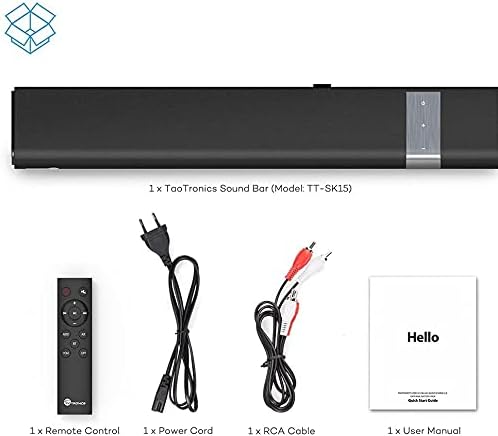
Figure 2: Package contents include the TaoTronics Sound Bar (Model: TT-SK15), a remote control, a power cord, an RCA cable, and a user manual.
- 1 x TaoTronics סאָונד בר (מאָדעל: TT-SK15)
- 1 x רימאָוט קאָנטראָל
- קסנומקס X מאַכט קאָרד
- 1 קס RCA קאַבלע
- 1 x באַניצער מאַנואַל (דאָס דאָקומענט)
2. פּלייסמאַנט אָפּציעס
The TT-SK15 Sound Bar offers flexible placement options to suit your home entertainment setup. It can be placed on a tabletop or mounted on a wall.
- טאַבלעטאָפּ אָרט: Place the sound bar on a stable, flat surface directly in front of your television. Ensure there are no obstructions blocking the sound.
- וואַנט מאָונטינג: The sound bar is designed to be wall-mountable. Use the integrated mounting holes on the back of the unit. Refer to the wall mounting template (if included in packaging) for precise drilling. Ensure the wall can support the weight of the sound bar.

Figure 3: The TT-SK15 Sound Bar positioned below a television, demonstrating a typical setup for enhanced audio. The sound bar can be placed on a stand or wall-mounted.
3. פֿאַרבינדן זיך צו אַודיאָ קוועלער
The TT-SK15 Sound Bar supports multiple wired and wireless connection methods. Choose the connection type that best suits your audio source.

Figure 4: The back panel of the TT-SK15 Sound Bar, highlighting its multiple input interfaces: 3.5mm Audio Input, RCA AUX Input, Optical Input, Coaxial Digital Input, and wall-mounted design features.
- אָפּטיש קשר: For high-quality digital audio. Connect an optical cable from your TV or audio device's Optical Out port to the sound bar's OPTICAL IN port.
- קאָאַקסיאַל קאַנעקשאַן: For digital audio. Connect a coaxial cable from your TV or audio device's Coaxial Out port to the sound bar's COAXIAL IN port.
- RCA AUX Connection: For analog audio. Connect an RCA cable (red and white plugs) from your TV or audio device's Audio Out (L/R) ports to the sound bar's RCA AUX IN ports.
- 3.5 מם אַודיאָ קאַנעקשאַן: For analog audio from devices with a headphone jack. Connect a 3.5mm audio cable from your device's headphone jack to the sound bar's 3.5mm AUX IN port.
- בלועטאָאָטה קאַנעקשאַן: For wireless audio streaming. See the "Bluetooth Pairing" section under Operating for instructions.
After connecting your audio source, connect the power cord to the sound bar's power input and then to a power outlet.
אפערירן דעם סאונד באר
1. מאַכט אויף / אויסגעלאשן
- מאַכט אויף: Press the Power button on the sound bar's touch panel or the remote control.
- מאַכט אַוועק: Press the Power button again to turn off the sound bar.
2. ינפּוט סעלעקציע
You can switch between different audio input modes using the sound bar's touch controls or the remote control.
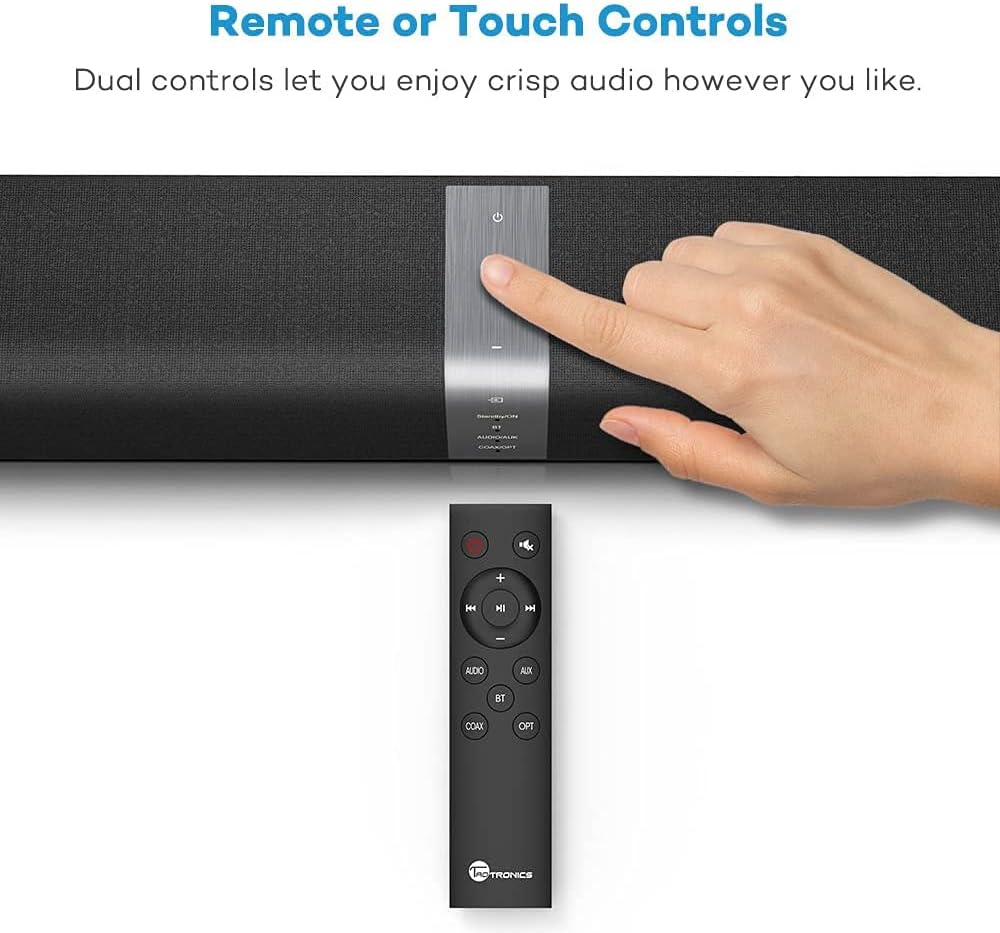
Figure 5: The TT-SK15 Sound Bar features both touch controls on the unit and a full-function remote control for convenient operation, including input selection and volume adjustment.
- ניצן ריר קאָנטראָלס: Tap the "Input" button on the sound bar's top panel to cycle through modes (BT, AUX, OPT, COAX).
- ניצן ווײַטקאָנטראָל: Press the dedicated buttons (BT, AUX, OPT, COAX) on the remote control to directly select the desired input.
3. באַנד קאָנטראָל
- פאַרגרעסערן באַנד: Press the "+" button on the sound bar or remote.
- פאַרמינערן באנד: Press the "-" button on the sound bar or remote.
- שטום/אומשטום: Press the "Mute" button on the remote control.
4. בלועטאָאָטה פּערינג
To connect your Bluetooth-enabled device to the sound bar:
- Turn on the sound bar and select Bluetooth mode (BT) using the input button. The Bluetooth indicator light will flash, indicating it's in pairing mode.
- אַקטיווירן בלועטוט אויף אייער מיטל (סמאַרטפאָן, טאַבלעט, אאז"וו) און זוכן פֿאַר פֿאַראַן דעוויסעס.
- Select "TT-SK15" from the list of devices.
- Once paired, the Bluetooth indicator light on the sound bar will turn solid blue. You can now play audio from your device through the sound bar.
- To disconnect, turn off Bluetooth on your device or select a different input mode on the sound bar.
וישאַלט
1. רייניקונג
To maintain the appearance and performance of your sound bar:
- Always unplug the sound bar from the power outlet before cleaning.
- ניצט אַ ווייכן, טרוקן, לינט-פֿרייע שטאָף צו ווישן די ייבערפֿלאַכן.
- Do not use liquid cleaners, aerosol sprays, or abrasive cleaning agents, as they may damage the finish or internal components.
- פֿאַרמײַדט אַרײַנצוקומען פֿײַכטקײַט אין קיין עפענונגען.
2. סטאָרידזש
If you plan to store the sound bar for an extended period:
- דיסקאַנעקט אַלע קייבאַלז.
- Store the sound bar in a cool, dry place, away from direct sunlight and extreme temperatures.
- It is recommended to keep the original packaging for storage and transport.
טראָובלעשאָאָטינג
If you encounter issues with your TT-SK15 Sound Bar, refer to the following common problems and solutions:
| פּראָבלעם | מעגלעך סיבה | לייזונג |
|---|---|---|
| קיין מאַכט | Power cord not connected securely; Power outlet not working. | Ensure the power cord is firmly plugged into the sound bar and a working power outlet. Try a different outlet. |
| קיין געזונט | Incorrect input selected; Volume too low; Cables not connected properly; Mute function activated. | Select the correct input mode (BT, AUX, OPT, COAX). Increase the volume. Check all audio cables for secure connections. Press the Mute button on the remote to unmute. |
| בלועטאָאָטה פּערינג פיילז | Sound bar not in pairing mode; Device too far; Interference; Device already paired with another unit. | Ensure the sound bar is in Bluetooth pairing mode (flashing indicator). Move your device closer to the sound bar. Turn off other Bluetooth devices nearby. Disconnect from other Bluetooth devices. |
| ווייַט קאָנטראָל נישט ארבעטן | באַטעריעס זענען טויט אָדער נישט ריכטיק אַרײַנגעשטעלט; אַ שטערונג צווישן דער ווײַטקאָנטראָלירטער און סאַונדבאַר. | Replace the batteries in the remote control, ensuring correct polarity. Remove any obstructions between the remote and the sound bar's sensor. |
ספּעסאַפאַקיישאַנז
The following are the technical specifications for the TaoTronics TT-SK15 Sound Bar:
- מאָדעל נומער: טט-סק 15
- קאַנעקטיוויטי טעכנאָלאָגיע: Wired/Wireless (Bluetooth)
- רעדנער טיפּ: Bluetooth Speakers, 2.0 Channel
- נאָמינאַל רעזולטאַט: 30 - 40 Watt (40 Watt total)
- רעדנער: 4 full-range high-quality speakers, 2 passive radiators
- Effective Bluetooth Distance: 10 מעטער / 33 פֿיס
- אַרייַנשרייַב פּאָרץ: 3.5mm AUX, Optical, Coaxial, RCA AUX
- קאָנטראָל מעטהאָדס: Touch controls on unit, Remote control
- מאַונטינג טיפּ: Tabletop, Wall-mountable
- פּראָדוקט וואָג: בעערעך 3.97 פונט (1.8 קג)
- פּעקל דימענשאַנז: 70.8 X 26.4 X 13.8 סענטימעטער
- אַודיאָ רעזולטאַט מאָדע: סטערעאָ

פיגור 6: אן עקספלאדירטע view of the TT-SK15 Sound Bar, illustrating its internal components including four drivers and two passive radiators, which contribute to its powerful stereo audio output.
וואָראַנטי און שטיצן
Your TaoTronics TT-SK15 Sound Bar comes with a manufacturer's warranty. Please refer to the warranty card included in your package for specific terms and conditions. For technical support, troubleshooting assistance, or warranty claims, please contact TaoTronics customer service. Contact information can typically be found on the official TaoTronics webזייטל אדער אויף דער וואָראַנטי קאַרטל.
For the most up-to-date support information, visit the official TaoTronics webפּלאַץ: www.taotronics.com
Ask a question about this manual
Ask about setup, troubleshooting, compatibility, parts, safety, or missing instructions. Manuals+ will review the question and use this page’s manual context to help answer it.