
1. פּראָדוקט איבערview
The LUMI LPA37-696 is an X-Large Heavy-Duty Full Motion TV Wall Mount designed for 60-inch to 100-inch curved and flat panel televisions. This mount supports TVs weighing up to 80 kg (176 lbs). Its robust construction ensures durability and safety, having been tested to withstand a minimum of four times its stated load capacity.
The full-motion design provides maximum flexibility, allowing users to tilt and swivel their television for optimal viewing angles from various positions within a room. Post-installation, a level adjustment feature enables the TV to be rotated up to 3 degrees clockwise or counterclockwise, ensuring a perfectly level display.
שליסל פֿעיִקייטן אַרייַננעמען:
- שווער-פליכט קאַנסטראַקשאַן: Made from high-quality steel, certified with CE and RoHS, and passes international standard drop tests.
- וניווערסאַל קאַמפּאַטאַבילאַטי: Fits most 60"-100" TVs with VESA patterns up to 900x600mm.
- Full Motion Capability: Allows for tilting, swiveling, and extension for flexible viewing.
- נאך-אינסטאַלאַציע לעוועלינג: Features ±3° level adjustment for precise alignment.
- עקסטענדעד דערגרייכן: Extends up to 18.5 inches (47 cm) from the wall and retracts to 2.75 inches (7 cm) for space-saving.
- ינטעגראַטעד קאַבלע פאַרוואַלטונג: Helps organize and conceal TV cables for a tidy appearance.
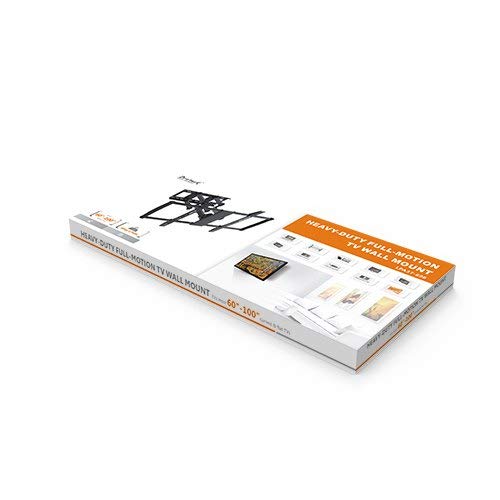
Figure 1: Packaging for the LUMI LPA37-696 TV Wall Mount, showing the product box.
2. פּעקל אינהאַלט
Before beginning installation, verify that all components are present and undamaged. Refer to the included installation manual for a detailed list of parts and hardware.
- 1 x LPA37-696 TV Wall Mount Assembly
- 1 x Accessory Kit Package (containing various screws, anchors, and washers)
- 1 רענטגענ ינסטאַללאַטיאָן מאַנואַל
3. סעטאַפּ און ייַנמאָנטירונג
Installation of the LUMI LPA37-696 TV Wall Mount requires careful attention to safety and proper procedures. It is recommended to have at least two people for installation due to the size and weight of the mount and television. Always consult the dedicated "INSTALLATION MANUAL" provided in the package for step-by-step instructions specific to your wall type and TV model.
3.1 Important Considerations
- וואַנט טיפּ: Ensure your wall can safely support the combined weight of the TV mount and your television. This mount is designed for various wall types, but specific anchors and techniques are required.
- וואָג קאַפּאַציטעט: נישט איבערשטייגן די מאקסימום וואָג קאַפּאַציטעט פון 80 ק"ג (176 פונט).
- VESA קאַמפּאַטאַבילאַטי: Verify your TV's VESA mounting pattern matches the mount's supported range (200x200mm to 900x600mm).
- מכשירים פארלאנגט: Gather all necessary tools as specified in the installation manual before starting.
3.2 אינסטאַלאַציע טריט (קורצע איבערבליק)
While the detailed steps are in the included manual, the general process involves:
- Marking the desired mounting location on the wall.
- Drilling pilot holes according to the wall plate template.
- Securing the wall plate to the wall using appropriate fasteners.
- Attaching the TV brackets to the back of your television.
- Carefully lifting and hooking the TV (with brackets) onto the wall plate.
- Securing the TV to the mount.
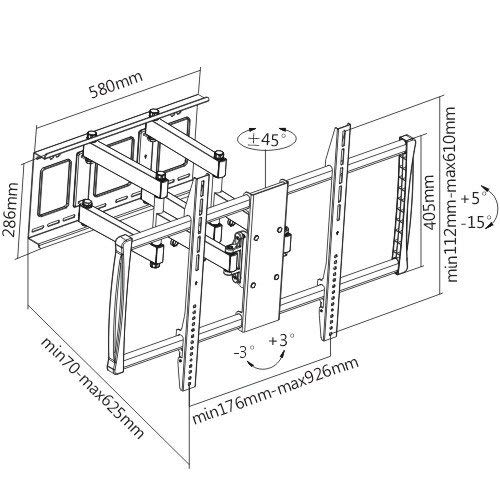
Figure 2: Technical drawing illustrating the dimensions, VESA compatibility, and range of motion (tilt, swivel, extension) for the LPA37-696 TV Wall Mount.
4. Operating the TV Mount
Once installed, the LUMI LPA37-696 mount offers various adjustments to optimize your viewינג דערפאַרונג.
4.1 טילט אַדזשאַסטמאַנט
The mount allows for vertical tilt adjustment. This feature is useful for reducing glare or achieving a comfortable viewing angle when the TV is mounted higher than eye level. Loosen the tilt adjustment knobs (refer to the installation manual for exact location), adjust the TV to the desired angle, and then securely tighten the knobs.
4.2 דריי-אדזשאַסטמענט
The full-motion arm enables horizontal swivel. Gently push or pull the TV to rotate it left or right to face different areas of the room. The mount is designed for smooth movement, but avoid excessive force.
4.3 אויסשטרעקן און צוריקציען
Extend the TV away from the wall for easier access to cables or to bring the screen closer for a more immersive view. To retract, gently push the TV back towards the wall until it reaches the desired distance. The mount can extend up to 18.5 inches (47 cm) and retract to 2.75 inches (7 cm) from the wall.
4.4 Post-Installation Leveling
If the TV appears slightly unlevel after installation, use the ±3° leveling function. Locate the leveling bolts (as shown in the installation manual) and adjust them until the TV is perfectly horizontal. Once level, ensure the bolts are tightened to secure the position.
4.5 קאַבלע מאַנאַגעמענט
Utilize the integrated cable management features to route and conceal your TV cables. This helps maintain a clean and organized appearance and prevents cables from being snagged during adjustments.
5. וישאַלט
רעגולערע אויפהאלטונג גאראנטירט די לאנגעוויטי און זיכערע אפעראציע פון אייער טעלעוויזיע וואנט מאונט.
- רייניקונג: Dust the mount periodically with a soft, dry cloth. Avoid abrasive cleaners or solvents that could damage the finish.
- טשעק קאַנעקשאַנז: Annually, inspect all mounting bolts and screws to ensure they remain securely tightened. Over time, vibrations or movement can cause fasteners to loosen.
- שמירן: The moving parts of the mount are designed for smooth operation. If any movement becomes stiff, consult the manufacturer's support or a qualified technician. Do not apply lubricants unless specifically instructed.
6. טראָובלעשאָאָטינג
This section addresses common issues you might encounter with your TV wall mount.
6.1 TV Appears Unlevel
- לייזונג: Use the post-installation ±3° level adjustment feature. Locate the leveling bolts and adjust them until the TV is perfectly horizontal. Ensure they are tightened afterward.
6.2 Difficulty Moving the TV
- לייזונג: Ensure no cables are snagged or obstructing movement. Check if any tilt or swivel locking mechanisms are engaged (refer to the installation manual). If movement remains stiff, contact customer support.
6.3 Mount Feels Loose on the Wall
- לייזונג: Immediately remove the TV from the mount. Re-check all wall mounting fasteners to ensure they are securely tightened. If the issue persists, consult a professional installer to assess the wall integrity and mounting method. Do not use the mount if it feels loose.
7. ספּעסאַפאַקיישאַנז
| סאָרט | LUMI |
| מאָדעל | LPA37-696 |
| קאָמפּאַטיבלע פאַרשטעלן סיזעס | 60" - 100" |
| וואָג קאַפּאַסיטי | 80 קג (176 לבס) |
| VESA קאַמפּאַטאַבילאַטי | 200x200, 300x300, 400x200, 400x400, 600x400, 800x400, 800x600, 900x600 מ״מ |
| מאַונטינג טיפּ | וואנט בארג |
| באַוועגונג טיפּ | Full Motion (Tilt, Swivel, Extension) |
| טילט ראַנגע | +5° צו -15° |
| סוויוואַל ראַנגע | Up to ±45° (depending on TV size) |
| מדרגה אַדזשאַסטמאַנט | ±3° Post-installation |
| פארלענגערונג פון וואנט | 2.75" (7 cm) to 18.5" (47 cm) |
| מאַטעריאַל | שטאָל |
| ייבערפלאַך ענדיקן | פּודער קאָוטינג |
| פּראָדוקט גרייס (געפאָלטן) | 92.6 X 7 X 61 סענטימעטער |
| Item Weight (Mount) | 18 קג |
| קאָליר | שוואַרץ |
8. וואָראַנטי און שטיצן
For warranty information, technical support, or assistance with installation and operation, please refer to the contact details provided in your product packaging or visit the official LUMI webזייטל. האַלט אייער קויף קוויטל ווי אַ באַווייַז פון קויפן פֿאַר וואָראַנטי קליימז.
Manufacturer: ARIHANT INFOMATICS / LUMI
Contact: 8108164916 (as per product specifications)