
R-MUSIC Booster S (RM301891)
R-MUSIC High Power Wireless Bluetooth Speaker - Booster S
מאָדעל: RM301891
1. הקדמה
Thank you for choosing the R-MUSIC Booster S High Power Wireless Bluetooth Speaker. This manual provides important information regarding the setup, operation, and maintenance of your new speaker. Please read this manual thoroughly before using the product to ensure proper function and to prevent damage.
2. פּעקל אינהאַלט
ביטע קאָנטראָלירט די אינהאַלט פון דער פּאַקעט ווען איר נעמט עס אויס. אויב עס פעלט עפּעס אָדער עס זענען צעבראָכן, קאָנטאַקטירט אייער הענדלער.
- R-MUSIC Booster S Speaker Unit
- מאַכט אַדאַפּטער/טשאַרדזשינג קאַבל
- Wired Microphone (if included with your model)
- באַניצער מאַנואַל

Image: Wired Microphone. This microphone is typically included for karaoke or public address functions.
3. פּראָדוקט פֿעיִקייטן
The R-MUSIC Booster S speaker is designed for powerful and versatile audio playback. Key features include:
- High Power Audio Output (40 Watts Max)
- ווירעלעסס בלועטאָאָטה קאַנעקטיוויטי
- USB Port for MP3 Playback
- MicroSD Card Reader for MP3 Playback
- 3.5mm AUX Input for Wired Connections
- Microphone Input with Echo Control
- Integrated LED Display
- דינאַמיש געפירט ליכט ווייַזן
- Portable Design with Integrated Handle

בילד: פראָנט view of the R-MUSIC Booster S speaker, highlighting the speaker grille and LED lighting.

בילד: ווינקלדיק view פונעם רעדנער, ווײַזןasing its compact yet powerful design.
4. קאָנטראָלס און קאַנעקשאַנז
Familiarize yourself with the control panel located on the rear of the speaker.
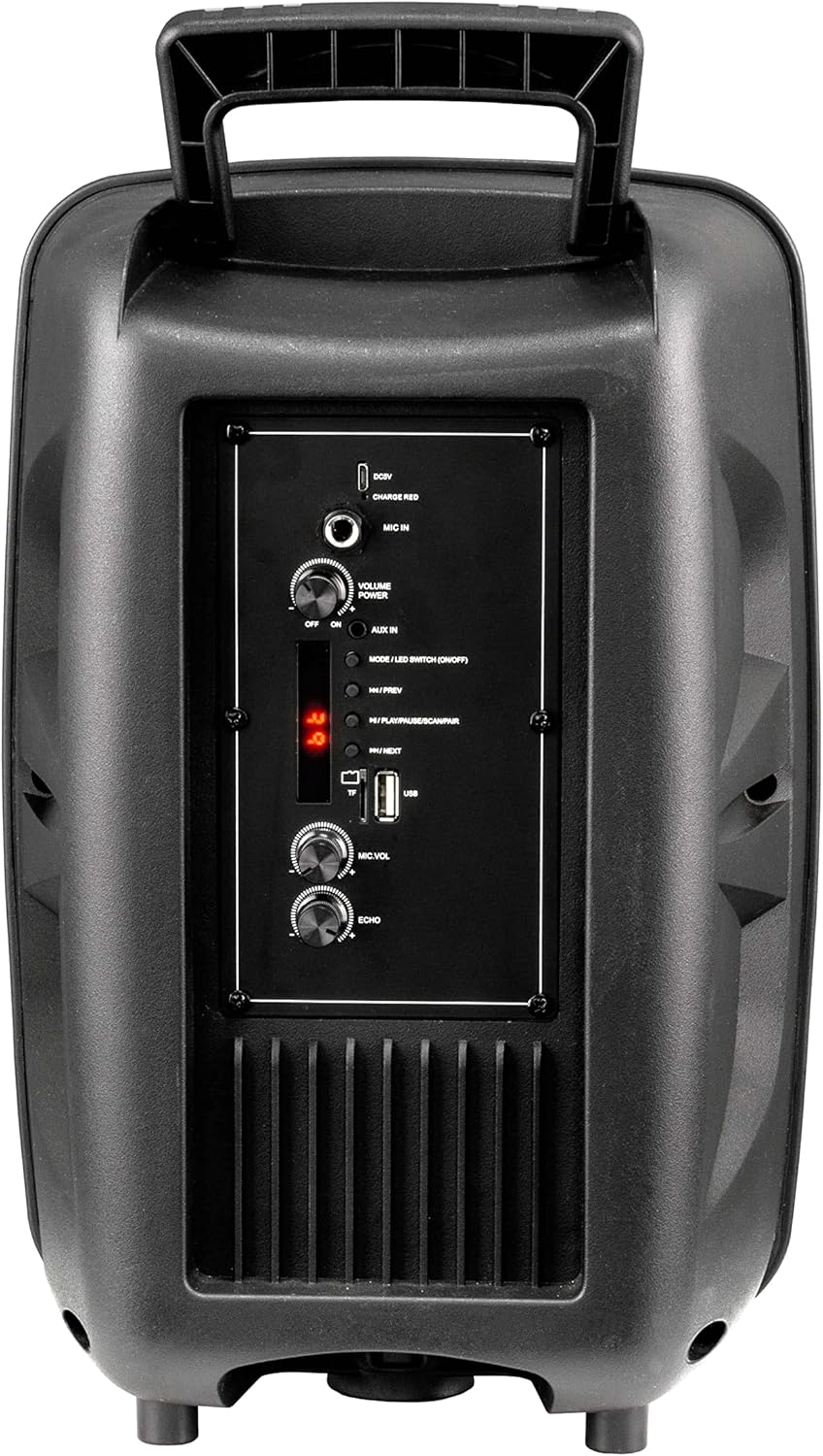
Image: Rear Control Panel Overview.
- DC 5V אַרייַנשרייַב: מאַכט אַרייַנגאַנג פֿאַר טשאַרדזשינג די רעדנער.
- CHARGE RED Indicator: Lights up red when charging.
- MIC אין: 6.35mm jack for connecting a wired microphone.
- VOLUME POWER (OFF/ON): Rotary knob to turn the speaker ON/OFF and adjust the master volume.
- AUX IN: 3.5 מ״מ אַודיאָ אַרייַנגאַנג פֿאַר פֿאַרבינדן פונדרויסנדיקע אַודיאָ דעוויסעס.
- MODE / LED SWITCH (ON/OFF): Press to switch between input modes (Bluetooth, USB, MicroSD, AUX). Press and hold to turn the LED light show ON/OFF.
- |<< / PREV: דרוק צו גיין צו די פריערדיקע שפּור.
- >>| / NEXT: דרוק צו גיין צו די ווייַטער שפּור.
- >|| / PLAY/PAUSE / SCAN/PAIR: Press to play or pause audio. In FM mode, press and hold to scan for stations. In Bluetooth mode, press and hold to initiate pairing.
- TF (מיקראָSD) קאַרטל שפּעלטל: Insert a MicroSD card for MP3 playback.
- וסב פּאָרט: Insert a USB flash drive for MP3 playback.
- MIC.VOL: Rotary knob to adjust the microphone volume.
- ECHO: Rotary knob to adjust the microphone echo effect.
5. סעטאַפּ
5.1. טשאַרדזשינג די ספּיקער
Before first use, fully charge the speaker. Connect the provided charging cable to the DC 5V input on the rear panel and plug the other end into a suitable USB power source (e.g., USB wall adapter, computer USB port). The "CHARGE RED" indicator will light up during charging and turn off when fully charged.
5.2. פּאָווערינג אויף / אויסגעלאשן
Rotate the "VOLUME POWER" knob clockwise to turn the speaker ON. Rotate it counter-clockwise until it clicks to turn the speaker OFF.
6. אַפּערייטינג ינסטרוקטיאָנס
6.1. בלועטאָאָטה מאָדע
- Turn on the speaker. It will automatically enter Bluetooth pairing mode, indicated by a flashing "BLUE" on the LED display.
- אַקטיווירן בלועטוט אויף אייער מאָביל מיטל (סמאַרטפאָון, טאַבלעט, קאָמפּיוטער).
- זוכן פֿאַר "R-MUSIC BOOSTER S" (or similar name) in your device's Bluetooth list and select it to pair.
- Once successfully paired, the speaker will emit a confirmation tone, and the "BLUE" indicator will stop flashing.
- You can now play audio from your device through the speaker. Use the speaker's control buttons or your device to control playback.
6.2. USB / MicroSD Card Playback
- Insert a USB flash drive or MicroSD card (pre-loaded with MP3 audio fileס) אין דעם באטרעפנדיקן פארט.
- The speaker will automatically switch to USB or TF (MicroSD) mode and begin playing the first compatible audio file.
- Use the "|<<" and ">>|" buttons to navigate between tracks. Use the ">||" button to play or pause.
6.3. AUX אינפוט מאָדע
- פֿאַרבינדט איין עק פֿון אַ 3.5 מ״מ אַודיאָ קאַבל (נישט אַרייַנגערעכנט) צום AUX IN פּאָרט אויף דעם רעדנער.
- פֿאַרבינדט דעם אַנדערן עק צום כעדפאָון דזשעק אָדער אַודיאָ אַרויסגאַנג פֿון אייער עקסטערנעם מיטל (למשל, MP3 שפּילער, לאַפּטאָפּ).
- Press the "MODE" button until "AUX" is displayed on the LED screen.
- Play audio from your external device. Volume can be controlled via the speaker's master volume knob or your external device.
6.4. מיקראָפאָן באַניץ
- Connect a wired microphone to the "MIC IN" jack.
- Adjust the microphone volume using the "MIC.VOL" knob.
- Adjust the echo effect using the "ECHO" knob.
6.5. על-אי-די ליכט שאָו
Press and hold the "MODE / LED SWITCH" button to toggle the dynamic LED light show ON or OFF.
7. וישאַלט
- רייניקט דעם רעדנער מיט אַ ווייכן, טרוקענעם שטאָף. ניצט נישט קיין שרײַבנדיקע רייניגערס אדער סאָלווענטן.
- האַלט דעם רעדנער אַוועק פון וואַסער, נעץ און עקסטרעמע טעמפּעראַטורן.
- דו זאלסט נישט פאַרשפּאַרן די ווענטאַליישאַן אָופּאַנינגז.
- האַלט דעם רעדנער אין אַ קיל, טרוקן אָרט ווען עס איז נישט אין באַנוץ פֿאַר לענגערע פּעריאָדן.
8. טראָובלעשאָאָטינג
| פּראָבלעם | מעגלעך סיבה | לייזונג |
|---|---|---|
| קיין מאַכט | Battery is depleted; Power knob is off. | Charge the speaker; Rotate the VOLUME POWER knob clockwise to turn on. |
| קיין געזונט | קול צו נידעריג; אומרעכטע מאָדע אויסגעקליבן; דעווייס נישט פארבונדן (בלוטעט); קאַבל נישט פארבונדן (AUX). | Increase volume; Press MODE button to select correct input; Re-pair Bluetooth device; Check AUX cable connection. |
| בלועטאָאָטה פּערינג ניט אַנדערש | רעדנער נישט אין פּערינג מאָדע; דעווייס צו ווייט; שטערונג. | Ensure speaker is in Bluetooth mode (flashing BLUE); Move device closer; Turn off other Bluetooth devices. |
| USB/MicroSD not playing | ניט געשטיצט file פֿאָרמאַט; פֿאַרדאָרבן fileס; קאַרטל/דרייוו נישט ריכטיק אַרײַנגעשטעלט. | פאַרזיכערן files are MP3 format; Try another USB/MicroSD; Re-insert card/drive. |
9. ספּעסאַפאַקיישאַנז
- מאָדעל: RM301891 (Booster S)
- סאָרט: ר-מוזיק
- קאַנעקטיוויטי: Bluetooth, USB, MicroSD, 3.5mm AUX
- מאַקסימום רעזולטאַט מאַכט: 40 וואטס
- רעדנער טיפּ: Subwoofer (as per product data, likely refers to bass capability)
- מאַונטינג טיפּ: שטאָק שטייענדיק
- דימענסיעס (פּאַקאַדזשינג): 44.4 x 30.1 x 22.6 ס״מ (אומגעפער 17.5 x 11.8 x 8.9 אינטשעס)
- וואָג (פּאַקאַגינג): 1.9 קילאָגראַמס (בעערעך 4.2 לבס)
- מאַכט אַרייַנשרייַב: DC 5V
10. זיכערקייַט אינפֿאָרמאַציע
- Do not disassemble or modify the speaker. This may cause electric shock, fire, or product damage.
- Do not expose the speaker to rain, moisture, or extreme temperatures.
- ויסמיידן דראַפּינג אָדער ונטערטעניק די רעדנער צו שטאַרק ימפּאַקץ.
- האַלטן אויס פון דערגרייכן פון קינדער.
- ניצט נאָר דעם ספּעציפֿישן טשאַרדזשינג קאַבל און מאַכט אַדאַפּטער.
- פּראַלאָנגד צוגעהערט אין הויך באַנד לעוועלס קען פאַרשאַפן געהער שעדיקן.
11. וואָראַנטי און שטיצן
R-MUSIC products are designed and manufactured to the highest quality standards. For warranty information and technical support, please refer to the warranty card included with your product or contact your local retailer. Keep your purchase receipt as proof of purchase.
For further assistance, you may visit the official R-MUSIC webפּלאַץ אָדער קאָנטאַקט זייער קונה סערוויס אָפּטיילונג.
Ask a question about this manual
Ask about setup, troubleshooting, compatibility, parts, safety, or missing instructions. Manuals+ will review the question and use this page’s manual context to help answer it.