
1. הקדמה
א דאנק פארן קויפןasing the BESTISAN 28-inch Soundbar. This manual provides detailed instructions for setting up, operating, and maintaining your new soundbar to ensure optimal performance and an immersive audio experience. Please read this manual thoroughly before use and retain it for future reference.
2. פּעקל אינהאַלט
באַשטעטיקט אַז אַלע זאכן וואָס זענען אויסגערעכנט אונטן זענען אַרייַנגערעכנט אין אייער פּעקל:
- סאָונדבאַר
- ווייַט קאָנטראָל
- מאַכט אַדאַפּטער
- דיגיטאַל אָפּטיש קאַבלע
- סטערעאָ רקאַ צו 3.5 מם אַודיאָ קאַבלע
- באַניצער ס גייד
- Mount Kits (Wall mount template, Mount screws, Wall mount brackets)

3. פּראָדוקט איבערview
3.1. פראָנט פּאַנעל קאָנטראָלן און אינדיקאַטאָרן

- מאַכט קנעפּל: Short press to turn on, long press for 2 seconds to turn off. Short press to switch modes (BT-HDMI-AUX-OPT-BT).
- Volume + / Next Button: Short press to increase volume step by step, long press for the next song (in Bluetooth mode).
- Volume - / Previous Button: Short press to decrease volume step by step, long press for the previous song (in Bluetooth mode).
- שפּיל / פּאָז קנעפּל: Short press to play/pause songs (in Bluetooth mode).
- Mode LED Indicator: Displays the current input mode (Standby, Bluetooth, Optical, ARC, AUX, USB).
3.2. דערציען פּאַנעל קאַנעקשאַנז
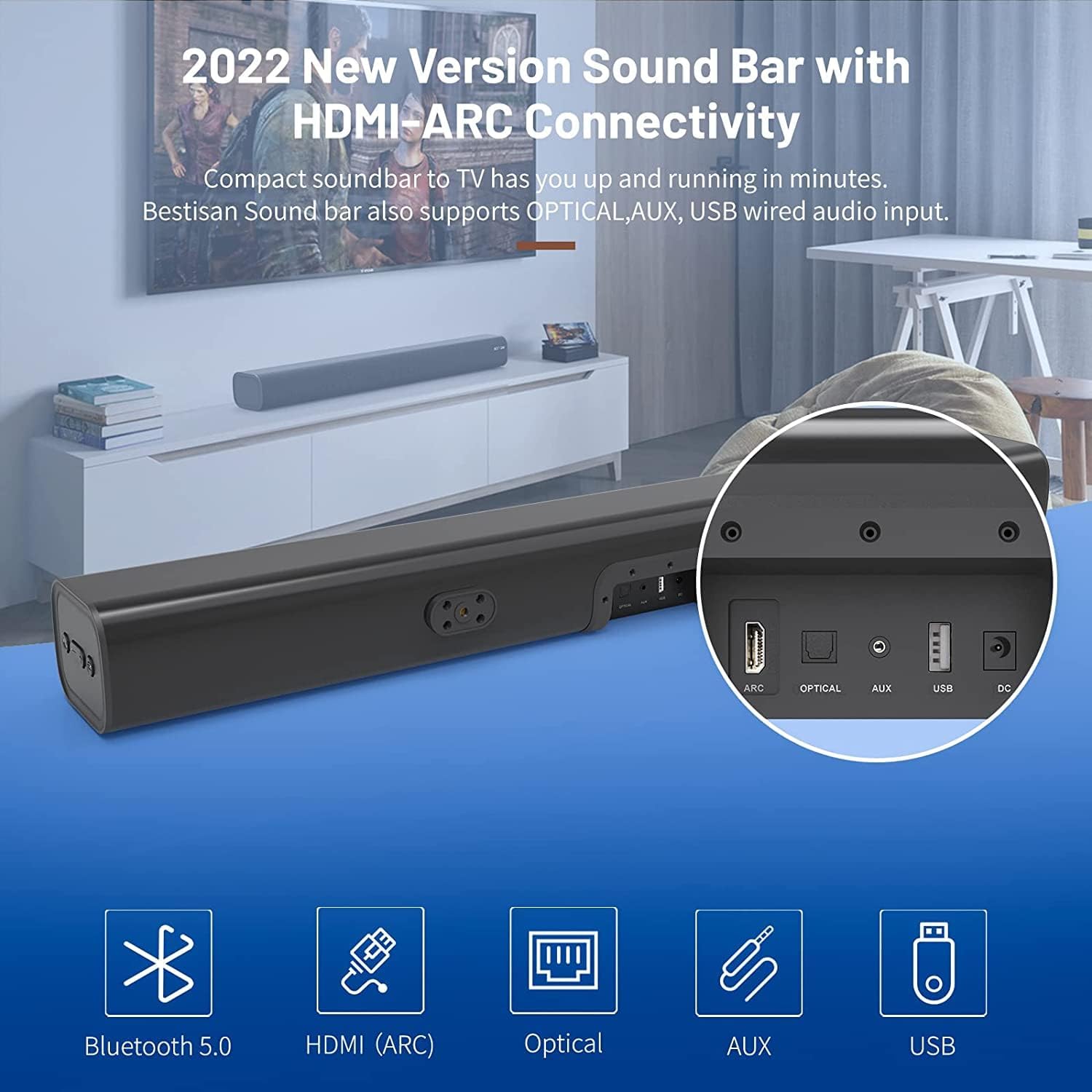
- HDMI ARC (TV): Connects to your TV's HDMI ARC port for high-quality audio transmission.
- אָפּטיש: דיגיטאַל אָפּטיש אַודיאָ אַרייַנשרייַב.
- AUX IN: 3.5 מם הילפס-אודיאָ אַרייַנגאַנג.
- וסב: USB input for media playback.
- דק אין: מאַכט אַרייַנגאַנג פֿאַר די סאַונדבאַר.
4. סעטאַפּ
4.1. פּלייסמאַנט אָפּציעס
The BESTISAN Soundbar offers flexible placement options to suit your home theater setup:
- דעסקטאַפּ פּלייסמאַנט: Place the soundbar on a flat surface in front of your TV. Ensure it does not obstruct the TV's remote sensor.
- וואַנט מאָונטינג: Use the included wall mount kit to securely attach the soundbar to the wall below your TV. A wall mounting template is provided for easy installation.


4.2. מאַכט אויף
- Connect the power cord to the DC IN port on the back of the soundbar.
- צאַפּן די אנדערע סוף פון די מאַכט שנור אין אַ ווענטיל.
- Press the Power button on the soundbar or the remote control to turn it on. The LED indicator will light up.
ווידעא 1: This video demonstrates the easy setup process for the soundbar, including connecting the power adapter and turning on the device. It highlights the various input options available on the back of the soundbar.
5. קאַנעקטינג צו דיין טעלעוויזיע
The soundbar offers multiple connection options for your TV. Choose the method that best suits your TV's available ports.
5.1. HDMI ARC Connection
- Connect one end of the HDMI cable (not included) to the HDMI ARC port on the soundbar.
- Connect the other end of the HDMI cable to your TV's HDMI ARC port.
- On your TV settings, set the audio output to "HDMI ARC" and the digital sound format to "PCM" or "Passthrough".
5.2. אָפּטיש קאַנעקשאַן
- Connect one end of the Digital Optical Cable (included) to the OPTICAL port on the soundbar.
- Connect the other end of the Digital Optical Cable to your TV's optical audio output port.
- On your TV settings, set the audio output to "Optical" and the digital sound format to "PCM".
5.3. AUX קאַנעקשאַן
- Connect one end of the Stereo RCA to 3.5mm Audio Cable (included) to the AUX IN port on the soundbar.
- Connect the RCA ends of the cable to your TV's RCA audio output ports (usually red and white).
- On your TV settings, ensure the audio output is set to "External Speakers" or "Headset".
5.4. בלועטאָאָטה קאַנעקשאַן
- Turn on the soundbar and press the "BT" button on the remote or the mode button on the soundbar until the LED indicator flashes blue, indicating Bluetooth pairing mode.
- אַקטיווירן בלועטוט אויף אייער מאָביל מיטל (סמאַרטפאָן, טאַבלעט, אאז"וו).
- זוכן פֿאַר "BESTISAN" or "ST08" in the list of available Bluetooth devices and select it to pair.
- אַמאָל קאָננעקטעד, די געפירט גראדן וועט ווערן האַרט בלוי.
6. אפערירן די סאונדבאַר
6.1. ניצן די רימאָוט קאָנטראָל
The included remote control provides full functionality for your soundbar:
- מאַכט: צינד אָן/אויס די סאַונדבאַר.
- שטום: Mute/unmute the sound.
- באנד +/-: סטרויערן די באַנד מדרגה.
- שפּיל / פּויזע: Play or pause audio (Bluetooth mode).
- פֿריִערדיקע / ווייַטער: Skip to the previous or next track (Bluetooth mode).
- Mode Selection (OPT, BT, ARC, AUX, USB): באַשטימען צווישן ינפּוט קוואלן.
- Sound Modes (Movie, Music, Dialogue): Select optimized equalizer settings for different content types.
- טרעבל +/-: אַדזשאַסטירן טרעבל לעוועלס.
- באַס +/-: אַדזשאַסטירן באַס לעוועלס.
6.2. Sound Modes (DSP Technology)
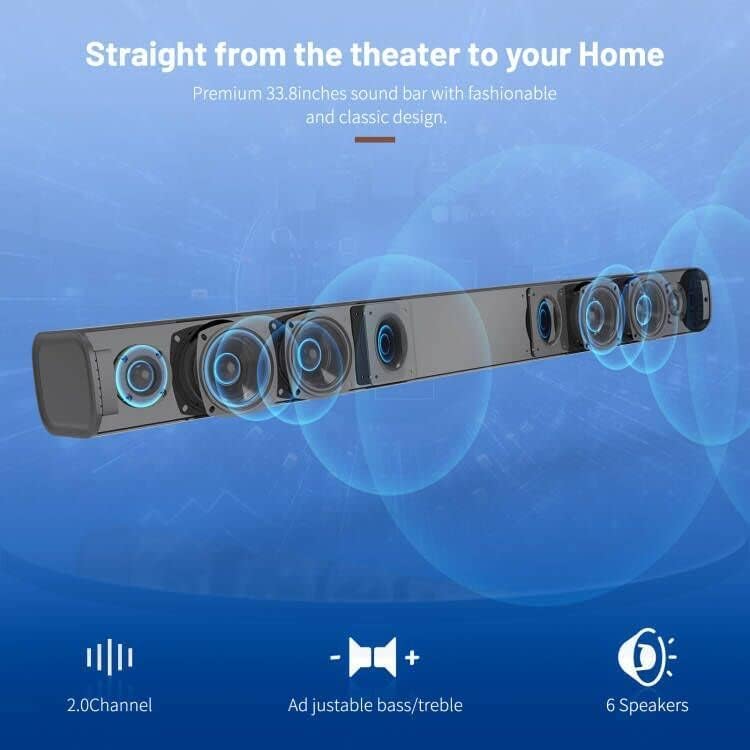
The soundbar features DSP (Digital Signal Processing) technology with three preset equalizer modes:
- פֿילם מאָדע: Enhances cinematic audio with dynamic range and impactful bass.
- מוזיק מאָדע: אָפּטימיזירט אַודיאָ פֿאַר מוזיק ווידערשפּיל, צושטעלנדיק באַלאַנסירט געזונט.
- דיאַלאָג מאָדע: Clarifies speech, making conversations easier to understand.

7. וישאַלט
- Clean the soundbar with a soft, dry cloth. Do not use liquid cleaners or aerosols.
- Avoid exposing the soundbar to extreme temperatures, humidity, or direct sunlight.
- פרובירט נישט צו צענעמען אדער פאררעכטן דעם איינהייט אליין. קאנטאקטירט קאסטומער סופארט פאר הילף.
8. טראָובלעשאָאָטינג
| פּראָבלעם | מעגלעך לייזונג |
|---|---|
| קיין מאַכט | זיכער מאַכן אַז דער מאַכט אַדאַפּטער איז זיכער פארבונדן צו דער סאַונדבאַר און אַ אַרבעטנדיקער מאַכט ווענטיל. |
| קיין געזונט |
|
| בלועטאָאָטה פּערינג ישוז |
|
| ווייַט קאָנטראָל נישט ארבעטן |
|
9. ספּעסאַפאַקיישאַנז
- סאָרט: BESTISAN
- מאָדעל נאָמען: ST08, SE08
- רעדנער טיפּ: סאָונדבאַר
- קאַנעקטיוויטי טעכנאָלאָגיע: HDMI (ARC), Optical, Aux, USB, Bluetooth 5.0
- אַודיאָ רעזולטאַט מאָדע: סטערעאָ
- רעדנער מאַקסימום רעזולטאַט מאַכט: 100 וואטס
- פּראָדוקט דימענשאַנז: 3.4"ד רענטגענ 33.79"וו רענטגענ 4.4"ה
- נומער וואָג: 5.19 פונט
- מאַונטינג טיפּ: וואנט בארג
- ספּעציעלע שטריך: Bass Boost, DSP Technology (Dialogue, Movie, Music modes)
10. וואָראַנטי און שטיצן
For warranty information, technical support, or customer service inquiries, please refer to the contact details provided in your User's Guide or visit the official BESTISAN webפּלאַץ.
פאַבריקאַנט: בעסטער
ערשטער דאַטע בנימצא: 3 נאוועמבער 2020