
1. פּראָדוקט איבערview
The Mounting Dream MD2263-XLK is a tilting TV wall mount designed for most 42-86 inch LCD/LED/Plasma TVs. It supports TVs weighing up to 120 LBS with VESA mounting patterns ranging from 200x100mm to 800x400mm. This mount features a large tilting angle for anti-glare viewing and easy cable access, along with a post-installation leveling adjustment for perfect TV positioning. Its slim 2.5-inch profile ensures a neat and space-saving installation.
2. וויכטיק סאַפעטי אינפֿאָרמאַציע
WARNING: Failure to read and follow all instructions may result in personal injury, property damage, or voiding of the warranty. If you have any questions, please contact customer service.
- Do not install on drywall alone. This mount is designed for wood studs, solid concrete, or brick walls.
- Ensure your TV's weight and VESA pattern are within the specified limits of this mount.
- Always use a stud finder to locate the center of wood studs accurately.
- Verify that the wall structure can safely support the combined weight of the mount and the TV.
- האַלטן קינדער אַוועק בעשאַס ינסטאַלירונג.
3. פּעקל אינהאַלט
Verify all components are present and undamaged before installation. The package includes:
- Wall Plate Assembly (main frame)
- TV Brackets (2 pieces)
- Hardware Kit (various screws, washers, spacers for TV and wall attachment, often in pre-labeled bags)
- Small Bubble Level
- ינסטאַללאַטיאָן ינסטרוקטיאָן מאַנואַל
4. פּראָדוקט ספּעסאַפאַקיישאַנז
| שטריך | באַשרייַבונג |
|---|---|
| מאָדעל | MD2263-XLK |
| טעלעוויזיע גרייס קאַמפּאַטאַבילאַטי | 42-86 אינטשעס |
| וואָג קאַפּאַסיטי | Up to 120 LBS (54.4 kg) |
| VESA קאַמפּאַטאַבילאַטי | 200 קס 100 מם צו 800 קס 400 מם |
| מאַונטינג טיפּ | טילטינג וואנט בארג |
| טילט ווינקל | +5° / -15° |
| מדרגה אַדזשאַסטמאַנט | ±1° post-installation |
| פּראָfile פֿון וואַנט | 2.5 אינטשעס |
| מאַטעריאַל | מעטאַל |
| קאָליר | שוואַרץ |
5. סעטאַפּ און ייַנמאָנטירונג
5.1 פאַר-ינסטאַללאַטיאָן טשעקליסט
Before you begin, ensure your TV and wall are compatible with the mount:
- TV VESA Pattern: Check the four mounting holes on the back of your TV. Measure the horizontal and vertical distance (in millimeters). This mount supports VESA from 200x100mm to 800x400mm.
- טעלעוויזיע וואָג: Confirm your TV's weight (without stand) does not exceed 120 LBS.
- וואַנט טיפּ: This mount is suitable for wood stud walls (16", 18", 24" spacing), solid concrete, or brick walls. Do NOT install on drywall alone.
- Blocked Inputs: Ensure the mount will not block any necessary ports or inputs on your TV.

Image: Pre-installation checks for TV and wall compatibility.
5.2 נויטיקע מכשירים (נישט אַרייַנגערעכנט)
- בלייַער
- טייפּ מעזשער
- פיליפּס קאָפּ שרויפנ - ציער
- Drill and Drill Bits (Wood: 7/32" (5.5mm); Concrete: 3/8" (10mm))
- שטיפֿ־פֿינדער (פֿאַר האָלץ־שטיפֿ־אינסטאַלאַציע)
- האַמער (פֿאַר בעטאָן אַנקערס)
- סאָקעט שליסל (פֿאַר לאַג באָלץ)
5.3 Step-by-Step Installation Guide
פֿאָלגט די שריט קערפֿול פֿאַר אַ זיכערע אינסטאַלאַציע. עס איז רעקאָמענדירט צו האָבן צוויי מענטשן פֿאַר טעלעוויזאָר מאָנטירן.
שריט 1: צוטשעפּען טעלעוויזיע בראַקאַץ צו טעלעוויזיע
- לייגט פֿאָרזיכטיק אייער טעלעוויזיע מיטן פּנים אַראָפּ אויף אַ ווייכער, ריינער ייבערפֿלאַך כּדי צו פֿאַרמייַדן שאָדן צום עקראַן.
- Align the two TV brackets with the VESA mounting holes on the back of your TV.
- אויסקלייבן די פּאַסיקע שרויפן, וואַשערס און ספּייסערס פֿון די האַרדווער קיט וואָס פּאַסן צו די מאָנטירונג לעכער פֿון אייער טעלעוויזיע.
- Securely fasten the brackets to the TV using a Phillips head screwdriver. Ensure they are tight but do not overtighten.
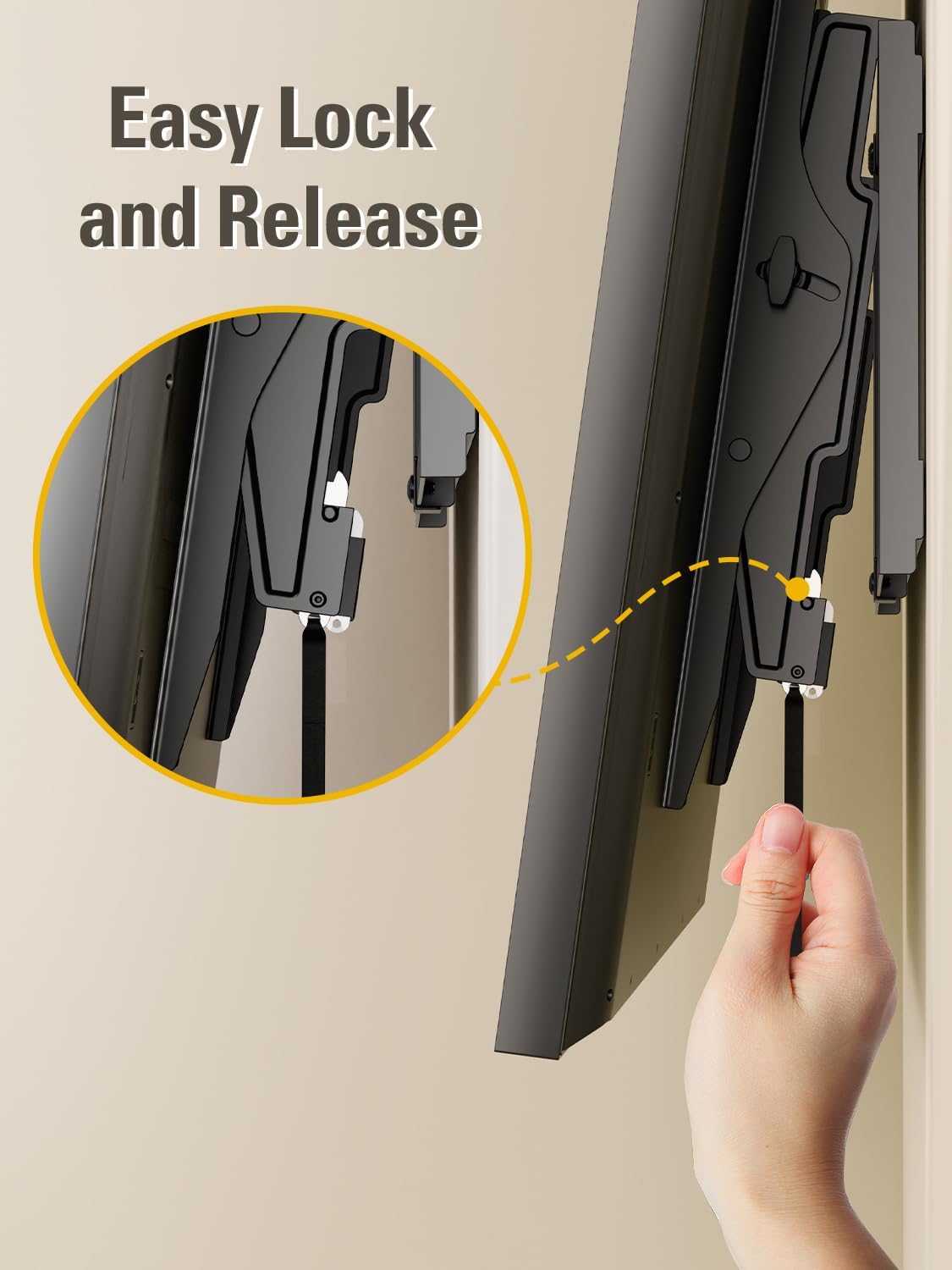
Image: Attaching the mounting brackets to the rear of the TV.
Video: Demonstrates attaching the TV brackets to the television, including screw selection and tightening.
שריט 2: ינסטאַלירן וואנט פּלאַטע
- Determine the desired height for your TV. Use a pencil to mark the center of your desired TV location on the wall.
- פֿאַר האָלץ שטאַפּל ווענט: Use a stud finder to locate the edges and center of the wood studs. Mark the center of the studs where the wall plate will be mounted. The wall plate is designed to fit 16", 18", or 24" stud spacing.
- Hold the wall plate against the wall, aligning it with your marked stud centers. Use the included bubble level to ensure it is perfectly horizontal. Mark the pilot hole locations.
- Drill pilot holes into the wood studs using a 7/32" (5.5mm) wood drill bit. Drill to a depth of approximately 2.5" (65mm).
- Attach the wall plate to the wall using the provided lag bolts and washers. Tighten them securely with a socket wrench.
- For Solid Concrete/Brick Walls: Hold the wall plate against the wall at your desired height and use the bubble level to ensure it is horizontal. Mark the pilot hole locations.
- Drill pilot holes into the concrete/brick using a 3/8" (10mm) masonry drill bit. Drill to a depth of approximately 2.5" (65mm).
- Insert the concrete wall anchors into the drilled holes. Tap them gently with a hammer until they are flush with the wall surface.
- Attach the wall plate to the wall using the provided lag bolts and washers. Tighten them securely with a socket wrench.

Image: Wall type compatibility and stud spacing.
Video: Illustrates the process of finding wood studs, marking holes, drilling, and attaching the wall plate securely.
Step 3: Hang and Secure TV to Wall Plate
- With assistance, carefully lift the TV with the attached brackets and hook the brackets onto the top edge of the wall plate.
- Gently lower the TV until the brackets are fully seated on the wall plate.
- Locate the safety locking straps or screws on the bottom of the TV brackets. Secure these to prevent the TV from accidentally lifting off the mount.
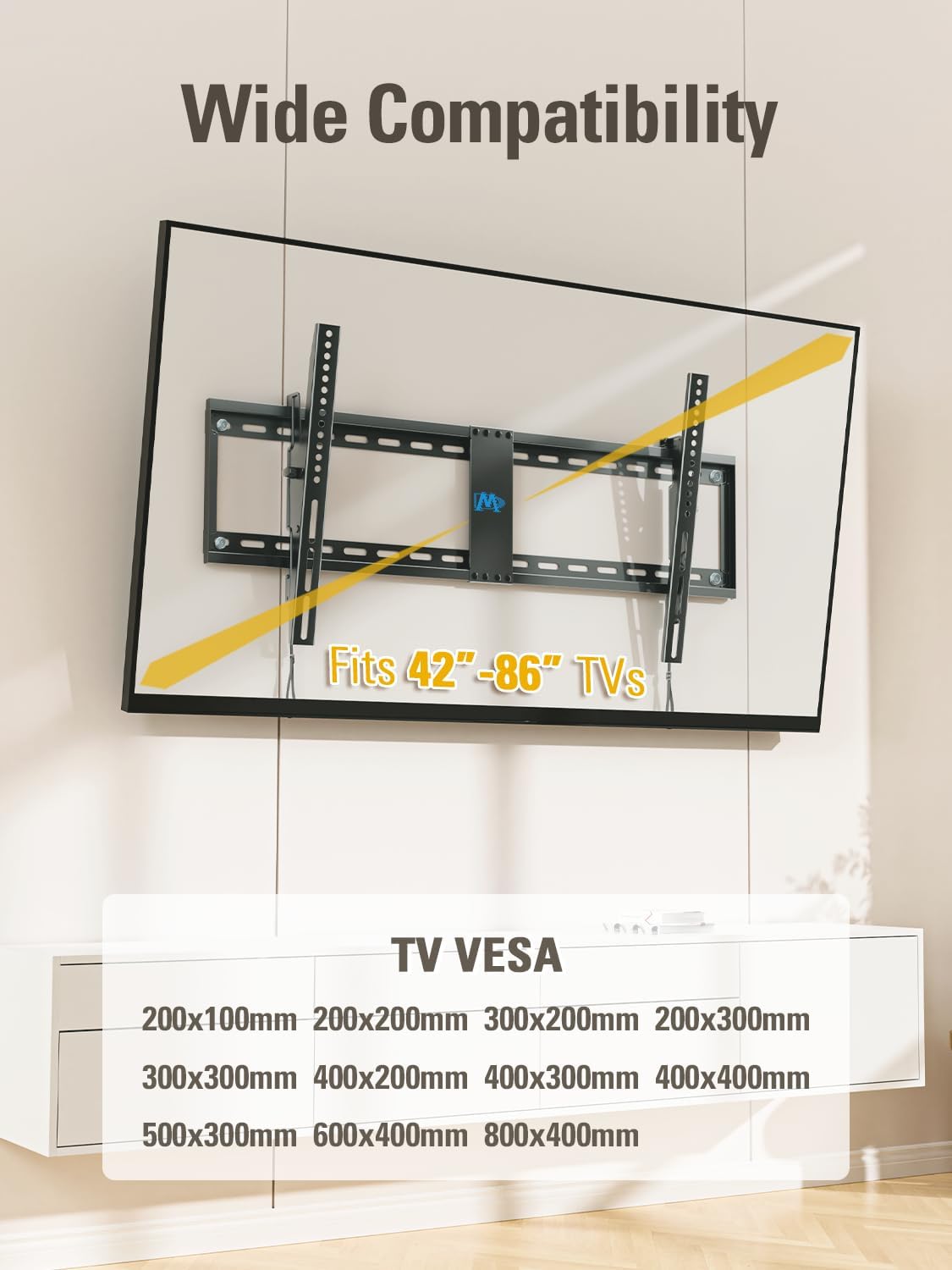
Image: TV securely mounted on the wall.
Video: Shows the final steps of hanging the TV onto the wall plate and securing it.
6. אַפּערייטינג ינסטרוקטיאָנס
6.1 קיפּינג פונקציע
The MD2263-XLK mount allows you to tilt your TV for optimal viewing and to reduce glare. It can tilt forward up to 15° and backward up to 5° for easy cable access.
- To adjust the tilt, loosen the tool-free handles located on the TV brackets.
- Gently tilt the TV to your desired angle.
- Tighten the tool-free handles to lock the TV in place.
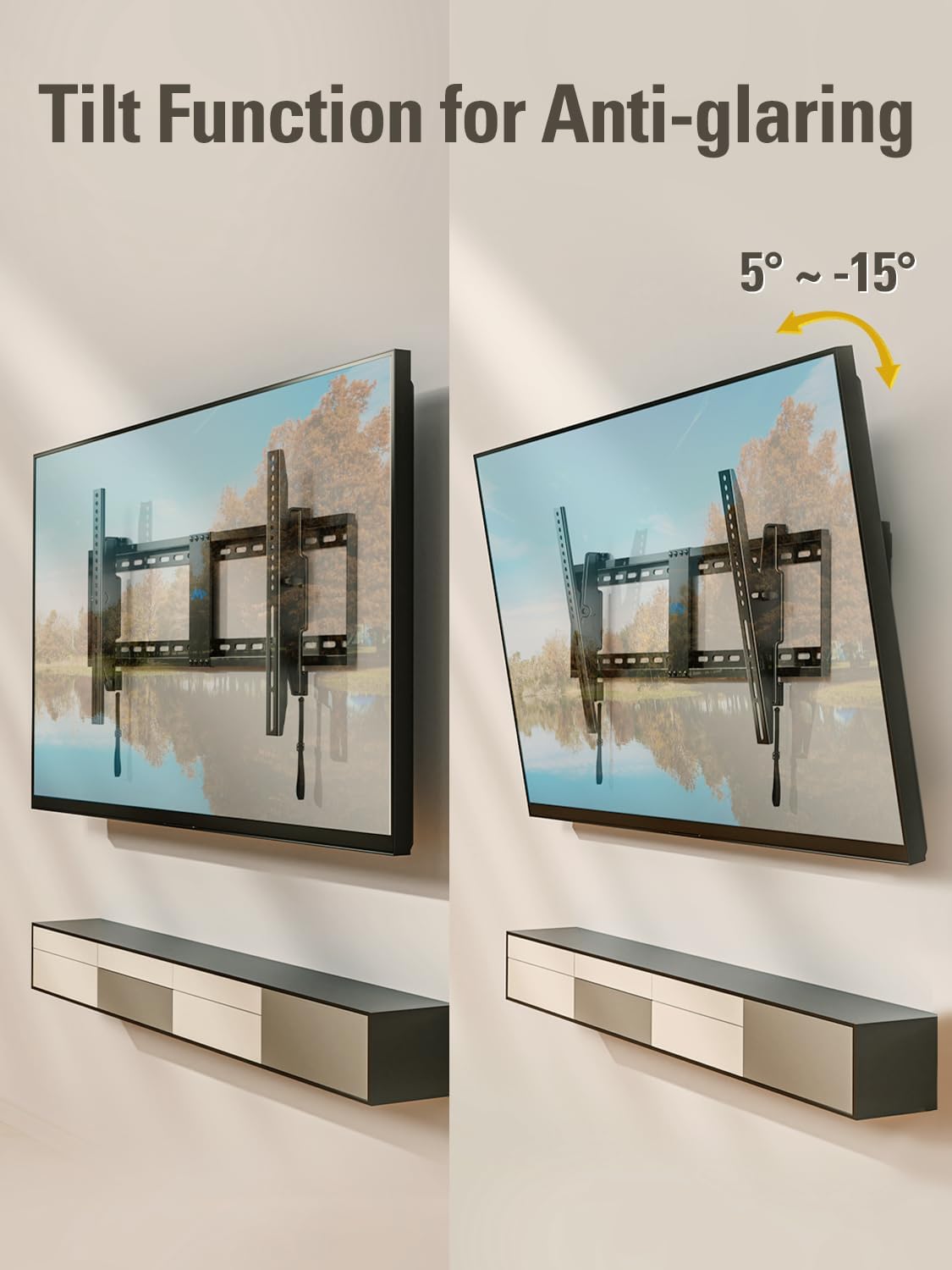
Image: Demonstrating the tilting function of the TV mount.
Video: Shows how to adjust the tilt angle of the TV mount.
6.2 לעוועל אַדזשאַסטמענט
After installation, you can make minor horizontal adjustments to ensure your TV is perfectly level (±1°).
- Locate the leveling screws on the TV brackets.
- Use a screwdriver to turn the leveling screws clockwise or counter-clockwise to achieve the desired level.

Image: Illustrates the post-installation leveling adjustment feature.
Video: Demonstrates the leveling adjustment feature of the TV mount.
7. וישאַלט
To ensure continued safe and optimal performance of your TV wall mount:
- Periodically check that all screws and bolts are securely tightened.
- Inspect the mount for any signs of wear, damage, or corrosion.
- רייניקט דעם מאָונט מיט אַ ווייכן, טרוקענעם שטאָף. פֿאַרמייַדט ניצן אַברייסיוו רייניגער אָדער סאָלווענטן.
8. טראָובלעשאָאָטינג
If you encounter any issues during or after installation, refer to the following common problems and solutions:
- טעלעוויזיע איז נישט גלייך: Use the post-installation leveling adjustment feature (refer to Section 6.2).
- טעלעוויזיע פּאַסט נישט צום מאָונט: Double-check your TV's VESA pattern and weight against the mount's specifications (refer to Section 4 and 5.1). Ensure you have selected the correct screws and spacers.
- באַרג פילט זיך נישט סטאַביל: Re-check all wall plate and TV bracket connections. Ensure lag bolts are securely fastened into studs or concrete anchors. Verify the wall type is appropriate for installation.
- Cables are difficult to access: Utilize the backward tilt feature (up to 5°) for easier access to ports (refer to Section 6.1).
For further assistance, please contact Mounting Dream customer support.
9. וואָראַנטי און שטיצן
This Mounting Dream TV wall mount is backed by a 10 יאָר וואָראַנטי.
If you have any pre-purchase questions, installation inquiries, or require technical support, Mounting Dream customer support is available 7 days a week to assist you. Please refer to the contact information provided in your product packaging or visit the official Mounting Dream webפּלאַץ פֿאַר שטיצן דעטאַילס.