
פּראָדוקט איבערview
The X9 Performance Wired Keyboard and Mouse Combo is designed to provide a highly efficient and comfortable workspace. This set includes a full-size wired keyboard, a wired optical mouse, and a memory foam mouse pad with wrist rest.
The keyboard features 104 concave keys, 14 shortcut/media keys, a 17-key numeric keypad, and an adjustable kickstand for ergonomic typing. The mouse is designed with an ambidextrous body, a high-resolution optical sensor with adjustable DPI settings (1000/1600/2400/3200), and 6 buttons for enhanced control.
This combo offers plug-and-play compatibility with Windows PC and Chrome OS, requiring no additional drivers or batteries.

Image: The X9 Performance Wired Keyboard and Mouse Combo, including the keyboard, mouse, and mouse pad with wrist rest.
סעטאַפּ אינסטרוקציעס
- ופשליסן די קאַמפּאָונאַנץ: Carefully remove the keyboard, mouse, and mouse pad from their packaging.
- פֿאַרבינדן די קלאַוויאַטור: Locate an available USB-A port on your computer (PC or Chromebook). Insert the USB connector of the keyboard into the USB-A port.
- פאַרבינדן די מויז: Locate another available USB-A port on your computer. Insert the USB connector of the mouse into the USB-A port.
- אָרט: Position the mouse pad on your desk. Place the keyboard and mouse in comfortable positions for use.
- אָטאַמאַטיק דערקענונג: Your operating system (Windows or Chrome OS) will automatically detect and install the necessary drivers. No manual driver installation is required. The devices are ready for use once connected.

Image: Close-up of USB-A cables from the keyboard and mouse connected to the back of a computer tower.
Operating Instructions - Keyboard
The X9 Performance keyboard is a full-size 104-key layout with additional features for enhanced productivity.
- נאָרמאַל טייפּינג: ניצט די הויפּט אַלפֿאַנומעריקע קנעפּלעך פֿאַר טעקסט אַרייַנשרייַב.
- נומעריק קיפּאַד: The dedicated 17-key numeric keypad on the right allows for efficient data entry. Ensure 'Num Lock' is active (indicated by an LED).
- Shortcut/Media Keys: The keyboard includes 14 dedicated shortcut or media keys (F1-F12, etc.) for quick access to functions like volume control, media playback, and web browsing. Refer to your operating system's documentation for specific functions of these keys.
- אַדזשאַסטאַבאַל קיקסטאַנד: Flip out the kickstands located on the underside of the keyboard to adjust the typing angle for improved comfort.
- LED ינדיקאַטאָרס: LEDs above the numeric keypad indicate the status of Num Lock, Caps Lock, and Scroll Lock.
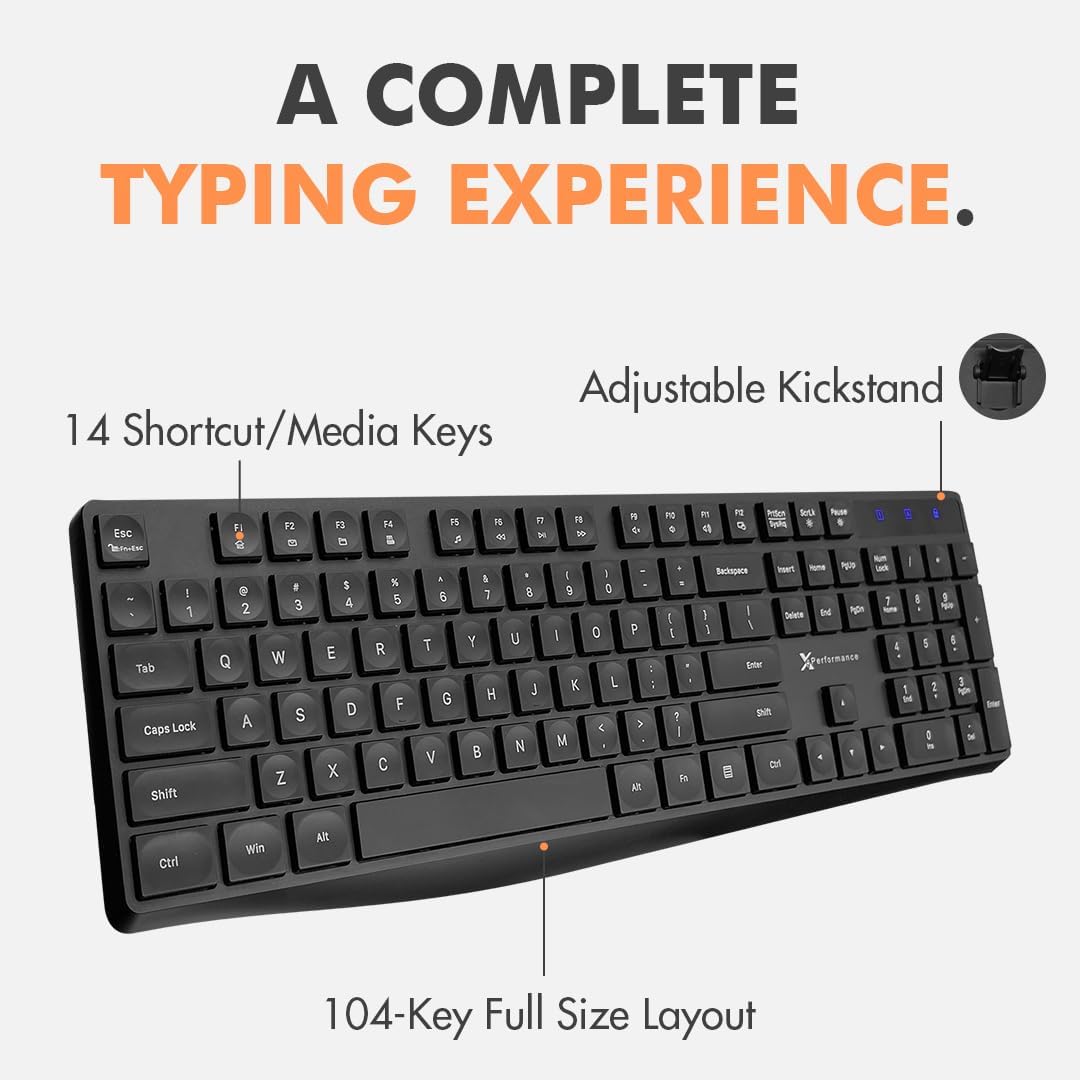
Image: The X9 Performance wired keyboard, highlighting its 104-key full-size layout and 14 shortcut/media keys.
Operating Instructions - Mouse
The X9 Performance wired mouse offers precise control and an ergonomic design.
- יקערדיק פאַנגקשאַנז: Use the left and right click buttons for standard operations. The scroll wheel allows for vertical scrolling and can also function as a middle click button.
- דפּי אַדזשאַסטמאַנט: The mouse features a DPI button, typically located behind the scroll wheel. Press this button to cycle through different sensitivity settings: 1000, 1600, 2400, and 3200 DPI. Choose the setting that best suits your preference and task.
- זייַט קנעפּלעך: Two side buttons are provided for quick navigation, commonly configured as 'Forward' and 'Back' in web בראַוזערז און file עקספּלאָרערס.
- ערגאָנאָמיק פּלאַן: The ambidextrous shape is designed for comfortable use by both left and right-handed users. The included memory foam mouse pad provides wrist support to reduce strain during extended use.

Image: The X9 Performance wired mouse, showcasing its ergonomic design, DPI button, and side navigation buttons.
וישאַלט
To ensure the longevity and optimal performance of your X9 Performance Keyboard and Mouse Combo, follow these maintenance guidelines:
- רייניקונג: רייניקט רעגולער די קלאַוויאַטור און מויז מיט אַ ווייכן, טרוקענעם, לינט-פֿרײַעם שטאָף. פֿאַר שווערן שמוץ, אַ ביסל אָפּווישןampen the cloth with water or a mild, non-abrasive cleaner. Avoid spraying liquids directly onto the devices.
- באַזייַטיקונג פון שטויב: Use compressed air to remove dust and debris from between the keyboard keys and from the mouse's optical sensor area.
- ויסמיידן עקסטרעמע טנאָים: שטעלט נישט אויס די דעווייסעס צו עקסטרעמע טעמפּעראַטורן, דירעקטע זונשייַן, אדער הויכע הומידיטי.
- קאַבלע זאָרגן: Avoid bending or twisting the USB cables excessively to prevent internal damage.
טראָובלעשאָאָטינג
If you encounter issues with your keyboard or mouse, try the following troubleshooting steps:
- מיטל ניט דערקענט:
- Ensure the USB cables are securely plugged into the computer's USB-A ports.
- פּרוּווט אַרײַנשטעקן די דעווײַסעס אין פֿאַרשידענע USB פּאָרטן אויף אײַער קאָמפּיוטער.
- ריסטאַרט דיין קאָמפּיוטער.
- Check your computer's Device Manager (Windows) or System Information (Chrome OS) to see if the devices are listed.
- קנעפלעך רעאגירן נישט (קלאַוויאַטור):
- זיכער מאַכן אַז די קלאַוויאַטור איז ריכטיק פֿאַרבונדן.
- If specific keys are not working, check for any physical obstructions or debris under the keys.
- פּרובירט די קלאַוויאַטור אויף אַן אַנדער קאָמפּיוטער צו באַשטימען צי די פּראָבלעם איז מיטן קלאַוויאַטור אָדער מיטן קאָמפּיוטער.
- Mouse Cursor Not Moving or Erratic:
- זייט זיכער אז די מויז איז ריכטיק פארבונדן.
- רייניקט דעם אָפּטישן סענסאָר אויף דער אונטערשטער זײַט פֿון דער מויז.
- Ensure you are using the mouse on a suitable surface (the included mouse pad is ideal).
- אַדזשאַסטירן די DPI סעטינג מיטן DPI קנעפּל אויף דער מויז.
- Test the mouse on another computer.
If these steps do not resolve the issue, please contact X9 Performance customer support.
ספּעסאַפאַקיישאַנז
| שטריך | באַשרייַבונג |
|---|---|
| סאָרט | X9 פאָרשטעלונג |
| מאָדעל | B08LZLMY3B |
| קאַנעקטיוויטי טעכנאָלאָגיע | USB (ווייערד) |
| קאַמפּאַטאַבאַל דעוויסעס | לאַפּטאַפּ, פערזענלעכע קאָמפּיוטער |
| אָפּערייטינג סיסטעם | Chrome OS, Windows OS |
| קלאַוויאַטור אויסלייג | QWERTY, Full-Size (104 keys) |
| קלאַוויאַטור ספּעציעלע פֿעיִקייטן | 14 Shortcut/Media Keys, Adjustable Kickstand |
| מויז באַוועגונג דעטעקציע | אָפּטיש |
| מויז דפּי סעטטינגס | 1000/1600/2400/3200 |
| מויז האַנט אָריענטירונג | אַמבידעקסטראַס |
| מאַכט מקור | קאָרד עלעקטריק (וסב) |
| באַטעריז פארלאנגט | ניין |
אפיציעלע פּראָדוקט ווידעאָ
Video: An official product video from X9 Performance showcasing the features and setup of the USB Wired Keyboard and Mouse Combo.
וואָראַנטי און שטיצן
X9 Performance values customer satisfaction. This product comes with a warranty and support:
- וואָראַנטי: Up to 2 years of warranty from the date of purchase.
- קערט: Free returns are available.
- קונה שטיצן: Friendly support is available for any questions or issues you may encounter. Please refer to the contact information provided with your purchase or on the X9 Performance official webפּלאַץ פֿאַר הילף.