
1. זיכערקייַט אינפֿאָרמאַציע
Read all safety instructions carefully before installing and operating the PNI SP2000W Voltage Inverter. Failure to follow these instructions may result in electric shock, fire, or serious injury.
- עלעקטריקאַל זיכערקייַט: דאָס אַפּאַראַט אַרבעט מיט הויך וואָלומעןtage. Do not open the inverter casing. All servicing must be performed by qualified personnel.
- ווענטילאַטיאָן: Ensure adequate ventilation around the inverter. Do not block the cooling fans or place the inverter in an enclosed space. Overheating can cause damage or fire.
- סוויווע: Do not expose the inverter to water, rain, snow, spray, or dust. Operate in a dry, cool, and well-ventilated area.
- באַטערי קשר: Connect the inverter directly to a 12V car battery. Do not connect to other voltage sources or attempt to use with solar panels, as special inverters are required for solar systems.
- לאָדן קאַמפּאַטאַבילאַטי: This inverter is designed for resistive loads such as TVs, lighting lamps, radios, fans, and mini-refrigerators. Avoid connecting inductive loads with high starting currents unless within the inverter's surge capacity.
- אָווערלאָאַד שוץ: The inverter includes overload protection. Do not exceed the continuous output power of 2000W.
2. פּראָדוקט איבערview
The PNI SP2000W is a pure sinusoid voltage inverter designed to convert 12V DC power from a car battery into 230V AC power, suitable for powering various electrical appliances. It features a continuous output of 2000W and active cooling for efficient operation.
2.1. שליסל פֿעיִקייטן
- רעזולטאַט מאַכט: 2000W continuous, 4000W peak.
- אַרייַנשרייַב וואָלtage: 12V דק.
- רעזולטאַט חלקtage: 220V / 230V AC.
- רעזולטאַט וואַוועפאָרם: Pure Sinusoid.
- אָפטקייַט: 50 הז.
- קאָאָלינג: Active cooling with two built-in fans and aluminum housing.
- שוץ: Overload, thermal, short circuit.
2.2. פּעקל אינהאַלט
- PNI SP2000W VoltagE ינווערטער
- Power connection cables (red for positive, black for negative)
- Wrench for terminal connections
- באַניצער מאַנואַל
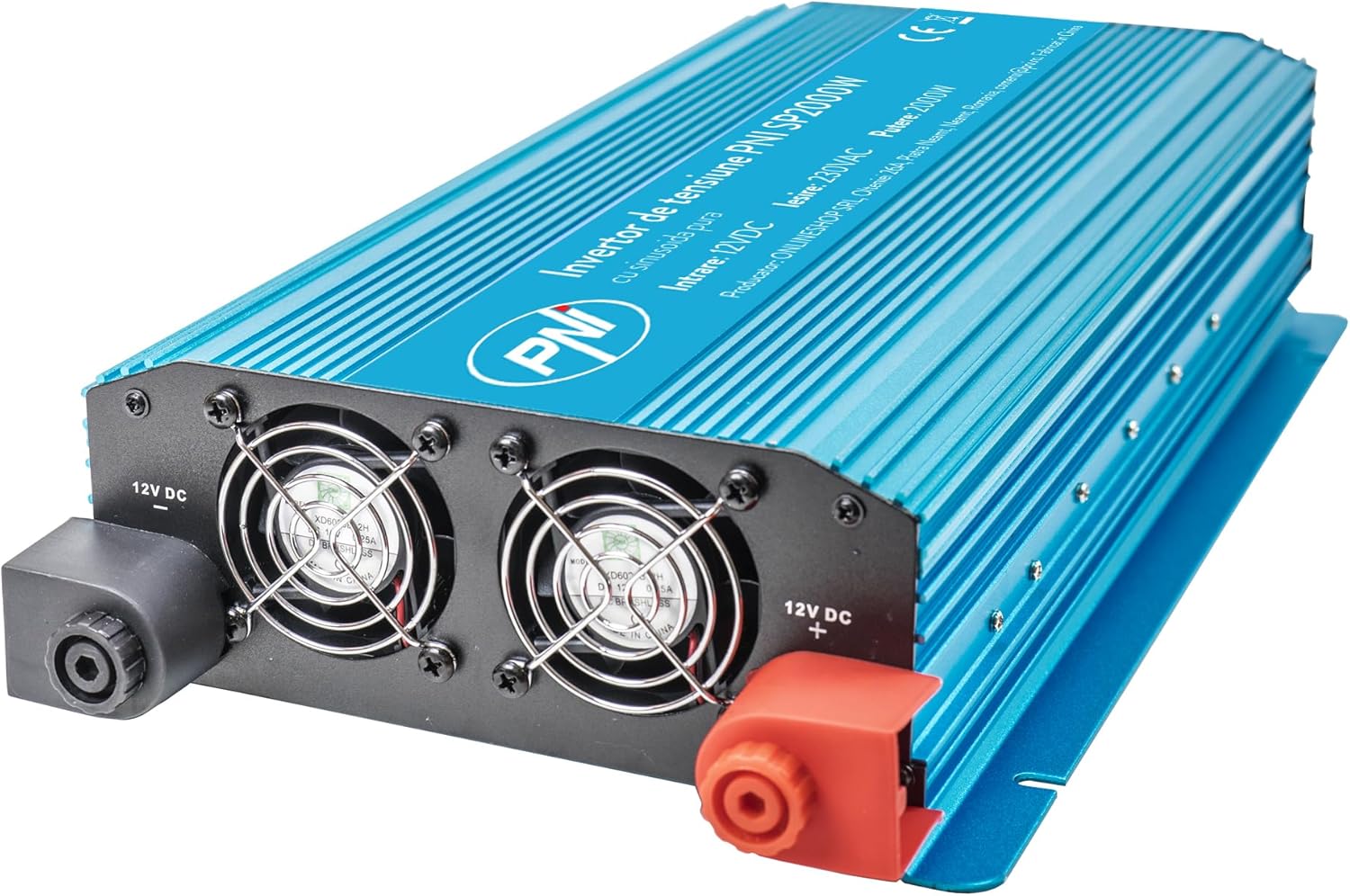
פיגורע 1: פראָנט view of the PNI SP2000W Voltage Inverter, showing the blue casing and the PNI logo.

פיגורע 2: שפּיץ view of the PNI SP2000W Voltage Inverter, displaying the product label with model information and specifications.

Figure 3: The PNI SP2000W Voltage Inverter shown with its included accessories: power connection cables (red and black) and a wrench for securing terminals.
3. סעטאַפּ
Proper setup is crucial for the safe and efficient operation of your inverter.
קסנומקס. פּלאַסעמענט
- Place the inverter on a flat, stable surface.
- Ensure there is at least 15 cm (6 inches) of clear space around the inverter for proper ventilation.
- Avoid direct sunlight, heat sources, and areas with high humidity or dust.
3.2. Connecting to a 12V Battery
The inverter must be connected directly to a 12V DC battery. Use the provided cables for connection.
- Ensure the inverter's power switch is in the "OFF" position.
- Connect the red cable to the positive (+) terminal of the inverter and then to the positive (+) terminal of the 12V battery.
- Connect the black cable to the negative (-) terminal of the inverter and then to the negative (-) terminal of the 12V battery.
- Tighten all connections securely using the provided wrench to prevent loose connections, which can cause overheating and damage.
- Verify that all connections are correct and secure before proceeding.

Figure 4: Input side of the inverter, showing the 12V DC positive (+) and negative (-) terminals for battery connection, along with the cooling fans.

Figure 5: Output side of the inverter, featuring two 230V AC sockets, the main power switch, and indicator lights for power and fault status.
4. אַפּערייטינג ינסטרוקטיאָנס
Follow these steps to operate your PNI SP2000W Voltage Inverter safely.
- מאַכט אויף: After ensuring all connections are secure and correct, switch the inverter's power button to the "ON" position. The green "POWER" indicator light should illuminate.
- פאַרבינדן אַפּפּליאַנסעס: Plug your 230V AC appliances into the inverter's output sockets. Ensure the total wattagדי מאַכט פון אַלע פֿאַרבונדענע אַפּאַראַטן זאָל נישט איבערשטייגן 2000 וואט.
- מאָניטאָר: Observe the inverter's indicator lights. If the red "FAULT" light illuminates, refer to the Troubleshooting section.
- מאַכט אַוועק: When you are finished using the inverter, first turn off and unplug all connected appliances. Then, switch the inverter's power button to the "OFF" position.
5. וישאַלט
Regular maintenance helps ensure the longevity and reliable performance of your inverter.
- רייניקונג: Periodically clean the exterior of the inverter with a soft, dry cloth. Do not use liquid cleaners or solvents. Ensure the cooling vents are free from dust and debris.
- ווענטילאַטיאָן: Regularly check that the cooling fans are not obstructed and are operating correctly. Good airflow is essential to prevent overheating.
- קאַבלע קאַנעקשאַנז: Periodically inspect the battery connection cables for any signs of wear, damage, or corrosion. Ensure connections remain tight.
- סטאָרידזש: If storing the inverter for an extended period, disconnect it from the battery and store it in a cool, dry place away from direct sunlight.
6. טראָובלעשאָאָטינג
If you encounter issues with your PNI SP2000W Inverter, refer to the following common problems and solutions.
| פּראָבלעם | מעגלעך סיבה | לייזונג |
|---|---|---|
| No power output / Inverter does not turn on | לוס באַטאַרייע קאַנעקשאַנז נידעריק באַטאַרייע וואָלtage דער אינווערטער סוויטש איז אויסגעלאשן | קאָנטראָלירן און אָנציִען די באַטעריע קאַבלען ריטשאַרדזש אָדער פאַרבייַטן די באַטאַרייע Ensure inverter switch is ON |
| Red "FAULT" light is on | אָווערלאָאַד אָוווערכיטינג קורץ קרייַז נידעריק / הויך אַרייַנשרייַב וואָלtage | רעדוצירן פארבונדענע לאסט Allow inverter to cool, ensure ventilation Check for short circuits in connected appliances/cables קוק די באַטאַרייע וואָלtage |
| Appliances not working correctly | Appliance wattage צו הויך Appliance type incompatible (e.g., high inductive load) | Ensure total load is within 2000W continuous Consult appliance manual for compatibility with pure sine wave inverters |
| Fans are constantly running loudly | High internal temperature due to heavy load or poor ventilation | Reduce load or improve ventilation around the inverter |
אויב די פראבלעם בלייבט נאך פרובירן די לייזונגען, קאנטאקטירט קאסטומער סופארט.
7. ספּעסאַפאַקיישאַנז
| שטריך | באַשרייַבונג |
|---|---|
| מאָדעל | PNI-SP2000W |
| קעסיידערדיק רעזולטאַט מאַכט | 2000 וו |
| Maximum Output Power (Peak) | 4000 וו |
| אַרייַנשרייַב וואָלtage | 12 V DC |
| רעזולטאַט חלקtage | 220 וו / 230 וו אַק |
| אַרבעט אָפטקייַט | 50 הז |
| רעזולטאַט וואַוועפאָרם | Pure Sinusoid |
| עפעקטיווקייַט | > 88% |
| Consumption in Stand-by | 10-15 וו |
| אַקטיוו קאָאָלינג | מיט פאן |
| דימענסיעס (L X W X H) | 440 X 220 X 100 מם |
| וואָג | 4.27 קג |
| קאַבלע לענג | 44 סענטימעטער |
| אַפּערייטינג טעמפּעראַטור | -10 °C ~ +40 °C |
| סטאָרידזש טעמפּעראַטור | -20 °C ~ +55 °C |
| הומידיטי | 90% (ניט-קאַנדענסינג) |
| אָווערלאָאַד קאַפּאַציטעט | > 120% |
| פּראַטעקשאַנז | Overload, Thermal, Short Circuit, Over-voltagע, אונטער-באנדtage |
| רעזולטאַט סאָקקעץ | 2 x 230 V AC sockets |
8. וואָראַנטי און שטיצן
PNI products are manufactured to high-quality standards. This product is covered by a manufacturer's warranty against defects in materials and workmanship. Please retain your proof of purchase for warranty claims.
For technical support or warranty inquiries, please refer to the contact information provided with your purchase documentation or visit the official PNI webפּלאַץ.