
הקדמה
This manual provides detailed instructions for the safe and effective use of your Phiaton 900 Legacy Bluetooth On-Ear Headphones. Please read this manual thoroughly before using the product and retain it for future reference.
פּראָדוקט איבערview
The Phiaton 900 Legacy headphones are designed for an immersive audio experience with digital hybrid noise-canceling technology. They feature customized 40mm drivers, Bluetooth 5.1 connectivity, and intuitive touch controls.

Image: Phiaton 900 Legacy headphones, showcasinזייער גלאַט שוואַרץ דיזיין.
וואָס איז אין די קעסטל
- Phiaton 900 Legacy Headphones
- קעריינג קאַסע
- 3.5 מם אַודיאָ קאַבלע
- וסב-C טשאַרדזשינג קאַבלע
- שנעל אָנהייב גייד
- באַניצער מאַנואַל (דעם דאָקומענט)

Image: The complete package contents of the Phiaton 900 Legacy headphones.
קאַמפּאָונאַנץ און קאָנטראָלס
Familiarize yourself with the various parts and controls of your headphones.

Image: Illustration of the touch control panel located on the right earcup.
- מאַכט קנעפּל: Located on the bottom of the right earcup. Used for powering on/off and Bluetooth pairing.
- ANC קנעפּל: Activates or deactivates Digital Hybrid Noise-Canceling.
- Touch Control Panel (Right Earcup):
- Swipe Up/Down: Volume control.
- Swipe Forward/Backward: Track navigation (Next/Previous).
- Double Tap: Play/Pause music, Answer/End calls.
- מיקראָפאָן: אינטעגרירט פֿאַר רופן און שטימע קאָמאַנדעס.
- וסב- C פּאָרט: פֿאַר טשאַרדזשינג.
- 3.5 מם אַודיאָ דזשאַק: פֿאַר דראָטיקער פֿאַרבינדונג.
סעטאַפּ
טשאַרדזשינג די כעדפאָונז
Before first use, fully charge your headphones. A full charge provides up to 43 hours of playback time with Active Noise Canceling (ANC) on.
- Connect the USB-C charging cable to the USB-C port on the headphones.
- פֿאַרבינדט דעם אַנדערן עק פֿונעם קאַבל צו אַ USB מאַכט אַדאַפּטער (נישט אַרייַנגערעכנט) אָדער אַ קאָמפּיוטער'ס USB פּאָרט.
- די LED אינדיקאַטאָר וועט ווייַזן די טשאַרדזשינג סטאַטוס (למשל, רויט פֿאַר טשאַרדזשינג, בלוי פֿאַר גאָר טשאַרדזשד).
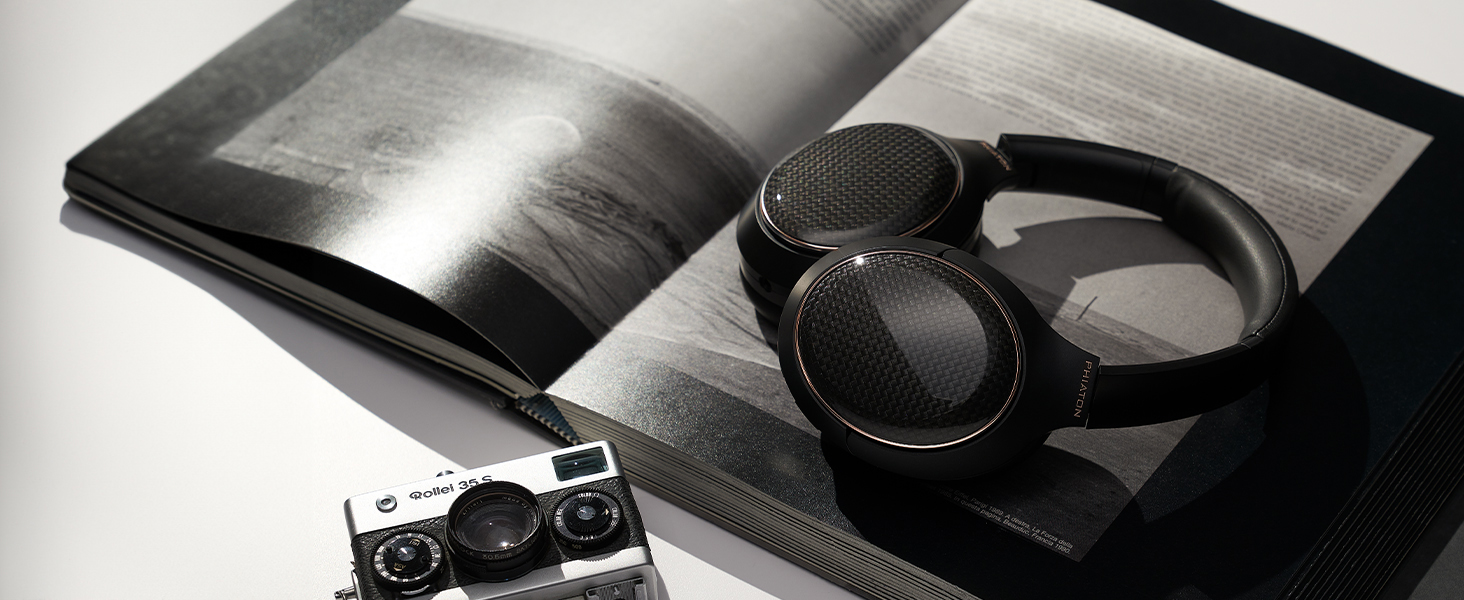
Image: Visual representation of the headphones' extended battery life.
בלועטאָאָטה פּערינג
צו פֿאַרבינדן אייערע קאָפּהערער צו אַ בלוטוט-פֿאַרשטאַרקטן מיטל:
- מאַכן זיכער אַז די כעדפאָונז זענען פּאַוערד אַוועק.
- דריק און האַלט דעם פּאַוער קנעפּל ביז דער LED אינדיקאַטאָר בלינקט בלוי און רויט אָלטערנאַטיוולי, וואָס ווײַזט אויף פּערינג מאָדע.
- אויף דיין מיטל, געבן בלועטאָאָטה און זוכן פֿאַר בנימצא דעוויסעס.
- Select "Phiaton 900 Legacy" from the list.
- אַמאָל פארבונדן, וועט די LED אינדיקאַטאָר בליצן בלוי פּעריִאָדיש.
אַפּערייטינג די כעדפאָונז
מאַכט אויף / אַוועק
- מאַכט אויף: Press and hold the Power button for approximately 2 seconds until the LED indicator lights up blue.
- מאַכט אַוועק: Press and hold the Power button for approximately 3 seconds until the LED indicator lights up red and then turns off.
Digital Hybrid Noise-Canceling (ANC)
The Phiaton 900 Legacy features advanced digital hybrid noise-canceling to reduce ambient sound.
- אַקטאַווייט ANC: Press the ANC button once. The ANC LED indicator will light up green.
- דיאַקטיווייט ANC: Press the ANC button again. The ANC LED indicator will turn off.

Image: Visual representation of the digital hybrid noise-canceling technology in action.
ריר קאָנטראָלס
Manage your audio playback and calls using the intuitive touch panel on the right earcup.
- באַנד אַרויף: Swipe up on the touch panel.
- באַנד אַראָפּ: Swipe down on the touch panel.
- ווייַטער שפּור: Swipe forward (right) on the touch panel.
- פֿריִערדיקע שפּור: Swipe backward (left) on the touch panel.
- שפּיל / פּויזע: טאָפּל-טאַפּ די צענטער פון די טאָוטש פּאַנעל.
Smart Play & Pause
The headphones automatically pause music when removed and resume when placed back on your head.

Image: A user demonstrating the smart play and pause feature by removing and wearing the headphones.
מולטיפּאָינט קאַנעקשאַן
Connect your headphones to two Bluetooth devices simultaneously and switch between them seamlessly.
- פּאָר די כעדפאָונז מיט דער ערשטער מיטל.
- שטעלט די כעדפאָונז ווידער אין פּערינג מאָדע און פּערט זיי מיטן צווייטן דעווייס.
- The headphones will automatically switch audio sources based on active playback or incoming calls.

Image: Diagram showing headphones connected to a laptop and a smartphone simultaneously.
מאַכן און באַקומען קאַללס
The integrated Qualcomm cVc dual microphones ensure clear voice transmission during calls.
- ענטפֿערן / סוף רופן: טאָפּל-טאַפּ די צענטער פון די טאָוטש פּאַנעל.
- אָפּוואַרפן רופן: Press and hold the center of the touch panel for 2 seconds.
- שטימע אַססיסטאַנט: Triple-tap the center of the touch panel to activate your device's voice assistant (e.g., Siri, Google Assistant).

Image: Icon representing Qualcomm cVc technology for enhanced call clarity.
Wired Mode (Everplay-X)
Use the included 3.5mm audio cable for a wired connection, which also conserves battery life.
- פֿאַרבינדט איין עק פֿון דעם 3.5 מ״מ אַודיאָ קאַבל צום אַודיאָ דזשעק אויף די כעדפֿאָונז.
- Connect the other end to your audio source's 3.5mm output.
- The headphones can be used in wired mode even if the battery is depleted.

Image: Icon representing the Everplay-X feature, allowing wired audio playback.
וישאַלט
Proper care will extend the life of your Phiaton 900 Legacy headphones.
- רייניקונג: ווישט די כעדפאָונז מיט אַ ווייכן, טרוקענעם שטאָף. ניצט נישט קיין שאַרפע כעמיקאַלן אדער שאַרפע מאַטעריאַלן.
- סטאָרידזש: When not in use, store the headphones in the provided carrying case to protect them from dust and damage.
- באַטערי זאָרגן: פֿאַרמײַדט צו פֿולשטענדיק אויסלאָדן די באַטעריע אָפֿט. לאָדט עס רעגולער אויף כּדי צו האַלטן די באַטעריע געזונט.
- אויער פּאַדס: The ear pads are made of high-quality memory foam for lasting comfort. Inspect them periodically for wear and tear.

Image: Headphones neatly folded and stored in their protective carrying case.
טראָובלעשאָאָטינג
אויב איר טרעפט פּראָבלעמען מיט אייערע כעדפאָונז, באַזירט זיך אויף די פאלגענדע געוויינטלעכע לייזונגען:
| פּראָבלעם | לייזונג |
|---|---|
| די קאָפּהערער ווערן נישט אנגעצינדן. | זיכער מאַכן אַז די באַטאַרייע איז אָנגעלאָדן. פֿאַרבינדט זיך צו אַ מאַכט מקור מיטן USB-C קאַבל. |
| קען נישט פארבינדן דורך בלוטוט. |
|
| קיין קלאַנג אָדער נידעריקע וואָלומען. |
|
| Noise-canceling is not effective. |
|
| די קוואַליטעט פון די רופן איז שלעכט. |
|
ספּעסאַפאַקיישאַנז
| שטריך | דעטאַל |
|---|---|
| מאָדעל נומער | PPU-BN0600BK01 |
| קאַנעקטיוויטי | בלועטאָאָטה 5.1 |
| בלועטאָאָטה קייט | אַרויף צו 33 פֿיס (10 מעטער) |
| דרייווער גרייס | Customized 40mm |
| כעדפאָונז אָפטקייַט רעספּאָנסע | 10 הערץ - 27 קילאָהערץ |
| מיקראָפאָן אָפטקייַט ענטפער | 50 הערץ - 4 קילאָהערץ |
| ימפּידאַנס | 32 אָהמס |
| ראַש קאָנטראָל | Digital Hybrid Active Noise Cancellation |
| באַטערי לעבן | אַרויף צו 43 שעה (מיט ANC אויף) |
| קאָנטראָל טיפּ | ריר, מעדיע קאָנטראָל |
| מיקראָפאָן טעכנאָלאָגיע | Qualcomm cVc Dual Microphones |
| אַודיאָ קאָדעק שטיצן | Qualcomm aptX HD |
| אויער פּלייסמאַנט | איבער אויער |
| מאַטעריאַל | פּלאַסטיק |
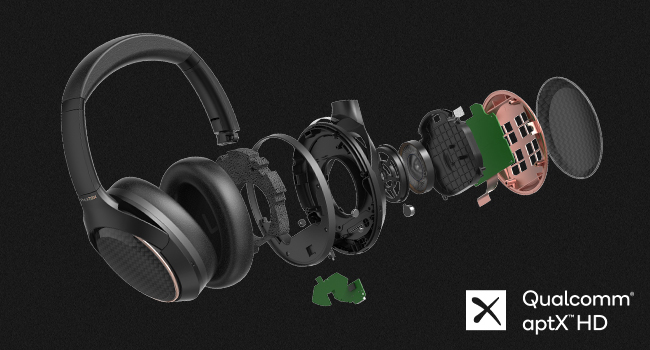
בילד: דעטאַלירט view of the internal components, including the customized 40mm speaker driver.
Image: Qualcomm aptX HD logo, signifying high-definition audio streaming capability.
וואָראַנטי און שטיצן
וואָראַנטי אינפֿאָרמאַציע
The Phiaton 900 Legacy headphones come with a 1-יאָר לימיטעד וואָראַנטי from the date of purchase. This warranty covers manufacturing defects in materials and workmanship. It does not cover damage caused by misuse, accidents, unauthorized modifications, or normal wear and tear.
ביטע האַלטן דיין דערווייַז פון קויפן פֿאַר וואָראַנטי קליימז.
קונה שטיצן
For technical assistance, warranty claims, or product inquiries, please visit the official Phiaton webפּלאַץ אָדער קאָנטאַקט זייער קונה סערוויס אָפּטיילונג.
אָנליין שטיצן: www.phiaton.com/support
פּראָדוקט ווידיאס
900 Legacy Features Introduction
Video: An official introduction to the key features and design of the Phiaton 900 Legacy headphones.