
Amazon Echo Show 5 (2nd Gen, 2021 release)
Amazon Echo Show 5 (2טע דור, 2021 אויסגאבע) באַניצער מאַנואַל
Model: Echo Show 5 (2nd Gen, 2021 release) | Brand: Amazon
הקדמה
The Amazon Echo Show 5 (2nd Gen, 2021 release) is a smart display designed to simplify your daily routines and enhance your connected home experience. This certified refurbished device has been tested and certified to function like new, offering all the features of a new unit.
With Alexa built-in, you can manage your day, stay entertained, and connect with others using just your voice. The compact 5.5-inch screen provides visual feedback for alarms, timers, news, video calls, and more.

Image: The Echo Show 5 on a nightstand, illustrating its use as a smart display for time and daily information.
סעטאַפּ
Setting up your Echo Show 5 is a straightforward process. The device is designed for simple setup, allowing you to connect to your Wi-Fi network with ease.
וואָס איז אין די קעסטל:
- עקאָ שאָו 5 מיטל
- Glacier White power adapter (15W) with cable (4.9 ft.)
- שנעל אָנהייב פירער
ערשט סעטאַפּ סטעפּס:
- צאַפּן אין: פֿאַרבינדט דעם מאַכט אַדאַפּטער צו אייער Echo Show 5 און שטעקט עס אין אַ וואַנט ווענטיל.
- גיי די אינסטרוקציעס אויף דער סקרין: The device will power on and guide you through the initial setup process on its touch screen.
- פאַרבינדן צו Wi-Fi: Select your Wi-Fi network from the list and enter the password. The Echo Show 5 supports dual-band 802.11a/b/g/n/ac Wi-Fi networks.
- Sign In to Amazon Account: לאָגין מיט דיין אַמאַזאָן חשבון קראַדענטשאַלז.
- פערזענליכען סעטינגס: Customize settings such as time zone, device name, and privacy preferences.
- דאַונלאָוד אַלעקסאַ אַפּ: For full functionality and advanced controls, download the Alexa app on your Fire OS, Android, or iOS device. The app is also accessible via a web בלעטערער.
Amazon's Wi-Fi simple setup technology helps streamline the connection process, making it easier to get your device up and running quickly.
אפערירן אייער עקאָ שאָו 5
The Echo Show 5 offers a wide range of functionalities, primarily controlled by voice commands to Alexa and through its interactive touch screen.
Daily Assistance:
- אַלאַרמס און טיימערס: Set alarms and timers with voice commands.
- Calendar & News: Check your calendar, get news updates, and view וועטער פאָרקאַסץ.
- רוטין: Create routines to automate actions, such as gradually turning on compatible lights in the morning.
סמאַרט היים קאָנטראָל:
Manage compatible smart home devices using the interactive display, your voice, or motion detection.
- געבויט-אין אַפּאַראַט: Use the 2 MP camera to look in on your home when you're away.
- דיווייס קאָנטראָל: Control lights, cameras, and other smart devices.

Image: A man carrying a laundry basket, with an Echo Show 5 in the foreground, demonstrating how the device can be used to control smart home devices, possibly through motion detection.
קאָמוניקאַציע:
- ווידעא רופן: Make video calls to friends and family who have the Alexa app or an Echo device with a screen using the 2 MP camera.
- אָנזאָגן: Send announcements to other compatible devices in your home.

Image: The Echo Show 5 displaying an active video call, highlighting its communication capabilities.
פֿאַרווייַלונג:
- סטרימינג: Play TV shows and movies from services like Prime Video and Netflix on the 5.5-inch screen.
- מוזיק און אַודיאָ: Stream music from Amazon Music, Apple Music, Spotify, and others.
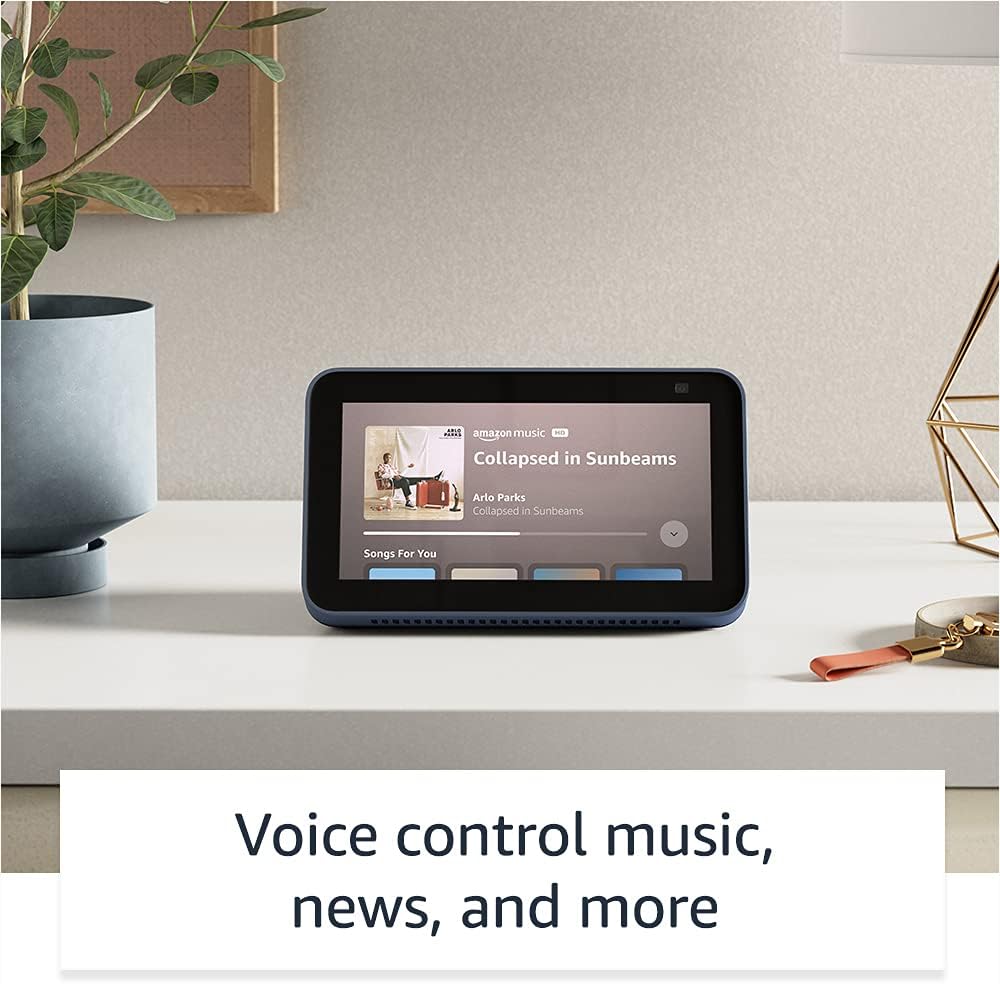
Image: The Echo Show 5 displaying a music playback screen, demonstrating its entertainment features.
פערזענליכען:
- דיגיטאַל פאָטאָ ראַם: Use Amazon Photos to turn your home screen into a digital photo frame.

Image: The Echo Show 5 displaying a personal photo, illustrating its use as a digital photo frame.
פּריוואַטקייט פֿעיִקייטן:
די עקאָ שאָו 5 איז דיזיינד מיט קייפל לייַערס פון פּריוואַטקייט קאָנטראָלס:
- Mic/Camera Off Button: א פיזישער קנעפּל צו עלעקטראָניש אָפּשטעקן די מיקראָפאָנען און קאַמעראַ.
- איינגעבויטע קאַמעראַ שאַטער: A physical shutter to cover the camera lens.
- Voice Recording Controls: פיייקייט צו view און אויסמעקן אייערע שטימע רעקארדירונגען.
- וועק ווארד טעכנאָלאָגיע: The device only begins listening after detecting your chosen wake word.
- סטרימינג אינדיקאַטאָרן: וויזועלע אינדיקאַטאָרן ווייַזן ווען אַודיאָ אָדער ווידעאָ ווערט געסטרימט צו די וואָלקן.

בילד: א נאָענטע בילד view of the Echo Show 5's top, highlighting the physical camera shutter button for privacy control.
אַקסעסאַביליטי פֿעיִקייטן:
The Echo Show 5 includes various accessibility features to personalize Alexa to your abilities. These can be accessed via סעטטינגס → צוטריטלעכקייט אויף דיין מיטל.
- צאַפּן צו אַלעקסאַ: אינטעראַקט מיט אַלעקסאַ דורך פאַרבינדן דורך אויף-פאַרשטעלן טיילז אָדער אַ קלאַוויאַטור.
- אַדאַפּטיוו צוהערן: גיט מער צייט צו ענדיגן רעדן איידער אַלעקסאַ ענטפערט.
- בילכער רעדן קורס: קאָנטראָליר ווי שנעל אָדער פּאַמעלעך אַלעקסאַ רעדט.
- אונטערשריפטן: אַלעקסאַ קעפּטשאַנינג, רוף קעפּטשאַנינג, און פארמאכט קעפּטשאַנינג צושטעלן טעקסט פֿאַר געשטיצט אינהאַלט.
- ווייזן און דערציילן: העלפט אידענטיפיצירן פּראָדוקטן פֿאַר באַניצער וואָס זענען בלינד אָדער וויזועל באַהאַנדיקעט.
- קולView סקרין לייענער: Enables access for blind or visually impaired users.
- סקרין פֿאַרגרעסערער: זום אריין/אויס און פאן ארום דעם עקראן.
- מעלדן ווען נאָענט: שפּילט אָנזאָג קלאַנגען ווען עס ווערט דעטעקטירט לעבן דעם מיטל.
- קינדל לייען הויך: אַלעקסאַ קען לייענען אייערע קינדלע ביכער הויך.
- טעקסט אין רעאל-צייט: Type live text during a video call.
- נאָך סעטטינגס פֿאַר קאָליר ינווערסיע, קאָליר קאָרעקציע, בעטן געזונט, און מער.
וישאַלט
The Certified Refurbished Echo Show 5 has undergone rigorous testing and certification to ensure it looks and works like new. Regular maintenance is minimal.
- רייניקונג: Gently wipe the screen and device exterior with a soft, lint-free cloth. Avoid abrasive cleaners or sprays.
- ווייכווארג דערהייַנטיקונגען: Ensure your device is connected to Wi-Fi to receive automatic software security updates, which are guaranteed for at least four years after the device is last available for purchase as a new unit.
טראָובלעשאָאָטינג
If you encounter issues with your Echo Show 5, consider the following general troubleshooting steps:
- מאַכט ציקל: Unplug the device from the power outlet, wait for 30 seconds, and then plug it back in.
- קוק די Wi-Fi קאַנעקשאַן: Ensure your Wi-Fi network is active and the device is connected. You can check network status in the device settings.
- Verify Internet Connectivity: Confirm your internet service is working by testing other devices on the same network.
- Check Microphone/Camera: Ensure the mic/camera off button is not activated and the camera shutter is open if you are trying to use these features.
- אַלעקסאַ אַפּ: Use the Alexa app on your smartphone or tablet to manage device settings, check for updates, and access further support resources.
- קול קאַמאַנדז: Speak clearly and ensure you are within range of the device's microphones.
For more detailed troubleshooting or specific issues, refer to the help section within the Alexa app or visit the official Amazon support webפּלאַץ.
ספּעסאַפאַקיישאַנז
| שטריך | דעטאַל |
|---|---|
| גרייס | 5.8 "רענטגענ 3.4" רענטגענ 2.9 "(148 מם רענטגענ 86 מם רענטגענ 73 מם) |
| וואָג | 14.5 אַז (410 גראַמז) |
| ווייַז | 5.5" פאַרבינדן פאַרשטעלן |
| אַפּאַראַט | 2 מעגאַפּיקסעל קאַמעראַ מיט אַן איינגעבויטן שאַטער |
| וויפי קאַנעקטיוויטי | Dual-band wifi (802.11a/b/g/n/ac). Does not support ad-hoc networks. |
| בלועטאָאָטה קאַנעקטיוויטי | A2DP support for audio streaming; AVRCP for voice control of connected mobile devices. PIN-code speakers not supported. |
| אַודיאָ | פול-רעינדזש 1.65” איינגעבויטער רעדנער |
| פּראַסעסער | MediaTek MT 8163 |
| דור | Echo Show 5 (2nd Gen) - 2021 release |
| שפּראַך | אַלעקסאַ רעדט ענגליש און שפּאַניש |
וואָראַנטי און שטיצן
Your Certified Refurbished Echo Show 5 comes with the same limited warranty as a new device. For specific details regarding your warranty, please refer to the documentation included with your device or visit the official Amazon website for Certified Refurbished Amazon devices.
For customer support, troubleshooting, and to manage your device settings, utilize the Alexa app on your compatible smartphone or tablet. You can also find extensive support resources and FAQs on the Amazon support webפּלאַץ.
ווייכווארג זיכערהייט דערהייַנטיקונגען: די דעווייס באקומט גאראנטירטע ווייכווארג זיכערהייט אפדעיטס ביז לפחות פיר יאר נאכדעם וואס די דעווייס איז לעצט בנימצא פאר קויפן אלס א נייע איינהייט אויף עמעזאן'ס webזייטלעך.
Ask a question about this manual
Ask about setup, troubleshooting, compatibility, parts, safety, or missing instructions. Manuals+ will review the question and use this page’s manual context to help answer it.