
1. הקדמה
The Ewent EW1538 Dual Monitor Desk Mount is designed to create an ergonomic and space-saving workspace. This gas spring-powered desk mount allows you to position two monitors (13-27 inches, 2-7 kg each) at your ideal height and viewing angle with ease. Its flexible adjustments help reduce strain on your neck, back, and shoulders, promoting a more comfortable and productive environment. The integrated cable management system keeps your workspace tidy.

Image 1.1: Ewent EW1538 Dual Monitor Desk Mount without monitors.
2. זיכערקייַט אינפֿאָרמאַציע
Please read all instructions carefully before assembly and use. Failure to follow these instructions may result in property damage, serious injury, or death.
- וואָג קאַפּאַציטעט: Do not exceed the maximum weight capacity of 7 kg (15.4 lbs) per monitor. Ensure your monitors are within the specified weight range.
- מאָניטאָר גרייס: This mount is suitable for monitors between 13 and 27 inches.
- VESA קאַמפּאַטאַבילאַטי: Ensure your monitors have VESA mounting patterns (75x75mm or 100x100mm).
- שרייַבטיש גרעב: Verify your desk is thick enough and structurally sound to support the combined weight of the mount and monitors.
- פּינטש ווייזט: Be aware of moving parts and potential pinch points during assembly and adjustment. Keep hands clear.
- פֿאַרזאַמלונג: Assemble the product exactly as described in this manual. Do not modify the mount.
- קינדער: האַלט קינדער אַוועק פֿון דער פֿאַרזאַמלונג־געגנט. קליינע טיילן קענען זײַן אַ דערשטיקונגס־געפֿאַר.
3. פּעקל אינהאַלט
Before assembly, ensure all parts are present and undamaged. If any parts are missing or damaged, contact your retailer for assistance.
- שרייַבטיש באַזע
- הויפּט פּאָול
- Dual Monitor Arm Assembly
- וועסאַ מאָונטינג פּלאַטעס (x2)
- Hardware Kit (screws, washers, spacers)
- Allen Keys / Wrenches
- קאַבלע מאַנאַגעמענט קליפּס
4. סעטאַפּ אינסטרוקציעס
Follow these steps to assemble and install your Ewent EW1538 Dual Monitor Desk Mount.
4.1. Attach Base to Pole
- Place the desk base on a stable surface.
- Insert the main pole into the designated slot on the desk base.
- Secure the pole to the base using the provided screws and an Allen key from underneath the base. Tighten firmly.
4.2. Attach Monitor Arm Assembly to Pole
- Slide the dual monitor arm assembly onto the main pole.
- Adjust the arm to your desired initial height and secure it by tightening the locking screw on the back of the arm assembly with an Allen key.

בילד 4.1: איבערview of the monitor mount components and assembly.
4.3. Attach VESA Plates to Monitors
- לייגט פֿאָרזיכטיק דעם מאָניטאָר מיטן פּנים אַראָפּ אויף אַ ווייכער, ריינער ייבערפֿלאַך.
- באַפעסטיקט אַ VESA מאָונטינג פּלאַטע צו דער הינטערשטער זייט פון יעדן מאָניטאָר מיט די פּאַסיקע שרויפן און וואַשערס פון די האַרדווער קיט. מאַכט זיכער אַז די שרויפן זענען פעסט צוגעצויגן אָבער נישט צו שטאַרק צוגעצויגן.

Image 4.2: Detail of VESA plate attachment to a monitor.
4.4. Mount Monitors to Arms
- With assistance, carefully lift each monitor and slide the VESA plate attached to the monitor onto the corresponding arm bracket.
- Ensure the monitor is securely seated on the bracket. Some brackets may have a quick-release or locking mechanism; engage it if present.
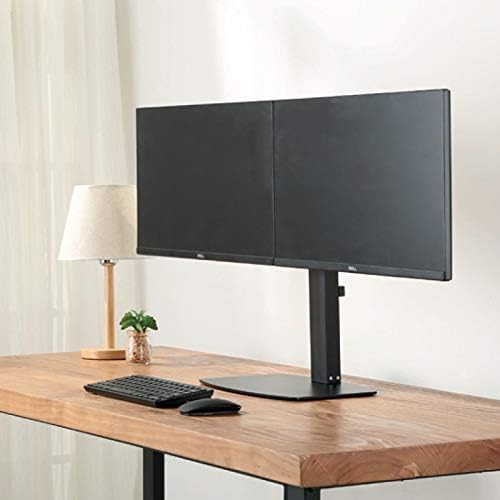
בילד 4.3: פראָנט view of two monitors mounted on the desk stand.
4.5. סטרויערן גאַז ספּרינג שפּאַנונג
- The gas spring tension may need adjustment to properly support your monitor's weight.
- Locate the tension adjustment screw on the arm (usually near the VESA plate or the arm pivot point).
- If the monitor sags, turn the screw clockwise to increase tension. If the monitor floats up too easily, turn the screw counter-clockwise to decrease tension. Adjust until the monitor stays in place when moved.
4.6. קאַבלע מאַנאַגעמענט
- Route your monitor cables (power, video) through the integrated cable management clips or channels on the monitor arms and down the main pole.
- This helps keep your workspace organized and prevents cable clutter.
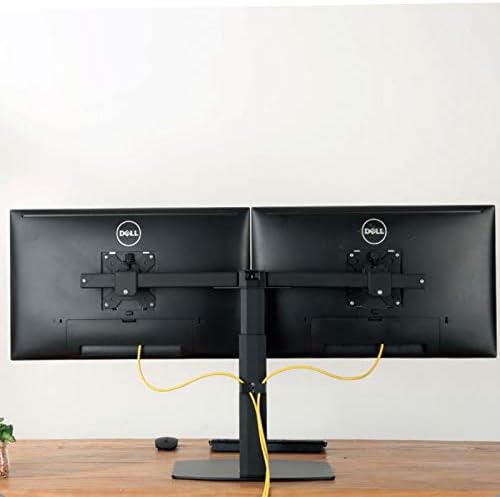
בילד 4.4: דערציען view illustrating cable management with monitors mounted.
5. אַפּערייטינג ינסטרוקטיאָנס
The Ewent EW1538 offers various adjustments for optimal viewאין טרייסט.
- הייך אַדזשאַסטמאַנט: Gently push or pull the monitor up or down to adjust its height. The gas spring mechanism will hold it in place.
- טילט אַדזשאַסטמאַנט: Tilt the monitor screen up or down to reduce glare and find your preferred viewינג ווינקל.
- סוויוואַל אַדזשאַסטמאַנט: Swivel the monitor left or right to share your screen or adjust your viewינג שטעלע.
- ראָוטיישאַן: דריי דעם מאָניטאָר 360 גראַד צו באַשטימען צווישן לאַנדשאַפט און פּאָרטרעט אָריענטאַציעס.

Image 5.1: Monitors adjusted to different orientations (landscape and portrait).
6. וישאַלט
Regular maintenance ensures the longevity and proper function of your monitor mount.
- רייניקונג: Clean the mount with a soft, damp שטאָף. פֿאַרמײַדט אַברייסיוו רייניגער אָדער סאָלווענטן.
- טשעק קאַנעקשאַנז: קאָנטראָלירט פּעריִאָדיש אַלע שרויפן און פֿאַרבינדונגען צו זיכער מאַכן אַז זיי בלייבן פֿעסט. פֿעסטשטײַערט ווידער אויב נייטיק.
- גאז פרילינג: The gas spring is designed for long-term use and generally requires no maintenance. If adjustment becomes difficult, re-check the tension setting.
7. טראָובלעשאָאָטינג
If you encounter issues with your monitor mount, refer to the following common solutions:
| פּראָבלעם | מעגלעך סיבה | לייזונג |
|---|---|---|
| Monitor sags or drops | Gas spring tension is too low for monitor weight. | Increase gas spring tension by turning the adjustment screw clockwise. |
| Monitor floats up too easily | Gas spring tension is too high for monitor weight. | Decrease gas spring tension by turning the adjustment screw counter-clockwise. |
| Monitors are not level | Minor height discrepancy between arms or VESA plates. | Adjust the individual VESA plate height or arm tilt to level the monitors. |
| באַרג פילט זיך נישט סטאַביל | Base screws are loose or desk is not sturdy. | Ensure all assembly screws are tightened. Verify desk stability. |
8. ספּעסאַפאַקיישאַנז
- מאָדעל: עוו 1538
- סאָרט: Ewent
- סקרין גרייס קאַמפּאַטאַבילאַטי: 13 - 27 אינטשעס
- וואָג קאַפּאַציטעט: 2 - 7 kg (4.4 - 15.4 lbs) per monitor
- VESA קאַמפּאַטאַבילאַטי: 75 קס 75 מם, 100 קס 100 מם
- באַוועגונג: Height adjustment (gas spring), Tilt (up to 15 degrees), Swivel, 360° Rotation
- מאַטעריאַל: דוראַבאַל מעטאַל און פּלאַסטיק קאַנסטראַקשאַן
- קאָליר: שוואַרץ
- פּראָדוקט וואָג: בעערעך 6 קג (13.2 לבס)
9. וואָראַנטי און שטיצן
For warranty information or technical support, please refer to the documentation provided with your purchase or visit the official Ewent webזייטל. קאָנטאַקט דעטאַלן פֿאַר קונה סערוויס קען מען טיפּיש געפֿינען דאָרט.