
1. הקדמה
This manual provides detailed instructions for the safe installation, operation, and maintenance of your Olucia Dico IP65 White Recessed Veranda Spotlights. Please read this manual thoroughly before installation and retain it for future reference. These spotlights are designed for both indoor and outdoor use, including bathrooms, thanks to their IP65 rating.
2. זיכערקייַט אינסטרוקציעס
- עלעקטריקאַל זיכערקייַט: Installation must be performed by a qualified electrician or competent person in accordance with local electrical codes and regulations. Always disconnect power at the main circuit breaker before installation or maintenance.
- Voltage: פאַרזיכערן די מאַכט צושטעלן וואָלtage שטימט מיט די באדערפענישן וואס זענען ספעציפירט אויפן פראדוקט עטיקעט.
- IP65 שאַץ: The IP65 rating indicates protection against dust ingress and low-pressure water jets from any direction. While suitable for wet locations, avoid submerging the product in water.
- היץ: Do not cover the spotlights with insulating material unless specifically designed for it. Ensure adequate ventilation around the fixtures.
- שעדיקן: Do not operate the product if any part is damaged. Contact customer support for replacement parts.
- רייניקונג: ניצן אַ ווייך, טרוקן שטאָף פֿאַר רייניקונג. דו זאלסט נישט נוצן אַברייסיוו קלינערז אָדער סאָלוואַנץ.
3. פּעקל אינהאַלט
באַשטעטיקן אַז אַלע קאָמפּאָנענטן זענען פאַראַן איידער איר הייבט אָן די אינסטאַלאַציע:
- Recessed Spotlights (Quantity: 8)
- מאַכט צושטעלן אַפּאַראַט
- Connection Set (Splitter/Hub)
- ווייַט קאָנטראָל
- באַניצער מאַנואַל (דעם דאָקומענט)
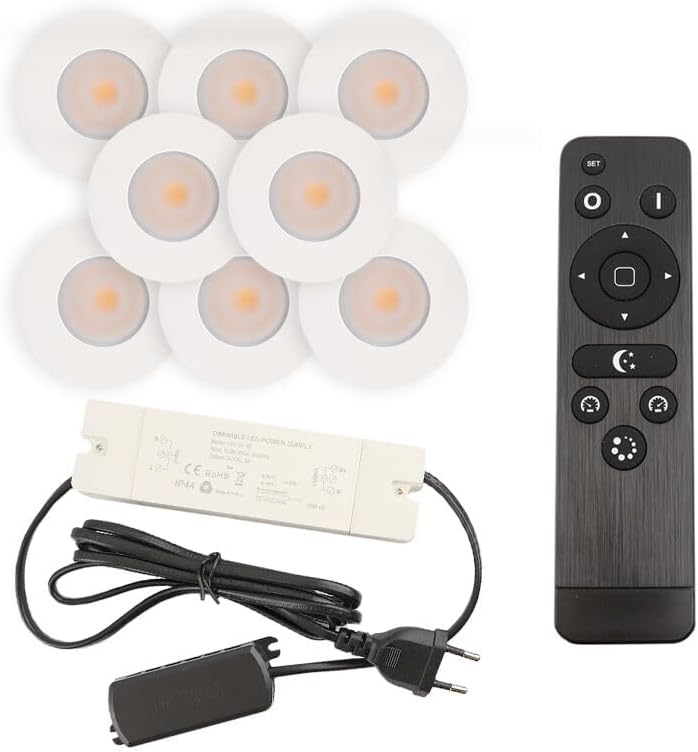
בילד 3.1: איבערview of the Olucia Dico IP65 spotlight set, including eight white recessed spotlights, a power supply unit, a connection hub, and a remote control.
4. סעטאַפּ און ייַנמאָנטירונג
Follow these steps for proper installation. Ensure power is disconnected before starting.
4.1 פּריפּערינג די ינסטאַלירונג שטח
- קלייַבן אָרט: Select appropriate locations for each spotlight, ensuring sufficient space behind the mounting surface for the fixture and wiring.
- בויער האָלעס: Drill mounting holes of the specified diameter (refer to specifications for exact dimensions, typically around 30-32mm for a 36mm outer diameter spotlight) in the ceiling or veranda structure.
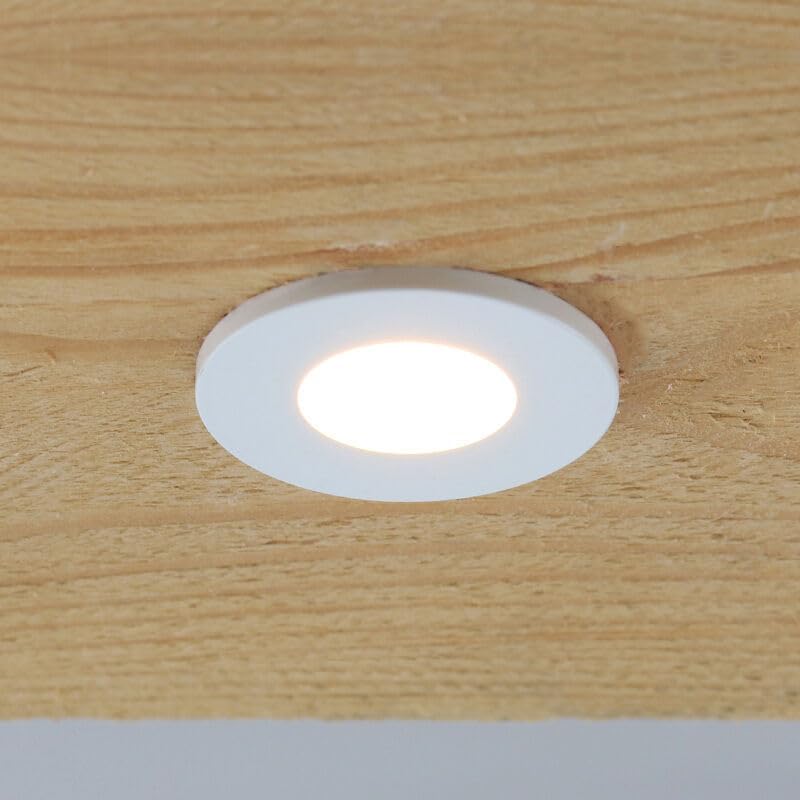
בילד 4.1: An Olucia Dico spotlight seamlessly integrated into a wooden ceiling panel, demonstrating a typical installed appearance.

בילד 4.2: א דיטיילד view of a single Olucia Dico recessed spotlight, highlighting its round, white design and integrated light source.
4.2 וויירינג און פֿאַרבינדונג
- Connect Spotlights to Hub: Each spotlight has a small connector. Plug these connectors into the corresponding ports on the connection hub. Ensure a secure fit.
- Connect Hub to Power Supply: Connect the output cable from the connection hub to the input cable of the power supply unit.
- Connect Power Supply to Mains: Plug the power supply unit into a standard electrical outlet.

בילד 4.3: The power supply unit and the multi-port connection hub, illustrating how the individual spotlights are connected to the main power source.
4.3 Installing the Spotlights
- Insert Spotlights: Gently push each spotlight into its drilled hole. The spring clips on the sides of the spotlight will hold it securely in place.
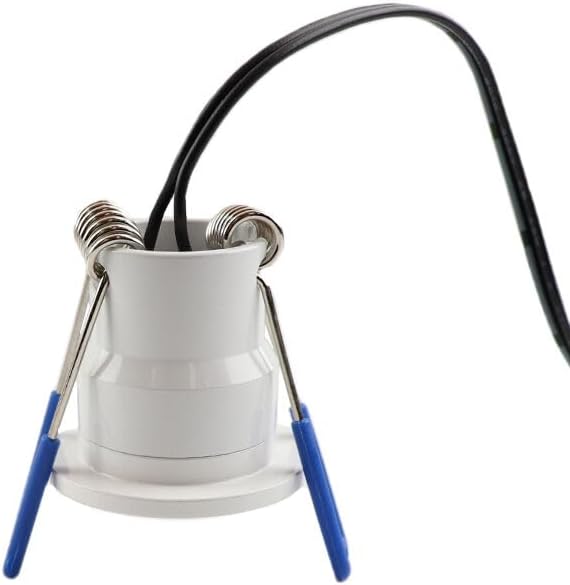
בילד 4.4: The back of an Olucia Dico spotlight, clearly showing the spring-loaded clips used for secure recessed installation.
Once all spotlights are installed and connected, restore power at the main circuit breaker.
5. אַפּערייטינג ינסטרוקטיאָנס
The Olucia Dico spotlights are controlled using the included remote control.
5.1 רימאָוט קאָנטראָל פאַנגקשאַנז

בילד 5.1: The remote control for the Olucia Dico spotlights, showing its various buttons and the battery compartment on the reverse side.
- SET קנעפּל: Used for pairing the remote with the spotlights (if not pre-paired) or for advanced settings. Refer to specific pairing instructions if lights do not respond.
- O (On) Button: Turns the spotlights ON.
- I (Off) Button: Turns the spotlights OFF.
- פײַל קנעפּלעך (אַרויף/אַראָפּ): Adjust brightness levels. Up increases brightness, Down decreases brightness.
- Arrow Buttons (Left/Right): Adjust color temperature (if applicable, for models with tunable white light) or cycle through preset modes.
- Crescent Moon Button: Activates a low-light/night mode setting.
- Clock Buttons: May function as timer settings (e.g., 30 min, 60 min auto-off).
- Starburst/Mode Button: Cycles through different lighting scenes or effects.
ייַנמאָנטירונג פון באַטאַרייע: The remote control requires AAA batteries. Open the battery compartment on the back of the remote and insert batteries according to the polarity markings.
6. וישאַלט
- רייניקונג: Ensure the power is off before cleaning. Wipe the spotlights with a soft, slightly damp שטאָף. דו זאלסט נישט נוצן האַרב קעמיקאַלז אָדער אַברייסיוו מאַטעריאַלס.
- דורכקוק: Periodically inspect the wiring and fixtures for any signs of damage or wear. If damage is found, disconnect power and contact a qualified electrician or customer support.
- געפירט לייפספּאַן: The integrated LED light sources are designed for long life and are not user-replaceable.
7. טראָובלעשאָאָטינג
| פּראָבלעם | מעגלעך סיבה | לייזונג |
|---|---|---|
| לייץ טאָן ניט קער אויף. | No power supply; remote control batteries depleted; remote not paired; loose connection. | Check main power switch/circuit breaker. Replace remote batteries. Re-pair remote (refer to SET button instructions). Check all wiring connections. |
| ליכטער פליקערן אדער טונקען זיך אומגעריכט. | Unstable power supply; faulty connection; remote interference. | Ensure stable power. Check connections. Try operating from closer distance or away from other wireless devices. |
| די ווײַטקאָנטראָל רעאַגירט נישט. | Batteries depleted; remote not paired; obstruction between remote and receiver. | Replace batteries. Re-pair remote. Ensure clear line of sight to the receiver (usually integrated into the power supply or hub). |
8. טעכניש ספּעסאַפאַקיישאַנז
| שטריך | דעטאַל |
|---|---|
| סאָרט | אָלוסיאַ |
| מאָדעל נומער | SRC80000000C045 |
| Product Dimensions (per spotlight) | 1 x 3.6 x 3.5 cm (10L x 36B x 35H millimeter) |
| ינגרעסס פּראַטעקשאַן (IP) שאַץ | IP65 (שטויב-דיכט, באַשיצט קעגן נידעריק-דרוק וואַסער דזשעטס) |
| קאָליר | ווייַס |
| פאָרעם | קייַלעכיק |
| נומער פון זאכן | 8 spotlights per set |
| פאַבריקאַנט | אָלוסיאַ |
9. וואָראַנטי אינפֿאָרמאַציע
Olucia products are manufactured to high-quality standards. For specific warranty terms and conditions, please refer to the warranty card included with your purchase or visit the official Olucia webזייטל. האַלט דיין קויפן באַווייַז פֿאַר וואָראַנטי קליימז.
10. קונה שטיצן
If you encounter any issues or have questions regarding your Olucia Dico spotlights, please contact Olucia customer support through their official website or the retailer where the product was purchased. Please have your model number (SRC80000000C045) and proof of purchase ready when contacting support.