
1. הקדמה
Thank you for choosing Senso Wireless Earbuds. These True Wireless Stereo (TWS) earphones are designed for an active lifestyle, featuring a secure fit, high-quality audio, and sweatproof construction. This manual will guide you through the setup, operation, and maintenance of your new earbuds.
2. וואָס איז אין דער קעסטל
- Senso Wireless Earbuds (Left and Right)
- פּאָרטאַטיוו טשאַרדזשינג קאַסע
- וסב טשאַרדזשינג קאַבלע
- באַניצער גייד
- קייפל גרייסן פון אויער עצות
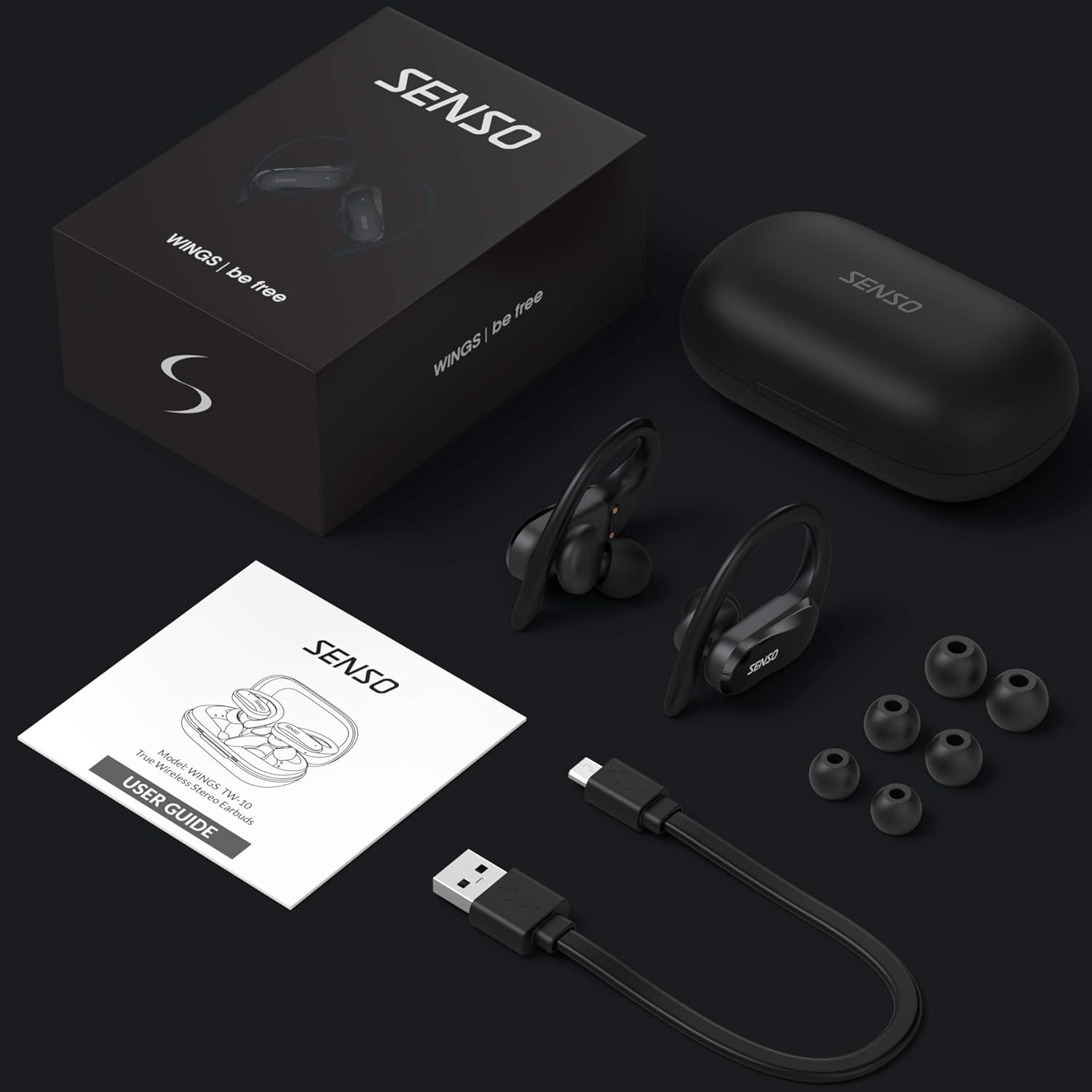
Image: The Senso Wireless Earbuds packaging, displaying the earbuds, charging case, user guide, USB charging cable, and various ear tip sizes.
3. פּראָדוקט איבערview
The Senso Wings TW10 earbuds are designed for comfort and performance, featuring advanced audio technology and a durable build.

בילד: אן עקספלאדירטע view of the earbud, illustrating the 13mm dynamic driver responsible for delivering premium sound quality with intense bass and dynamic range.

בילד: א דעטאַלירטע view of the earbud's internal circuitry, emphasizing the Bluetooth 5.0 chipset and CVC 8.0 Noise Cancellation Technology for stable connection and clear audio.

Image: Two scenarios demonstrating the earbuds' versatility: one earbud in use for mono mode (e.g., driving) and both earbuds for dual mode (e.g., binaural calls).

Image: The earbuds are shown resisting water splashes, indicating their IPX6 waterproof rating, suitable for sweat, water, and rain.
4. סעטאַפּ
4.1 אויפלאָדן די אויערקנעפּלעך און קעסטל
Before first use, fully charge the earbuds and the charging case. Place the earbuds into the charging case. Connect the USB charging cable to the case and a power source. The indicator lights on the case will show the charging status.
4.2 ערשטע פּאָרינג
- זייט זיכער אז אייערע אויערן-קנעפלעך זענען אויפגעלאדן.
- עפֿנט דעם טשאַרדזשינג קעסטל. די אויערקנעפּלעך וועלן זיך אויטאָמאַטיש אָנצינדן און אַרײַן אין פּערינג מאָדע.
- אויף אייער דעווייס (סמאַרטפאָן, טאַבלעט, אאז"וו), אַקטיווירט בלועטוט.
- זוכן פֿאַר available Bluetooth devices and select "SENSO Wings TW10" from the list.
- אַמאָל פארבונדן, וועט איר הערן אַן אַודיאָ פּראָמפּט, און די אויערקנעפּל אינדיקאַטאָר ליכט וועלן זיך טוישן.

Image: The earbuds are shown connecting to a smartphone, demonstrating the simple and fast pairing process upon removal from the charging case.
Video: An official product video demonstrating the features and setup of the Senso WINGS Ultra Durable Premium Audio Wireless Earbuds.
5. אַפּערייטינג ינסטרוקטיאָנס
5.1 טראָגן די אויערקנעפּלעך
Place the earbuds in your ears and adjust the ear hooks for a secure and comfortable fit. The 60-degree twist lock system ensures they stay in place during physical activity.

Image: A user demonstrating the secure fit of the earbuds with the 60-degree twist lock system, ideal for sports and exercise.
5.2 יקערדיק קאָנטראָלס
The earbuds feature touch-sensitive controls for media playback and call management. Refer to the detailed user guide included in the box for specific touch commands for functions such as play/pause, skip track, answer/end call, and voice assistant activation.
5.3 Mono or Dual Mode
You can use either earbud independently (mono mode) or both together (dual mode) for a stereo audio experience. This flexibility allows for awareness of your surroundings when needed.
5.4 רופן פאַנגקשאַנז
Each earbud is equipped with a microphone, enabling binaural calls for clear communication. Use the touch controls to answer, end, or reject calls.
6. וישאַלט
6.1 רייניקונג
- רייניקט רעגולער די אויערקנעפּלעך און די טשאַרדזשינג קעסטל מיט אַ ווייכן, טרוקענעם, לינט-פֿרייע שטאָף.
- אַראָפּנעמען די אויער־שפּיצן און רייניקן זיי מיט מילד זייף און וואַסער, און דערנאָך טרוקן גוט אויס איידער איר זיי צוריקבאַפעסטיקט.
- ויסמיידן ניצן אַברייסיוו קלינערז אָדער סאָלוואַנץ.
6.2 סטאָרידזש
- סטאָר די עאַרבודז אין זייער טשאַרדזשינג פאַל ווען ניט אין נוצן צו באַשיצן זיי און האַלטן זיי טשאַרדזשינג.
- האַלט דעם אַפּאַראַט אין אַ קיל, טרוקן אָרט, אַוועק פון עקסטרעמע טעמפּעראַטורן און דירעקט זונשייַן.
7. טראָובלעשאָאָטינג
7.1 פּראָבלעמען מיטן צוזאַמענשטעלן
- פאַרזיכערן אַז ביידע עאַרבודז זענען גאָר באפוילן.
- אויסלעשן בלועטוט אויף אייער דעווייס, און דערנאך עס צוריק אנצינדן.
- פֿאַרגעסט דעם דעווייס פֿון אייער בלועטוט ליסטע און פּרוּווט ווידער צו פּאָרן.
- If only one earbud connects, try resetting the earbuds (refer to the full user guide for specific reset instructions).
7.2 קיין קלאַנג אָדער נידעריקע באַנד
- קאָנטראָלירט די וואָלומען לעוועלס אויף ביידע אייער דעווייס און די אויערקנעפּלעך.
- זייט זיכער אז די אויערקנעפּלעך זענען ריכטיק אײַנגעזעצט אין אייערע אויערן.
- רייניקט יעדן שמוץ פון די אויערקנעפל רעדנערס און אויער עצות.
7.3 פּראָבלעמען מיטן אויפלאָדן
- באַשטעטיקן אַז דער טשאַרדזשינג קאַבל איז זיכער פארבונדן צו ביידע דעם קעסטל און די מאַכט מקור.
- זיכער מאַכן אַז די טשאַרדזשינג קאָנטאַקטן אויף די אויערקנעפּלעך און אינעווייניק פון די קעסטל זענען ריין און פריי פון שטערונגען.
- פרובירט אן אנדערן טשאַרדזשינג קאַבל אדער מאַכט אַדאַפּטער.
8. ספּעסאַפאַקיישאַנז
| שטריך | דעטאַל |
|---|---|
| מאָדעל נאָמען | Wings TW10 |
| קאַנעקטיוויטי טעכנאָלאָגיע | בלועטוט 5.0, וויירלעס |
| ווירעלעסס קאָמוניקאַציע טעכנאָלאָגיע | בלועטאָאָטה |
| ראַש קאָנטראָל | אַקטיוו ראַש קאַנסאַליישאַן |
| וואַסער קעגנשטעל מדרגה | וואָטערפּרוף (IPX6) |
| באַטעריע לעבן (אויערקנעפּלעך) | 8 שעה |
| גאַנץ שפּילצייט (מיט קעסטל) | אַרויף צו 30 שעה |
| אַודיאָ דרייווער גרייס | 10 מילאַמיטערז |
| ימפּידאַנס | 32 אָהמס |
| קאָנטראָל טיפּ | מעדיע קאָנטראָל |
| קאָנטראָל מעטאָד | ווייַט |
| אויער פּלייסמאַנט | אין אויער |
| פאָרם פאַקטאָר | אין אויער |
| מאַטעריאַל | סיליקאָנע |
| פּונקט וואָג | 7 אונסעס |

Image: The earbuds and charging case illustrating the extended playtime: 6 hours for the earbuds and up to 30 hours total with the portable charging case.
9. וואָראַנטי און שטיצן
Senso offers a standard warranty for its products. Additionally, you may be eligible for an extended warranty.
9.1 עקסטענדעד וואָראַנטי
To convert to a two-year extended warranty, visit www.sensoshop.com/warranty. This must be claimed within 7 days of receiving your product.
9.2 קונה שטיצן
For any product-related issues or inquiries, please contact Senso customer support. Details can be found on the warranty card included in your product packaging or on the official Senso webפּלאַץ.