
הקדמה
Thank you for choosing the Docooler HXSJ A876 Wired Gaming Mouse. This manual provides detailed instructions for setting up, operating, and maintaining your new gaming mouse. Please read this manual carefully before use to ensure optimal performance and longevity of your device.
פּראָדוקט פֿעיִקייטן
- אַדזשאַסטאַבאַל דפּי: Supports 800, 1600, 3200, and 6400 DPI settings for precise control.
- 7-Color Breathing Light: Synchronized lighting provides a dynamic visual effect.
- ערגאָנאָמיק פּלאַן: Engineered for comfort during extended use, fitting naturally in the palm.
- דויערהאפֿטע סוויטשעס: Equipped with high-performance mechanical micro-switches rated for 10 million clicks.
- אַנטי-גליטש סקראָלל ראָד: Designed for smooth and precise scrolling.
- ווייערד USB קאָנעקטיוויטי: Ensures stable and reliable performance.
פּעקל אינהאַלט
- 1 x Docooler HXSJ A876 Wired Gaming Mouse
- 1 x באַניצער מאַנואַל
סעטאַפּ
- Unpack the Docooler HXSJ A876 Wired Gaming Mouse and its accessories from the packaging.
- Locate an available USB port on your computer (PC or laptop).
- שטעקט אריין דעם USB קאַנעקטאָר פון דער מויז אין דעם USB פּאָרט.
- The mouse is plug-and-play and should be automatically recognized by your operating system. No additional drivers are typically required.
אַפּערייטינג ינסטראַקשאַנז
דפּי אַדזשאַסטמאַנט
The HXSJ A876 mouse features adjustable DPI settings, allowing you to switch sensitivity on the fly. Use the dedicated DPI buttons (DPI Loop + and DPI Loop -) located near the scroll wheel to cycle through the available DPI levels.
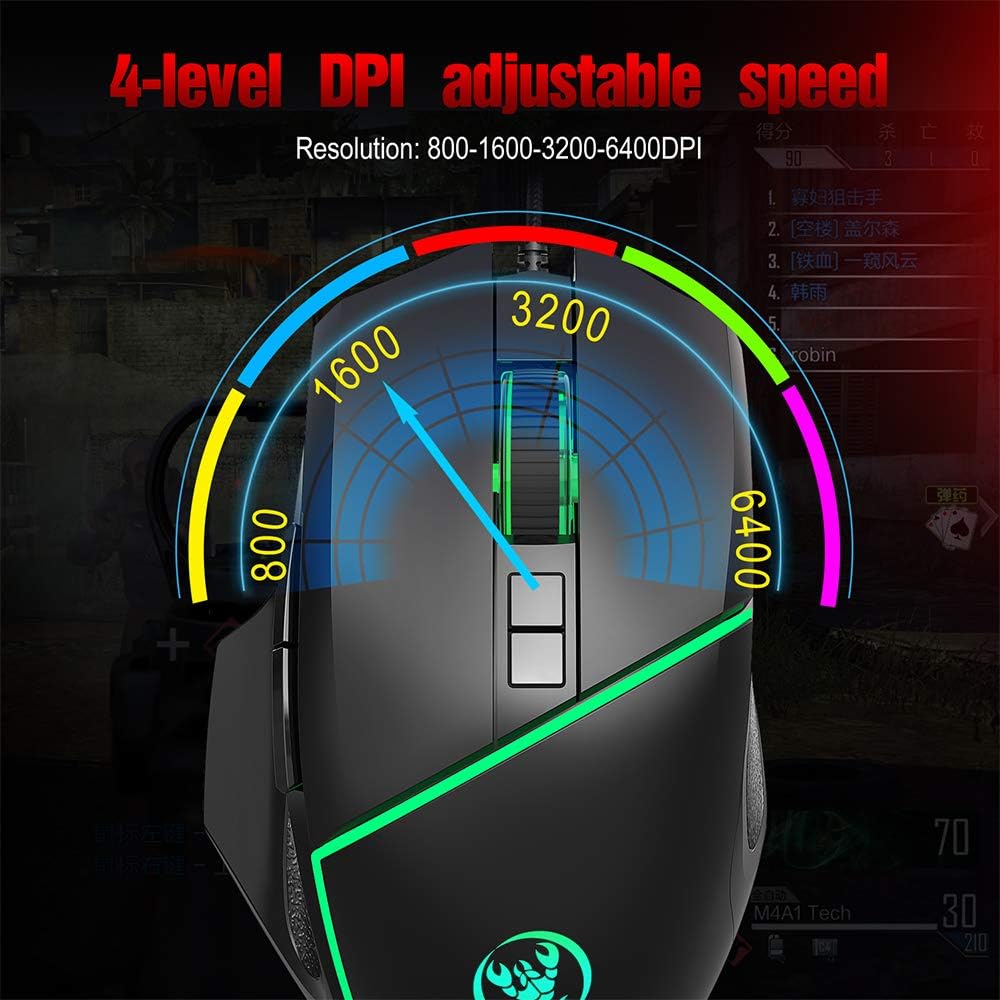
Visual representation of the 4-level adjustable DPI settings on the HXSJ A876 gaming mouse. The graphic indicates how the DPI can be cycled through different resolutions for varied gaming and work needs.
- 800 דפּי: Suitable for precise tasks.
- 1600 דפּי: א באַלאַנסירטע סעטינג פֿאַר אַלגעמיינעם באַנוץ.
- 3200 דפּי: פֿאַרגרעסערטע סענסיטיוויטי פֿאַר שנעלער קורסאָר באַוועגונג.
- 6400 דפּי: High sensitivity for rapid movements in gaming.
DPI Indicator Feedback
The mouse provides visual feedback for the current DPI setting:

This image demonstrates the HXSJ A876 gaming mouse on a desk, detailing how to turn the lights on and off by pressing the Mid button + DPI +. It also explains the DPI indicator feedback: red light flashes once for 800 DPI, twice for 1600 DPI, three times for 3200 DPI, and four times for 6400 DPI.
- When 800 DPI is selected, the DPI indicator flashes red once.
- When 1600 DPI is selected, the DPI indicator blinks red twice.
- When 3200 DPI is selected, the DPI indicator blinks red three times.
- When 6400 DPI is selected, the DPI indicator flashes red four times.
קנעפּל פאַנגקשאַנז
The HXSJ A876 mouse features a seven-button design for enhanced functionality:

A clear diagram labeling the seven buttons on the HXSJ A876 gaming mouse: Left Button, Right Button, Mid Button (scroll wheel), DPI Loop +, DPI Loop -, Forward Button, Backward Button, and Fire Key. This helps users identify each control.
- לינקס קנעפּל: ערשטיק גיט פֿונקציע.
- רעכט קנעפּל: צווייטע קליק פונקציע (קאנטעקסט מעניו).
- Mid Button (Scroll Wheel): Scrolls pages up/down; click for middle-click function.
- DPI Loop +: Increases DPI sensitivity.
- DPI Loop -: Decreases DPI sensitivity.
- פֿאָרווערטס קנעפּל: נאַוויגירט פאָרויס אין web בראַוזערז אָדער file עקספּלאָרערס.
- צוריק קנעפּל: נאַוויגירט צוריק אין web בראַוזערז אָדער file עקספּלאָרערס.
- Fire Key: Programmable button, often used for rapid firing in games.
ליגהטינג קאָנטראָל
To toggle the synchronized 7-color breathing light on or off, press the מיטן קנעפּל און די דפּי + קנעפּל סיימאַלטייניאַסלי.

This image displays the HXSJ A876 wired gaming mouse, emphasizing its 6400 DPI high precision capability for stable transmission and accurate analysis. The mouse features a sleek black design with red accents.
וישאַלט
- רייניקונג: ניצט אַ ווייכע, טרוקענע שטאָף צו רייניקן די ייבערפלאַך פון דער מויז. פֿאַר שווערע שמוץ, אַ ביסל ווייכער מאַכןampשווענק דעם שטאָף מיט וואַסער. פֿאַרמייַדט ניצן שאַרפע כעמיקאַלן אָדער אַברייסיוו מאַטעריאַלן.
- סטאָרידזש: האַלט די מויז אין אַ ריינער, טרוקענער סביבה אַוועק פון עקסטרעמע טעמפּעראַטורן און דירעקטער זון.
- קאַבלע זאָרגן: פֿאַרמײַדט צו בייגן אָדער דרייען דעם USB קאַבל צו פֿיל כּדי צו פֿאַרמײַדן שאָדן.
טראָובלעשאָאָטינג
- מויז ענטפערט נישט:
- זיכער מאַכן אַז דער USB קאַבל איז זיכער אַרייַנגעשטעקט אין אַ אַרבעטנדיקן USB פּאָרט.
- פרובירט אריינצושטעקן די מויז אין אן אנדער USB פארט אויף אייער קאמפיוטער.
- ריסטאַרט דיין קאָמפּיוטער.
- DPI טוישט זיך נישט:
- Ensure you are pressing the correct DPI adjustment buttons.
- Check if the DPI indicator light provides feedback when buttons are pressed.
- ליכטער ארבעטן נישט:
- Ensure the mouse is properly connected to your computer.
- Try toggling the lights using the Mid button + DPI + combination.
ספּעסאַפאַקיישאַנז
| סאָרט | דאָקאָאָלער |
| מאָדעל | A876 |
| טיפּ | ווייערד גיימינג מאַוס |
| מאַטעריאַל | ABS |
| ליגהטינג מאָדע | 7-color synchronized breathing light |
| דפּי סעטטינגס | 800-1600-3200-6400DPI (Adjustable) |
| סוויטש לעבן | 10 מיליאָן סייקאַלז |
| קאַבלע לענג | בעערעך 150 סענטימעטער |
| אַפּערייטינג וואָלtagE/קראַנט | דק 5וו/100מאַ |
| דימענסיעס (L X W X H) | 12.5 X 8 X 4 סענטימעטער |
| פּונקט וואָג | בעערעך 138 ג |
| קאַנעקטיוויטי טעכנאָלאָגיע | וסב |
| באַוועגונג דעטעקשאַן טעכנאָלאָגיע | אָפּטיש |
| האַנט אָריענטירונג | אַמבידעקסטראַס |
| רעקאַמענדיד נוצן | Office, Video Gaming |
| קאַמפּאַטאַבאַל דעוויסעס | פערזענלעכער קאמפיוטער, לעפטאפ |

This image shows a hand comfortably gripping the HXSJ A876 gaming mouse, highlighting its ergonomic design. The text indicates that the design is made for a better fit in the palm, ensuring comfort and reducing fatigue during long-term use.

An image depicting the HXSJ A876 gaming mouse in use on a desk, with an overlay indicating a '10,000,000 Times Click Test'. This illustrates the mouse's durability and the longevity of its mechanical switches.
וואָראַנטי און שטיצן
פֿאַר וואָראַנטי אינפֿאָרמאַציע אָדער טעכנישע שטיצע, ביטע זען די דאָקומענטאַציע וואָס איז צוגעשטעלט געוואָרן ביים קויפן אָדער קאָנטאַקט דיין הענדלער. האַלט דיין באַווייַז פון קויפן פֿאַר קיין וואָראַנטי קליימז.