
Sharp B08H3STVWG
Sharp Digital Clock with Alarm and Dual USB FastCharge Charging Ports
Model: B08H3STVWG
סאָרט: Sharp
1. פּראָדוקט איבערview
The Sharp Digital Clock is designed for simplicity and convenience, featuring a clear green LED display and dual USB FastCharge ports for charging your devices. It includes an alarm function and a battery backup system to retain settings during power outages.

פיגורע 1: פראָנט view of the Sharp Digital Clock, highlighting the large green LED display and dual USB charging ports.
2. סעטאַפּ גייד
2.1 מאַכט קאַנעקשאַן
Connect the provided power adapter to the DC IN jack located at the back of the clock. Plug the other end into a standard electrical outlet. The display will illuminate, and the clock will be ready for time setting.
2.2 באַטאַרייע באַקקופּ (אַפּשאַנאַל)
For battery backup functionality, which retains time and alarm settings during a power outage, install two (2) AAA batteries (not included) into the battery compartment located on the bottom of the unit. During battery backup, the display will go blank to conserve power, but settings will be preserved.
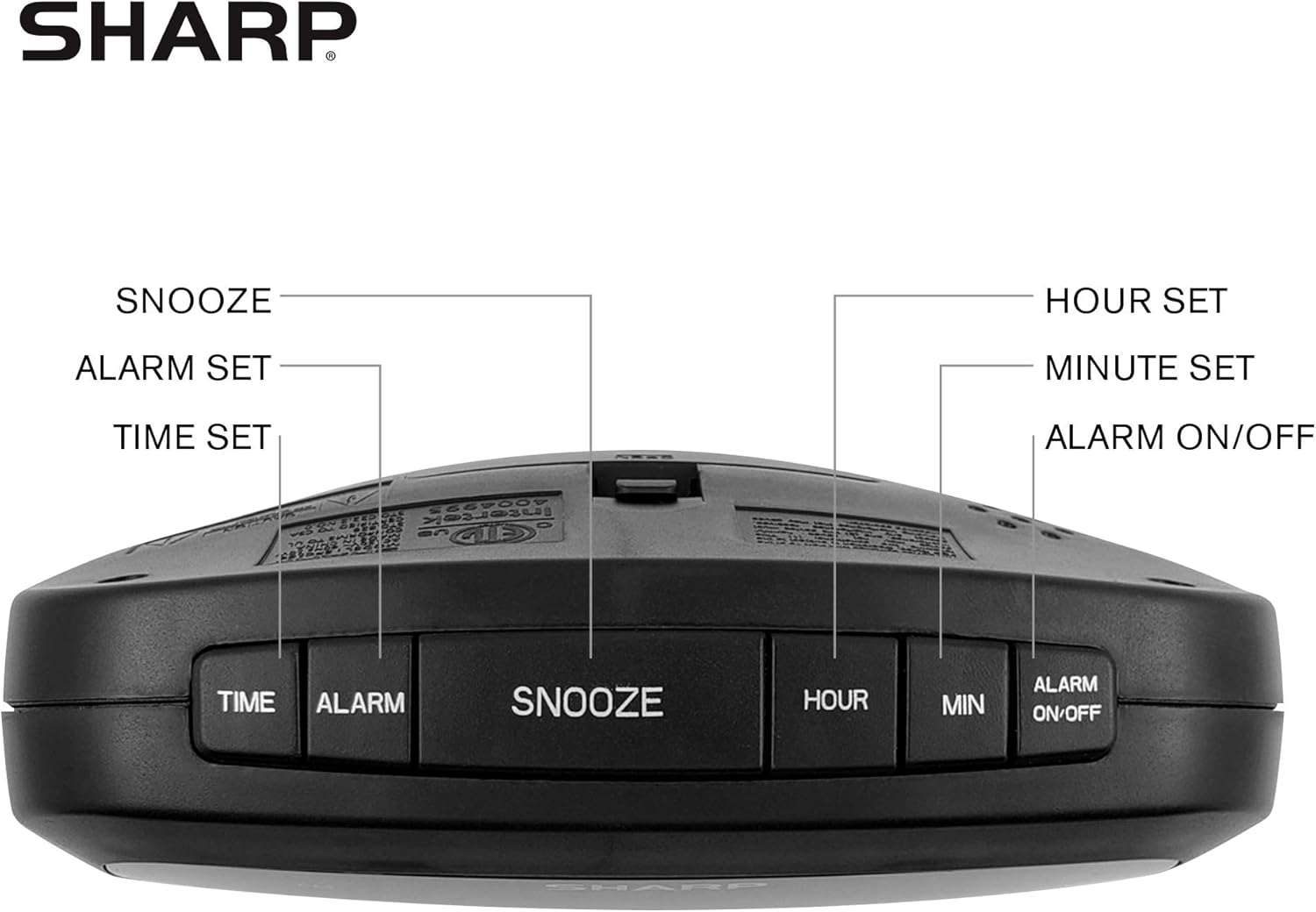
Figure 2: Underside of the clock with the battery compartment visible, requiring 2 AAA batteries for backup.
3. אַפּערייטינג ינסטרוקטיאָנס
The clock features intuitive top-mounted buttons for easy operation.

Figure 3: Top panel of the clock with clearly labeled buttons for time, alarm, snooze/dimmer, hour, minute, and alarm on/off.
3.1 באַשטעטיקן די צייט
- דריקן און האַלטן די צייט קנעפּל ביז די שעה ציפערן הייבן אן צו בלינקען.
- דרוק די שעה קנעפּל צו סטרויערן די שעה. גיט אכט אויף דעם PM אינדיקאַטאָר אויב איר שטעלט איין אַ PM צייט.
- דרוק די MIN קנעפּל צו סטרויערן די מינוט.
- דרוק די צייט קנעפּל נאכאמאל צו באשטעטיגן און שפארן די צייט.
3.2 באַשטעטיקן די שרעק
- דריקן און האַלטן די שרעק קנעפּל ביז די אַלאַרם שעה ציפערן אָנהייבן צו בליצן.
- דרוק די שעה קנעפּל צו סטרויערן די שרעק שעה.
- דרוק די MIN קנעפּל צו סטרויערן די אַלאַרם מינוטן.
- דרוק די שרעק קנעפּל נאכאמאל צו באשטעטיגן און ראטעווען די אַלאַרם צייט.
- צו אַקטיווירן אָדער דעאַקטיווירן דעם אַלאַרם, דריק די ALARM ON / OFF button. An alarm indicator light will appear on the display when the alarm is active.
3.3 Snooze and Dimmer Function
- ווען דער אַלאַרם קלינגט, דריק די גרויסע קנעפּל SNOOZE / DIMMER button to temporarily silence the alarm for a few minutes.
- To adjust the brightness of the green LED display, repeatedly press the SNOOZE / DIMMER button when the alarm is not sounding. Cycle through bright, medium, and low brightness settings.
3.4 ניצן די USB טשאַרדזשינג פּאָרץ
The clock is equipped with two 2 AMP USB charging ports on the front, allowing you to conveniently charge your smartphone or other USB-powered devices directly from the clock.

Figure 4: The clock demonstrating its dual USB charging capability with two smartphones connected.
- Simply connect your device's USB charging cable to one of the USB ports on the front of the clock.
- Ensure your device is compatible with 2 AMP charging for optimal speed.
4. וישאַלט
To ensure the longevity and proper functioning of your Sharp Digital Clock, follow these simple maintenance guidelines:
- רייניקונג: Wipe the clock with a soft, dry cloth. Do not use abrasive cleaners, waxes, or solvents as they may damage the finish.
- אָרט: שטעלט דעם זייגער אויף א סטאַבילער, גלאַטער ייבערפלאַך אַוועק פון דירעקטער זון, היץ-קוואַלן און איבערגעטריבענער פייכטקייט.
- באַטערי פאַרבייַט: If using the battery backup, replace the AAA batteries annually or when the clock consistently loses time during power interruptions.
5. טראָובלעשאָאָטינג
| פּראָבלעם | מעגלעך סיבה | לייזונג |
|---|---|---|
| די זייגער אויסשטעלונג איז ליידיק. | קיין מאַכט אָדער מאַכטtage. | Ensure the power adapter is securely plugged into the clock and a working electrical outlet. If there was a power outage, check if backup batteries are installed and functional. |
| דער אַלאַרם קלינגט נישט. | Alarm not set or not activated. | Verify that the alarm time is correctly set and that the alarm indicator light is visible on the display (press ALARM ON/OFF). |
| USB פּאָרטן זענען נישט טשאַרדזשינג דעוויסעס. | Device incompatibility or faulty cable. | Ensure your device is compatible with USB charging. Try a different USB cable. Confirm the clock is powered on. |
| דער עקראַן איז צו העל/טונקעל. | די ליכטיקייט איינשטעלונג דאַרף אַדזשאַסטמענט. | Press the SNOOZE/DIMMER button repeatedly to cycle through brightness levels (bright, medium, low). |
6. פּראָדוקט ספּעסאַפאַקיישאַנז
- סאָרט: שאַרף
- מאָדעל: B08H3STVWG
- ווייַז טיפּ: Digital Green LED
- מאַכט מקור: קאָרדעד עלעקטריק
- באַטאַרייע באַקאַפּ: 2 X AAA באַטעריז (ניט אַרייַנגערעכנט)
- וסב פּאָרץ: 2 X 2 AMP USB FastCharge Ports
- פּראָדוקט דימענשאַנז: 5.95"ברייט x 2.3"היך
- נומער וואָג: 9.59 אונסעס
- קאָליר: גרין לעד
- מאַטעריאַל: פּלאַסטיק
- UPC: 049353005089
7. וואָראַנטי און שטיצן
This Sharp Digital Clock comes with a limited warranty. For detailed warranty information, product support, or to purchase accessories, please visit the official Sharp webזייטל אדער קאנטאקט זייער קאסטומער סערוויס. איר קענט אויך באזוכן די שאַרפּ סטאָר אויף עמעזאָן.
ביטע באַהאַלטן אייער קויף קוויטל פֿאַר וואָראַנטי קליימז.
Ask a question about this manual
Ask about setup, troubleshooting, compatibility, parts, safety, or missing instructions. Manuals+ will review the question and use this page’s manual context to help answer it.