
1. הקדמה
1.1 פּראָדוקט איבערview
The Renkforce RF-HC-100 is a compact 16-megapixel trail camera designed for outdoor monitoring. It features a time-lapse function, night vision capabilities, and a durable, camouflage brown housing. This camera is suitable for wildlife observation, property surveillance, and other outdoor recording needs.
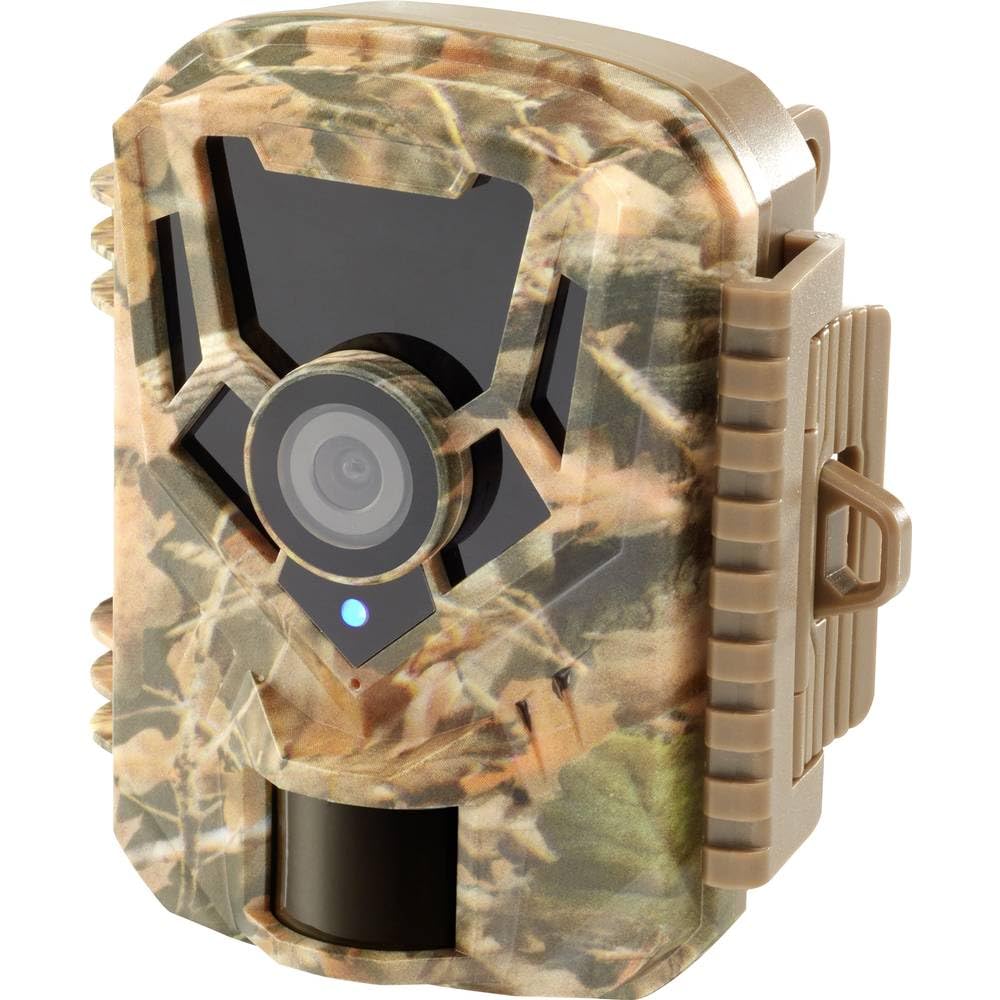
בילד: פראָנט-זייט view of the Renkforce RF-HC-100 Trail Camera, showcasing its compact design and camouflage pattern.

בילד: פראָנט view of the Renkforce RF-HC-100 Trail Camera, highlighting the main lens and motion sensor.
1.2 פּעקל אינהאַלט
- 1 x Renkforce RF-HC-100 Trail Camera Unit
- Note: Additional accessories such as mounting straps, USB cables, or user manuals may be included depending on the specific package.
2. זיכערקייַט אינפֿאָרמאַציע
- לייענען אַלע ינסטראַקשאַנז קערפאַלי איידער אַפּערייטינג די מיטל.
- Do not expose the camera to extreme temperatures, direct sunlight for prolonged periods, or corrosive liquids.
- Ensure the battery compartment is properly sealed to maintain the IP65 weather resistance.
- Dispose of batteries according to local regulations. Do not mix old and new batteries or different types of batteries.
- האַלטן די מיטל אויס פון דערגרייכן פון קינדער.
- פּרוּווט נישט צו צענעמען אָדער מאָדיפֿיצירן די קאַמעראַ, ווײַל דאָס וועט בטל מאַכן די וואָראַנטי און קען פאַראורזאַכן שאָדן.
3. פּראָדוקט פֿעיִקייטן
The Renkforce RF-HC-100 Trail Camera offers the following key features:
- הויך רעזאָלוציע בילדער: 16 Megapixel effective capture resolution for clear photos and 1080p video recording.
- נאַכט זעאונג: Equipped with color night vision for monitoring in low-light conditions.
- צייט-פאַרשפּעטיקונג פונקציע: Capture images at set intervals to observe long-term events.
- SD Card Slot: Supports external SD cards for ample storage of photos and videos.
- וועטער קעגנשטעל: IP65 international protection rating ensures durability in various outdoor environments.
- סאָליד פּלאַן: Miniature form factor with a camouflage brown finish for discreet placement.
- ברייט ווינקל View: 90-degree angle of view to cover a broad area.
- קאַנעקטיוויטי: Features wired connectivity (USB, AV ports) and Wi-Fi protocol for data transfer and control via application.
- מאַונטינג אָפּציעס: Includes support for wall mounting.
4. סעטאַפּ
4.1 באַטאַרייע ייַנמאָנטירונג
- עפֿנט די קאַמעראַ־געhäuse דורך אָפּצוּנעמען די זײַטיקע קליפּס.
- געפינען די באַטאַרייע אָפּטייל.
- Insert the required number of AA batteries (not included) according to the polarity markings (+/-).
- פאַרמאַכן די באַטאַרייע אָפּטייל סיקיורלי.
4.2 סד קאָרט ינסטאַלירונג
- מיטן קאַמעראַ־געhäuse אָפֿן, זוכט דעם SD־קאַרטל־סלאָט.
- Insert a compatible SD card (up to 32GB, Class 10 recommended) into the slot with the metal contacts facing down until it clicks into place.
- To remove, push the SD card in again until it springs out.

Image: The Renkforce RF-HC-100 Trail Camera with its housing open, revealing the control panel, USB, AV, and DC ports, and the ON/SETUP/OFF switch.
4.3 מאָונטינג די אַפּאַראַט
The camera can be mounted using a strap or a wall mount bracket (if included or purchased separately).
- רימען מאַונטינג: Thread a mounting strap through the slots on the back of the camera and secure it to a tree or pole.
- וואַנט מאָונטינג: Use the integrated mounting points or a compatible wall mount bracket to attach the camera to a flat surface. Ensure the camera is stable and pointed in the desired direction.
5. אַפּערייטינג ינסטרוקטיאָנס
5.1 אײַנשטעלן/אויסשטעלן און מאָדע אויסוואַל
Locate the ON/SETUP/OFF switch inside the camera housing.
- OFF: מאַכט אויס די קאַמעראַ.
- שטעל אויף: Enters setup mode, allowing you to configure settings via the internal display.
- אויף: Activates the camera for recording based on the configured settings.
5.2 Configuring Settings
In SETUP mode, use the navigation buttons (if available) to access the menu and adjust parameters such as:
- פאָטאָ / ווידעא האַכלאָטע
- PIR סענסער סענסיטיוויטי
- דעטעקשאַן פאַרהאַלטן
- צייט-לויפן ינטערוואַל
- טאָג און צייט
- Recording Mode (Photo, Video, Photo+Video, Time-Lapse)
5.3 דאַטאַ ריטריוואַל
צו צוטריט רעקאָרדעד files:
- דורך וסב: Connect the camera to a computer using a USB cable. The camera will appear as a removable disk.
- דורך SD קאַרטל: Remove the SD card from the camera and insert it into a computer's card reader.
6. וישאַלט
- רייניקונג: Use a soft, dry cloth to clean the camera lens and housing. For stubborn dirt, a slightly damp מען קען ניצן אַ שטאָף, אָבער זאָרגט זיך אַז קיין נאַס זאָל נישט אַרײַנגיין אין דעם אַפּאַראַט.
- באַטערי פאַרבייַט: טוישט די באַטעריעס ווען דער נידעריקע באַטעריע אינדיקאַטאָר דערשיינט אָדער ווען די פאָרשטעלונג פאַרערגערט זיך.
- סד קאַרד מאַנאַגעמענט: Regularly format the SD card (after backing up important data) to maintain optimal performance and prevent errors.
- סטאָרידזש: ווען נישט אין באַנוץ פֿאַר לענגערע פּעריאָדן, אַרויסנעמען באַטעריעס און האַלטן די קאַמעראַ אין אַ קיל, טרוקן אָרט אַוועק פון דירעקט זונשייַן.
7. טראָובלעשאָאָטינג
| פּראָבלעם | מעגלעך סיבה | לייזונג |
|---|---|---|
| די קאַמעראַ גייט נישט אָן. | Low or dead batteries; incorrect battery installation; power switch in OFF position. | Replace batteries; ensure correct polarity; set switch to ON or SETUP. |
| שלעכטע בילד/ווידעא קוואַליטעט. | שמוציקע לינז; שוואַכע ליכט באדינגונגען; אומרעכטע רעזאָלוציע סעטטינגס. | Clean the lens; ensure adequate lighting or use night vision; adjust resolution settings. |
| קאַמעראַ רעקאָרדירט נישט. | SD card full or faulty; incorrect mode selected; PIR sensor blocked. | Format or replace SD card; select appropriate recording mode; clear sensor path. |
| קענען ניט פאַרבינדן צו קאָמפּיוטער. | Faulty USB cable; camera not in correct mode; driver issues. | Try a different USB cable; ensure camera is in connection mode (if applicable); try another computer or card reader. |
8. ספּעסאַפאַקיישאַנז
| מאָדעל נאָמען | RF-HC-100 (RF-4466574) |
| Effective Capture Resolution | 16 מעגאַפּיקסעלס |
| ווידעא האַכלאָטע | 1080 פּ |
| דימענסיעס (L X W X H) | 21 X 12 X 9 סענטימעטער (8.27 X 4.72 X 3.54 אינטשעס) |
| וואָג | 186 גראַמז (0.41 לבס) |
| קאַנעקטיוויטי טעכנאָלאָגיע | Wired (USB, AV), Wi-Fi Protocol (for control/transfer) |
| ספּעציעלע פֿעיִקייטן | Local Recording, Night Vision (Color Night Vision) |
| באַניץ סוויווע | דרויסנדיק |
| אינטערנאַציאָנאַלע פּראַטעקשאַן שאַץ | IP65 |
| מאַכט מקור | Manual Operation (Battery-powered, batteries not included) |
| וואָסtage | 1.5 וואטס |
| View ווינקל | 90 דיגריז |
| קאָליר | Camouflage Brown |
| מאַטעריאַל | Metal (internal) |
| בארג טיפּ | וואנט בארג סופּפּאָרט |
9. וואָראַנטי און שטיצן
Renkforce provides support for its products. Spare parts availability is indicated for 1 year from the date of purchase. For technical assistance, troubleshooting beyond this manual, or warranty claims, please refer to the contact information provided with your product packaging or visit the official Renkforce webפּלאַץ.