
הקדמה
This manual provides detailed instructions for the safe and effective use of your Hoover Smartwash Automatic Carpet Cleaner, model FH52000G. Please read all instructions carefully before operating the appliance. Proper use and maintenance will ensure optimal performance and longevity of your carpet cleaner.
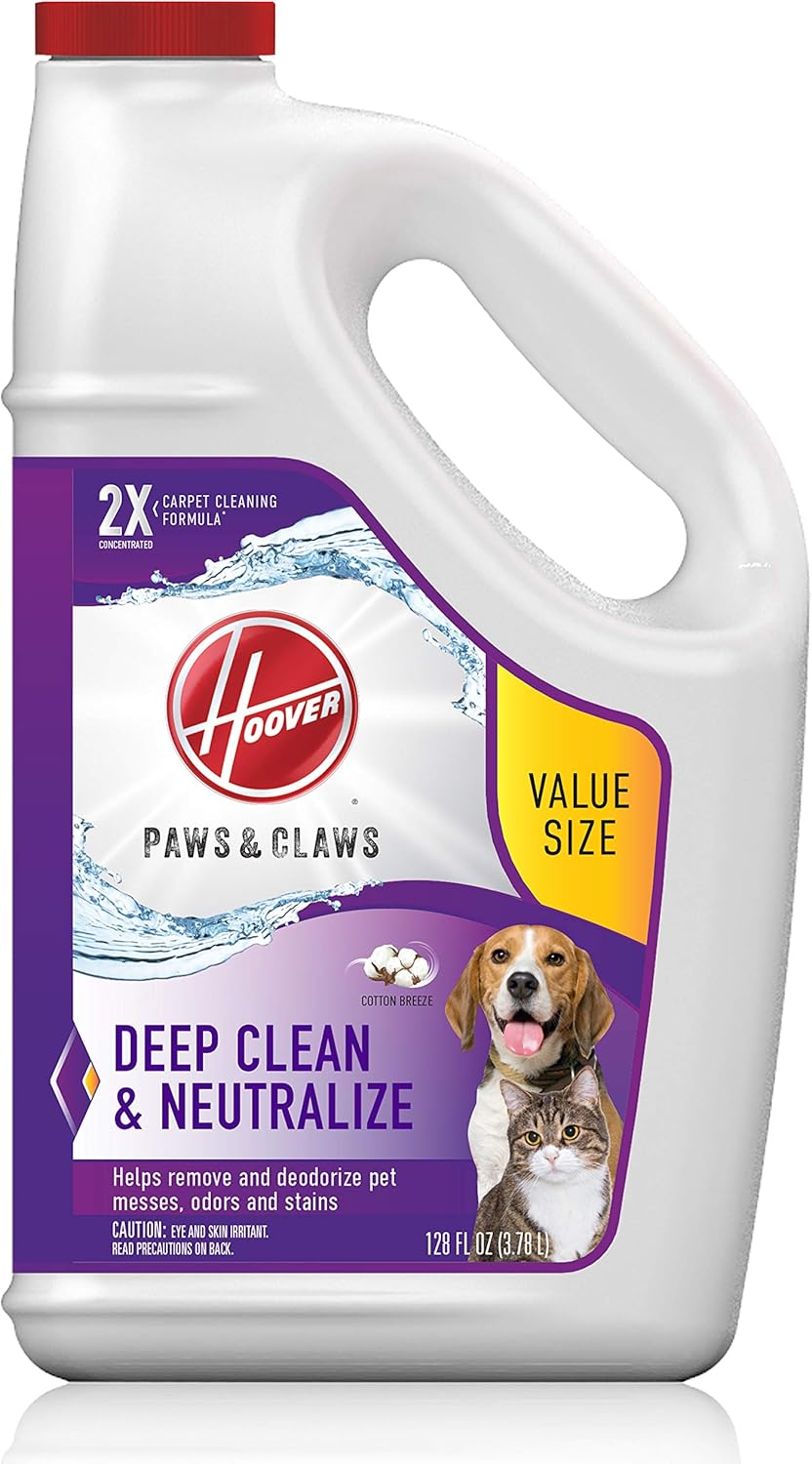
The Hoover Smartwash Automatic Carpet Cleaner is designed to simplify deep carpet cleaning with its automatic cleaning technology. It features FlexForce power brushes for deep dirt removal, Auto Mix for precise solution dispensing, and Auto Dry with HeatForce for faster drying. This bundle also includes Hoover Paws & Claws Deep Cleaning Carpet Shampoo (AH30933), formulated to tackle pet stains and odors.
זיכערקייַט אינפֿאָרמאַציע
Always follow basic safety precautions when using an electrical appliance.
- לייענען אַלע ינסטראַקשאַנז איידער נוצן.
- ניצן בלויז ווי דיסקרייבד אין דעם מאַנואַל.
- דו זאלסט נישט לאָזן די מיטל אַנאַטענדיד ווען פּלאַגד אין.
- דו זאלסט נישט נוצן מיט דאַמידזשד שנור אָדער צאַפּן.
- האַלטן האָר, פרייַ קליידער, פינגער און אַלע טיילן פון גוף אַוועק פון אָופּאַנינגז און מאָווינג טיילן.
- ניצט נאָר Hoover רייניקונג פּראָדוקטן וואָס זענען באַשטימט פֿאַר נוצן מיט דער מאַשין.
- דו זאלסט נישט ייַנטונקען די מיטל אין וואַסער.
- אַרויסציען דעם שטעקער איידער איר רייניגט אדער פירט אויס וישאַלט.
פּראָדוקט קאַמפּאָונאַנץ
Familiarize yourself with the main components of your Hoover Smartwash Automatic Carpet Cleaner.

בילד: The Hoover Smartwash Automatic Carpet Cleaner, model FH52000G, shown from the front. It features a clear solution tank, a clear dirty water tank, and a transparent brush roll cover, highlighting its automatic cleaning capabilities.
- ריין וואַסער טאַנק: האַלט ריין וואַסער און רייניקונג לייזונג.
- גראָב וואַסער טאַנק: זאמלט ארויסגעצויגענע שמוציג וואסער.
- FlexForce Power Brushes: Rotating brushes for deep cleaning.
- שעפּן: Ergonomic handle for pushing and pulling the cleaner.
- Wash/Dry Indicator: Illuminates to show current operating mode.
- לייזונג טאַנק: For the cleaning solution.
סעטאַפּ
1. פֿאַרזאַמלונג
Your Hoover Smartwash cleaner may require minimal assembly. Follow the instructions provided in the quick start guide included in the packaging. Typically, this involves attaching the handle to the main body of the cleaner.
2. פילונג די טאַנקס
- אַראָפּנעמען דעם ריין-וואַסער טאַנק פֿון דער אַפּאַראַט.
- Fill the clean water tank with hot tap water up to the indicated fill line.
- Remove the solution tank from the unit.
- Fill the solution tank with Hoover Paws & Claws Deep Cleaning Carpet Shampoo (AH30933) up to the indicated fill line.
- Replace both tanks securely onto the unit. The Auto Mix feature will precisely mix and dispense the correct amount of solution during operation.
בילד: A close-up of the Hoover Smartwash solution tank being inserted into the cleaner. This demonstrates the easy-to-fill and install design for the cleaning solution.

בילד: A bottle of Hoover Paws & Claws Deep Cleaning Carpet Shampoo, 128 fl oz (AH30933). This solution is designed for deep cleaning and neutralizing pet odors and stains.

בילד: The back of the Hoover Paws & Claws Deep Cleaning Carpet Shampoo bottle, showing detailed directions for use. It specifies instructions for both automatic and manual machines, and includes safety precautions.
אַפּערייטינג ינסטראַקשאַנז
1. Preparing the Area
- וואַקוום די טעפּעך ונ דורך צו באַזייַטיקן פרייַ שמוץ און דעבריס.
- Move furniture out of the area to be cleaned.
- Test a small, inconspicuous area of carpet for colorfastness before full cleaning.
2. אויטאָמאַטיש רייניקונג
The Hoover Smartwash features automatic cleaning technology.
- צו וואשן: Push the cleaner forward. The machine will automatically dispense cleaning solution and scrub the carpet with FlexForce power brushes. The "WASH" indicator will illuminate.
- צו טרוקן: Pull the cleaner backward. The machine will automatically stop dispensing solution and engage powerful suction with HeatForce to extract water and dry the carpet. The "DRY" indicator will illuminate.

בילד: A graphic illustrating the Hoover Smartwash's automatic cleaning technology. It shows the cleaner moving forward for "WASH" and backward for "DRY", with corresponding indicators.

בילד: A person operating the Hoover Smartwash on a carpet, with visual cues indicating the "WASH" zone (forward pass) and "DRY" zone (backward pass), demonstrating the automatic cleaning process.

בילד: A close-up of the Hoover Smartwash's "DRY" indicator light, showing the machine is in drying mode, extracting water from the carpet.

בילד: A hand gripping the ergonomic handle of the Hoover Smartwash, highlighting its triggerless design for ease of use.
3. Spot Cleaning and Stairs (with attachment)
For targeted cleaning of spots, stairs, or upholstery, attach the included hose and tool.
- Connect the hose to the designated port on the cleaner.
- Attach the desired cleaning tool (e.g., upholstery tool, stair tool) to the end of the hose.
- Spray solution by pressing the trigger on the tool and scrub the area.
- Release the trigger and use the tool to suction up the dirty water.

בילד: A person using an upholstery tool attachment with the Hoover Smartwash to clean a sofa, demonstrating its versatility for cleaning various surfaces beyond carpets.
4. ווידעא דעמאַנסטראַציע
ווידעא: Official Hoover Smartwash FH52000 product video demonstrating the automatic wash and dry functions, highlighting its ease of use and effective cleaning.
ווידעא: A detailed demonstration of the HOOVER Smartwash Carpet Cleaner, showcasing its features and how it simplifies the carpet cleaning process for various household messes.
וישאַלט
1. ליידיקן און רייניקן טאנקען
- After each use, remove and empty the dirty water tank. Rinse it thoroughly with clean water.
- Rinse the clean water tank if any solution remains or if it needs refilling.
- Allow tanks to air dry before reassembling.
2. Cleaning the Brush Rolls
The FlexForce power brushes should be cleaned regularly to maintain performance.
- אָפּשטויסן די רייניקונג.
- אַראָפּנעמען די באַרשט זעמל דעקן.
- Carefully remove the brush rolls.
- Remove any hair, debris, or tangled fibers from the brushes. Rinse under running water if necessary.
- Allow brushes to air dry completely before reinstalling.
- Reinstall the brush rolls and secure the cover.

בילד: A person removing the brush rolls from the Hoover Smartwash for cleaning. This image demonstrates the ease of access for routine maintenance of the FlexForce power brushes.
3. סטאָרידזש
Store the cleaner in a dry, indoor area. Ensure all tanks are empty and clean before storage.
טראָובלעשאָאָטינג
| פּראָבלעם | מעגלעך סיבה | לייזונג |
|---|---|---|
| קיין מאַכט | נישט איינגעשטעקט; קרייז ברעיקער האט אויסגעלאשן | Ensure plug is fully inserted; check circuit breaker. |
| קיין לייזונג אויסגעבן | Solution tank empty; tank not seated correctly; clogged nozzle | Refill solution tank; re-seat tank; clean nozzle. |
| נעבעך סאַקשאַן | Dirty water tank full; tank not seated correctly; clogged hose/nozzle | Empty dirty water tank; re-seat tank; clear any clogs. |
| ברושעס נישט ראָוטייטינג | Debris tangled in brushes; belt broken | Clean brushes of debris; contact customer support if belt is broken. |
ספּעסאַפאַקיישאַנז
- סאָרט: האָאָווער
- מאָדעל נומער: FH52000
- קאָליר: טערקווויז
- מאַכט מקור: קאָרדעד עלעקטריק
- רייניקונג טעכנאָלאָגיע: Automatic Wash & Dry
- Brush System: FlexForce Power Brushes
- דריינג טעכנאָלאָגיע: HeatForce
- Included Solution: Hoover Paws & Claws Deep Cleaning Carpet Shampoo (AH30933, 128 Fl Oz)
וואָראַנטי און שטיצן
פֿאַר וואָראַנטי אינפֿאָרמאַציע און קונה שטיצע, ביטע זען די וואָראַנטי קאַרטל אַרייַנגערעכנט מיט דיין פּראָדוקט אָדער באַזוכן די באַאַמטער Hoover וועבזייטל website. You can also contact Hoover customer service for assistance with any product-related inquiries or issues.
אפיציעלער הוּווער Webפּלאַץ: www.hoover.com


