
1. הקדמה
This manual provides detailed instructions for the setup, operation, maintenance, and troubleshooting of your Sceptre Curved 27" FHD 1080p Gaming Monitor. Please read this manual thoroughly before using your monitor to ensure proper functionality and safety.

Image: Sceptre Curved 27" FHD 1080p Gaming Monitor in a typical desk setup.
2. פּעקל אינהאַלט
Verify that all items listed below are included in your package. If any items are missing or damaged, please contact Sceptre customer support.
- Sceptre Curved 27" FHD 1080p Gaming Monitor
- מאָניטאָר שטאַנד (באַזע און אָרעם)
- HDMI קאַבלע
- Power Supply and Adapter
- פיליפּס קאָפּ שרויפנ - ציער
- שרויפן און האַרדווער קיט
- באַניצער מאַנואַל
- Warranty Information and Customer Service Card

בילד: איבערview of all items included in the Sceptre monitor package, including the monitor, stand components, cables, tools, and documentation.
3. פֿאַרזאַמלונג
גיי די פאלגענדע טריט צו צוזאמענשטעלן דעם מאָניטאָר שטאַנד:
- Attach the metal stand arm to the plastic base. Align the tabs and gently twist until secure.
- Use the provided Philips head screwdriver and the designated base screw to fasten the stand arm to the base.
- גלייכט אויס דעם צוזאמענגעשטעלטן שטאנד מיט די בארג-פונקטן אויף דער הינטערשטער זייט פונעם מאָניטאָר.
- Insert the two remaining Philips head screws into the designated holes on the monitor's back and tighten them securely.
- Place the plastic cover over the screws on the stand arm.

Image: The Sceptre Curved 27" monitor with its dimensions labeled, showing the curved screen and the stand.
4. קאַנעקשאַנז
The monitor features various ports for connectivity. Ensure proper connection for optimal performance.
- דק אין: פאַרבינדן די מאַכט אַדאַפּטער דאָ.
- אַודיאָ אָוט: פֿאַרבינדט עקסטערנע רעדנערס אָדער כעדפאָונז.
- אַודיאָ אין: Connect an audio source for the built-in speakers.
- ווגאַ: Connect to a computer's VGA port. Supports up to 75Hz refresh rate.
- HDMI 1.4 (x2): Connect to devices with HDMI output. Supports up to 75Hz refresh rate.
- קענזינגטאן זיכערהייט שלאָס: For securing the monitor.
בילד: דעטאַלירט view of the monitor's rear panel, highlighting the DC IN, Audio In/Out, VGA, and two HDMI 1.4 ports.
5. אַפּערייטינג ינסטרוקטיאָנס
The On-Screen Display (OSD) menu allows you to adjust various monitor settings. Use the buttons on the back of the monitor to navigate.
OSD מעניו נאַוויגאַציע
- שנעל אָנהייב: Adjust basic settings like preset modes, aspect ratio, source, volume, Blue Light Shift, and Adaptive Sync.
- בילד: Fine-tune image settings including brightness, contrast, DCR, aspect ratio, and sharpness.
- קאָליר: Adjust color temperature, gamma, tint, saturation, and Blue Light Shift.
- סיסטעם: Configure overdrive, Adaptive Sync, sleep mode, language, OSD position, timer, transparency, mute, and factory reset.
Video: A user demonstrates the Sceptre monitor's OSD menu, showing navigation through settings like volume and input source while displaying gameplay.
6. ווייַז פֿעיִקייטן
- 1500R געבויגענער דיספּליי: The 1500R curvature immerses you into the content, providing a comfortable viewינג דערפאַרונג.
- 100Hz דערפרישן קורס: Experience smoother visuals with a refresh rate of up to 100Hz, reducing screen tearing.
- 98% sRGB: Offers a wider color gamut for deeper and more accurate colors.
- בלוי ליכט שיפט: Reduces blue light emission to protect your eyes from fatigue and strain during extended use.
- אַדאַפּטיוו סינק: סינקראָניזירט דעם מאָניטאָר'ס רעפרעש קורס מיט דיין גראַפיקס קאַרטל'ס ראַם קורס צו עלימינירן פאַרשטעלן טיערינג און שטאַטערינג.
- FPS-RTS Game Modes: Pre-set display modes optimized for First Person Shooter (FPS) and Real-Time Strategy (RTS) games.
- געבויט-אין ספּיקערז: Integrated speakers provide audio without needing external devices.

Image: Visual representation of the 1500R curvature, highlighting its immersive design.

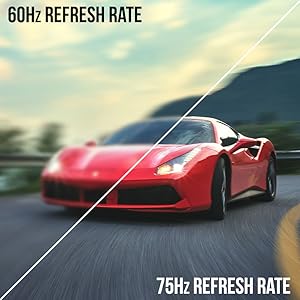
Image: A side-by-side comparison demonstrating the visual smoothness of 75Hz refresh rate versus 60Hz.

Image: A visual comparison highlighting the enhanced color accuracy of 98% sRGB compared to a conventional display.

Image: Split-screen view demonstrating the visual enhancements provided by FPS and RTS game modes.
7. וישאַלט
כדי צו זיכער מאַכן די לאַנגלעבעניש און אָפּטימאַלע פאָרשטעלונג פון דיין מאָניטאָר, נאָכפאָלגן די רייניקונג גיידליינז:
- שטענדיק אָפּשטעקן די מאַכט קאַבלע איידער רייניקונג.
- ניצן אַ ווייך, לינט-פֿרייַ שטאָף אַ ביסל דampגעוואשן מיט וואַסער אָדער אַ מילד, נישט-אַברייזיוו רייניגער.
- Avoid using alcohol, ammonia, or abrasive cleaners, as these can damage the screen surface.
- Gently wipe the screen and exterior surfaces. Do not spray cleaner directly onto the screen.
8. טראָובלעשאָאָטינג
If you encounter any issues with your monitor, refer to the following common solutions:
- קיין מאַכט: Ensure the power cable is securely connected to both the monitor and a working power outlet. Check the power adapter and outlet.
- קיין בילד: Verify that the video cable (HDMI or VGA) is securely connected to both the monitor and your computer/device. Ensure the correct input source is selected in the OSD menu.
- פליקערנדיק/פארדרייטע בילד: Check the video cable for damage. Try a different cable or port. Ensure your graphics card drivers are up to date. Adjust refresh rate settings in your device's display settings.
- קיין אַודיאָ: Check the volume settings in the OSD menu and on your connected device. Ensure external speakers are properly connected if used.
- קנעפּלעך ניט ריספּאַנדינג: Perform a factory reset through the OSD menu if accessible.
For further assistance, please refer to the full user manual or contact Sceptre customer support.
9. ספּעסאַפאַקיישאַנז
| שטריך | באַשרייַבונג |
|---|---|
| פאַרשטעלן גרייס | 27 אינטשעס |
| האַכלאָטע | 1920 x 1080 (FHD 1080p) |
| דערפרישן קורס | Up to 100Hz (75Hz via HDMI/VGA) |
| קערוואַטשער | 1500ר |
| ענטפער צייט | 3ms (GtG) |
| טאַפליע טיפּ | VA |
| ברייטנאַס | 280 ניץ |
| קאָליר גאַמע | 98% sRGB |
| ווידעא ינפּוץ | 2x HDMI 1.4, 1x VGA |
| אַודיאָ פּאָרץ | Audio In, Audio Out |
| ספּיקערז | געבויט-אין |
| וועסאַ בארג | 100 מם X 100 מם |
| דימענשאַנז (LxWxH) | 15.09 X 19.97 X 7.02 אינטשעס |
| וואָג | 5.5 פונט |
10. גיימינג דערפאַרונג
The Sceptre Curved 27" monitor is designed to enhance your gaming experience with its high refresh rate, low response time, and immersive curvature.
Video: An official Sceptre video showcasing various gaming monitors, including the Curved 27" model, highlighting their features and performance in gaming scenarios.
For optimal gaming performance, ensure your device's display settings match the monitor's capabilities (e.g., 1920x1080 resolution at 75Hz).
11. וואָראַנטי און שטיצן
Your Sceptre monitor comes with a 1-יאָר לימיטעד פּראָדוקט וואָראַנטי. For detailed terms and conditions, please refer to the included warranty information card in your package.
For technical support, troubleshooting, or warranty claims, please contact Sceptre Customer Service. Contact information is provided on the customer service card included with your monitor.