
PowerPac PPFS212B 2-in-1 Dual-Usage Stand Fan Instruction Manual
Model: PPFS212B
1. וויכטיק סאַפעטי אינפֿאָרמאַציע
ביטע ליינט אלע אינסטרוקציעס קערפול איידער איר ניצט דעם אפאראט און האלט זיי פאר שפעטערדיגע רעפערענץ. נישט נאכפאלגן די אינסטרוקציעס קען רעזולטירן אין עלעקטרישע שאק, פייער, אדער ערנסטע שאדן.
- פאַרזיכערן די וואָלtagדי ווערט וואָס איז אָנגעגעבן אויף דער ראַנג־עטיקעט שטימט מיט אייער הויפּט־צושטעל־וואָלומע.tage.
- Do not immerse the fan, plug, or cord in water or other liquids.
- Unplug the fan from the power outlet before cleaning, assembling, or disassembling parts.
- Keep fingers, pencils, or any other objects out of the fan grille when it is running.
- ניצט נישט דעם ווענטילאַטאָר מיט אַ צעבראָכענעם שנור אָדער פּלאָג. קאָנטאַקטירט קוואַליפֿיצירטע סערוויס פּערסאָנעל פֿאַר רעפּאַראַטור.
- This appliance is equipped with thermal fuse protection against overheating. If the fan stops working unexpectedly, unplug it and allow it to cool before attempting to restart.
- דער אַפּפּליאַנסע איז נישט בדעה פֿאַר נוצן דורך מענטשן (אַרייַנגערעכנט קינדער) מיט רידוסט פיזיש, סענסערי אָדער גייַסטיק קייפּאַבילאַטיז, אָדער פעלן פון דערפאַרונג און וויסן, סייַדן זיי האָבן באקומען השגחה אָדער לימעד וועגן די נוצן פון דעם אַפּפּליאַנסע דורך אַ מענטש פאַראַנטוואָרטלעך פֿאַר זייער זיכערקייַט. .
2. פּראָדוקט איבערview
The PowerPac PPFS212B is a versatile 2-in-1 dual-usage stand fan designed for efficient cooling in indoor environments. It features 7 blades for maximum airflow, 3-speed settings, and an oscillation function for wider air distribution. The fan is equipped with thermal fuse protection for enhanced safety.
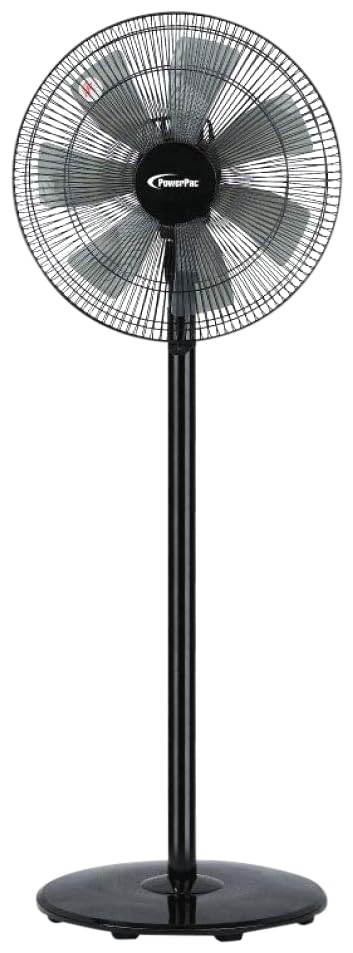
Image: PowerPac PPFS212B 2-in-1 Dual-Usage Stand Fan, showcasing its black finish and stand configuration.
3. פּעקל אינהאַלט
ביטע קאָנטראָלירט דעם אינהאַלט פֿון דער פּאַקעט בײַם עפֿענען, כּדי צו זיכער מאַכן אַז אַלע טיילן זענען פֿאַראַן און נישט געשעדיגט:
- 1 x PowerPac PPFS212B Stand Fan (includes fan head, stand pole, and base)
4. אַסעמבלי אינסטרוקציעס
Follow these steps to assemble your PowerPac PPFS212B fan:
- קערפאַלי אַנפּאַק אַלע קאַמפּאָונאַנץ פון די פּאַקקאַגינג.
- Attach the stand pole to the fan base. Ensure it is securely fastened according to the markings or locking mechanism.
- Mount the fan head assembly onto the top of the stand pole. Align the connection points and secure it firmly.
- Ensure all screws and fasteners are tightened to prevent wobbling during operation.
- Place the assembled fan on a stable, flat surface.
Image: Illustrative diagram of the PowerPac PPFS212B fan assembly, showing the base, stand, and fan head components.
5. אַפּערייטינג ינסטרוקטיאָנס
To operate your PowerPac PPFS212B fan:
- צאַפּן די מאַכט שנור אין אַ פּאַסיק עלעקטריקאַל ווענטיל.
- מאַכט אויף / אַוועק: Press the 'ON/OFF' button (or corresponding button) on the control panel to turn the fan on or off.
- גיכקייט אַדזשאַסטמאַנט: Press the 'SPEED' button repeatedly to cycle through the 3 available speed settings (Low, Medium, High).
- אַסאַליישאַן פונקציע: Press the 'OSC' button (or corresponding button) to activate or deactivate the oscillation feature, which allows the fan head to sweep from side to side.
- When finished, press the 'ON/OFF' button to turn off the fan and unplug it from the power outlet.
6. וישאַלט און רייניקונג
Regular cleaning and maintenance will help ensure optimal performance and longevity of your fan:
- שטענדיק אָפּשטויסן די פאָכער פון די מאַכט צושטעלן איידער רייניקונג.
- ניצן אַ ווייך, דamp cloth to wipe the exterior surfaces of the fan. Do not use abrasive cleaners, solvents, or harsh chemicals.
- To clean the fan blades, carefully remove the front grille (if detachable) according to the product design. Wipe the blades with a soft cloth. Ensure all parts are dry before reassembling.
- דו זאלסט נישט לאָזן וואַסער דריפּן אין די מאָטאָר האָוסינג.
- האַלט דעם ווענטילאַטאָר אין אַ קיל, טרוקן אָרט ווען ער איז נישט אין באַנוץ פֿאַר לענגערע פּעריאָדן.
7. טראָובלעשאָאָטינג
If you encounter issues with your fan, refer to the following table for common problems and solutions:
| פּראָבלעם | מעגלעך סיבה | לייזונג |
|---|---|---|
| דער ווענטילאַטאָר צינדט זיך נישט אָן. | קיין מאַכט צושטעלן. Thermal fuse activated. | קוק אויב די צאַפּן איז סיקיורלי ינסערטאַד אין די ווענטיל. מאַכן זיכער אַז די מאַכט ווענטיל איז פאַנגקשאַנאַל. Unplug and allow the fan to cool down for 30 minutes before restarting. |
| שוואַכער אָדער קיין לופטפלוס. | די ווענטילאַטאָר גיכקייט איז צו נידעריק געשטעלט. די ווענטילאַטאָר בליידז זענען שמוציק. | פֿאַרגרעסערן די ווענטילאַטאָר גיכקייט אײַנשטעלונג. Unplug the fan and clean the blades as per maintenance instructions. |
| דער ווענטילאַטאָר אָסצילירט נישט. | די אָסצילאַציע פונקציע איז אויסגעלאָשן. | Press the 'OSC' button to activate oscillation. |
| ומגעוויינטלעך ראַש בעשאַס אָפּעראַציע. | פרייַ טיילן. פאַרשטעלונג. | Unplug the fan and check for any loose components or obstructions around the blades or motor. Tighten any loose parts. |
אויב די פראבלעם בלייבט נאך פרובירן די לייזונגען, ביטע קאנטאקטירט קאסטומער סופארט.
8. ספּעסאַפאַקיישאַנז
| שטריך | באַשרייַבונג |
|---|---|
| סאָרט | PowerPac |
| מאָדעל נומער | PPFS212B |
| טיפּ | 2-in-1 Dual-Usage Stand Fan |
| נומער פון בלאַדעס | 7 |
| נומער פון ספּידז | 3 |
| מאַכט מקור | קאָרדעד עלעקטריק |
| וואָסtage | 50 וואטס |
| קאָנטראָל מעטאָד | דרוק קנעפּל |
| ספּעציעלע פֿעיִקייטן | Oscillating, Thermal Fuse Protection |
| מאַטעריאַל | פּלאַסטיק |
| דרינענדיק / דרויסנדיק באַניץ | דרינענדיק |
| קאָליר | שוואַרץ |
9. וואָראַנטי און שטיצן
This PowerPac PPFS212B fan comes with a 2 יאָר וואָראַנטי פֿון דעם קויפֿדאַטום. די וואָראַנטי דעקט פֿאַבריקאַציע־דעפֿעקטן אונטער נאָרמאַלע באַניץ־באַדינגונגען.
For warranty claims, technical support, or any inquiries regarding your product, please contact PowerPac customer service. Keep your proof of purchase for warranty validation.