
1. פּראָדוקט איבערview
The Cello C2220FSDE is a compact 22-inch Full HD LED television designed for versatile use. It features an integrated DVD player and a triple tuner (DVBT2/S2) for comprehensive signal reception. Its sleek design makes it suitable for various environments, including guest rooms, motorhomes, caravans, trucks, or boats.
Key features include HDMI and USB inputs for connecting external devices like game consoles and hard drives. The USB functionality also supports recording live television and playing stored media. This TV can also function as a monitor for laptops or desktop computers.

בילד 1.1: The integrated DVD player allows for direct playback of DVDs without additional devices.

בילד 1.2: Experience clear and detailed images with Full HD 1080p resolution.
2. סעטאַפּ און ייַנמאָנטירונג
2.1 אויספּאַקן און אינהאַלט
נעמט פֿאָרזיכטיק אַרויס אַלע קאָמפּאָנענטן פֿון דער פּאַקעט. מאַכט זיכער אַז די פֿאָלגנדיקע זאַכן זענען פֿאַראַן:
- 1 x Cello 22-inch LED TV
- מאַכט שנור
- ווייַט קאָנטראָל
- שנעל אָנהייב גייד
- 2 X AAA באַטעריז
- טעלעוויזיע שטייט
2.2 אַטאַטשינג די שטיין
Place the TV screen face down on a soft, clean surface to prevent scratches. Align the stand with the mounting holes on the bottom of the TV and secure it using the provided screws.
2.3 Connecting Power and Antenna
- פֿאַרבינדט דעם עלעקטרישן שנור צום טעלעוויזאָר'ס עלעקטרישן אַרײַנגאַנג און דערנאָך צו אַ וואַנט אַוטלעט.
- Connect your TV aerial cable to the 'TV Aerial' input on the back of the TV.
- For satellite reception, connect a satellite dish cable (not supplied) to the 'DVB-S2' input.

בילד 2.1: דערציען view of the TV showing power, antenna, and other connectivity ports.
2.4 עקסטערנע דעווייס קאַנעקשאַנז
די טעלעוויזיע אָפפערט פֿאַרשידענע פּאָרטן פֿאַר פֿאַרבינדן עקסטערנע דעוויסעס:
- הדמי: Connect high-definition devices such as Blu-ray players, game consoles, or set-top boxes.
- וסב: Connect USB storage devices for media playback or recording.
- ווגאַ: פֿאַרבינדט אַ קאָמפּיוטער צו נוצן ווי אַ מאָניטאָר.
- 3.5 מם אַודיאָ אָוט: פֿאַרבינדט עקסטערנע כעדפאָונז אָדער רעדנערס.

בילד 2.2: Illustration of HDMI and USB ports for connecting various devices.

בילד 2.3: The integrated satellite tuner allows connection to a satellite dish for satellite TV reception.
3. אַפּערייטינג ינסטרוקטיאָנס
3.1 Initial Power On and Channel Scan
- אַרייַנלייגן די אַאַאַ באַטעריז אין די ווייַט קאָנטראָל.
- דרוק די מאַכט קנעפּל אויף די ווייַט קאָנטראָל אָדער אויף די טעלעוויזיע צו קער עס אויף.
- Follow the on-screen instructions for initial setup, including language selection and automatic channel scanning for DVB-T2 (terrestrial) and DVB-S2 (satellite) signals.
3.2 גרונטלעכע טעלעוויזיע פונקציעס
- קאַנאַל סעלעקציע: Use the 'CH+' / 'CH-' buttons or the numeric keypad on the remote control.
- באַנד קאָנטראָל: Use the 'VOL+' / 'VOL-' buttons.
- מקור סעלעקציע: Press the 'SOURCE' button to switch between inputs (TV, HDMI, USB, DVD).
- מעניו נאַוויגאַציע: Use the 'MENU' button to access settings and navigation arrows to browse.
3.3 Integrated DVD Player Operation
- זייט זיכער אז די טעלעוויזיע איז אנגעצונדן און די אינפוט קוואל איז איינגעשטעלט צו 'DVD'.
- Gently insert a DVD disc into the slot on the side of the TV, label side facing the mirror side (as indicated on the slot).
- The DVD should load automatically. Use the remote control for playback functions (Play, Pause, Stop, Skip).
3.4 USB Recording and Media Playback
- מעדיע פּלייבאַק: Insert a USB storage device into the USB port. Select 'USB' as the input source. Navigate through your files (photos, music, videos) using the remote control.
- USB Recording (PVR): While watching live TV, insert a USB storage device. Press the 'RECORD' button on the remote to start recording. You can also use the 'PAUSE' function for time-shifting live TV.
ווידעא 3.1: This video demonstrates the physical controls on the TV and the various input/output ports available on the back and side of the unit, including the DVD slot, USB, HDMI, and antenna connections.
4. וישאַלט
4.1 רייניקן דעם טעלעוויזאר
- שטענדיק ארויסנעמען דעם טעלעוויזאר פון דער עלעקטרישער ווענטיל איידער איר רייניגט.
- ניצט אַ ווייכע, טרוקענע שטאָף צו ווישן דעם עקראַן און קאַבינעט. פֿאַר שווערע פֿלעקן, לייכט ווישןampווישט דעם שטאָף מיט וואַסער אָדער אַ מילד, נישט-אַבראַוויזיוו עקראַן רייניגער.
- Do not use alcohol, benzene, thinners, or other volatile substances, as they may damage the screen or finish.
4.2 DVD Player Care
- Keep the DVD slot free from dust and debris.
- Only insert clean, undamaged discs.
5. טראָובלעשאָאָטינג
If you encounter issues with your Cello TV, refer to the following common problems and solutions:
| פּראָבלעם | מעגלעך סיבה | לייזונג |
|---|---|---|
| קיין מאַכט | Power cord not connected; power outlet faulty | Check power cord connection; try a different outlet |
| קיין בילד נישט, אבער סאונד איז דא | Incorrect input source selected; faulty cable connection | Press 'SOURCE' to select correct input; check HDMI/VGA cable connections |
| קיין קלאַנג, אָבער בילד איז דאָ | Volume too low or muted; external audio device issue | Increase volume; check mute status; ensure external audio devices are connected correctly |
| Poor picture quality (TV channels) | Weak antenna signal; incorrect antenna connection | Adjust antenna position; check antenna cable connection; perform a channel rescan |
| די-ווי-די שפּילט נישט | Disc inserted incorrectly; dirty or damaged disc; incorrect source selected | Re-insert disc correctly; clean or replace disc; select 'DVD' source |
| ווייַט קאָנטראָל נישט ארבעטן | Batteries depleted or inserted incorrectly; obstruction between remote and TV | Replace batteries; ensure correct polarity; remove obstructions; point remote directly at TV sensor |
For further assistance, please refer to the support section or the full instruction manual available online.
6. ספּעסאַפאַקיישאַנז
Below are the detailed technical specifications for the Cello C2220FSDE 22-inch Full HD LED TV:
| שטריך | באַשרייַבונג |
|---|---|
| פאַרשטעלן גרייס | 22 אינטשעס (54.6 ס״מ דיאַגאָנאַל) |
| סאָרט | טשעלאָ |
| ווייַז טעכנאָלאָגיע | געפירט |
| האַכלאָטע | 1080p (פול HD, 1920 x 1080 פּיקסעלס) |
| דערפרישן קורס | 60 הז |
| ספּעציעלע שטריך | Integrated DVD Player |
| קאַנעקטיוויטי טעכנאָלאָגיע | HDMI, USB, VGA |
| אַספּעקט פאַרהעלטעניש | 16:9 |
| פּראָדוקט דימענשאַנז (ד רענטגענ וו רענטגענ ה) | 5P X 50.4W X 34.2H סענטימעטער |
| פּונקט וואָג | 2.55 קילאָגראַמס |
| קאַנטראַסט פאַרהעלטעניש | 600:1 |
| מאַקסימום ברייטנאַס | 180 NIT Coating |
| HDR שטיצן | HDR10 |
| ענטפער צייט | 10 מיליסעקאַנדז |
| טונער טיפּ | דווב-C, דווב-ס2, דווב-ט2 |
| אַודיאָ רעזולטאַט מאָדע | סטערעאָ |
| רעדנער באַשרייַבונג | 2 x 3 W Pitch Perfect Sound |
| מאַכט קאַנסאַמשאַן | 21 קוו |
| Voltage | 230 Volts (100-240 V AC 50-60 Hz) |
| וועסאַ מאָונט סטאַנדאַרט | 100 רענטגענ 100 מם |
| מאָדעל יאָר | 2023 |
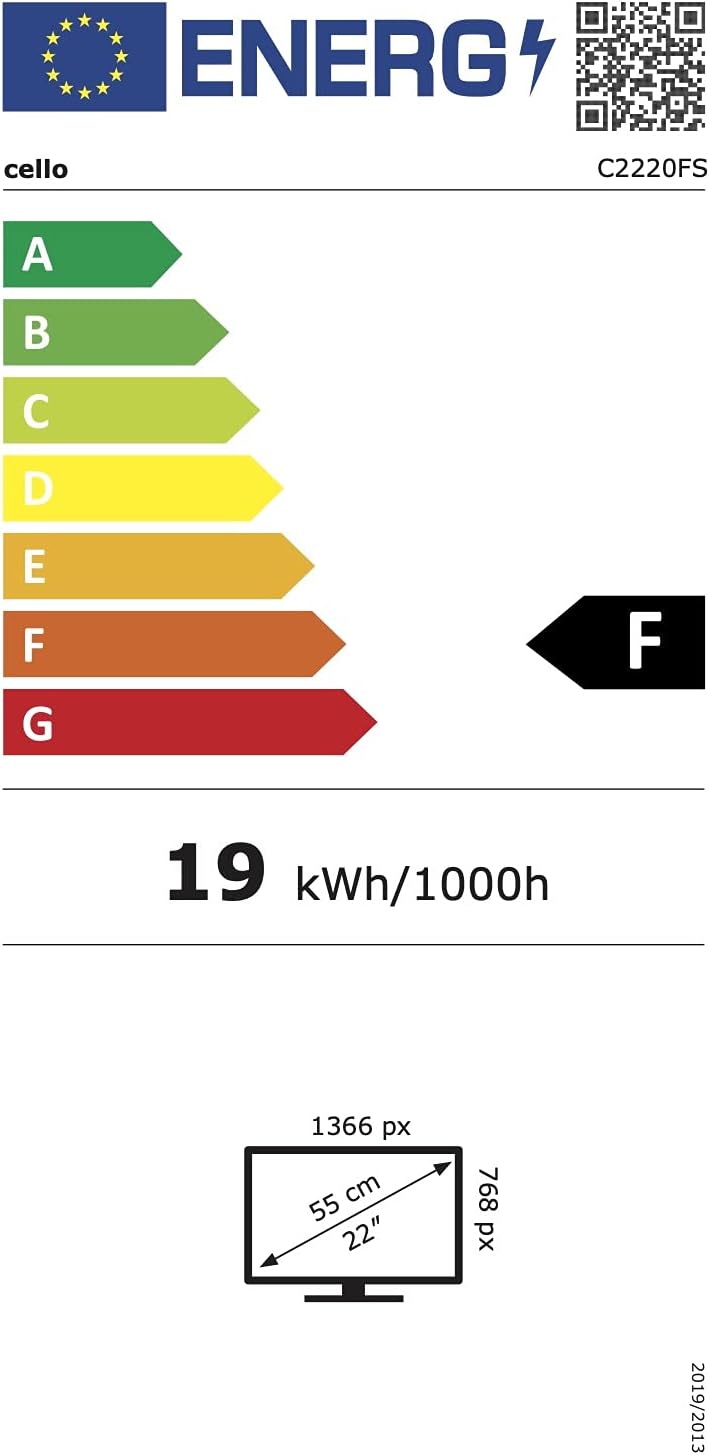
בילד 6.1: Energy efficiency label for the Cello C2220FSDE TV. For more details, visit EPREL דאַטאַבאַסע.

בילד 6.2: Detailed product information sheet. For more details, visit EPREL דאַטאַבאַסע.
7. וואָראַנטי און שטיצן
7.1 וואָראַנטי אינפֿאָרמאַציע
This Cello TV comes with a 1-יאָר לימיטעד וואָראַנטיביטע באַהאַלטן אייער קויפן באַווייַז פֿאַר וואָראַנטי קליימז.
7.2 קונה שטיצן
For technical support or customer service, please contact Cello Electronics:
- Webפּלאַץ: www.celloelectronics.de
- בליצפּאָסט: consumersupport@celloelectronics.com
- טעלעפֿאָן: 03334330312
- אַדרעס: Dovecot Hills, Bishop Auckland, DL14 6XW Durham, United Kingdom
You can also download the full instruction manual for your device in your preferred language from the official Cello webפּלאַץ: https://celloelectronics.de/instruction-books/.