
EONCHARM 1315
Universal Remote Control User Manual
מאָדעל: 1315
Brand: EONCHARM
הקדמה
This manual provides comprehensive instructions for the EONCHARM Universal Remote Control, designed to be compatible with a wide range of Samsung televisions. This remote offers a straightforward, plug-and-play experience, requiring no complex setup or programming. It is an ideal replacement for your original Samsung TV remote, restoring full functionality and convenience.
פּראָדוקט פֿעיִקייטן
- Infrared replacement remote compatible with all Samsung Smart TV, LED, LCD, HDTV, and 3D Series TVs.
- Compatible with all Samsung series TVs, including models from 2017 to 2024.
- Simple, compact, and ergonomic design for easy grip and handling.
- No programming or setup required; ready to use out of the box.
- Offers stable performance and farther transmitting distance.
- Includes dedicated shortcut buttons for NETFLIX, Prime Video, and Hulu for quick access to streaming services.
- Replaces various Samsung remote models, including BN59-01315A, BN59-01315J, BN59-01301A, BN59-01175N, BN59-01199F, AA59-00741A, AA59-00786A, AA59-00602A, BN59-01247A, AA59-00743A, BN59-01175B, AA59-00818A, AA59-00603A, BN59-01199G, and others.
פּעקל אינהאַלט
- 1 x EONCHARM Universal Remote Control (Model 1315)
באַמערקונג: AAA באַטעריעס זענען נישט אַרייַנגערעכנט און מוזן זיין געקויפט באַזונדער.
סעטאַפּ
ייַנמאָנטירונג פון באַטאַרייע
- געפֿינען די באַטאַרייע אָפּטייל אויף די צוריק פון די ווייַט קאָנטראָל.
- רוקט דעם באַטעריע דעקל אַראָפּ אָדער אין דער ריכטונג וואָס ווערט אָנגעוויזן דורך אַ פײַל צו עס עפֿענען.
- אַרײַנשטעלן צוויי (2) AAA באַטעריעס, און זיכער מאַכן אַז די פּאָזיטיוו (+) און נעגאַטיוו (-) טערמינאַלן זענען ריכטיק אויסגעשטעלט מיט די מאַרקירונגען אינעווייניק אין דעם אָפּטייל.
- לייגט צוריק דעם באַטעריע דעקל דורך עס צוריקצורוקן אין זיין פּאָזיציע ביז עס קליקט זיכער.
Once batteries are installed, the remote is ready for immediate use with compatible Samsung TVs. No pairing or programming is required.

אַפּערייטינג ינסטראַקשאַנז
The EONCHARM Universal Remote Control features a standard layout with clearly labeled buttons for intuitive operation. Below is a guide to the primary functions of each button.
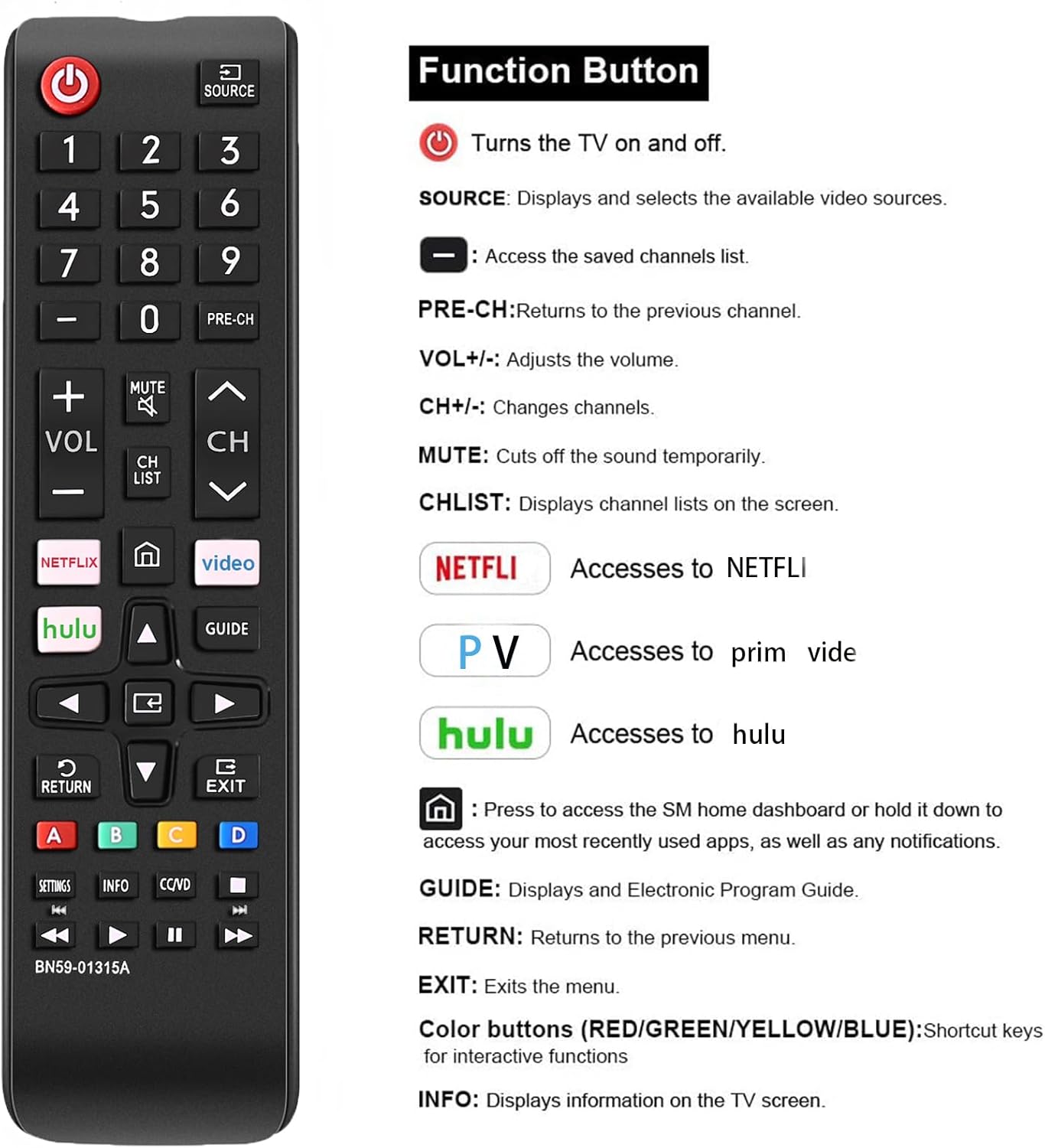
| קנעפּל | פֿונקציע |
|---|---|
| מאַכט (⏻) | טורנס און אַוועק די טעלעוויזיע. |
| מקור | Displays and selects available video sources (e.g., HDMI 1, AV, TV). |
| נומער קנעפּלעך (0-9) | גלייך אריינלייגן קאַנאַל נומערן. |
| PRE-CH | קערט צו דעם פריערדיקן קאַנאַל. |
| וואָל +/- | אַדזשאַסץ די באַנד מדרגה. |
| CH ^/v | טוישט קאַנאַלן אַרויף אָדער אַראָפּ. |
| שטום | Cuts the sound temporarily. |
| CH רשימה | Displays channel lists on the screen. |
| נעטפליקס | Directly accesses the NETFLIX application. |
| פּריים ווידעא | Directly accesses the Prime Video application. |
| הולו | Directly accesses the Hulu application. |
| היים (⌂) | Press to access the Smart Hub home dashboard or hold it down to access your most recently used apps, as well as any notifications. |
| נאַוויגאַציע פײַלן (אַרויף, אַראָפּ, לינקס, רעכטס) | נאַוויגירן דורך מעניוז און אָפּציעס. |
| אַרייַן | קאַנפערמז סאַלעקשאַנז. |
| גייד | Displays the Electronic Program Guide (EPG). |
| צוריקקומען | קערט צו די פריערדיקע מעניו אָדער פאַרשטעלן. |
| אַרויסגאַנג | פֿאַרלאָזט דעם איצטיקן מעניו אָדער אַפּליקאַציע. |
| קאָלירטע קנעפּלעך (A, B, C, D) | Shortcut keys for interactive functions, specific to TV content or applications. |
| SETTINGS | Accesses TV settings menu. |
| INFO | דיספּלייז אינפֿאָרמאַציע וועגן דעם קראַנט פּראָגראַם אָדער אינהאַלט. |
| CC/VD | Activates Closed Captions/Video Description. |
| Media Control Buttons (Play, Pause, Stop, Rewind, Fast Forward) | קאָנטראָלס מעדיע פּלייבאַק. |

קאַמפּאַטאַבילאַטי
This EONCHARM Universal Remote Control is designed for broad compatibility with Samsung televisions. It supports:
- All Samsung Smart TV models.
- Samsung LCD, LED, HDTV, and 3D Series TVs.
- Samsung TVs from various years, including 2017, 2018, 2019, 2020, 2021, 2022, 2023, and 2024 series.
- Common screen sizes such as 43, 50, 55, 58, 65, and 75 inches.
It is a direct replacement for many original Samsung remote models, ensuring seamless integration without the need for complex setup procedures.


וישאַלט
באַטערי פאַרבייַט
When the remote control's performance degrades (e.g., reduced range, unresponsive buttons), it is likely time to replace the batteries. Follow the battery installation steps outlined in the Setup section.
רייניקונג
צו רייניקן די ווײַטקאָנטראָל, ניצט אַ ווייכע, טרוקענע שטאָף. פֿאַר שווערע שמוץ, אַ ביסל ווייכער מאַכןampen the cloth with water or a mild, non-abrasive cleaner. Do not use harsh chemicals or abrasive materials, as these can damage the remote's surface or internal components. Avoid getting moisture into the battery compartment or any openings.
סטאָרידזש
Store the remote control in a cool, dry place away from direct sunlight, extreme temperatures, and high humidity. If the remote will not be used for an extended period, it is advisable to remove the batteries to prevent leakage and potential damage.
טראָובלעשאָאָטינג
- ווייַט ניט ריספּאַנדינג:
- זיכער מאַכן אַז די באַטעריעס זענען ריכטיק אַרײַנגעשטעלט מיט דער ריכטיקער פּאָלאַריטעט.
- פאַרבייַטן אַלטע אָדער אויסגעשעפּט באַטעריעס מיט נייַע AAA באַטעריעס.
- זיכער מאַכן אַז עס זענען נישטאָ קיין שטערונגען צווישן דעם ווײַטקאָנטראָל און דעם טעלעוויזיע'ס אינפֿראַרעד סענסאָר.
- ריכט די ווײַטקאָנטראָל גלייך אויפן טעלעוויזאָרס סענסאָר.
- קנעפּלעך זענען קלעפּיק אָדער רעאַגירן נישט:
- Clean the remote control as described in the Maintenance section.
- If the issue persists after cleaning and battery replacement, the remote may be damaged and require replacement.
- Remote controls some functions but not others:
- Verify that your TV model is a Samsung TV. This remote is specifically designed for Samsung TVs.
- Ensure the TV's firmware is up to date, as some older TVs might have limited compatibility with newer remote features.
ספּעסאַפאַקיישאַנז
| שטריך | דעטאַל |
|---|---|
| פּראָדוקט דימענשאַנז | 2.36 X 1.97 X 3.1 אינטשעס |
| פּונקט וואָג | 2.11 אונסעס |
| מאָדעל נומער | 1315 |
| באַטעריז פארלאנגט | 2 AAA באַטעריז (ניט אַרייַנגערעכנט) |
| סאָרט | EONCHARM |
| ספּעציעלע שטריך | ערגאַנאַמיק פּלאַן |
| קאָליר | שוואַרץ |
| מאַקס נומער פון שטיצט דעוויסעס | 50 (refers to internal capability, designed for Samsung TVs) |
| קאַמפּאַטאַבאַל דעוויסעס | Television (Samsung TVs) |
וואָראַנטי און שטיצן
For information regarding warranty coverage or technical support, please refer to the product packaging or contact the retailer from whom you purchased the EONCHARM Universal Remote Control. Keep your proof of purchase for any warranty claims.
Ask a question about this manual
Ask about setup, troubleshooting, compatibility, parts, safety, or missing instructions. Manuals+ will review the question and use this page’s manual context to help answer it.