
הקדמה
This manual provides detailed instructions for the installation, operation, maintenance, and troubleshooting of the HP ProDesk 400 G3 MS-7957 motherboard. Please read this manual thoroughly before proceeding with any installation or operation to ensure proper functionality and safety.
זיכערקייַט אינפֿאָרמאַציע
שטענדיק אָבסערווירן די פאלגענדע זיכערהייט מיטלען צו פאַרמייַדן שעדיקן צו די מוטערבאָרד אָדער שאָדן צו זיך:
- טרענט אפ די מאַכט צושטעל פון די וואַנט אַוטלעט איידער איר ינסטאַלירן אָדער אַראָפּנעמען קיין קאָמפּאָנענטן.
- טראָגט אַן אַנטי-סטאַטישן האַנטגעלענק-רימען אָדער רירט אָפט אָן אַן געערדטן מעטאַלנעם אָביעקט צו אָפּלאָדן סטאַטישע עלעקטריע איידער איר האַנדלט מיט דעם מוטערבאָרד.
- האַלט אָן דאָס מוטערבאָרד ביי די ברעגן כּדי נישט צו אָנרירן סענסיטיווע קאָמפּאָנענטן.
- זאָרגט פֿאַר געהעריקע ווענטילאַציע אינעווייניק פֿון קאָמפּיוטער קעסטל כּדי צו פֿאַרמייַדן איבערהיצונג.
- האַלט די מאַדערבאָרד אַוועק פון נאַס און עקסטרעמע טעמפּעראַטורן.
פּראָדוקט איבערview
The HP ProDesk 400 G3 MS-7957 is a MicroATX motherboard designed for Intel processors with an LGA 1151 socket. It supports DDR4 RAM and features a B250 chipset, offering a reliable foundation for desktop computing.
שליסל פֿעיִקייטן
- Compatible CPU Brand: ינטעל
- סאָקקעט טיפּ: LGA 1151/Socket H4
- פאָרם פאַקטאָר: מיקראָאַטקס
- I/O קאַנעקטערז: Ethernet (RJ-45), USB 2.0, USB 3.0, VGA, DisplayPort, HD Audio Jack
קאָמפּאָנענט לעגיטימאַציע
Familiarize yourself with the layout of the motherboard to facilitate proper installation and connection of components.

פיגור 1: ווינקלדיק view of the HP ProDesk 400 G3 MS-7957 motherboard. This image highlights the CPU socket (LGA 1151), four DDR4 RAM slots, PCIe slots, and various headers for front panel connections and storage devices.
סעטאַפּ און ינסטאַלירונג
איידער איר אָנהייבן
- Ensure your computer case is compatible with the MicroATX form factor.
- Gather all necessary components: CPU, RAM, CPU cooler, power supply, storage devices, and graphics card (if not using integrated graphics).
- Prepare your workspace by ensuring it is clean, well-lit, and static-free.
מאָטהערבאָאַרד ינסטאַלירונג
- Install the CPU into the LGA 1151 socket. Carefully align the CPU with the socket's notch and gently lower it into place. Close the retention arm.
- טראָגט אויף טערמישע פּאַסטע אויף די סי-פּי-יו און אינסטאַלירט דעם סי-פּי-יו קולער לויט די אינסטרוקציעס פון זיין פאַבריקאַנט.
- Install the DDR4 RAM modules into the designated slots. Ensure they are fully seated until the clips lock into place.
- Mount the motherboard into the computer case using the appropriate standoffs and screws.
- פֿאַרבינדט דעם הויפּט 24-פּין ATX מאַכט קאַנעקטאָר און דעם 4-פּין אָדער 8-פּין CPU מאַכט קאַנעקטאָר פֿון אייער מאַכט צושטעל צום מוטערבאָרד.
- Install any expansion cards (e.g., graphics card) into the PCIe slots.

פיגור 2: אויבן-אראפ ווינקלעד view of the HP ProDesk 400 G3 MS-7957 motherboard. This perspective provides a clear view of the processor socket, memory slots, and the layout of the various internal connectors and components.
קאַנעקטינג פּעריפעראַלס
- Connect SATA storage devices (HDDs/SSDs) to the SATA ports on the motherboard.
- Connect front panel headers (power button, reset button, USB ports, audio jacks) to their respective pins on the motherboard. Refer to your case manual for specific pin assignments.
- Connect external peripherals such as monitor, keyboard, mouse, and Ethernet cable to the rear I/O panel.
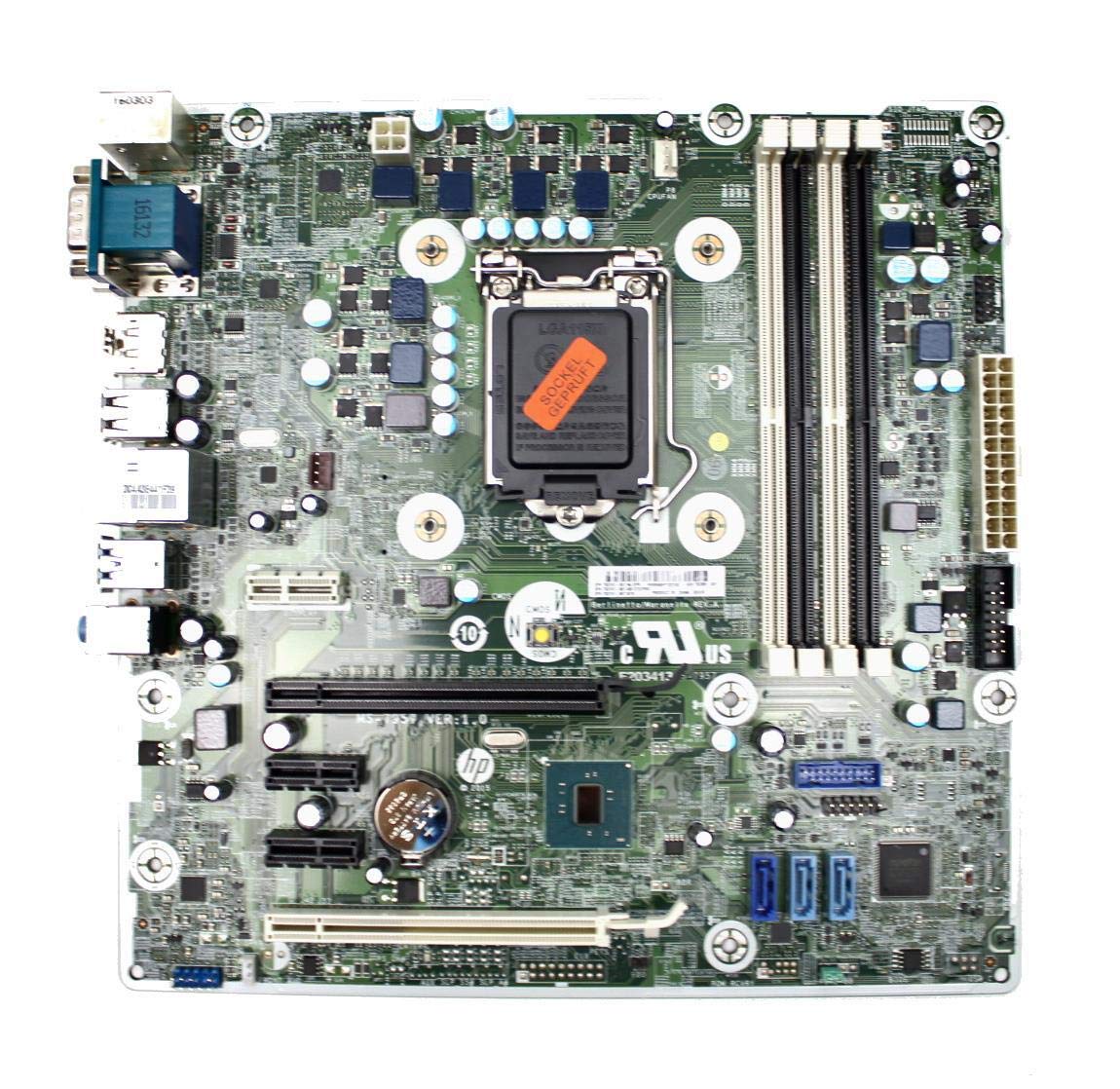
Figure 3: Rear I/O panel of the HP ProDesk 400 G3 MS-7957 motherboard. This image displays the available external connectivity options, including PS/2 ports, serial port, VGA, DisplayPort, USB 2.0, USB 3.0, Ethernet (RJ-45), and HD audio jacks.
אַפּערייטינג ינסטראַקשאַנז
ערשט מאַכט אויף
After all components are installed and connected, connect the power cable to the power supply and press the power button on your computer case. The system should initiate the boot process.
בייאָוס/UEFI קאָנפיגוראַציע
כדי צו צוקומען צום BIOS/UEFI סעטאַפּ פּראָגראַמיר-פּראָגראַם, דריק דעם באַשטימטן קנעפּל (געווענליך דעל, F2, פ10, אָדער פ12) during the initial boot sequence. Here you can configure boot order, system time, and other hardware settings.
דרייווער ינסטאַלירונג
After installing your operating system, it is crucial to install the latest drivers for your motherboard's chipset, integrated graphics, audio, and network adapter. These drivers can typically be found on the HP support webוועבזייטל אדער דעם טשיפּסעט פאַבריקאַנט'ס webפּלאַץ.
וישאַלט
- רייניקונג: רעגולער רייניקט שטויב פון די מאַדערבאָרד און קאָמפּאָנענטן מיט קאָמפּרעסירטע לופט. זיכערט זיך אַז די סיסטעם איז אויסגעלאָשן און נישט אַרייַנגעשטעקט פון די פּלאַטפֿאָרמע איידער איר רייניקט.
- בייאָוס/UEFI דערהייַנטיקונגען: Periodically check for BIOS/UEFI updates from HP's official support website. Updates can improve stability, compatibility, and performance. Follow update instructions carefully to avoid system damage.
- דרייווער דערהייַנטיקונגען: Keep all system drivers updated to ensure optimal performance and compatibility with new software and hardware.
טראָובלעשאָאָטינג
די סעקציע גיט לייזונגען צו געוויינטלעכע פראבלעמען וואָס איר קענט באַגעגענען:
- קיין מאַכט: Check all power connections, including the 24-pin ATX and CPU power cables. Ensure the power supply is switched on and the wall outlet is functional.
- קיין ווייַז: Verify that your monitor is connected to the correct video output (VGA or DisplayPort) and is powered on. Reseat the graphics card (if applicable) and RAM modules.
- סיסטעם אינסטאביליטעט/קראכן: This could be due to overheating, faulty RAM, or outdated drivers. Check CPU and GPU temperatures, run memory diagnostic tools, and update drivers.
- פּעריפעראַל נישט דעטעקטירט: Ensure the peripheral is properly connected. Try a different port or update the relevant drivers.
- בייאָס/UEFI פּראָבלעמען: If you encounter issues after changing BIOS settings, try resetting the CMOS by removing the CMOS battery for a few minutes or using the clear CMOS jumper (refer to motherboard diagram for location).
ספּעסאַפאַקיישאַנז
| שטריך | באַשרייַבונג |
|---|---|
| סאָרט | HP |
| קפּו סאָקקעט | LGA 1151 |
| קאַמפּאַטאַבאַל דעוויסעס | דעסקטאָפּ קאָמפּיוטער |
| ראַם טעכנאָלאָגיע | דדר4 |
| קאָמפּאַטיבלע פּראַסעסאָרן | Intel Core i3-6xxx, Intel Core i5-6xxx, Intel Core i7-6xxx, Intel Core i3-7xxx, Intel Core i5-7xxx, Intel Core i7-7xxx, Intel Core i3-8xxx, Intel Core i5-8xxx, Intel Core i7-8xxx |
| טשיפּסעט טיפּ | Intel B250 |
| פּלאַטפאָרמע | Windows |
| מאָדעל נאָמען | MS-7957 |
| קפּו מאָדעל | Core i3 (Note: Supports i3, i5, i7 as listed above) |
| הויפּט מאַכט קאַנעקטער טיפּ | 24 שפּילקע |
| graphics קאָרט צובינד | PCI Express |
| Available Memory Slots | 4 |
| גאַנץ SATA פּאָרץ | 6 |
| גאַנץ וסב פּאָרץ | 2 (Note: Refers to internal headers, rear I/O has more) |
| גאַנץ עטהערנעט פּאָרץ | 1 |
| Total PCIe Ports | 3 |
| פאַבריקאַנט | Computer Store Berlin (Reseller/Supplier) |
| טייל נומער | 4061435962741 |
| ASIN | B08CS13PTQ |
וואָראַנטי און שטיצן
דער פּראָדוקט קומט מיט אַ 1 יאָר וואָראַנטי פון די דאַטע פון קויפן. די וואָראַנטי קאָווערס חסרונות אין מאַטעריאַלס און ווערקמאַנשיפּ אונטער נאָרמאַל נוצן.
For technical support, warranty claims, or further assistance, please contact your point of purchase or refer to the official HP support resources for the ProDesk 400 G3 series.