
1. הקדמה
This manual provides comprehensive instructions for the proper use, setup, and maintenance of your SMARTEK SW-832 Smartwatch. Please read this manual thoroughly before operating the device to ensure optimal performance and longevity.
The SMARTEK SW-832 is a versatile smartwatch designed to integrate with your mobile communication and activity tracking needs. It features Bluetooth connectivity, a touchscreen interface, and the capability to function as a standalone mobile device with a Micro-SIM card.
2. פּעקל אינהאַלט
באַשטעטיקט אַז אַלע זאכן זענען פאַראַן אין אייער פּראָדוקט פּאַקעט:
- SMARTEK SW-832 Smartwatch
- טשאַרדזשינג קאַבלע
- באַניצער מאַנואַל (דעם דאָקומענט)
- 32GB Micro SD Card (if included in your specific package)
3. דיווייס איבערview
Familiarize yourself with the physical components of your SMARTEK SW-832 Smartwatch.
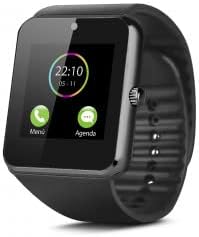
This image displays the SMARTEK SW-832 Smartwatch from the front. The square touchscreen shows a digital clock (22:10) and two icons labeled 'Menú' (Menu) and 'Agenda' (Calendar). A circular physical button is visible on the right side of the watch casing. The watch features a black silicone strap.
- טאָוטשסקרעען ווייַז: Main interface for interaction.
- Power Button/Home Button: Typically located on the side, used for powering on/off and returning to the home screen.
- מיקראָפאָן: For calls and voice input.
- רעדנער: For call audio and notifications.
- טשאַרדזשינג פּאָרט: פֿאַר פֿאַרבינדן דעם טשאַרדזשינג קאַבל.
- SIM קאָרט שפּעלטל: For inserting a Micro-SIM card.
- מיקראָ סד קאָרט שפּעלטל: פֿאַר אויסברייטערן סטאָרידזש.
- אַפּאַראַט: Integrated camera for capturing images.
4. סעטאַפּ
4.1 טשאַרדזשינג די מיטל
- Connect the charging cable to the smartwatch's charging port.
- Connect the other end of the cable to a compatible USB power adapter or a computer's USB port.
- Allow the device to charge fully before first use. A full charge typically takes approximately 2-3 hours. The battery indicator on the screen will show charging status.
4.2 אריינשטעלן סים קארטל (אפציאנאל)
To use the smartwatch as a standalone phone, insert a Micro-SIM card.
- Ensure the smartwatch is powered off.
- Locate the SIM card slot, usually on the side or under the back cover. Refer to the device diagram for exact location.
- Carefully open the SIM card slot cover.
- Insert a Micro-SIM card with the gold contacts facing down and the notched corner aligned correctly.
- דריק די סים קאַרטל מיט אײַן ביז זי קליקט אַרײַן אין פּלאַץ.
- פֿאַרמאַכט דעם דעקל פֿון דער סים קאַרטל שפּאַלט זיכער.
4.3 Inserting Micro SD Card (Optional)
To expand storage for photos, music, and other files, insert a Micro SD card (up to 32GB supported).
- Ensure the smartwatch is powered off.
- Locate the Micro SD card slot, often adjacent to the SIM card slot.
- Carefully open the Micro SD card slot cover.
- Insert the Micro SD card with the gold contacts facing down.
- דזשענטלי שטופּן די קאָרט ביז עס קליקס אין פּלאַץ.
- Close the Micro SD card slot cover securely.
4.4 פּאַוערינג אויף / אַוועק
- צו מאַכט אויף: דריק און האלט דעם פּאַוער קנעפּל ביז דער עקראַן באַלויכטנט זיך.
- צו מאַכט אַוועק: Press and hold the Power button until a power-off menu appears. Select "Power Off" or similar option on the screen.
4.5 Pairing with Smartphone (Bluetooth)
To extend functionality and receive notifications from your smartphone, pair the smartwatch via Bluetooth.
- Ensure Bluetooth is enabled on both your smartwatch and your smartphone.
- On your smartwatch, navigate to the Bluetooth settings menu.
- אויף אייער סמאַרטפאָון, זוכט פֿאַר פֿאַראַן בלועטוט דעוויסעס.
- Select "SW-832" or a similar device name from the list on your smartphone.
- באַשטעטיקן די פּאָרינג בעטן אויף ביידע דעוויסעס אויב געבעטן.
- For full functionality, you may need to install a companion application on your smartphone. Refer to the smartwatch's on-screen instructions or packaging for app details.
5. אפערירן די סמאַרטוואַטש
5.1 יקערדיק נאַוויגאַציע
- טאָוטשסקרעען: Tap to select items, swipe left/right/up/down to navigate through menus and screens.
- מאַכט/היים קנעפּל: Press once to return to the home screen.
5.2 מאַכן און באַקומען קאַללס
- With SIM Card: Access the Dialer application to make calls directly from the smartwatch.
- Via Bluetooth (Paired with Smartphone): When paired, you can answer incoming calls or initiate calls through the smartwatch, which will route audio through its speaker and microphone.
5.3 שיקן און באַקומען מעסעדזשעס
- With SIM Card: Use the Messaging application to send and receive SMS messages.
- Via Bluetooth (Paired with Smartphone): Receive notifications for incoming messages from your smartphone. Some functionality may allow for quick replies or viewing full messages.
5.4 אַפּאַראַט פאַנגקשאַנאַליטי
Access the Camera application from the main menu. Tap the screen to take a photo. Images are saved to the internal memory or the inserted Micro SD card.
5.5 מוזיק קאָנטראָל
When paired with your smartphone, the smartwatch can control music playback (play, pause, skip tracks) on your phone. If a Micro SD card with music files is inserted, the smartwatch can play music directly.
5.6 אַקטיוויטעט טראַקער
The smartwatch includes an activity tracker to monitor steps, distance, and calories. Access the dedicated application to view your daily activity data.
5.7 נאָוטאַפאַקיישאַנז
When paired with your smartphone, the smartwatch will display notifications for calls, messages, and other applications. Manage notification settings through the companion app on your smartphone.
5.8 Internet Browsing (with SIM)
If a SIM card with data connectivity is inserted, you can access basic internet browsing functionality through the built-in browser application.
6. וישאַלט
6.1 רייניקונג
- Wipe the screen and body of the smartwatch with a soft, lint-free cloth.
- פֿאַרמײַדן ניצן שטרענגע כעמיקאַלן, אַברייסיוו רייניגער, אָדער אַעראָסאָל ספּרײַס.
- דו זאלסט נישט סאַבמערדזש די מיטל אין וואַסער.
6.2 באַטערי קער
- פֿאַרמײַדט עקסטרעמע טעמפּעראַטורן, ווײַל זיי קענען אַפֿעקטירן די לעבן פֿון די באַטעריע.
- Charge the battery regularly, but avoid leaving it fully discharged for extended periods.
- Use only the provided charging cable or a certified compatible charger.
6.3 סטאָרידזש
When storing the smartwatch for an extended period, ensure it is partially charged (around 50%) and stored in a cool, dry place.
7. טראָובלעשאָאָטינג
| פּראָבלעם | מעגלעך לייזונג |
|---|---|
| די מיטל טוט נישט מאַכט אויף. | זיכער מאַכן אַז די באַטאַרייע איז אויפגעלאָדן. פֿאַרבינדט זיך צום טשאַרדזשער און פּרוּווט ווידער. |
| קען נישט פאַרבינדן מיטן סמאַרטפאָן. |
|
| סים קאָרט ניט דיטעקטאַד. |
|
| די פאַרשטעלן איז ניט ריספּאַנדאַבאַל. | Perform a soft reset by pressing and holding the Power button until the device restarts. If unresponsive, allow the battery to fully discharge and then recharge. |
| נעבעך באַטאַרייע לעבן. |
|
8. ספּעסאַפאַקיישאַנז
| שטריך | דעטאַל |
|---|---|
| מאָדעל | SMARTEK SW-832 |
| פּראַסעסער | MTK626111D |
| ווייַז | 1.54 inch IPS LCD, 240 x 240 pixels |
| GSM באַנדס | 850/900/1800/1900 מהז |
| בלועטאָאָטה ווערסיע | 4.0 |
| באַטערי | 380 mAh 3.7V Lithium-Polymer |
| באַניץ צייט | ביז 72 שעה (נאָרמאַל נוצן) |
| באַראַן | 64 מב |
| אינערלעכער סטאָרידזש (ראַם) | 64 מב |
| יקספּאַנדאַבאַל סטאָרידזש | Up to 32 GB via Micro SD card |
| סים קאָרט טיפּ | מיקראָ-סים |
| אַפּאַראַט | 1.3 מעגאַפּיקסעל |
| וואָג | 65 גראַמז |
| דימענסיעס (L X W X H) | 46 X 42 X 11.5 מם |
| אָפּערייטינג סיסטעם | Proprietary OS with smartphone connectivity features |
| קאַמפּאַטאַבאַל דעוויסעס | Smartphones, Tablets (Android/iOS via Bluetooth) |
9. וואָראַנטי און שטיצן
For warranty information, please refer to the warranty card included with your purchase or visit the official SMARTEK website. Support contact details are typically provided with your product documentation or on the manufacturer's webפּלאַץ.
ביטע האַלטן דיין דערווייַז פון קויפן פֿאַר וואָראַנטי קליימז.