
1. הקדמה
This manual provides detailed instructions for the safe and effective use of the Walfront PM6508 Digital Temperature Humidity Meter. This device is designed for high-precision measurement of ambient temperature and relative humidity, offering features such as data hold, backlight display, and wet bulb/dew point temperature calculations. It is suitable for various applications including home, office, industrial settings, and environmental monitoring.
2. זיכערקייַט אינפֿאָרמאַציע
Please read and understand all safety warnings and operating instructions before using this instrument. Failure to follow these instructions may result in electric shock, fire, or injury.
- Do not operate the meter if it appears damaged or if the battery cover is not properly closed.
- Avoid exposing the meter to extreme temperatures, direct sunlight, or high humidity for prolonged periods.
- Do not attempt to repair or modify the meter. Refer all servicing to qualified personnel.
- Remove batteries if the meter is not used for an extended period to prevent leakage.
- Keep the sensor area clean and free from obstructions to ensure accurate readings.
3. פּראָדוקט איבערview
The Walfront PM6508 is a compact and portable digital meter designed for accurate environmental measurements. It features an easy-to-read LCD display with backlight and intuitive button controls.

פיגורע 3.1: פראָנט view of the Walfront PM6508 meter with key components labeled. This includes the temperature and humidity sensor at the top, the HD display, various control buttons (Power, Max/Min, Data Hold, Data Storage, Unit Switch, Backlight), and an anti-fall protective sleeve.
3.1 שליסל פֿעיִקייטן
- הויך פּרעסיסיאָן סענסאָר: Provides accurate temperature and humidity readings.
- LCD דיספּלעי מיט באַקלייט: זיכערט קלאָרע ליינערהייט אין פֿאַרשידענע ליכט באדינגונגען.
- דאַטאַ האַלטן פֿונקציע: איינפֿרירט די איצטיקע לייענונג אויפן דיספּלעי.
- דאַטן סטאָרידזש: שפּאָרט ביז 100 גרופּעס פון מעסטונג דאַטן.
- Wet Bulb & Dew Point Temperature: Calculates and displays these critical environmental parameters.
- אַפּאַראַט באַשטימען: לייכט טוישן צווישן צעלזיוס (°C) און פאַהרענהייט (°F).
- אָטאַמאַטיק פאַרמאַכן: שפּאָרט באַטאַריע לעבן.
- נידעריק מאַכט ינדיקאַטאָר: וואָרענונגען ווען באַטעריעס דאַרפֿן צו זיין ריפּלייסט.
3.2 פּעקל אינהאַלט

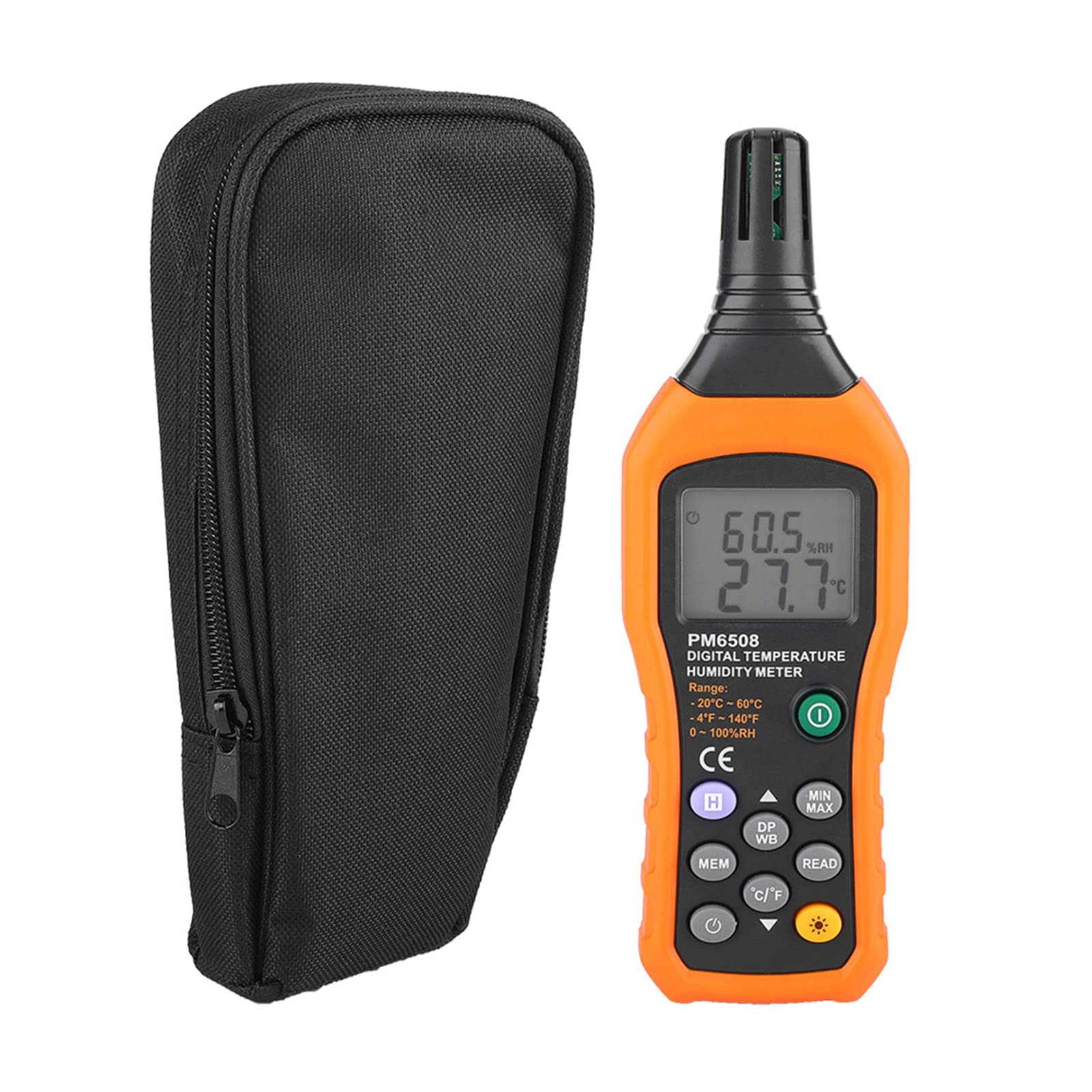
פיגורע 3.2: The Walfront PM6508 meter shown alongside its portable storage bag, indicating typical package contents.
- Walfront PM6508 Digital Temperature Humidity Meter
- פּאָרטאַטיוו סטאָרידזש באַג
- באַניצער מאַנואַל
4. סעטאַפּ
4.1 באַטאַרייע ייַנמאָנטירונג
The PM6508 meter requires 4 x 1.5V AAA batteries (not included) for operation.
- געפינט דעם דעקל פונעם באַטעריע־אָפּטייל אויף דער הינטערשטער זייט פונעם מעטער.
- רוקט דעם באַטעריע דעקל אַראָפּ צו עס עפענען.
- Insert four AAA batteries, ensuring correct polarity (+ and -) as indicated inside the compartment.
- לייגט צוריק דעם באַטעריע דעקל דורך עס צוריקצורוקן אין זיין פּאָזיציע ביז עס קליקט זיכער.
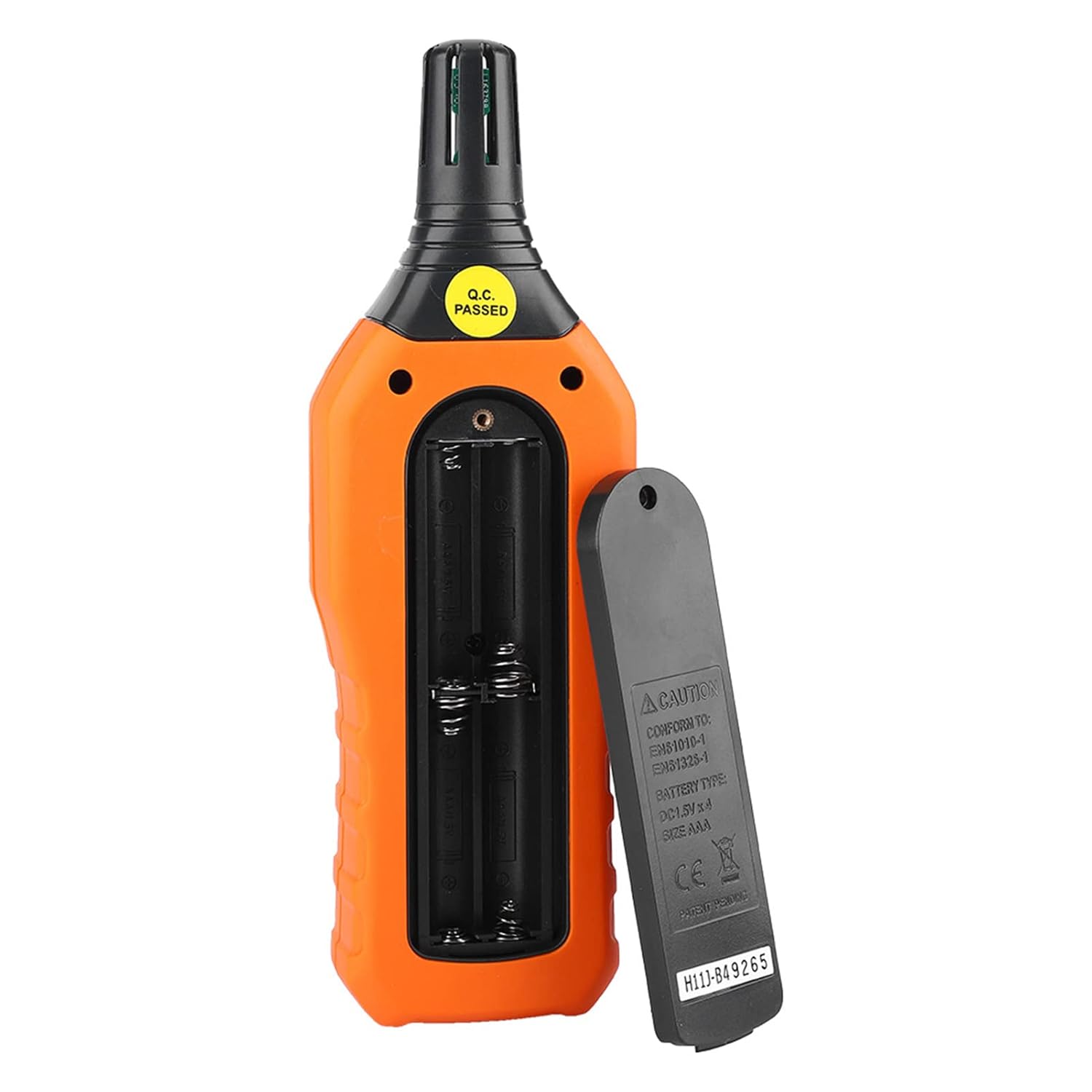
פיגורע 4.1: דערציען view of the meter showing the open battery compartment for AAA battery installation.
5. אַפּערייטינג ינסטרוקטיאָנס
5.1 מאַכט אויף / אַוועק
- דרוק די גרינע מאַכט קנעפּל (
 ) to turn the meter on.
 - דריקן און האַלטן די gray power button () for approximately 2 seconds to turn the meter off. The meter also features an automatic shut-down function to conserve battery life.
5.2 גענומען מעזשערמאַנץ
Once powered on, the meter will immediately begin displaying real-time temperature and humidity readings on the LCD screen. Ensure the sensor at the top of the device is exposed to the environment you wish to measure.

פיגורע 5.1: The meter in use, displaying temperature and humidity readings on its LCD screen.
5.3 איינהייט סוויטשינג (°C/°F)
To switch between Celsius (°C) and Fahrenheit (°F) temperature units:
- דרוק די °C/°F קנעפּל () located on the keypad. The display will update to show readings in the selected unit.
5.4 באַקלייט פונקציע
To activate or deactivate the display backlight:
- דרוק די באַקלייט קנעפּל () to toggle the backlight on or off. This is useful for reading in low-light conditions.
5.5 דאַטן האַלטן (H)
To freeze the current readings on the display:
- דרוק די ה קנעפּל (). The "H" icon will appear on the display, indicating that the data is held.
- דרוק די ה קנעפּל again to release the data hold and resume real-time measurements.
5.6 Maximum/Minimum (MIN/MAX) Measurement
צו view the maximum or minimum recorded values:
- דרוק די MIN/MAX קנעפּל () once to display the maximum temperature and humidity recorded since the meter was powered on or the function was reset.
- דרוק די MIN/MAX קנעפּל again to display the minimum temperature and humidity.
- דרוק די MIN/MAX קנעפּל a third time to exit the MIN/MAX mode and return to real-time readings.
5.7 Data Storage (MEM) and Retrieval (READ)
The meter can store up to 100 groups of measurement data.
- To Store Data: דרוק די MEM קנעפּל () to save the current temperature and humidity readings. The display will briefly show a memory location number.
- To Retrieve Data: דרוק די לייענען קנעפּל () to enter data retrieval mode. Use the MEM קנעפּל to scroll through stored data records.
- To Exit Retrieval: דרוק די לייענען קנעפּל again to exit data retrieval mode.
5.8 Wet Bulb (WB) and Dew Point (DP) Temperature
To display Wet Bulb or Dew Point temperatures:
- דרוק די DP/WB קנעפּל () once to display the Dew Point temperature.
- דרוק די DP/WB קנעפּל again to display the Wet Bulb temperature.
- דרוק די DP/WB קנעפּל a third time to return to standard temperature and humidity display.
6. וישאַלט
6.1 רייניקונג
- ווישט אויס דעם מעטער'ס קasinג מיט אַ ווייך, דamp שטאָף. דו זאלסט נישט נוצן אַברייסיוו קלינערז אָדער סאָלוואַנץ.
- Keep the sensor area clean and free from dust or debris to ensure accurate readings. Do not insert any objects into the sensor opening.
6.2 סטאָרידזש
- ווען נישט אין באַנוץ פֿאַר לענגערע פּעריאָדן, אַרויסנעמען די באַטעריעס צו פאַרמייַדן ליקאַדזש און שעדיקן צו די מיטל.
- Store the meter in a cool, dry place, away from direct sunlight and extreme temperatures.
- Utilize the provided portable storage bag for protection during storage and transport.
7. טראָובלעשאָאָטינג
| פּראָבלעם | מעגלעך סיבה | לייזונג |
|---|---|---|
| דער מעטער גייט נישט אן. |
|
|
| ומפּינקטלעך רידינגז. |
|
|
| דער עקראַן איז טונקל אָדער פליקערט. |
|
|
| Cannot store or retrieve data. |
|
|
8. ספּעסאַפאַקיישאַנז
The following table outlines the technical specifications for the Walfront PM6508 Digital Temperature Humidity Meter.


פיגורע 8.1: Detailed technical specifications including ranges, resolution, and precision for temperature, humidity, wet bulb, and dew point measurements, along with general parameters.
| פּאַראַמעטער | ווערט |
|---|---|
| מאָדעל | PM6508 |
| אַמביאַנט טעמפּעראַטור ראַנגע | -20 צו 60 °C (-4 צו 140 °F) |
| Ambient Temperature Precision | ±1.5 °C (-20 to 0 °C, 45 to 60 °C), ±0.5 °C (0 to 45 °C) |
| קאָרעוו הומידיטי קייט | 0% - 100% RH |
| Relative Humidity Precision | ±4.0% (0-20%, 80-100%), ±3.0% (20-80%) |
| נאַס באַלב טעמפּעראַטור קייט | -20 צו 60 °C (4 צו 140 °F) |
| Wet Bulb Temperature Precision | ±1.5 °C (-20 to 0 °C, 45 to 60 °C), ±0.5 °C (0 to 45 °C) |
| טוי פונט טעמפּעראַטור ראַנגע | -50 צו 60 °C (-58 צו 140 °F) |
| Dew Point Temperature Precision | ±1.5 °C (-50 to 0 °C, 45 to 60 °C), ±0.5 °C (0 to 45 °C) |
| האַכלאָטע | 0.1 °C / °F / %RH |
| דאַטאַ סטאָרידזש | 100 גרופּעס |
| מאַכט צושטעלן | 4 x 1.5V AAA Battery (not included) |
| דימענסיעס (L X W X H) | 180 X 60 X 29 מם (7.1 X 2.4 X 1.1 אינטש) |
| וואָג | 254 ג (9 אַז) |
| אַפּערייטינג הומידיטי | 0% - 100% (נישט קאנדענסירנדיק) |
9. אַפּפּליקאַטיאָנס
The Walfront PM6508 is suitable for a wide range of applications requiring accurate temperature and humidity monitoring.

פיגורע 9.1: Examples of environments where the PM6508 meter can be effectively used for temperature and humidity monitoring.
- Residential and Office Environments: Monitoring indoor climate for comfort and health.
- Industrial Production: Ensuring optimal conditions for manufacturing processes.
- Warehousing and Storage: Protecting goods sensitive to temperature and humidity, such as in wine cellars or general storage.
- אַגריקולטורע: Monitoring conditions in planting sheds, greenhouses, and aquaculture.
- Research and Development Laboratories: Maintaining precise environmental controls for experiments.
- HVAC סיסטעמען: Assisting in the evaluation and maintenance of heating, ventilation, and air conditioning systems.
10. וואָראַנטי און שטיצן
Walfront products are designed for reliability and performance. For warranty information, technical support, or service inquiries, please refer to the contact information provided with your purchase or visit the official Walfront webזייטל. ביטע באַהאַלטן אייער קויפן באַווייַז פֿאַר וואָראַנטי קליימז.