
1. הקדמה
The WinAPEX ET8104 is a portable, auto-ranging digital multimeter designed for accurate measurement of various electrical parameters. It features a clear LCD color screen, True RMS measurement, and a built-in flashlight, making it suitable for both professional and DIY electrical tasks. This manual provides essential information for safe and effective use of your multimeter.
2. זיכערקייַט אינפֿאָרמאַציע
Always read and understand all safety warnings and operating instructions before using this instrument.
- נישט איבערשרייטן די מאקסימום איינגאבע ווערטן פאר קיין פונקציע.
- ניצט נישט דעם מעטער אויב ער איז געשעדיגט אדער אויב די טעסט דראָטן זענען געשעדיגט.
- געניטונג עקסטרעם וואָרענען ווען ארבעטן מיט וואָלtagהעכער 30V AC RMS, 42V שפּיץ, אדער 60V DC. די וואַליומעןtagדאָס איז אַ ריזיקירן פון קלאַפּ.
- שטענדיק אָפּשטעקן די מאַכט פֿון דער קרייז און אָפּלאָדן אַלע הויך-וואָלוומעtagקאַפּאַסיטאָרס איידער מעסטן קעגנשטעל, קאָנטינעואַטי, דיאָדעס, אָדער קאַפּאַסיטאַנס.
- זיכער מאַכן אַז די ריכטיקע פונקציע און קייט זענען אויסגעקליבן איידער איר מאַכט מעסטונגען.
- Keep fingers behind the probe barriers during measurement.
- טוישט די באַטעריע אַזוי שנעל ווי דער נידעריק באַטעריע אינדיקאַטאָר דערשיינט צו ענשור פּינקטלעכע מעסטונגען.
3. פּעקל אינהאַלט
באַשטעטיקט אַז אַלע זאכן וואָס זענען אויסגערעכנט אונטן זענען אַרייַנגערעכנט אין אייער פּעקל:
- 1 x WinAPEX ET8104 Digital Multimeter
- 1 x K-type Thermocouple (TP01)
- 1 x פּאָר פון טעסט לידז
- 1 x באַניצער מאַנואַל
4. פּראָדוקט איבערview
The WinAPEX ET8104 features a compact design with a clear LCD display and intuitive controls. The protective casing enhances durability and provides dust resistance.
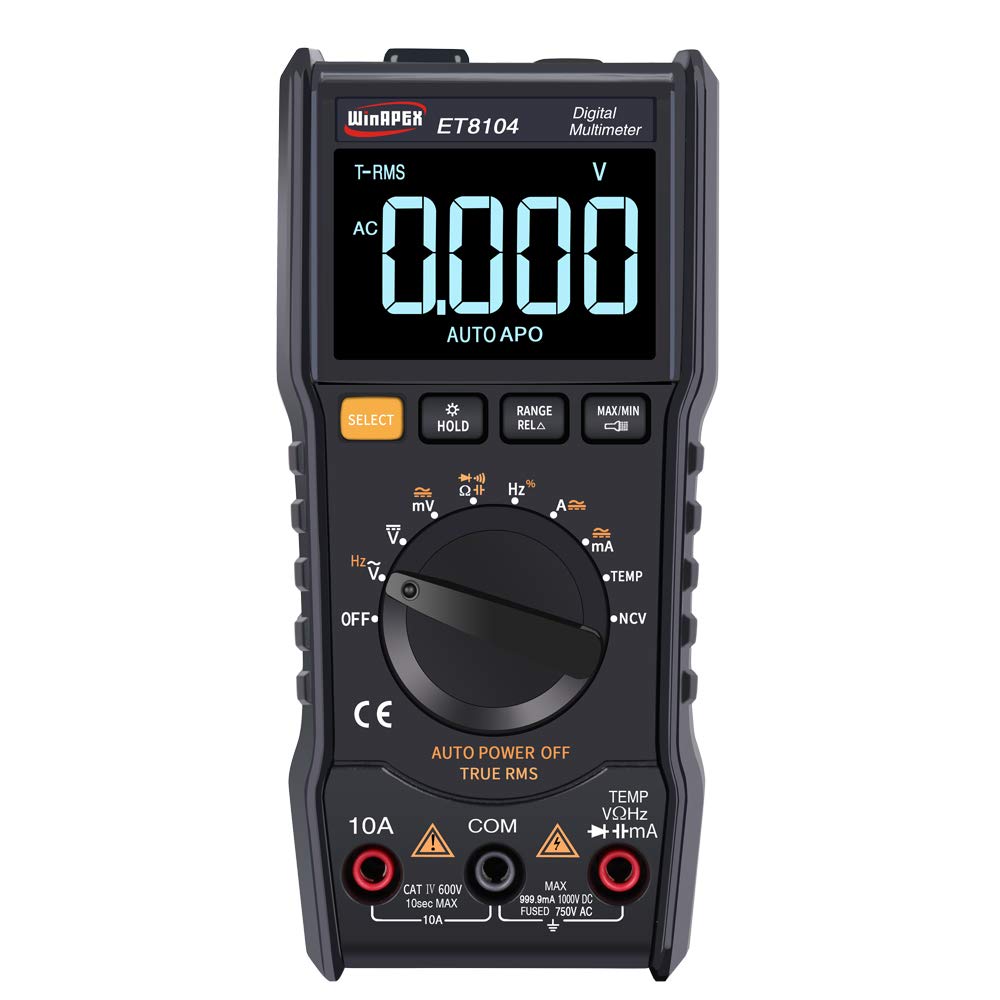
פיגורע 4.1: פראָנט view of the WinAPEX ET8104 Digital Multimeter, showing the display, rotary dial, and function buttons.

פיגור 4.2: פאָרנט און הינטן view of the WinAPEX ET8104 Digital Multimeter, highlighting its robust protective casing.

Figure 4.3: The WinAPEX ET8104 Multimeter displaying a summary of its measurement capabilities.
4.1 אַרויסווייַז און קאָנטראָלס
- LCD ווייַז: Shows measurement readings, unit symbols, and function indicators. Features a backlight for low-light conditions.
- דריי רעדל: Used to select the desired measurement function (e.g., V~, V-, Ω, A~, A-, Hz, Temp, NCV, OFF).
- SELECT קנעפּל: Toggles between AC/DC modes or different sub-functions within a rotary dial setting (e.g., AC VoltagE / DC Voltagאון).
- האַלטן קנעפּל: איינפֿרירט די איצטיקע לייענונג אויף דער אַרויסווייַזונג. דריק ווידער צו באַפֿרײַען.
- RANGE/RELA Button: Manually selects measurement range or activates relative measurement mode.
- MAX/MIN קנעפּל: Displays the maximum or minimum measured value.
- אַרייַנשרייַב דזשאַקס: Terminals for connecting test leads (COM, VΩHz, 10A, mA).
- פלאַשליגהט: Integrated flashlight for illuminating work areas.
- NCV סענסאָר: נאַן-קאָנטאַקט חלקtagE דעטעקציע געגנט.
5. סעטאַפּ
5.1 באַטאַרייע ייַנמאָנטירונג
- זיכער מאַכן אַז דער מולטימעטער איז אויסגעלאָשן.
- געפֿינען די באַטאַרייע אָפּטייל אויף די צוריק פון די מיטל.
- ניצן אַ שרויפנ - ציער צו עפענען די באַטאַרייע דעקן.
- Insert the required batteries (typically AAA or 9V, refer to the battery compartment label) observing correct polarity.
- פאַרבייַטן די באַטאַרייע דעקן און באַוואָרענען עס מיט די שרויף.
5.2 פֿאַרבינדן טעסט דראָטן
שטענדיק פֿאַרבינדן דעם שוואַרצן טעסט־דראָט צום COM (Common) jack. Connect the red test lead to the appropriate input jack based on the measurement function:
- פֿאַר וואָלtage, Resistance, Capacitance, Frequency, Diode, Continuity, and Temperature measurements: Connect the red lead to the VΩHz דזשאַק.
- For Current measurements up to 10A: Connect the red lead to the 10 א דזשאַק.
- For Current measurements in milliampere range: Connect the red lead to the mA דזשאַק.
6. אַפּערייטינג ינסטרוקטיאָנס
The ET8104 features auto-ranging, simplifying operation by automatically selecting the correct measurement range. For specific functions, use the rotary dial and the SELECT button.
6.1 מעאַסורינג אַק/דק וואָלtage (V~ / V-)
- קער די דריי - רעדל צו V~ or V-. The meter will automatically detect AC or DC voltage.
- פאַרבינדן די שוואַרץ פּרובירן פירן צו די COM דזשעק און די רויטע טעסט פירט צו די VΩHz דזשאַק.
- Connect the test probes in parallel to the circuit or component under test.
- לייענען דעם חלקtagE ווערט אויף די אַרויסווייַזן.
6.2 מעסטן קעגנשטעל (Ω)
- קער די דריי - רעדל צו Ω.
- פאַרבינדן די שוואַרץ פּרובירן פירן צו COM און דער רויטער טעסט פירט צו VΩHz.
- Ensure the circuit is de-energized before connecting the probes across the component.
- לייענען די קעגנשטעל ווערט אויף די אַרויסווייַזן.
6.3 מעאַסורינג קאַפּאַסיטאַנס
- Turn the rotary dial to the capacitance symbol (typically || or F).
- פאַרבינדן די שוואַרץ פּרובירן פירן צו COM און דער רויטער טעסט פירט צו VΩHz.
- זיכער מאַכן אַז דער קאַפּאַסיטאָר איז גאָר אויסגעלאָדן איידער איר קאַנעקט די פּראָבעס.
- פֿאַרבינדט די פּראָבעס אַריבער די קאַפּאַסיטאָר טערמינאַלס.
- לייענען די קאַפּאַסאַטאַנס ווערט אויף די אַרויסווייַזן.
6.4 ניט-קאָנטאַקט VoltagE (NCV) דעטעקשאַן
די NCV פונקציע ערמעגליכט דעטעקציע פון AC וואָלומעןtage without direct contact with wires.
- קער די דריי - רעדל צו NCV.
- Place the NCV sensor (located at the top of the meter) near the wire or outlet.
- The meter will emit an audible beep and the LED indicator will flash if AC voltage ווערט דעטעקטירט. די אָפטקייט פון ביפּס און בליץ וואַקסט מיט שטאַרקערער וואָלומעןtage.

Figure 6.1: Demonstrating the NCV function and integrated flashlight.
6.5 טעמפּעראַטור מעזשערמאַנט
- קער די דריי - רעדל צו TEMP.
- Connect the K-type thermocouple to the VΩHz און COM דזשאַקס, אַבזערווינג פּאָולעראַטי.
- Place the thermocouple probe on or near the object whose temperature is to be measured.
- Read the temperature value on the display. Use the SELECT button to switch between Celsius (°C) and Fahrenheit (°F).
6.6 אנדערע פאַנגקשאַנז
- פלאַשליגהט: Press the flashlight button (if available, or a dedicated button) to turn on/off the integrated flashlight.
- דאַטן האַלטן: דרוק די האַלטן קנעפּל צו פֿאַרפֿרירן די איצטיקע לייענונג אויף דער אַרויסווייַז.
- מאַקס/מין: דרוק די מאַקסימום / מין button to cycle through maximum, minimum, and current readings.
- אַוטאָ מאַכט אַוועק: דער מעטער וועט זיך אויטאָמאַטיש אויסלעשן נאָך אַ צייט פון אינאַקטיוויטעט צו שפּאָרן באַטאַרייע לעבן.
7. וישאַלט
7.1 רייניקונג
ווישן די פאַל מיט אַדamp שטאָף און מילדן וואַשפּולווער. ניצט נישט קיין שוואַרצע מאַטעריאַלן אָדער סאָלווענטן. האַלט די אַרייַנגאַנג טערמינאַלן פריי פון שמוץ און נעץ.
7.2 באַטערי פאַרבייַט
When the low battery indicator appears on the display, replace the batteries immediately to ensure accurate measurements. Follow the battery installation steps in Section 5.1.
7.3 קאָריק פאַרבייַט
אויב די קראַנט מעסטונג פונקציע הערט אויף צו ארבעטן, קען מען דאַרפֿן צו טוישן די פיוז. זעט די ספּעציפֿיקאַציעס פֿאַר די ריכטיקע פיוז טיפּ און שאַץ. פיוז אויסטויש זאָל נאָר דורכגעפֿירט ווערן דורך קוואַליפֿיצירטע פּערסאָנעל.
8. טראָובלעשאָאָטינג
| פּראָבלעם | מעגלעך סיבה | לייזונג |
|---|---|---|
| מעטער גייט נישט אן | טויט באַטעריז אָדער פאַלש באַטאַרייע ינסטאַלירונג | קאָנטראָלירט די פּאָלאַריטעט פון די באַטעריע אָדער פאַרבייט די באַטעריעס. |
| קיין לייענונג אדער 'OL' געוויזן | Incorrect function/range selected, open circuit, or over-range input | Verify function selection, check circuit connections, or ensure input is within range. |
| ומפּינקטלעך רידינגז | Low battery, damaged test leads, or external interference | Replace batteries, check/replace test leads, move away from strong electromagnetic fields. |
| קראַנט מעסטונג אַרבעט נישט | בלאָון קאָריק | Replace the fuse (refer to Section 7.3). |
9. ספּעסאַפאַקיישאַנז
| פּאַראַמעטער | ווערט |
|---|---|
| סאָרט | ווינאַפּעקס |
| מאָדעל | ET8104 |
| ווייַז גראף | 9999 |
| מאַכט מקור | באַטערי אַפּערייטאַד |
| קאָליר | שוואַרץ |
| מעאַסורעמענט מעטאַד | טאָפּל ינטאַגראַל א / די קאַנווערזשאַן |
| Sampלינג קורס | בעערעך. 3 מאל / סעקונדע |
| איבער-קייט אַרויסווייַז | "0L" |
| אַרבעט סוויווע | 0~40°C, Relative humidity <80% |
| לקד גרייס | 49 x 32 מם (1.9 רענטגענ 1.3 אינטשעס) |
| פּראָדוקט גרייס | 142 x 70 מם (5.6 רענטגענ 2.8 אינטשעס) |
| פּעקל וואָג | 305 ג (10.8 אונסעס) |
| DC Voltage אַקיעראַסי | ±(1.2%+10) |
| AC Voltage אַקיעראַסי | ±(1.2%+10) |
| דק קראַנט ראַנגע | 60 מאַ / 600 מאַ / 10 אַ |
| דק קראַנט אַקיעראַסי | ±(2.0%+30) for 10A, Resolution: 0.01A |
| אַק קראַנט ראַנגע | 60 מאַ / 600 מאַ / 10 אַ |
| אַק קראַנט אַקיעראַסי | ±(2.0%+30) for 10A, Resolution: 0.01A |
| קעגנשטעל ראַנגע | 1000Ω / 10kΩ / 100kΩ / 1MΩ / 10MΩ / 100MΩ |
| קעגנשטעל אַקקוראַסי | 1000Ω: ±(0.8%+5); 10kΩ-10MΩ: ±(0.8%+3); 100MΩ: ±(2.5%+3) |
| קאַפּאַסיטאַנס ראַנגע | 100nF/1000nF/10µF/100µF/1000µF/100mF |
| קאַפּאַסיטאַנס אַקיעראַסי | 100nF-1000µF: ±(3.5%+20); 100mF: ±(5%+3) |
| אָפטקייַט ראַנגע | 10Hz/100Hz/1KHz/10KHz/100KHz/1MHz/10MHz |
| אָפטקייַט אַקיעראַסי | ±(0.1%+3) |
| טעמפּעראַטור ראַנגע | (-20-1000)°C / (0-1832)°F |
| טעמפּעראַטור אַקקוראַסי | °C: ±(1.0%+5) <400°C, ±(1.5%+15) ≥400°C; °F: ±(0.75%+5) <750°F, ±(1.5%+15) ≥750°F |
| NCV | יא |
| אמת RMS | יא |
| אַוטאָ מאַכט אויסגעלאשן | יא |
| Data Hold | יא |
| באַקלייט | יא |
| פלאַשליגהט | יא |
10. וואָראַנטי און שטיצן
WinAPEX products are designed for reliability and performance. For warranty information or technical support, please refer to the warranty card included with your product or contact your local distributor. Keep your purchase receipt as proof of purchase.