
BIOS 335FC
BIOS Living Digital Pedometer 335FC User Manual
מאָדעל: 335FC
1. הקדמה
Thank you for choosing the BIOS Living Digital Pedometer 335FC. This compact and smart device is designed to help you maintain a healthy and active lifestyle by accurately tracking your daily physical activity.
It counts your steps walked, distance traveled, and calories burned, all displayed on a large, easy-to-read LCD screen. The pedometer is designed for convenience, easily clipping to your belt or waistband, and offers both 12/24 hour time formats and imperial/metric unit options.
2. זיכערקייַט אינפֿאָרמאַציע
- האַלט דעם אַפּאַראַט אַוועק פון וואַסער און איבעריקער נעץ.
- Do not expose the pedometer to extreme temperatures (hot or cold).
- ויסמיידן דראַפּינג אָדער אונטערטעניק די מיטל צו שטאַרק ימפּאַקץ.
- Do not attempt to disassemble or repair the pedometer yourself. Refer to qualified service personnel.
- האַלטן באַטעריז אויס פון דערגרייכן פון קינדער. אויב סוואַלאָוד, זוכן באַלדיק מעדיציניש ופמערקזאַמקייַט.
- אַוועקוואַרפן באַטעריעס און דעם אַפּאַראַט לויט די לאָקאַלע רעגולאַציעס.
3. פּראָדוקט איבערview
Familiarize yourself with the components of your BIOS Living Digital Pedometer 335FC.

פיגורע 3.1: פראָנט View of Pedometer
This image shows the front of the BIOS Living Digital Pedometer 335FC. It features a prominent LCD screen displaying "23 STEP" and three buttons below it: "RESET", "SET", and "MODE". The device is white with a blue accent around the screen, and "BIOS living" is printed at the top.
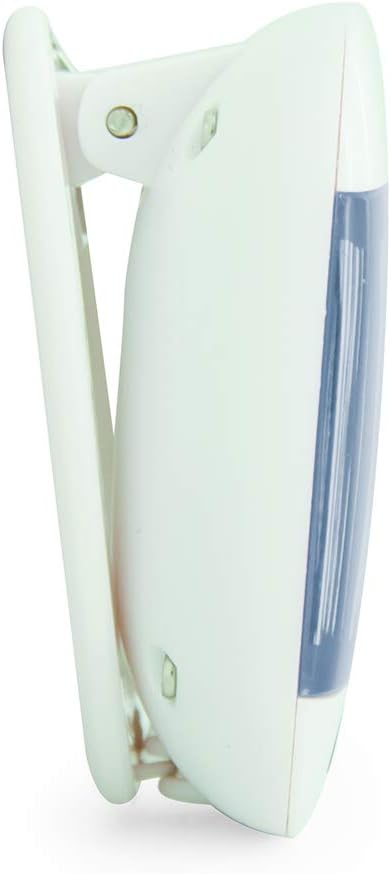
פיגורע 3.2: זייַט View with Belt Clip
דאָס בילד ווײַזט אַ זײַטיקן פּראָfile of the BIOS Living Digital Pedometer 335FC. It highlights the integrated white clip mechanism designed for attaching the pedometer to clothing, such as a belt or waistband. The blue accent on the front is visible from this angle.

פיגורע 3.3: צוריק View with Battery Compartment
This image shows the back of the BIOS Living Digital Pedometer 335FC. It clearly displays the battery compartment cover, which can be opened to insert or replace the battery. The back is white with some regulatory markings and the brand "HAPTIME" embossed.
שליסל קאַמפּאָונאַנץ:
- LCD ווייַז: גרויסער עקראַן פֿאַר גרינגקייט viewing of steps, distance, calories, and time.
- RESET קנעפּל: Used to clear current readings or reset settings.
- SET קנעפּל: Used to confirm settings or enter setting mode.
- מאָדע קנעפּל: Used to cycle through different display modes (Steps, Distance, Calories, Time).
- גאַרטל קליפּ: Integrated clip for secure attachment to clothing.
- באַטערי אָפּטייל: Located on the back for battery installation.
4. סעטאַפּ
4.1 באַטאַרייע ייַנמאָנטירונג
Your pedometer comes with a battery. Follow these steps to install it:
- Locate the battery compartment on the back of the pedometer (refer to Figure 3.3).
- Using a small screwdriver or coin, gently open the battery compartment cover.
- Insert the provided battery, ensuring the correct polarity (+/-) as indicated inside the compartment.
- פאַרבייַטן די דעקן פון די באַטאַרייע אָפּטייל און באַוואָרענען עס.
4.2 Initial Settings (Time & Units)
After battery installation, the device may prompt you to set the time and units. If not, press and hold the שטעלן קנעפּל צו אַרייַן סעטטינג מאָדע.
- צייט פֿאָרמאַט: The display will flash "12H" or "24H". Use the מאָדע button to toggle between 12-hour and 24-hour formats. Press שטעלן צו באַשטעטיקן.
- שטעלן צייט: The hour digit will flash. Use the מאָדע קנעפּל צו סטרויערן די שעה. דריק שטעלן to confirm. Repeat for minutes.
- אַפּאַראַט סיסטעם: The display will flash "KM" (metric) or "MI" (imperial). Use the מאָדע button to select your preferred unit system. Press שטעלן צו באַשטעטיקן.
- Stride Length (for distance accuracy): If prompted, enter your average stride length. This can be estimated by walking 10 steps and dividing the total distance by 10. Use מאָדע צו סטרויערן און שטעלן צו באַשטעטיקן.
- Weight (for calorie accuracy): If prompted, enter your weight. Use מאָדע צו סטרויערן און שטעלן צו באַשטעטיקן.
The pedometer is now ready for use.
5. אַפּערייטינג ינסטרוקטיאָנס
5.1 Wearing the Pedometer
For accurate readings, clip the pedometer securely to your belt or waistband, preferably near your hip. Ensure it is positioned vertically.
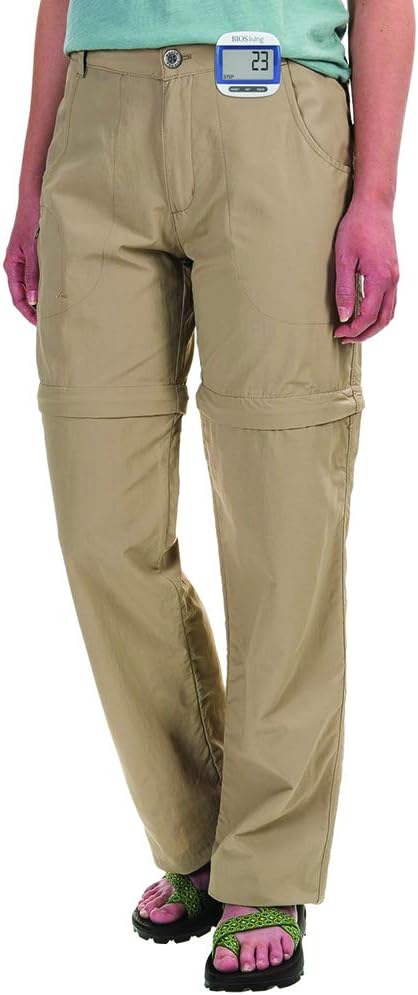
Figure 5.1: Correct Pedometer Placement
This image shows a person wearing the BIOS Living Digital Pedometer 335FC. The pedometer is clipped to the waistband of their khaki pants, positioned on the side of their hip, demonstrating the recommended placement for accurate step counting.
5.2 אַרויסווייַזן מאָדעס
דרוק די מאָדע קנעפּל צו דורכגיין די פאלגענדע אַרויסווייַז מאָדעס:
- סטעפּס: Displays the total number of steps taken.
- דיסטאַנסע: Displays the total distance traveled (in KM or MI).
- קאַלאָריעס: Displays the estimated calories burned (in KCAL).
- צייט: דיספּלייז די קראַנט צייט.

Figure 5.2: Time Display Mode
This image shows the BIOS Living Digital Pedometer 335FC displaying the time. The large LCD screen shows "2:34 P", indicating 2:34 PM. A small clock icon is visible on the bottom left of the display.

Figure 5.3: Distance Display Mode
This image shows the BIOS Living Digital Pedometer 335FC displaying distance. The screen shows "1.25" with "DIST" and "KM" below it, indicating a distance of 1.25 kilometers.

Figure 5.4: Calories Display Mode
This image shows the BIOS Living Digital Pedometer 335FC displaying calories burned. The screen shows "4.87" with "KCAL" below it, indicating 4.87 kilocalories.
5.3 צוריקשטעלן דאַטן
To reset your daily steps, distance, and calorie count to zero, press and hold the באַשטעטיק button until the display clears. This is typically done at the start of a new day or activity.
6. וישאַלט
6.1 רייניקונג
Wipe the pedometer with a soft, dry cloth. Do not use abrasive cleaners or immerse the device in water.
6.2 באַטערי פאַרבייַט
When the display becomes dim or the device stops responding, it's time to replace the battery. Follow the battery installation steps in Section 4.1.
7. טראָובלעשאָאָטינג
| פּראָבלעם | מעגלעך סיבה | לייזונג |
|---|---|---|
| דער עקראַן איז ליידיק אָדער טונקל. | נידעריק אָדער טויט באַטאַרייע. | טוישט אויס די באַטעריע (זעט סעקציע 6.2). |
| Inaccurate step count. | Incorrect placement of pedometer; irregular walking motion; incorrect stride length setting. | Ensure pedometer is clipped securely and vertically to your belt/waistband. Walk naturally. Re-enter stride length in settings (Section 4.2). |
| די קנעפּלעך זענען נישט ריספּאַנדינג. | Battery issue; temporary software glitch. | Replace battery. If problem persists, try removing and reinserting the battery to perform a hard reset. |
| קען נישט ענדערן סעטטינגס. | Not in setting mode. | דריקן און האַלטן די שטעלן קנעפּל צו אַרייַן סעטטינג מאָדע. |
8. ספּעסאַפאַקיישאַנז
| שטריך | דעטאַל |
|---|---|
| מאָדעל נומער | 335FC |
| קאָליר | בלוי |
| מאַטעריאַל | פּלאַסטיק |
| דימענסיעס (L X W X H) | בעערעך 5 רענטגענ 2 רענטגענ 2 סענטימעטער |
| וואָג | בעערעך. 31.81 ג |
| ווייַז | גרויס לקד |
| פאַנגקשאַנז | Steps, Distance, Calories, Time |
| צייט פֿאָרמאַט | 12/24 Hour selectable |
| וניץ | Imperial/Metric selectable |
| באַטערי ינקלודעד | יא |
| באַטערי לעבן | 24 Hours (Note: This might refer to continuous operation or a specific test condition, typical pedometer battery life is much longer) |
| UPC | 057475335632 |
9. וואָראַנטי און שטיצן
This BIOS Living Digital Pedometer 335FC is covered by a manufacturer's warranty against defects in materials and workmanship. Please refer to the warranty card included with your purchase for specific terms and conditions, including the warranty period and how to make a claim.
For technical support, troubleshooting assistance, or warranty inquiries, please contact BIOS Living customer service. Contact information can typically be found on the product packaging or the manufacturer's official webפּלאַץ.
ביטע באַהאַלטן אייער קויפן-באַווייַז פֿאַר גאַראַנטיע צוועקן.
Ask a question about this manual
Ask about setup, troubleshooting, compatibility, parts, safety, or missing instructions. Manuals+ will review the question and use this page’s manual context to help answer it.