
LAUNCH X431 PRO3 APEX
LAUNCH X431 PRO3 APEX Diagnostic Scanner
באַניצער ינסטרוקטיאָן מאַנואַל
1. הקדמה
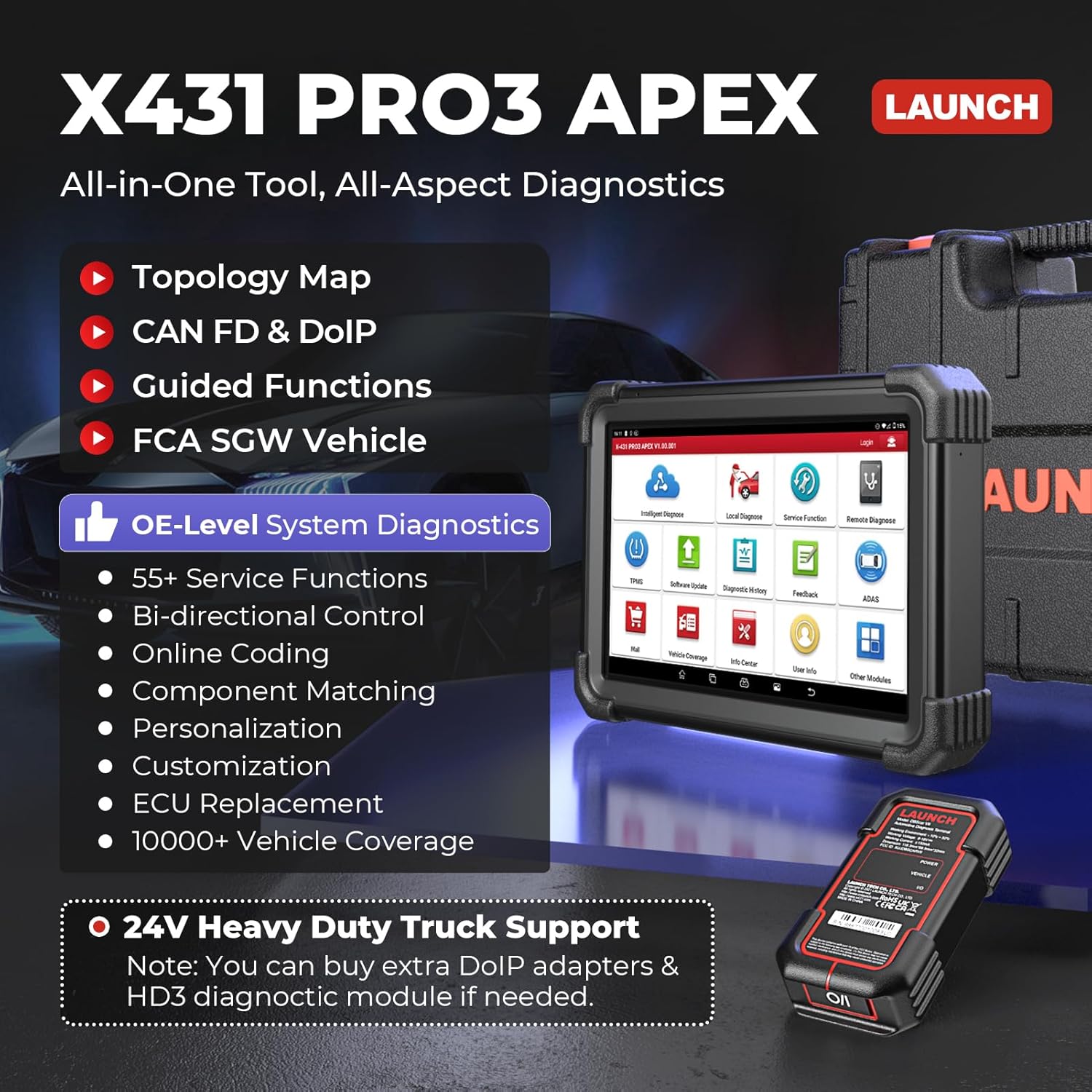
The LAUNCH X431 PRO3 APEX is a professional-grade diagnostic scanner designed for comprehensive vehicle analysis and maintenance. This advanced tool features a 2025 Topology Map, Online Coding capabilities, support for HD Trucks, CAN FD & DoIP protocols, and Guided Functions. It is equipped to handle a wide range of diagnostic tasks, including all-system diagnostics, and offers over 50 service functions for various vehicle brands and models.
This manual provides detailed instructions on setting up, operating, maintaining, and troubleshooting your LAUNCH X431 PRO3 APEX diagnostic scanner to ensure optimal performance and longevity.
2. שליסל פֿעיִקייטן
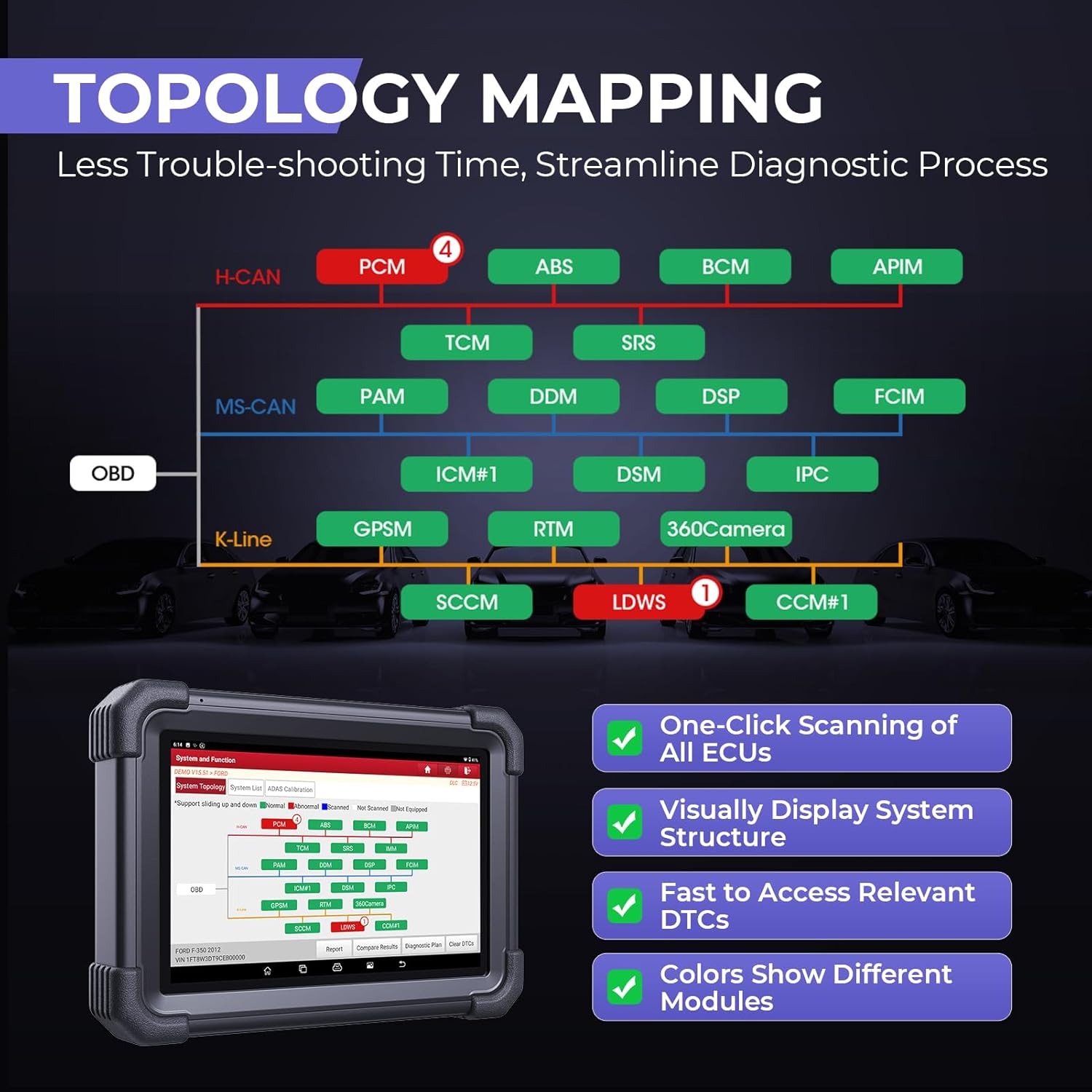
- One-Stop Intelligent Diagnosis: Features a newly developed topology map for direct access to all systems, communication status checks, and DTC identification, streamlining the diagnostic process.
- Powerful ECU Coding: Supports ECU replacement, matching, relearning, recoding, online coding, personalization, and OE-setting customization. Includes VAG Guided Functions and PMI for Mazda/Ford.
- ברייטע פאָרמיטל קאַווערידזש: Compatible with over 200 brands and models from 1996-2024, supporting CAN FD & DoIP for faster data transfer. Includes FCA & Renault SGW access.
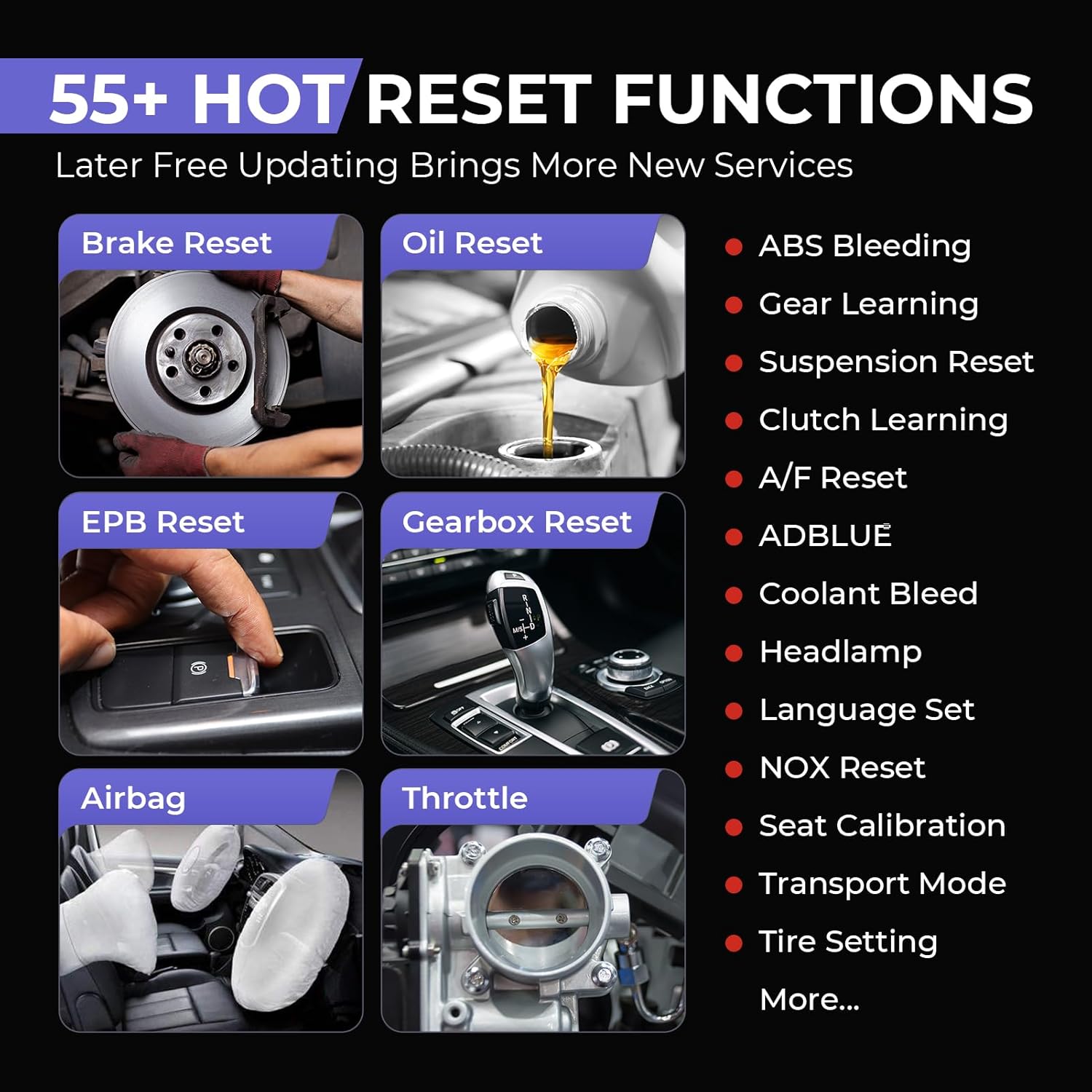
- 50+ סערוויס פונקציעס: Comprehensive range of maintenance services including Oil Reset, EPB Reset, ABS Bleeding, TPMS Reset, Throttle Matching, and more.
- All System Diagnostics & Bidirectional Control: Performs dealership-level diagnostics across all accessible systems, reads/clears DTCs, views live data, and conducts active tests on various modules.
- אויסברייטערבארע מאָדולן: Supports additional modules like X431 HDIII for heavy-duty trucks, BST360 battery tester, Videoscope, X431-PROG3, ADAS, Printer, Scopebox, and Multimeter.
3. סעטאַפּ גייד
3.1 אויספּאַקן די קעסטל און ערשטע דורכקוק
Upon receiving your LAUNCH X431 PRO3 APEX, carefully open the packaging and inspect all components for any signs of damage. Ensure all items listed in the packing list are present.

3.2 טשאַרדזשינג די מיטל
Before first use, fully charge the device. Connect the provided power adapter to the charging port on the scanner and plug it into a power outlet. The charging indicator will show the charging status. A full charge ensures stable operation during diagnostic procedures.
3.3 אײַנצושאַלטן און ערשטע קאָנפיגוראַציע
Press and hold the power button to turn on the device. Follow the on-screen prompts to complete the initial setup, including language selection, Wi-Fi connection, and time zone settings. It is recommended to connect to a stable Wi-Fi network for software updates and online functions.

4. אַפּערייטינג ינסטרוקטיאָנס
4.1 זיך פֿאַרבינדן צו אַ פֿאָרמיטל
Locate the vehicle's OBD-II port (usually under the dashboard). Connect the diagnostic cable from the X431 PRO3 APEX to the vehicle's OBD-II port. Ensure the vehicle's ignition is in the ON position (engine off).
4.2 אַלע סיסטעם דיאַגנאָסטיקס
From the main menu, select "Intelligent Diagnose" or "Local Diagnose". The scanner will automatically identify the vehicle's VIN and establish communication with all accessible electronic control units (ECUs). This process allows for reading and clearing Diagnostic Trouble Codes (DTCs), viewינג לייוו דאַטן סטרימז, און ריטריווינג ECU אינפֿאָרמאַציע.
4.3 ECU קאָדירונג
ECU Coding allows for advanced vehicle customization and module replacement. Navigate to the "ECU Coding" function. This feature can be used to match, relearn, or recode new modules, perform online coding, personalize vehicle settings, and restore failed coding operations. Always ensure you have a stable power supply and internet connection for online coding procedures.

4.4 סערוויס פאַנגקשאַנז
The X431 PRO3 APEX offers over 50 common service and reset functions. Select "Service Function" from the main menu. Exampדי אַרייַננעמען:
- Oil Reset: Resets the engine oil life system.
- EPB Reset: Resets the electronic parking brake after brake pad replacement.
- ABS Bleeding: Performs bleeding of the brake system.
- TPMS Reset: Resets tire pressure monitoring system.
- Throttle Matching: Relearns the throttle body position.
- Gearbox Reset: Adapts the transmission control unit.
4.5 צוויי-דירעקציאָנעלע קאָנטראָל (אַקטיווע טעסטן)
This function allows the diagnostic tool to send commands to vehicle systems to perform specific tests and functions, verifying component integrity. Examples include turning on/off the radiator fan, cycling ABS pump, opening/closing windows, and performing compression tests.

4.6 פאָרמיטל קאַווערידזש
The LAUNCH X431 PRO3 APEX supports over 200 vehicle brands and models from 1996 to 2024, including compatibility with newer CAN FD & DoIP protocols. It also provides access to secure gateways for FCA and Renault vehicles, ensuring broad diagnostic capabilities across a diverse range of automobiles.

4.7 Guided Functions (VAG)
For Volkswagen Audi Group (VAG) vehicles, the X431 PRO3 APEX provides guided functions that simplify complex diagnostic and service procedures by providing step-by-step instructions.
5. וישאַלט
5.1 ווייכווארג דערהייַנטיקונגען
Regular software updates are crucial for maintaining optimal performance, expanding vehicle coverage, and adding new features. Connect the device to a stable Wi-Fi network and navigate to the "Software Update" section. Follow the on-screen instructions to download and install available updates. It is recommended to perform updates regularly to ensure compatibility with the latest vehicle models and diagnostic protocols.

5.2 באַטערי קער
כדי צו פארלענגערן די לעבן פון די באַטעריע, זאָלט איר נישט אָפט אויסלאָדן דאָס אַפּאַראַט. האַלט דאָס אַפּאַראַט אין אַ קיל, טרוקן אָרט ווען עס ווערט נישט גענוצט. אויב איר האַלט עס אויף פֿאַר אַ לענגערע צייט, זאָרגט אַז די באַטעריע איז אויפֿגעלאָדן צו אַרום 50-70%.
5.3 רייניקונג און סטאָרידזש
ריין די מיטל מיט אַ ווייך, דamp cloth. Avoid using abrasive cleaners or solvents. Store the scanner in its protective case in a clean, dry environment away from direct sunlight and extreme temperatures.
6. טראָובלעשאָאָטינג
| פּראָבלעם | מעגלעך סיבה | לייזונג |
|---|---|---|
| די מיטל טוט נישט מאַכט אויף. | Low battery; Power button not pressed long enough; Device malfunction. | Charge the device fully. Press and hold the power button for 3-5 seconds. If problem persists, contact support. |
| נישט געקענט זיך פארבינדן צום אויטא. | Loose OBD-II connection; Vehicle ignition off; Damaged cable; Vehicle communication protocol not supported. | Ensure cable is securely connected. Turn ignition to ON. Check cable for damage. Verify vehicle compatibility. |
| ווייכווארג דערהייַנטיקונג פיילז. | Unstable Wi-Fi connection; Insufficient storage space; Server issues. | Ensure strong Wi-Fi. Clear some storage. Try updating later. |
| לאַנגזאַמע אָפּעראַציע אָדער פֿאַרפֿרירן. | צו פיל אַפּליקאַציעס לויפן; ווייניק זכּרון; ווייכווארג פּראָבלעם. | Close unnecessary applications. Restart the device. Perform a software update. |
7. ספּעסאַפאַקיישאַנז
| שטריך | דעטאַל |
|---|---|
| מאָדעל נומער | X431 PRO3 APEX |
| אָפּערייטינג סיסטעם | אַנדרויד 10.0 |
| קפּו | 2.0GHz 4-קאָר |
| זכּרון | 4 גיגאבייט באַראַן + 64 גיגאבייט סטאָרידזש |
| באַטערי | 6300mAh ליטהיום יאָן (אַרייַנגערעכנט) |
| ווייַז | 10.1-אינטש טאָוטשסקרעען |
| קאַנעקטיוויטי | 2.4 & 5GHz Dual Wi-Fi |
| דימענשאַנז | 1.57 X 10.63 X 7.48 אינטשעס |
| פּונקט וואָג | 18.13 פונט |
| לאַנד פון אָריגין | כינע |
8. וואָראַנטי און שטיצן
8.1 וואָראַנטי אינפֿאָרמאַציע
The LAUNCH X431 PRO3 APEX comes with a standard manufacturer's warranty. Please refer to the warranty card included in your product packaging for specific terms, conditions, and duration. Keep your proof of purchase for warranty claims.
8.2 טעכניש שטיצן
For technical assistance, troubleshooting beyond this manual, or warranty inquiries, please contact LAUNCH customer support. You can typically find contact information on the official LAUNCH website or through the "Info Center" application on your device. Regular software updates also provide access to repair tips, DTC help, and a technology handbook.
You may also visit the official LAUNCH Store on Amazon for additional resources and support: לאָנטש קראָם
Ask a question about this manual
Ask about setup, troubleshooting, compatibility, parts, safety, or missing instructions. Manuals+ will review the question and use this page’s manual context to help answer it.