
Mesqool CR1001F
Mesqool Projection Alarm Clock User Manual
Model: CR1001F
בראַנד: מעסקול
הקדמה
א דאנק פארן קויפןasing the Mesqool Projection Alarm Clock. This manual provides comprehensive instructions for setting up, operating, and maintaining your new alarm clock. Please read this manual carefully before use to ensure proper function and to maximize your experience with the product.
שליסל פֿעיִקייטן
- 180° Adjustable Projector: Projects ultra-clear time onto a wall or ceiling with a 1.6-9.8ft (0.5-3m) optimum projection distance. Features a focus ring for clarity adjustment and a projection flip function.
- צווייפֿאַכיקע אַלאַרמס מיט שלאָף: Set two independent alarms with a large, easy-to-press snooze button for an extra 9 minutes of sleep.
- אַדזשאַסטאַבאַל שרעק באַנד: Alarm volume (Level 1-5) can be adjusted from 76dB to 106dB, with a progressive increase to gently wake you.
- 7.5'' Large LED Display: Super-clear time display visible across the room, with 5 levels of brightness dimmer to protect your eyes.
- וסב טשאַרדזשינג פּאָרט: Built-in 5V/1.0A USB output interface for convenient charging of mobile devices.
- באַטאַרייע באַקאַפּ: Requires 2 AAA batteries (not included) to retain time and alarm settings during power outages, ensuring alarms still trigger.
- 12/24H Time Format & DST: Easily switch between 12-hour and 24-hour time formats and activate Daylight Saving Time (DST) with a dedicated button.
- Easy-to-Set: Simple and intuitive buttons for straightforward setup and operation.
פּעקל אינהאַלט
- Mesqool Projection Alarm Clock Unit
- 5V/2A מאַכט אַדאַפּטער
- באַניצער מאַנואַל
פּראָדוקט איבערview
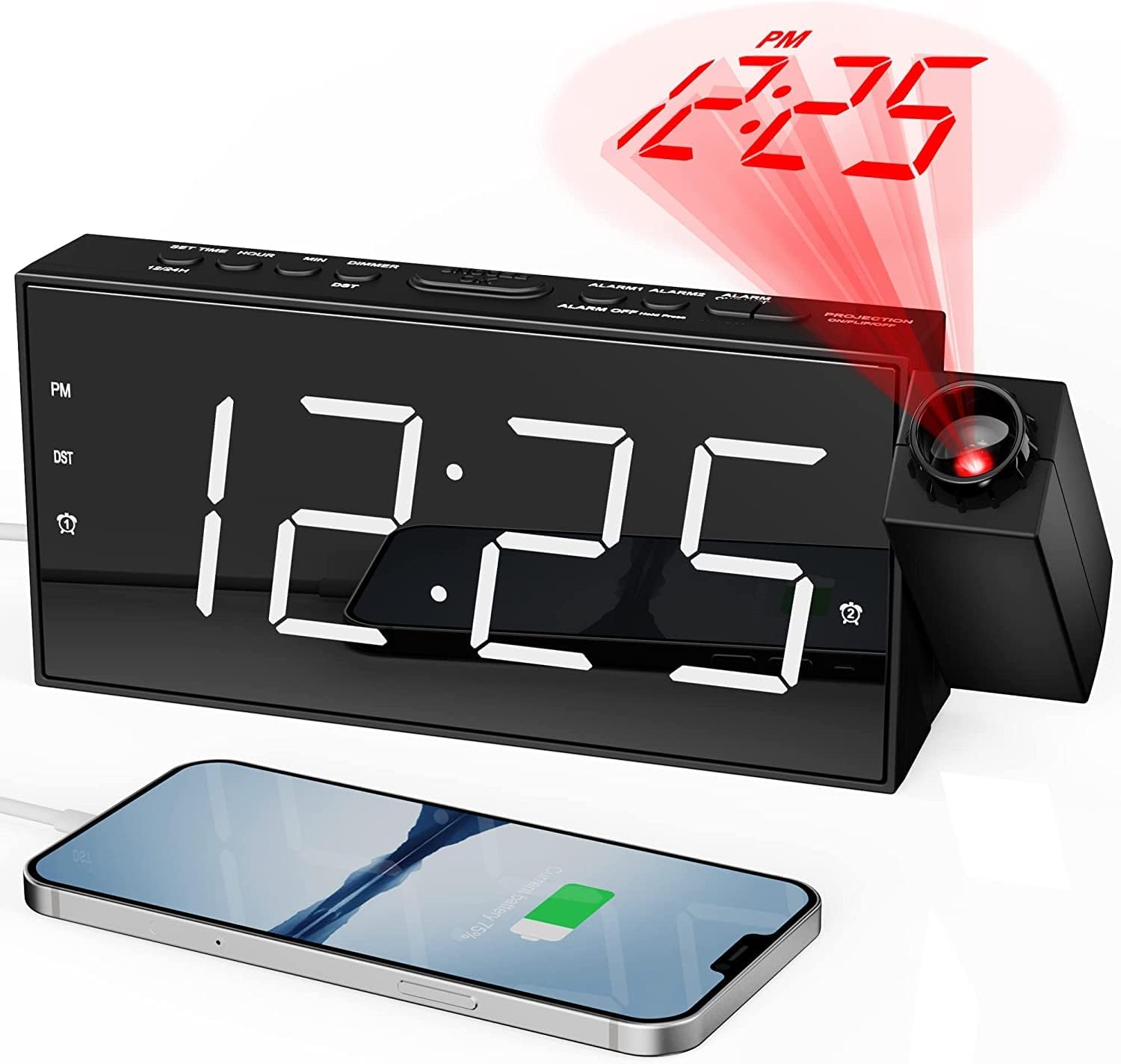
פראָנט view of the Mesqool Projection Alarm Clock, showing the large LED display, the rotatable projector, and a phone connected to the USB charging port.
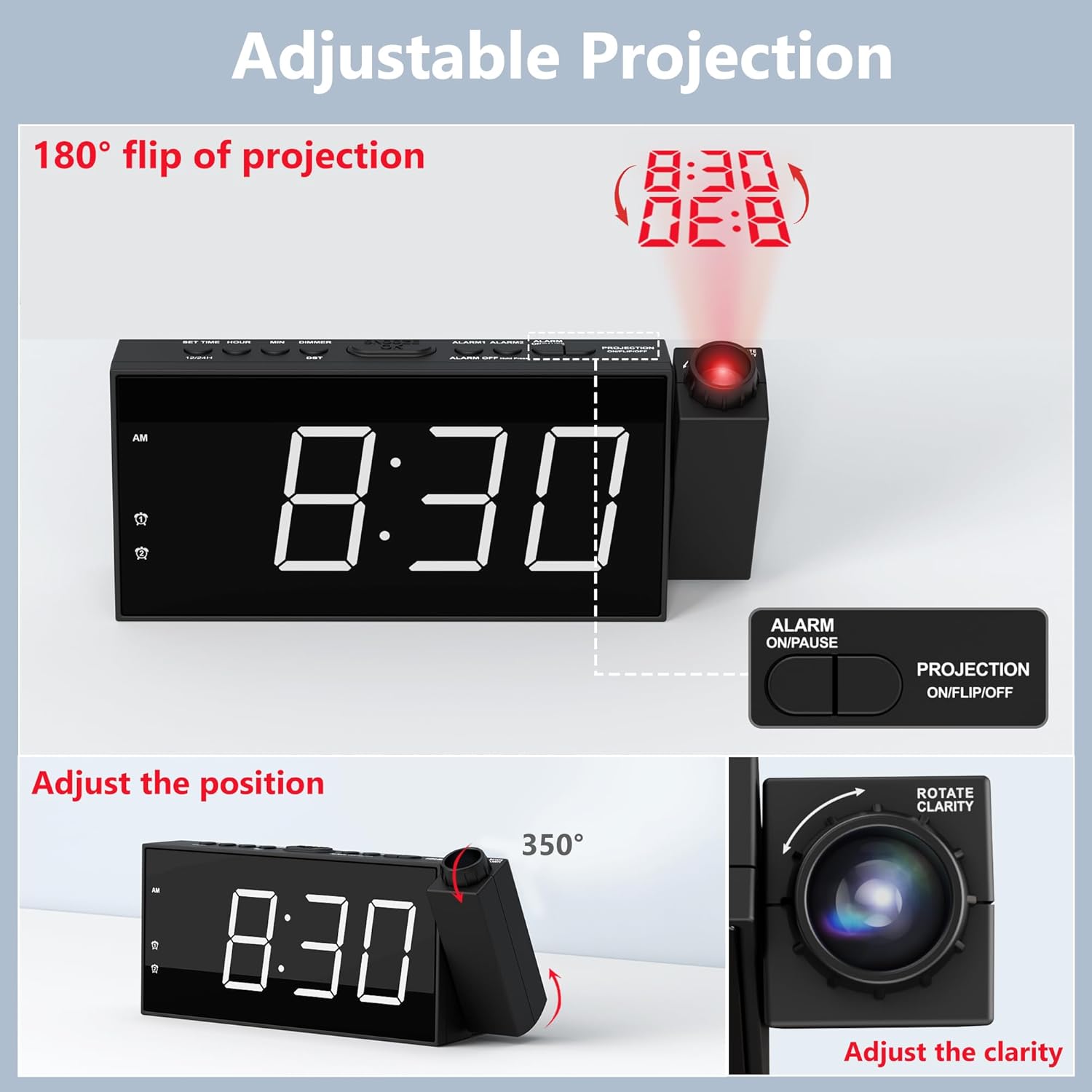
דעטאַילעד view of the adjustable projection feature, illustrating the 180° rotation, projection flip, and the focus ring for clarity adjustment.

Illustration of the 7.5-inch LED display with its 5-level brightness dimmer and options for 12-hour, 24-hour, and DST time formats.

Depiction of the dual alarm functionality, the convenient snooze button, and the 5 adjustable alarm volume levels (76dB-106dB).

דערציען view of the clock highlighting the battery backup compartment and the USB charging port for external devices.

A visual guide demonstrating the four steps to operate and adjust the projection feature, including rotation, flipping, focusing, and brightness adjustment.
סעטאַפּ
1. מאַכט קאַנעקשאַן
Connect the provided 5V/2A power adapter to the DC IN port on the back of the alarm clock and plug the adapter into a standard electrical outlet (100-240V). The clock display will light up.
2. באַטאַרייע באַקקופּ ינסטאַלירונג
Open the battery compartment on the back of the clock. Insert 2 AAA batteries (not included) according to the polarity markings (+/-). These batteries serve as a backup to retain time and alarm settings during a power outage. The clock requires AC power for full functionality, including the display and projection.
3. ערשטע צייט איינשטעלונג
- Press and hold the "SET TIME" button located on the top of the clock. The hour digits will begin to flash.
- ניצט די "+" אדער "-" קנעפלעך צו סטרויערן די שעה.
- Press "SET TIME" again to confirm the hour and move to minute setting. The minute digits will flash.
- ניצט די "+" אדער "-" קנעפלעך צו סטרויערן די מינוטן.
- Press "SET TIME" one more time to save the time setting and exit.
4. 12/24H Time Format
To switch between 12-hour and 24-hour time formats, long press the "12/24H" button on the top of the clock. In 12-hour format, "AM" or "PM" indicators will be displayed.
5. טאָגליכט שפּאָרן צייט (דסט)
To activate or deactivate the Daylight Saving Time (DST) function, simply press the "DST" button on the top of the clock. The time will adjust by one hour forward or backward accordingly.
אַפּערייטינג ינסטראַקשאַנז
1. שטעלן אַלאַרמס (אַלאַרם 1 און אַלאַרם 2)
- Press and hold the "ALARM 1" or "ALARM 2" button (depending on which alarm you want to set). The hour digits for that alarm will flash.
- ניצט די "+" אדער "-" קנעפלעך צו סטרויערן די אַלאַרם שעה.
- דריק נאכאמאל דעם באטרעפנדיקן אלארם קנעפל צו באשטעטיגן די שעה און אריבערגיין צו מינוט איינשטעלונג. די מינוט ציפערן וועלן בלינקען.
- Use the "+" or "-" buttons to adjust the alarm minutes.
- Press the alarm button one more time to save the alarm setting. The alarm icon will appear on the display, indicating the alarm is active.
- To turn an alarm ON or OFF, short press the corresponding "ALARM 1" or "ALARM 2" button. The alarm icon will appear or disappear.
2. אַדזשאַסטירן אַלאַרם באַנד
When an alarm is sounding, or during alarm setup, use the "V+" or "V-" buttons on the side of the clock to adjust the alarm volume from Level 1 (76dB) to Level 5 (106dB). The alarm sound will progressively increase in volume when it triggers.
3. Using the Snooze Function
When the alarm sounds, press the large "SNOOZE/OK" button on the top of the clock to temporarily silence the alarm for 9 minutes. The alarm will sound again after 9 minutes. To turn off the alarm completely, press any other button (e.g., ALARM ON/PAUSE) or let it ring for its full duration.
4. פּראָיעקציע פֿונקציע
- Activating/Deactivating Projection: Press the "PROJECTION ON/FLIP/OFF" button on the top of the clock to turn the projection ON or OFF.
- Adjusting Projection Angle: Manually rotate the projector lens unit up to 180° to direct the time display onto your desired surface (wall or ceiling).
- Flipping Projection: If the projected time appears upside down, short press the "PROJECTION ON/FLIP/OFF" button to flip the orientation of the projected image.
- Adjusting Projection Clarity (Focus): Rotate the focus ring around the projector lens to achieve a clear and sharp projected image.
- Adjusting Projection Brightness: Press the "PROJECTION DIMMER" button repeatedly to cycle through 5 levels of projection brightness.
5. ווייַז ברייטנאַס
Press the "DIMMER" button repeatedly to cycle through 5 levels of LED display brightness, allowing you to adjust it to your comfort level, especially at night.
6. וסב טשאַרדזשינג פּאָרט
The USB charging port (5V/1.0A output) on the back of the clock can be used to charge your mobile devices, such as smartphones and tablets. Simply connect your device's USB charging cable to this port.
וישאַלט
רייניקונג
To clean the clock, gently wipe the surface with a soft, dry cloth. Do not use abrasive cleaners, waxes, or solvents as they may damage the finish. Keep the projector lens clean for optimal clarity.
באַטערי פאַרבייַט
אויב די זייגער פארלירט צייט אדער אַלאַרם סעטטינגס בעת אַן אויספאַל פון שטראָםtage, it may be time to replace the AAA backup batteries. Ensure the clock is connected to AC power before replacing batteries to avoid losing current settings.
טראָובלעשאָאָטינג
| פּראָבלעם | מעגלעך סיבה | לייזונג |
|---|---|---|
| Clock display is off / No power. | מאַכט אַדאַפּטער נישט פארבונדן אָדער דעפעקטיוו. | Ensure the power adapter is securely plugged into the clock and a working electrical outlet. Check the outlet with another device. |
| דער אַלאַרם קלינגט נישט. | אַלאַרם נישט אַקטיוויזירט אָדער פאַלש געשטעלט. | Verify that the alarm is set and activated (alarm icon visible). Check the alarm time. Ensure volume is not set to minimum. |
| די פּראָיעקטירטע צייט איז פֿאַרשוואָמען אָדער נישט קלאָר. | פּראָיעקציע פאָקוס דאַרף אַדזשאַסטמענט. | Rotate the focus ring around the projector lens until the image is clear. Ensure projection distance is within 1.6-9.8ft. |
| Projected time is upside down. | Projection orientation needs flipping. | Short press the "PROJECTION ON/FLIP/OFF" button to flip the projected image. |
| Clock loses time during power outage. | באַקאַפּ באַטעריעס זענען טויט אָדער נישט אינסטאַלירט. | Install 2 new AAA batteries or replace existing ones. |
| די USB טשאַרדזשינג פּאָרט אַרבעט נישט. | די דעווייס איז נישט קאמפאטיבל אדער די קאבל איז דעפעקטיוו. | Ensure the clock is powered by AC. Try a different USB cable or device. |
ספּעסאַפאַקיישאַנז
| סאָרט | Mesqool |
| מאָדעל נומער | CR1001F |
| ווייַז טיפּ | דיגיטאַל געפירט |
| מאַכט מקור | עלעקטריש מיט שנור (AC 100-240V) |
| באַטאַרייע באַקקופּ | 2 X AAA באַטעריז (ניט אַרייַנגערעכנט) |
| וסב רעזולטאַט | 5V/1.0A |
| פּרויעקציע דיסטאַנסע | 1.6 - 9.8 פֿוס (0.5 - 3 מעטער) |
| Alarm Volume Range | 76dB - 106dB (5 levels) |
| פּראָדוקט דימענשאַנז | 7.99"ברייט x 3.58"היך |
| פּונקט וואָג | 8.5 אונסעס |
| מאַטעריאַל | אַקרילאָניטריל בוטאַדין סטירען (פּלאַסטיק) |
וואָראַנטי און שטיצן
וואָראַנטי אינפֿאָרמאַציע
Mesqool provides an 18-month warranty for this product. This warranty covers manufacturing defects and issues arising from normal use. Please retain your proof of purchase for warranty claims.
קונה שטיצן
For any questions, concerns, or technical assistance regarding your Mesqool Projection Alarm Clock, please contact our customer support team. You can find our support email address in this User Manual or on the product packaging. We are committed to providing prompt and helpful assistance.
Ask a question about this manual
Ask about setup, troubleshooting, compatibility, parts, safety, or missing instructions. Manuals+ will review the question and use this page’s manual context to help answer it.