
1. הקדמה
This instruction manual provides essential information for the proper use and installation of the Jensen AWM965 Service Pack (PXXPSVCAWM965). This service pack is designed to complement and support the Jensen AWM965 AM/FM/CD/DVD/MP3/USB Wallmount Stereo, offering replacement or supplementary components to ensure optimal functionality. Please read this manual thoroughly before attempting any installation or operation.
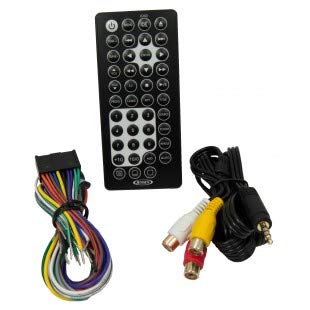
בילד 1.1: איבערview of Jensen AWM965 Service Pack components.
2. פּעקל אינהאַלט
Upon opening the Jensen AWM965 Service Pack, verify that all the following items are present and in good condition:
- 1 רימאָוט קאָנטראָל: This infrared remote control allows for convenient operation of the AWM965 stereo from a distance. It includes a pre-installed battery for immediate use.
- 1 Power/A-B-C Speakers Mating Pigtail: This wiring harness provides connections for power input and speaker outputs (A, B, and C channels) to the AWM965 stereo unit. It is designed to mate with the corresponding connector on the stereo.
- 1 C Speakers Mating Pigtail: A separate wiring harness specifically for the 'C' speaker channel connections, providing additional flexibility or replacement for the 'C' speaker wiring.
- 1 Trim Ring: A decorative ring designed to fit around the AWM965 stereo unit, providing a finished appearance after installation.
- 1 Cable: A general-purpose cable, typically used for auxiliary input or other connectivity needs, depending on the specific AWM965 model.
- 4 M3 x 20mm PPH Tapping Screws: These screws are provided for securing components or the stereo unit during installation.
3. סעטאַפּ און ייַנמאָנטירונג
Before proceeding with installation, ensure the Jensen AWM965 stereo unit is powered off and disconnected from its power source to prevent electrical shock or damage.
3.1 אינסטאַלאַציע פון באַטעריע פֿאַר ווײַטקאָנטראָל
The remote control typically comes with a pre-installed battery. If replacement is needed:
- געפֿינען די באַטאַרייע אָפּטייל אויף די צוריק פון די ווייַט קאָנטראָל.
- רוק די באַטאַרייע דעקן עפענען.
- Remove the old battery and insert a new CR2025 (or equivalent) battery with the positive (+) side facing up.
- פאַרמאַכן די באַטאַרייע אָפּטייל סיקיורלי.
3.2 Wiring Harness Connections
The Power/A-B-C Speakers Mating Pigtail and the C Speakers Mating Pigtail are designed for specific connections to the Jensen AWM965 stereo. Refer to the original AWM965 owner's manual for detailed wiring diagrams.
- Power/A-B-C Speakers Pigtail: Connect this harness to the main power and speaker output port on the rear of the AWM965 unit. Ensure all wires are correctly matched for power (12V constant, 12V switched, ground) and speaker channels (A, B, C) to their respective terminals. Incorrect wiring can cause damage to the unit or speakers.
- C Speakers Pigtail: If your setup utilizes additional 'C' speakers or requires a separate connection for them, connect this pigtail to the designated 'C' speaker output port on the AWM965. Observe correct polarity (+/-) for all speaker connections.
וויכטיק: Always double-check wiring connections before restoring power to the stereo unit. Consult a professional if you are unsure about any wiring procedures.
3.3 Trim Ring Installation
The trim ring is typically installed after the AWM965 stereo unit is mounted in its desired location. It snaps or slides into place around the front bezel of the stereo to provide a clean, finished look.
- Ensure the AWM965 unit is securely mounted.
- Align the trim ring with the edges of the stereo's front panel.
- Gently press the trim ring into place until it clicks or sits flush against the mounting surface.
3.4 Using M3 x 20mm PPH Tapping Screws
These screws are general-purpose fasteners. Use them as needed for securing mounting brackets, the stereo chassis, or other components as specified in the AWM965's main installation guide. Do not overtighten.
4. Operation (Remote Control)
The remote control provides wireless access to the primary functions of your Jensen AWM965 stereo. Point the remote directly at the infrared (IR) sensor on the stereo's front panel for optimal performance.
- מאַכט אויף / אַוועק: דרוק די מאַכט קנעפּל צו קער די אַפּאַראַט אויף אָדער אַוועק.
- באַנד קאָנטראָל: ניצן די VOL+ און וואָל- קנעפּלעך צו סטרויערן די אַודיאָ לעוועל.
- מקור סעלעקציע: דרוק די מאָדע or מקור button to cycle through available audio sources (e.g., AM/FM, CD, DVD, USB, AUX).
- Track/Tune Selection: ניצן די SKIP or TUNE buttons to change radio stations, CD tracks, or USB files.
- שטום: דרוק די שטום קנעפּל צו צייטווייליג שטיל מאַכן דעם אַודיאָ.
- מעניו נאַוויגאַציע: Utilize arrow keys and אַרייַן for navigating on-screen menus (if applicable to your AWM965 model).
Refer to your Jensen AWM965 stereo's main owner's manual for a complete list of remote control functions and advanced operations.
5. וישאַלט
Proper maintenance ensures the longevity and reliable performance of your service pack components.
- ווייַט קאָנטראָל:
- Keep the remote control clean and dry. Wipe with a soft, dry cloth.
- Avoid exposing the remote to extreme temperatures or direct sunlight.
- Replace the battery promptly when the remote's range or responsiveness decreases.
- וויירינג כאַרנעסעס:
- ענשור אַז אַלע קאַנעקשאַנז בלייבן זיכער און פריי פון קעראָוזשאַן.
- Periodically inspect wiring for any signs of wear, fraying, or damage. Replace if necessary.
- Keep wiring away from sharp edges, moving parts, and heat sources.
- רינג רינג:
- Clean the trim ring with a soft, damp cloth and mild detergent if needed. Avoid abrasive cleaners.
6. טראָובלעשאָאָטינג
This section addresses common issues related to the components in the service pack.
| פּראָבלעם | מעגלעך סיבה | לייזונג |
|---|---|---|
| ווייַט קאָנטראָל נישט ארבעטן. |
|
|
| No audio from speakers after wiring harness installation. |
|
|
If troubleshooting steps do not resolve the issue, contact Jensen customer support or a qualified service technician.
7. ספּעסאַפאַקיישאַנז
This section outlines key specifications related to the Jensen AWM965 Service Pack (PXXPSVCAWM965).
- מאָדעל נומער: PXXPSVCAWM965
- UPC: 681787023927
- Connectivity Technology (for AWM965 compatibility): וסב, 3.5 מם דזשאַק
- Controller Type (included): ווייַט קאָנטראָל
- רימאָוט קאָנטראָל באַטערי טיפּ: CR2025 (or equivalent)
- פאַבריקאַנט: ASA Electronics (for Jensen products)
- פּעקל דימענשאַנז: 20.32 X 15.24 X 2.54 סענטימעטער
- וואָג: 181.44 ג
8. וואָראַנטי און שטיצן
Jensen products are manufactured by ASA Electronics. For specific warranty information regarding the Jensen AWM965 Service Pack, please refer to the warranty card included with your purchase or visit the official Jensen/ASA Electronics webפּלאַץ. וואָראַנטי טערמינען דעקן טיפּיש חסרונות אין מאַטעריאַלן און אַרבעט פֿאַר אַ ספּעציפֿישער צייט פֿון דעם קויפֿדאַטום.
For technical assistance, replacement parts, or customer service inquiries, please contact Jensen customer support. Contact information can usually be found on the manufacturer's website or in the original AWM965 stereo manual.
שטענדיק האַלטן דיין קויפן באַווייַז פֿאַר וואָראַנטי קליימז.