
1. הקדמה און איבערview
The KYY 15.6-inch FHD 1080P Portable Monitor (Model K3) is designed to enhance your productivity and entertainment experience. Featuring an IPS panel with 1920 x 1080 resolution at 60Hz, 178° viewing angles, and a 1000:1 contrast ratio, it delivers vibrant colors and clear visuals. Its ultra-slim and lightweight design makes it ideal for travel and on-the-go use. The monitor supports HDR and Scene modes for optimized viewing across various applications, from multi-tasking to gaming.

Image 1.1: KYY 15.6-inch Portable Monitor showcasing its 1080P FHD IPS screen with key display specifications.
2. וואָס איז אין דער קעסטל
Upon unboxing your KYY Portable Monitor, please ensure all the following items are present:
- 1 x 15.6'' פּאָרטאַטיוו מאָניטאָר
- 1 x סמאַרט קאָווער
- 1 קס וסב-C צו וסב-א קאַבלע
- 1 קס וסב-C צו וסב-C קאַבלע
- 1 x מיני-HDMI צו הדמי קאַבלע
3. פּראָדוקט פֿעיִקייטן
3.1. ווייַז קוואַליטי
The monitor features a 15.6-inch Full HD (1920x1080) IPS panel, offering a wide 178° viewing angle and a 60Hz refresh rate. With 300 nits brightness and a 1000:1 contrast ratio, it delivers clear and vibrant images. HDR mode is supported for enhanced visual experience.
3.2. קאַנעקטיוויטי
Equipped with 2 USB-C ports, a Mini-HDMI port, and a 3.5mm audio input, the monitor offers versatile connectivity. It is compatible with laptops, smartphones, PCs, PS4, Xbox, and Nintendo Switch without requiring additional drivers.
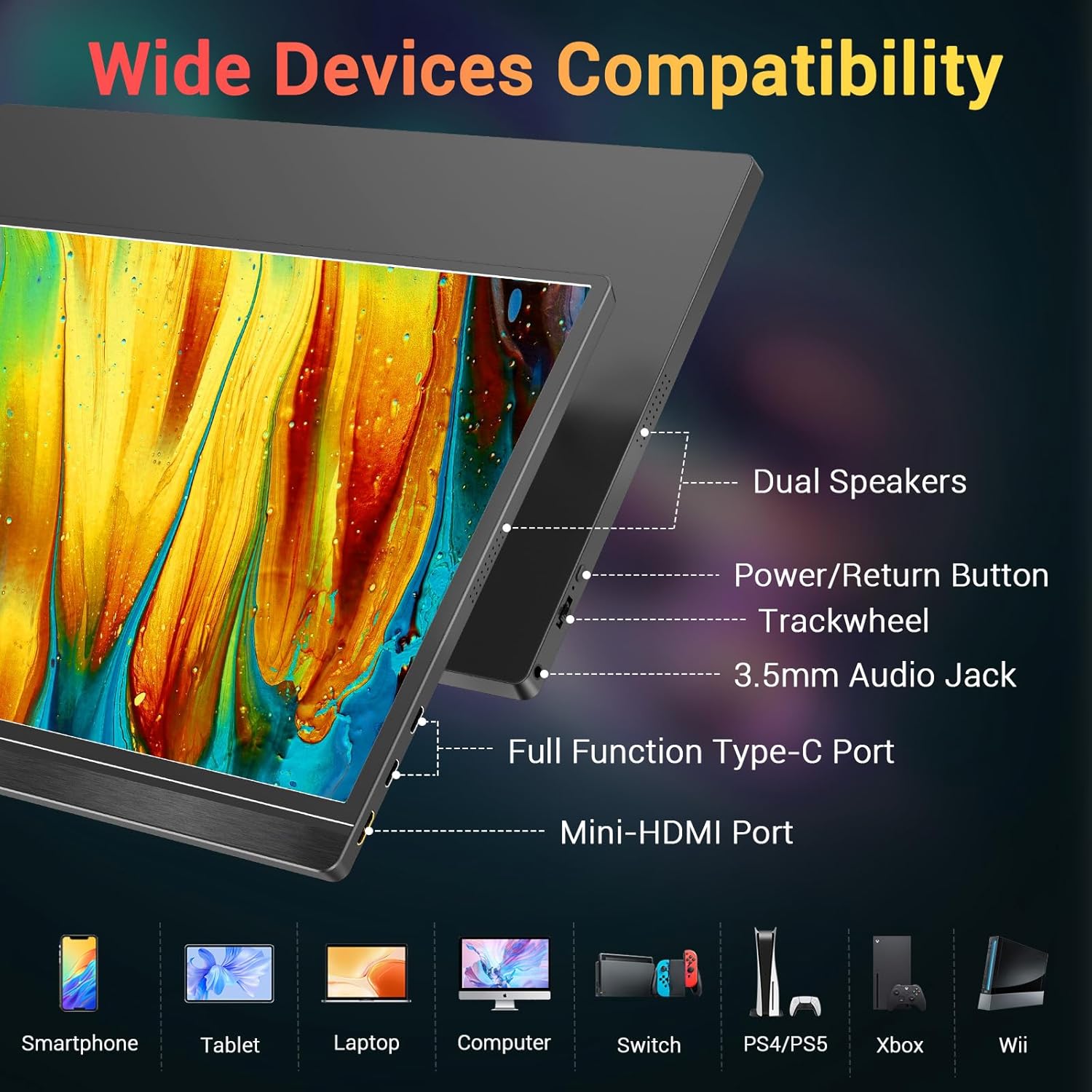
בילד 3.1: איבערview of the monitor's ports and controls, including dual speakers, power button, trackwheel, audio jack, USB-C, and Mini-HDMI.
3.3. פּאָרטאַביליטי און פּלאַן
Weighing approximately 1.7 lbs and only 0.3 inches thin, this monitor is designed for maximum portability. Its durable metal frame ensures longevity, making it an excellent travel companion.

Image 3.2: The KYY portable monitor demonstrating its lightweight and ultra-slim profile.
3.4. Smart Cover and Stand
The included smart cover is made of high-quality PU leather, offering scratch-proof protection. It doubles as a stable foldable stand, allowing for multiple viewing angles to suit your needs.

Image 3.3: The 2-in-1 magnetic smart cover functioning as a stand for the KYY portable monitor.
4. סעטאַפּ אינסטרוקציעס
4.1. ערשטע פֿאַרבינדונג
Connect the monitor to your device (laptop, smartphone, console) using the appropriate cable (USB-C to USB-C or Mini-HDMI to HDMI). For devices with a full-function USB-C port, a single cable can provide both power and video. For other connections, ensure the monitor receives external power via the USB-C to USB-A cable and a power adapter (not included).

Image 4.1: Illustrates a single USB-C cable connection for power and video from a smartphone to the KYY portable monitor.
4.2. Using the Smart Cover as a Stand
Fold the smart cover into a triangular shape to create a stable stand. The magnetic design allows for easy adjustment to various viewing angles. Ensure the monitor is securely placed in the grooves of the cover base.
4.3. Driver Installation (If Needed)
The monitor is generally plug-and-play. However, if your operating system does not automatically recognize the monitor, refer to your device's display settings or the KYY support website for potential driver downloads.
4.4. Video Demonstration: Setup and Connectivity
Video 4.1: A seller-provided video demonstrating the physical setup and various connectivity options of the KYY portable monitor with a laptop, including USB-C and HDMI connections.
5. אַפּערייטינג ינסטרוקטיאָנס
5.1. מאַכט אויף / אויסגעלאשן
Press and hold the power button located on the side of the monitor to turn it on or off. A brief press may activate the On-Screen Display (OSD) menu.
5.2. אויף-סקרין דיספּליי (OSD) מעניו נאַוויגאַציע
Use the trackwheel/buttons on the side of the monitor to navigate the OSD menu. This menu allows you to adjust settings such as brightness, contrast, color temperature, HDR mode, and input source.
5.3. ווייַז מאָדעס
דער מאָניטאָר שטיצט פֿאַרשידענע אַרויסווייַז מאָדעס ווען פֿאַרבונדן צו אַ קאָמפּיוטער:
- שפּיגל מאָדע: Duplicates your primary screen's content.
- עקסטענדעד מאָדע: Extends your desktop space, allowing for multi-tasking.
- צווייטע סקרין מאָדע: ניצט דעם פּאָרטאַטיוון מאָניטאָר ווי דער איינציקער דיספּליי.
You can also switch between landscape and portrait orientation based on your preference and device settings.

Image 5.1: Visual representation of Mirror, Extended, and Second Screen display modes.
5.4. אַודיאָ אָוטפּוט
The monitor includes built-in stereo speakers. For private listening, connect headphones or external speakers to the 3.5mm audio jack.
5.5. Video Demonstration: Portability and Usage
Video 5.2: A seller-provided video highlighting the monitor's portability, ease of setup, and usage in various scenarios, including its integrated stand and single-cable connectivity.
6. ספּעסאַפאַקיישאַנז
| שטריך | באַשרייַבונג |
|---|---|
| מאָדעל נומער | K3 |
| פאַרשטעלן גרייס | 15.6 אינטשעס |
| האַכלאָטע | 1920 x 1080 פּיקסעלס (FHD 1080p) |
| טאַפליע טיפּ | IPS |
| אַספּעקט פאַרהעלטעניש | 16:9 |
| בילד ברייטנאַס | 300 קאַנדעלאַ |
| קאַנטראַסט פאַרהעלטעניש | 1000:1 |
| Viewאין אַנגלעס | 178° |
| גאַנץ וסב פּאָרץ | 2 (וסב-C) |
| ווידעא אַרייַנשרייַב | USB-C, Mini-HDMI |
| אַודיאָ רעזולטאַט | 3.5mm Audio Jack, Built-in Speakers |
| פּונקט וואָג | 4.13 פונט |
| Voltage | 5 וואלטס |
| פאַרשטעלן ייבערפלאַך | מאַט |
7. וישאַלט
To ensure the longevity and optimal performance of your KYY Portable Monitor, follow these maintenance guidelines:
- רייניקונג: Use a soft, lint-free cloth to gently wipe the screen. For stubborn smudges, lightly dampווישט דעם שטאָף מיט וואַסער אָדער אַ רייניקונג לייזונג וואָס איז זיכער פֿאַרן עקראַן. פֿאַרמייַדט שטרענגע כעמיקאַלן אָדער אַברייסיוו מאַטעריאַלן.
- סטאָרידזש: ווען נישט אין באַנוץ, לייגט אַוועק דעם מאָניטאָר אין זײַן קלוגן דעקל צו באַשיצן דעם עקראַן פֿון קראַצן און שטויב.
- האַנדלינג: באַהאַנדלט דעם מאָניטאָר מיט פֿאָרזיכט צו פֿאַרמייַדן פֿאַלן אָדער קלאַפּן, וואָס קענען שעדיקן דעם עקראַן אָדער אינעווייניקסטע קאָמפּאָנענטן.
- קאַבלע פאַרוואַלטונג: Avoid excessive bending or tugging on cables to prevent damage to the connectors and ports.
8. טראָובלעשאָאָטינג
If you encounter issues with your KYY Portable Monitor, try the following basic troubleshooting steps:
- קיין דיספּלעי/סיגנאַל:
- זיכער מאַכן אַז אַלע קייבלס (USB-C, HDMI) זענען זיכער פארבונדן צו ביידע דעם מאָניטאָר און אייער דעווייס.
- Verify that the monitor is receiving power. If using a single USB-C cable for power and video, confirm your device's USB-C port supports full-function output. Otherwise, connect the external power supply.
- Check your device's display settings to ensure the external monitor is detected and configured correctly (e.g., extended, duplicate).
- Try a different cable or port if available.
- פליקערנדיקער עקראַן:
- אַדזשאַסטירן די רעפרעש קורס אין אייער מיטל'ס דיספּליי סעטטינגס.
- Ensure the monitor is receiving stable power.
- קיין אַודיאָ:
- קאָנטראָלירט די וואָלומען סעטטינגס אויף ביידע דעם מאָניטאָר און אייער פֿאַרבונדענעם מיטל.
- זיכער מאַכן אַז די ריכטיקע אַודיאָ אַרויסגאַנג מיטל איז אויסגעקליבן אויף דיין קאָמפּיוטער.
- If using external speakers or headphones, ensure they are properly connected to the 3.5mm audio jack.
- Buttons/Trackwheel Unresponsive:
- Restart the monitor by powering it off and on.
For persistent issues, please contact KYY customer support.
9. וואָראַנטי און שטיצן
For warranty information, technical support, or service inquiries, please refer to the documentation included with your product or visit the official KYY webזייטל. האַלט אייער קויף קוויטל ווי אַ באַווייַז פון קויפן פֿאַר וואָראַנטי קליימז.