
FLINQ 8720168680396
FlinQ Mobile Air Conditioner User Manual
מאָדעל: 8720168680396
1. וויכטיק סאַפעטי אינסטרוקציעס
ביטע ליינט אלע אינסטרוקציעס קערפול איידער איר ניצט דעם אפאראט און האלט זיי פאר שפעטערדיגע רעפערענץ. נישט נאכפאלגן די אינסטרוקציעס קען רעזולטירן אין עלעקטרישע שאק, פייער, אדער ערנסטע פערזענליכע שאדן.
- שטענדיק פֿאַרבינדן דעם אַפּאַראַט צו אַ געערדטער עלעקטרישער ווענטיל.
- דו זאלסט נישט אַרבעטן די אַפּאַראַט מיט אַ דאַמידזשד שנור אָדער צאַפּן.
- האַלט דעם אַפּאַראַט אַוועק פון ברענענדיקע מאַטעריאַלן און אָפֿענע פֿלאַמען.
- זיכער מאַכן אַז די ווענטילאַציע אַרום דעם אַפּאַראַט איז ריכטיק בעתן אָפּעראַציע.
- דו זאלסט נישט אַרייַנלייגן אַבדזשעקץ אין די לופט ינלעט אָדער ווענטיל.
- נעמט ארויס דעם אַפּאַראַט איידער איר רייניגט אדער פירט אויס קיין שום אויפהאלטונג.
- דער אַפּפּליאַנסע איז נישט בדעה פֿאַר נוצן דורך מענטשן (אַרייַנגערעכנט קינדער) מיט רידוסט גשמיות, סענסערי אָדער גייַסטיק קייפּאַבילאַטיז, אָדער פעלן פון דערפאַרונג און וויסן, סייַדן זיי האָבן באקומען השגחה אָדער לימעד וועגן די נוצן פון דעם אַפּפּליאַנסע דורך אַ מענטש פאַראַנטוואָרטלעך פֿאַר זייער זיכערקייַט.
2. פּראָדוקט איבערview
The FlinQ Mobile Air Conditioner is a versatile unit designed to provide cooling, dehumidification, and fan functions for your living space. It is equipped with an energy-efficient design and comes with a window kit for easy installation.

פיגורע 2.1: פראָנט view of the FlinQ Mobile Air Conditioner, showing the main air outlet and control panel area.

Figure 2.2: The mobile air conditioner unit, displaying its energy efficiency label (Class A) and the included remote control for convenient operation.
3. קאָמפּאָנענטן און טיילן
Familiarize yourself with the main components of your mobile air conditioner:
- הויפּט איינהייט (מיט קאָנטראָל פּאַנעל)
- ויסמאַטערן קישקע
- Window Sealing Kit (adjustable window slider/plate)
- ווייַט קאָנטראָל
- Drain Hose (for continuous drainage in dehumidification mode)
- Air Filters (located on the back/side)
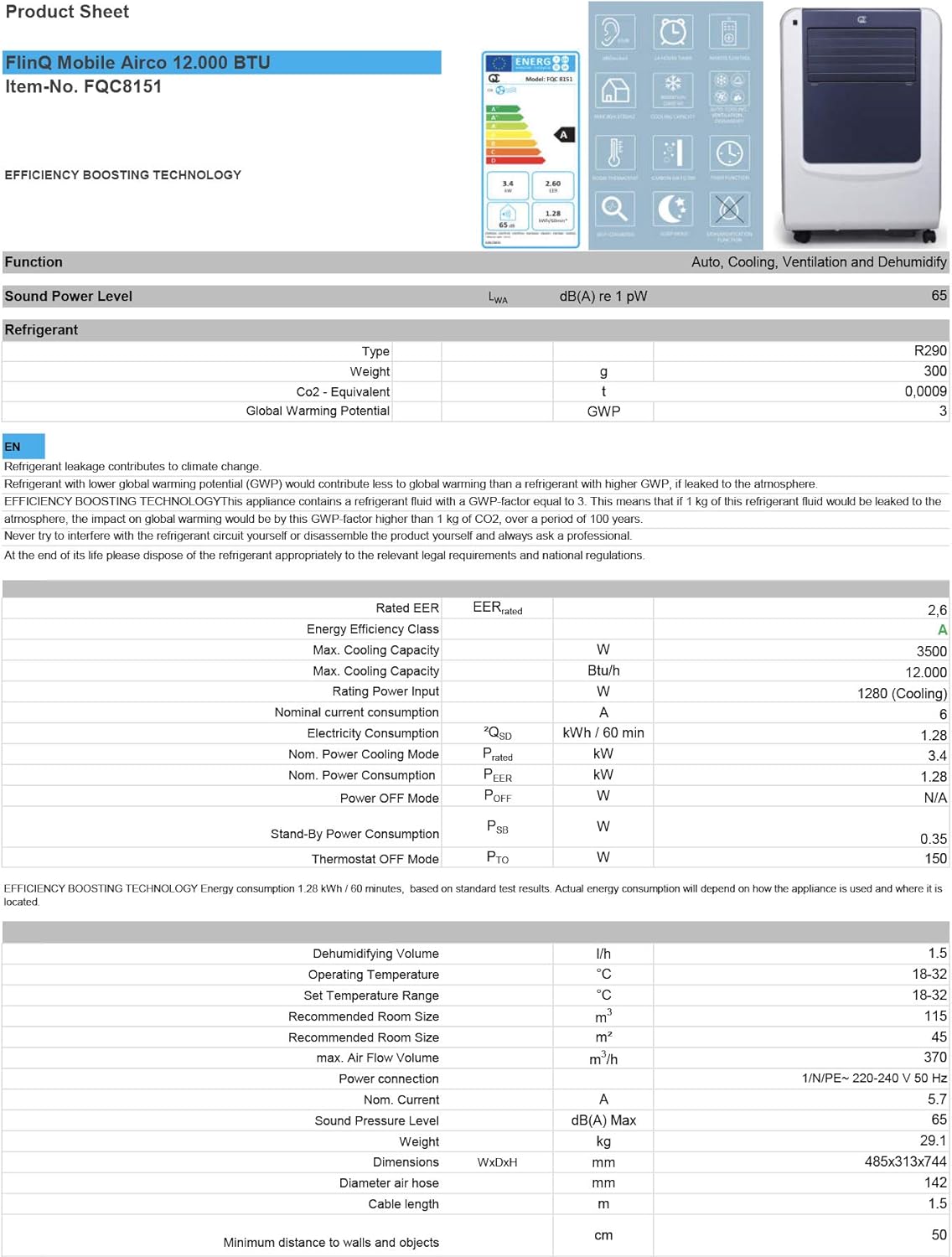
Figure 3.1: The remote control and a visual representation of the unit's key features, including noise level (65dB), 24-hour timer, cooling capacity (12000 BTU/h), room thermostat, carbon air filter, self-diagnosis, sleep mode, remote control function, timer function, auto cooling/fan/dehumidification, and dehumidification function.
4. סעטאַפּ און ייַנמאָנטירונג
4.1 אַנפּאַקינג
Carefully remove the air conditioner and all accessories from the packaging. Inspect for any damage during transit. Keep the original packaging for future storage or transport.
4.2 פּלייסמאַנט
Place the unit on a flat, stable surface. Ensure there is at least 30 cm (12 inches) of clear space around the unit for proper airflow. Do not place it near heat sources or in direct sunlight.
4.3 פֿענצטער קיט אינסטאַלאַציע
To ensure efficient cooling, the hot air extracted by the unit must be vented outside. Use the provided window sealing kit for this purpose.
- באַפעסטיקט דעם אויסגאַנג-שלאַנג קאַנעקטער צום לופט-אַרויסגאַנג אויף דער הינטערשטער זײַט פֿון דער אַפּאַראַט.
- Extend the exhaust hose and attach the window adapter to the other end.
- Adjust the window slider/plate to fit your window opening.
- Insert the window adapter into the opening of the window slider/plate.
- Close the window as much as possible to seal the opening around the kit, minimizing air leakage.

פיגורע 4.1: זייַט view of the mobile air conditioner, illustrating the connection point for the exhaust hose, which expels hot air from the room.
5. אַפּערייטינג ינסטרוקטיאָנס
5.1 קאָנטראָל פּאַנעל
The control panel is located on the top of the unit and features various buttons and an LED display for setting modes, temperature, and timer functions.
5.2 רימאָוט קאָנטראָל
The remote control allows you to operate all functions of the air conditioner from a distance. Ensure the remote control batteries are inserted correctly.
5.3 אַפּערייטינג מאָדעס
Press the 'Mode' button to cycle through the available operating modes:
- קאָאָלינג מאָדע: For cooling the room. Set your desired temperature using the temperature adjustment buttons.
- דעהומידיפיקאַטיאָן מאָדע: Removes excess moisture from the air. The fan speed is typically fixed in this mode. Consider connecting a drain hose for continuous drainage.
- פאָכער מאָדע: Circulates air without cooling. You can adjust the fan speed (Low, Medium, High).

פיגורע 5.1: נאָענט-אַרויף view of the adjustable louvers on the air conditioner's front panel, which direct the airflow.
6. וישאַלט
רעגולערע אויפהאלטונג גאראנטירט אפטימאלע פאָרשטעלונג און פארלענגערט די לעבנסדויער פון אייער לופטקילונג.
6.1 Cleaning Air Filters
The air filters should be cleaned every two weeks or more frequently depending on usage and air quality. Dirty filters reduce efficiency and can damage the unit.
- נעמט ארויס דעם לופטקילונג פון דער עלעקטרישער ווענטיל.
- Locate and remove the air filters (usually on the back or side of the unit).
- Wash the filters under running water (warm, not hot) or use a vacuum cleaner to remove dust.
- Allow the filters to air dry completely before reinserting them. Do not expose them to direct sunlight.

Figure 6.1: Illustration of how to remove the air filter from the mobile air conditioner for cleaning, highlighting the accessible filter panel.
6.2 אויסלאָזן וואַסער
The unit collects condensed water during cooling and dehumidification. The internal tank will fill up, and the unit may stop operating when full. Drain the water regularly.
- Place a shallow pan or tray under the drain port (usually at the bottom rear of the unit).
- אַראָפּנעמען דעם אַראָפּגאַנג פּלאָג כּדי וואַסער זאָל אַרויסרינען.
- For continuous drainage in dehumidification mode, attach the provided drain hose to the drain port.
6.3 סטאָרידזש
ווען מען לייגט אפ דעם איינהייט פאר א לענגערע צייט:
- אַרויסלאָזן אַלע וואַסער פֿון דער אַפּאַראַט.
- ריין די לופט פילטערס.
- אַרויסנעמען דעם עלעקטרישן שנור פֿון דער עלעקטרישער פּלאַטע און עס אָפּדרייען אויף אַ אָרדנטלעכן אופֿן.
- האַלט דעם אַפּאַראַט אין אַ טרוקענעם, קילן אָרט, בעסער אין זיין אָריגינעלער פּאַקאַדזשינג.
7. טראָובלעשאָאָטינג
איידער איר קאָנטאַקטירט קונה שטיצע, ביטע זעט די פאלגענדע טאַבעלע פֿאַר געוויינטלעכע פּראָבלעמען און זייערע לייזונגען:
| פּראָבלעם | מעגלעך סיבה | לייזונג |
|---|---|---|
| אַפּאַראַט טוט נישט קער אויף | No power; Power cord not plugged in; Full water tank | Check power outlet; Plug in power cord; Drain water tank |
| Unit cools insufficiently | Dirty air filters; Exhaust hose blocked/leaking; Room too large; Doors/windows open | Clean filters; Check hose for blockages/proper sealing; Ensure room size is within capacity; Close doors/windows |
| אַפּאַראַט איז טומלדיק | Unit not on a flat surface; Air filters dirty | Place on flat surface; Clean air filters |
| וואַסער ליקינג פון אַפּאַראַט | Drain plug not properly sealed; Unit tilted | Ensure drain plug is secure; Place unit on a level surface |
8. ספּעסאַפאַקיישאַנז
Technical details for the FlinQ Mobile Air Conditioner:
| שטריך | ווערט |
|---|---|
| מאָדעל נומער | 8720168680396 |
| פּראָדוקט דימענשאַנז | 74 X 48 X 31 סענטימעטער |
| פּונקט וואָג | 29 g (Note: This weight seems unusually low for an AC unit, please refer to product packaging for accurate weight) |
| ראַש מדרגה | 65 דב |
| קאָאָלינג קאַפּאַציטעט | 12000 BTU / ה |
| רעקאַמענדיד רום גרייס | אַרויף צו 45 מ² |
| ספּעציעלע פֿעיִקייטן | ווייַט קאָנטראָל |
| ענערגיע קלאַס | A |

Figure 8.1: Official product sheet detailing technical specifications, energy consumption, cooling capacity, and dimensions of the FlinQ Mobile Air Conditioner.
9. וואָראַנטי און שטיצן
This FlinQ Mobile Air Conditioner comes with a limited warranty. Please refer to the warranty card included with your purchase for specific terms and conditions.
For technical support, service, or warranty claims, please contact your retailer or the manufacturer directly. Keep your proof of purchase for warranty validation.
קאָנטאַקט אינפֿאָרמאַציע:
- סאָרט: FLINQ
- Webפּלאַץ: www.flinq.nl (עקסampביטע זעט די פאַקטישע פּראָדוקט דאָקומענטאַציע פֿאַר ריכטיקע אינפֿאָרמאַציע. webפּלאַץ)
- בליצפּאָסט: support@flinq.nl (עקסampביטע זעט די פאַקטישע פּראָדוקט דאָקומענטאַציע פֿאַר די ריכטיקע אימעיל)
Ask a question about this manual
Ask about setup, troubleshooting, compatibility, parts, safety, or missing instructions. Manuals+ will review the question and use this page’s manual context to help answer it.