
Iproda T1045A
iProda T1045A 10.1 inch Android Tablet User Manual
Comprehensive instructions for your iProda T1045A Android Tablet.
1. הקדמה
This manual provides detailed instructions for the setup, operation, maintenance, and troubleshooting of your iProda T1045A 10.1 inch Android Tablet. Please read this manual thoroughly before using your device to ensure proper functionality and to maximize your user experience.
The iProda T1045A is a 10.1-inch tablet featuring an HD IPS display with 1280x800 resolution, powered by a 64-bit Quad-core processor running Android 9 Pie. It includes 3GB RAM, 64GB internal storage expandable up to 128GB via TF card, dual-band Wi-Fi, HDMI output, and a 5000mAh battery for extended use.
2. פּראָדוקט איבערview
2.1 פּעקל אינהאַלט
ביים עפענען דעם פעקל, זיכער מאכן אז אלע זאכן זענען דא:
- iProda T1045A 10.1 inch Android Tablet
- וסב קאַבלע
- מאַכט אַדאַפּטער
- באַניצער מאַנואַל (דעם דאָקומענט)

Image: Contents of the iProda T1045A tablet package.
2.2 מיטל אויסלייג
Familiarize yourself with the physical components and ports of your tablet:
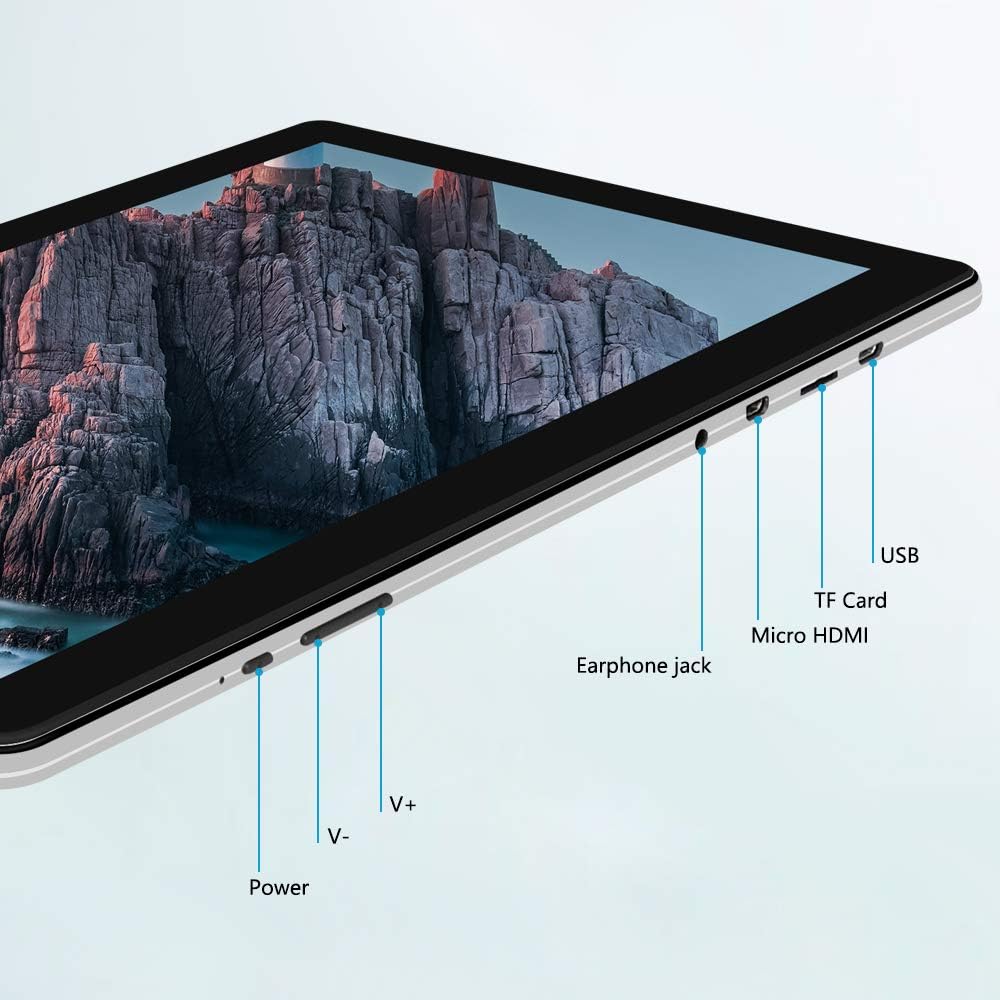
בילד: זייט view of the iProda T1045A tablet highlighting port locations.
- מאַכט קנעפּל: Press and hold to power on/off or restart the tablet. Short press to turn the screen on/off.
- Volume Buttons (V+, V-): סטרויערן די אַודיאָ באַנד.
- עאַרפאָנע דזשאַק: פאַרבינדן 3.5 מם כעדפאָונז.
- טף קאַרד שפּעלטל: Insert a microSD card for expandable storage (up to 128GB).
- Micro HDMI Port: Connect to an external display using a Micro HDMI to HDMI cable.
- וסב פּאָרט: Connect to a computer for data transfer or for charging the device.
3. סעטאַפּ
3.1 ערשט טשאַרדזשינג
Before first use, fully charge the tablet. Connect the provided USB cable to the tablet's USB port and the power adapter, then plug the adapter into a wall outlet. The charging indicator will typically illuminate. A full charge may take several hours.
3.2 פּאַוערינג אויף / אַוועק
- צו מאַכט אויף: דריקן און האַלטן די מאַכט קנעפּל ביז די פאַרשטעלן לייץ.
- צו מאַכט אַוועק: דריק און האלט דעם פּאַוער קנעפּל ביז אַ פּאַוער מעניו דערשיינט אויפן עקראַן. סעלעקטיר "אויסלאָשן" און באַשטעטיק.
- צו ריסטאַרט: From the power menu, select "Restart".
- פאַרשטעלן אויף / אַוועק: Briefly press the Power button to turn the screen off (sleep mode) or wake it up.
3.3 ערשטע סעטאַפּ וויזאַרד
The first time you power on the tablet, you will be guided through an initial setup process. Follow the on-screen prompts to:
- אויסקלייַבן דיין בילכער שפּראַך.
- פאַרבינדן צו אַ Wi-Fi נעץ.
- שטעלט אויף אייער גוגל אקאונט (אפציאנאל, אבער רעקאמענדירט פאר אפליקאציע דאונלאודס).
- קאַנפיגיער דאַטע און צייט סעטטינגס.
3.4 Inserting a TF Card (MicroSD)
To expand the tablet's storage:
- געפינט די TF קאַרטל שפּעלטל אויף דער זייט פון די טאַבלעט.
- Carefully insert a microSD card (up to 128GB) into the slot with the gold contacts facing down until it clicks into place.
- צו אַרויסנעמען, שטופּ די קאַרטל לײַכט אַרײַן ביז זי שפּרינגט אַרויס.
4. אַפּערייטינג ינסטרוקטיאָנס
4.1 יקערדיק נאַוויגאַציע
The iProda T1045A uses a touch-sensitive screen for navigation:
- צאַפּן: אויסקלייבן אַן אייטעם אָדער עפֿענען אַן אַפּליקאַציע.
- טאַפּ און האַלטן: צוטריט קאנטעקסטועלע מעניוס אדער באוועג איקאנעס.
- לאַקכענען: סקראָלן דורך ליסטעס אדער וועקסלען צווישן היים סקרינז.
- קניפּ: פארגרעסערן אדער פארקלענערן בילדער און web בלעטער.
4.2 ווי-פי קאַנעקשאַן
צו פאַרבינדן צו אַ וויירליס נעץ:
- גיין צו סעטטינגס > נעץ & אינטערנעט > ווי-פי.
- טוישן Wi-Fi On.
- אויסקלייבן אייער געוואונטשענע נעץ פון דער ליסטע.
- אַרייַן די פּאַראָל אויב געבעטן, און דאַן צאַפּן פאַרבינדן.
The tablet supports both 2.4G and 5G dual-band Wi-Fi for faster and more stable connections.
4.3 בלועטאָאָטה פּערינג
צו פאַרבינדן זיך מיט בלועטוט דעוויסעס (למשל, כעדפאָונז, ספּיקערז):
- גיין צו סעטטינגס > קאָננעקטעד דעוויסעס > בלועטאָאָטה.
- באַשטימען בלועטאָאָטה On.
- מאַכן זיכער אַז דיין בלועטאָאָטה מיטל איז אין פּערינג מאָדע.
- Select your device from the list of available devices and follow any on-screen prompts to complete pairing.
4.4 ניצן די קאַמעראַס
The tablet is equipped with a 2MP front camera and a 5MP rear camera.
- עפענען די אַפּאַראַט application from the app drawer.
- צאַפּן אויף די קאַמעראַ ייקאַן צו באַשטימען צווישן פראָנט און הינטערשטע קאַמעראַס.
- צאַפּן דעם שאַטער קנעפּל צו נעמען פאָטאָס אָדער אָנהייבן/אָפּשטעלן ווידעאָ רעקאָרדינג.

Image: Tablet in use, showcasing its camera capabilities.
4.5 פֿאַרבינדן זיך צו אַן עקסטערנעם דיספּליי (HDMI)
To display your tablet's screen on a larger monitor or TV:
- Connect one end of a Micro HDMI cable to the tablet's Micro HDMI port.
- Connect the other end of the cable to an HDMI input on your external display.
- Select the correct HDMI input source on your external display.
- The tablet's screen content should now be mirrored on the external display.
4.6 אַפּ פאַרוואַלטונג
The tablet runs Android 9 Pie and supports applications from the Google Play Store.
- ינסטאָלינג אַפּפּס: עפענען די שפּיל סטאָר app, search for your desired application, and tap ינסטאַלירן.
- אַראָפּנעמען אַפּפּס: Tap and hold an app icon on the home screen or in the app drawer, then drag it to "Uninstall" or select "App info" and choose "Uninstall". Alternatively, go to סעטטינגס > אַפּפּס & נאָוטאַפאַקיישאַנז, אויסקלייבן די אַפּ, און צאַפּן נעם אַוועק.
5. וישאַלט
5.1 רייניקונג די מיטל
צו רייניקן אייער טאַבלעט:
- Power off the tablet before cleaning.
- ניצט אַ ווייכן, לינט-פֿרייע שטאָף, אַ ביסל ווייכערampened with water or a screen cleaner, to wipe the screen and body.
- פֿאַרמײַדן ניצן שטרענגע כעמיקאַלן, אַברייסיוו רייניגער, אָדער איבערגעטריבענע נעץ.
5.2 ווייכווארג דערהייַנטיקונגען
Periodically check for software updates to ensure optimal performance and security:
- גיין צו סעטטינגס > סיסטעם > אַוואַנסירטע > סיסטעם דערהייַנטיקן.
- Follow the on-screen instructions to download and install any available updates. Ensure your tablet is sufficiently charged or connected to power during updates.
5.3 סטאָרידזש פאַרוואַלטונג
To manage internal storage and the TF card:
- גיין צו סעטטינגס > סטאָרידזש.
- דאָ איר קענען view storage usage, free up space, and manage files on both internal storage and the inserted TF card.
6. טראָובלעשאָאָטינג
This section addresses common issues you might encounter with your iProda T1045A tablet.
6.1 דיווייס גייט נישט אן
- Ensure the tablet is sufficiently charged. Connect it to the power adapter and allow it to charge for at least 30 minutes before attempting to power on again.
- Try holding the Power button for 10-15 seconds to force a restart.
6.2 Wi-Fi פֿאַרבינדונג פּראָבלעמען
- באַשטעטיקן אַז Wi-Fi איז אַקטיווירט אין סעטטינגס.
- פאַרזיכערן אַז איר אַרייַן די ריכטיק Wi-Fi פּאַראָל.
- ריסטאַרט דיין Wi-Fi ראַוטער און די טאַבלעט.
- Try connecting to a different Wi-Fi network to determine if the issue is with the tablet or the network.
6.3 לאַנגזאַמע פאָרשטעלונג
- נאָענט ומנייטיק הינטערגרונט אַפּלאַקיישאַנז.
- Clear cached data for apps in סעטטינגס > אַפּפּס & נאָוטאַפאַקיישאַנז > [אַפּ נאָמען] > סטאָרידזש און קאַש > ויסמעקן קאַש.
- Ensure sufficient free storage space. Uninstall unused apps or move large files to a TF card.
- ריסטאַרט די טאַבלעט.
6.4 באַטעריע ווערט שנעל אויסגעליידיקט
- רעדוצירן פאַרשטעלן ברייטנאַס.
- דיאַקטיווירן Wi-Fi, בלועטוט, און GPS ווען נישט אין באַנוץ.
- Close background apps that consume significant power.
- טשעק באַטאַרייע באַניץ אין סעטטינגס > באַטערי צו אידענטיפיצירן מאַכט-הונגעריקע אַפּפּס.
- Ensure the tablet is not allowed to run below 15% charge frequently, as this can impact battery longevity.
6.5 פאַבריק באַשטעטיק
אויב עס פּאַסירן שטענדיקע פּראָבלעמען, קען אַ פֿאַבריק ריסעט זיי פֿאַרריכטן. ווארענונג: דאָס וועט אויסמעקן אַלע דאַטן אויף דיין טאַבלעט. מאַכט אַ באַקאַפּ פון וויכטיקע דאַטן איידער איר גייט ווייטער.
- גיין צו סעטטינגס > סיסטעם > אַוואַנסירטע > באַשטעטיק אָפּציעס.
- אויסקלייַבן מעקן אַלע דאַטן (פאַבריק באַשטעטיק).
- באַשטעטיקן אייער באַשלוס און נאָכפאָלגן די אינסטרוקציעס אויף דעם עקראַן.
7. ספּעסאַפאַקיישאַנז
Below are the technical specifications for the iProda T1045A tablet:
| מאָדעל נאָמען | T1045A |
| אָפּערייטינג סיסטעם | אַנדרויד 9 פּיראָג |
| ווייַז גרייס | 10.1 אינטשעס |
| ווייַז האַכלאָטע | 1280 x 800 פּיקסעלס (HD IPS) |
| פּראַסעסער | MediaTek Quad-core 1.5Ghz |
| באַראַן | 3 גיגאבייט |
| אינערלעכער סטאָרידזש | 64 גיגאבייט ססד |
| יקספּאַנדאַבאַל סטאָרידזש | Up to 128 GB via TF Card (MicroSD) |
| גראַפיקס קאָופּראַסעסער | ARM Mali-T720 MP2 |
| דערציען אַפּאַראַט | 5 מפּ |
| פראָנט אַפּאַראַט | 2 מפּ |
| באַטאַרייע קאַפּאַציטעט | 5000 מאַה ליטהיום פּאָלימער |
| דורכשניטלעך באַטאַרייע לעבן | אַרויף צו 8 שעה |
| ווירעלעסס קאַנעקטיוויטי | Dual-Band Wi-Fi (802.11a/b/g/n), Bluetooth 4.0 |
| פּאָרץ | 1x USB 2.0, 1x Micro HDMI, 3.5mm Earphone Jack, TF Card Slot |
| דימענשאַנז | 34.5 X 19.7 X 5.5 סענטימעטער |
| וואָג | 550 ג |

Image: Key performance specifications of the tablet.

Image: Tablet portability and battery details.
8. וואָראַנטי און שטיצן
8.1 פּראָדוקט וואָראַנטי
The iProda T1045A tablet comes with a 12-חודש וואָראַנטי פֿון דעם קויפֿדאַטום. די וואָראַנטי דעקט פֿאַבריקאַציע חסרונות און מאַלפאַנגקשאַנז אונטער נאָרמאַל נוצן. עס דעקט נישט שעדיקן געפֿירט דורך מיסברויך, אַקסאַדאַנץ, נישט-אָטעריזירטע ריפּערז, אָדער נאָרמאַל טראָגן און טרער.
8.2 קונה שטיצן
If you encounter any issues not covered in the troubleshooting section or require further assistance, please contact iProda customer support. Refer to your purchase documentation or the iProda official webפּלאַץ פֿאַר קאָנטאַקט אינפֿאָרמאַציע.
When contacting support, please have your tablet's model number (T1045A) and purchase details readily available.
Ask a question about this manual
Ask about setup, troubleshooting, compatibility, parts, safety, or missing instructions. Manuals+ will review the question and use this page’s manual context to help answer it.