
1. הקדמה
Thank you for choosing the DELUX M625BU(3050) RGB Wired Gaming Mouse. This manual provides detailed instructions for setting up, operating, and maintaining your gaming mouse to ensure optimal performance and an enhanced gaming experience. Please read this manual thoroughly before use.
2. פּעקל אינהאַלט
- DELUX M625BU(3050) RGB Wired Gaming Mouse
- באַניצער מאַנואַל
3. פּראָדוקט איבערview
The DELUX M625BU(3050) is an ergonomic wired gaming mouse designed for precision and customization. It features a high-performance A3050 PixArt optical sensor, 7 programmable buttons, and customizable RGB lighting.
3.1 Mouse Layout and Buttons
Familiarize yourself with the buttons and their default functions:

Image: DELUX M625BU(3050) Gaming Mouse Button Layout
- לינקס קנעפּל: ערשטיק גיט פֿונקציע.
- רעכט קנעפּל: צווייטיק גיט פֿונקציע.
- סקראָל ראָד: סקראָלן אַרויף/אַראָפּ, מיטעלער קליק.
- DPI קנעפּל: גייט דורך די DPI סעטטינגס.
- פֿאָרווערטס קנעפּל: נאַוויגירט פאָרויס אין web בראַוזערז/אַפּליקאַציעס.
- צוריק קנעפּל: נאַוויגירט צוריק אין web בראַוזערז/אַפּליקאַציעס.
- פייער קנעפּל: Rapid-fire function (default).
3.2 ערגאָנאָמישער פּלאַן
The mouse features an ergonomic streamline structure and non-slip rubber sides, designed to fit comfortably in your palm for extended gaming sessions.
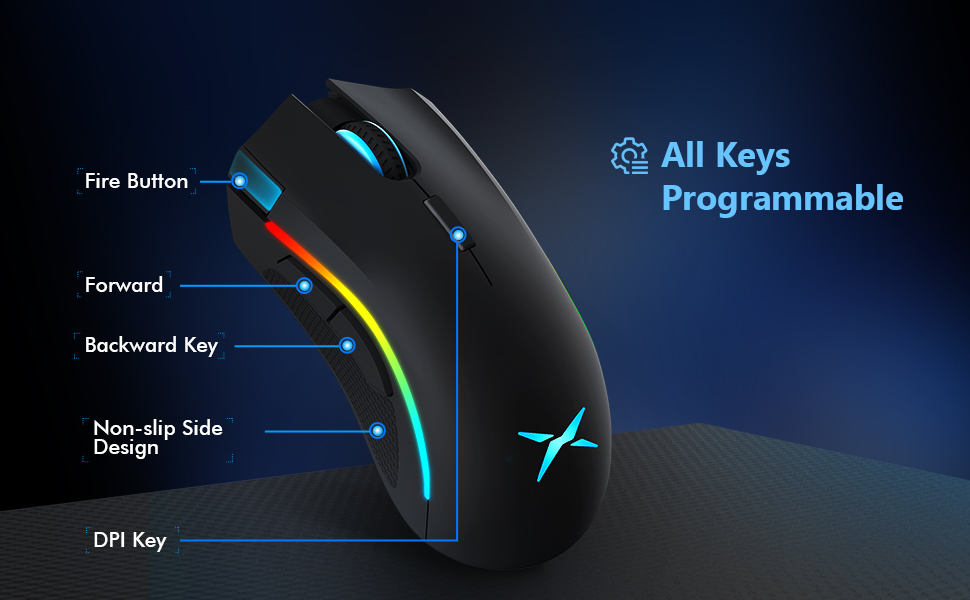
Image: Ergonomic Design Features
4. סעטאַפּ
The DELUX M625BU(3050) mouse is a plug-and-play device, requiring no additional drivers for basic functionality.
- פאַרבינדן די מויז: Plug the USB connector of the mouse's 1.8m braided cable into an available USB port on your computer.
- סיסטעם דערקענונג: Your operating system (Windows XP, Vista, 7, 8, or 10) will automatically detect and install the necessary drivers.
- אפציאנעלע ווייכווארג אינסטאַלאַציע: For advanced customization of buttons, DPI, and RGB lighting, download and install the DELUX Pro Game Software from the official DELUX webפּלאַץ.

Image: Plug and Play Connectivity
5. אַפּערייטינג ינסטרוקטיאָנס
5.1 Adjusting DPI (Dots Per Inch)
The mouse features an A3050 PixArt optical sensor with adjustable DPI settings. You can cycle through preset DPI levels by pressing the DPI button located behind the scroll wheel.

Image: DPI Adjustment Levels
- Available DPI levels: 800, 1600, 3200, 4000.
- Each press of the DPI button will switch to the next level.
- The current DPI level may be indicated by a specific LED color or pattern (refer to software for detailed customization).
5.2 RGB לייטינג יפעקץ
The mouse features customizable RGB lighting with various effects.
- טוישן לייטינג מאָדעס: Press the Left Button, Scroll Wheel, and Right Button simultaneously for 3 seconds to cycle through different lighting modes (e.g., full lighting, breathing, floating).
- Customization via Software: Use the DELUX Pro Game Software to customize RGB backlight effects from 16.8 million colors, adjust lighting direction, and speed.
5.3 פּראָגראַמירבארע קנעפּלעך און ווייכווארג
All 7 buttons on the M625BU(3050) mouse are programmable using the DELUX Pro Game Software.
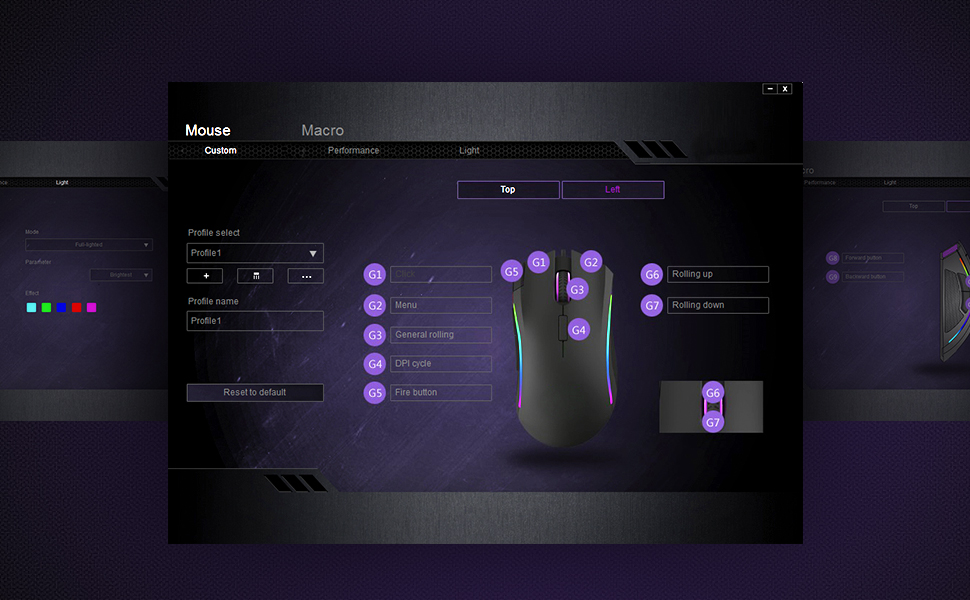
Image: Pro Game Software Interface for Customization
- קנעפּל פאַנגקשאַנז: Reassign any button to perform different functions, including keyboard keys, multimedia controls, or specific file אויספירונג.
- מאַקראָס: Create and assign complex macro sequences to buttons for automated actions.
- Sensitivity and Polling Rate: Fine-tune pointer speed, DPI sensitivity, and polling rate (125/250/500/1000Hz) for precise control.
6. וישאַלט
To ensure the longevity and optimal performance of your DELUX M625BU(3050) gaming mouse, follow these maintenance guidelines:
- רייניקונג: ניצט אַ ווייכע, טרוקענע שטאָף צו ווישן די מויז ייבערפלאַך. פֿאַר שווערע שמוץ, אַ ביסל ווייכער מאַכןampווישט דעם שטאָף מיט וואַסער אָדער אַ מילדער רייניקונג לייזונג. פֿאַרמייַדט שטרענגע כעמיקאַליעס.
- סענסאָר זאָרגן: Keep the optical sensor on the underside of the mouse clean and free from dust or debris. Use a cotton swab if necessary.
- קאַבלע זאָרגן: Avoid sharp bends or excessive pulling on the braided cable to prevent damage.
- סטאָרידזש: האַלט די מויז אין אַ ריינער, טרוקענער סביבה ווען זי איז נישט אין באַנוץ.
7. טראָובלעשאָאָטינג
If you encounter issues with your DELUX M625BU(3050) mouse, refer to the following common solutions:
| פּראָבלעם | מעגלעך לייזונג |
|---|---|
| מויז ניט ריספּאַנדינג |
|
| קורסאָר באַוועגונג איז נישט סטאַביל אָדער נישט פּינקטלעך |
|
| RGB לייטינג ארבעט נישט אדער איז נישט ריכטיג |
|
| Programmable buttons not functioning |
|
| Scroll wheel behaves erratically (e.g., scrolls opposite direction) |
|
8. ספּעסאַפאַקיישאַנז
| שטריך | דעטאַל |
|---|---|
| מאָדעל נומער | M625BU(3050) |
| קאַנעקטיוויטי | Wired (1.8m Braided Cable) |
| סענסאָר | A3050 PixArt Optical Sensor |
| דפּי סעטטינגס | 800 / 1600 / 3200 / 4000 דפּי |
| פּאָללינג קורס | 125 / 250 / 500 / 1000 הז |
| קנעפּלעך | 7 פּראָגראַממאַבלע קנעפּלעך |
| לייטינג | Customizable RGB Lighting Effects |
| ערגאָנאָמיקס | Ergonomic Streamline Structure, Non-slip Rubber Side |
| פּראָדוקט דימענשאַנז | 5.14 X 2.71 X 1.67 אינטשעס |
| פּונקט וואָג | 3.53 אונסעס |
| קאַמפּאַטאַבילאַטי | Windows XP, Vista, 7, 8, 10 |
9. וואָראַנטי און שטיצן
All DELUX products include a 12-חודש וואָראַנטי from the date of purchase. Additionally, DELUX provides פרייע לעבנס-לאַנג טעכנישע שטיצע פֿאַר דעם פּראָדוקט.
For warranty claims, technical assistance, or further inquiries, please contact DELUX customer support through the official DELUX webפּלאַץ אָדער דיין זיצער.