
הקדמה
The ESP8266 ESP-01 is a highly integrated Wi-Fi module designed to provide a complete and self-contained networking solution. It can function as a standalone application host or offload Wi-Fi networking functions from another application processor. This module is suitable for various applications including smart grids, intelligent transportation, smart home devices, and industrial control systems.

פיגורע 1: איבערview of the AITRIP ESP8266 ESP-01 WiFi Module.
שליסל פֿעיִקייטן
- מאָדעל: ESP-01.
- קאַמפּאַטאַבילאַטי: Compatible with Arduino and NodeMCU platforms.
- אַפּערייטינג מאָדעס: Supports Access Point (AP), Station (STA), and combined AP+STA modes.
- מאַכט רעקווירעמענץ: Operates strictly on 3.3V DC.
- פלאַש זכּרון: 1MB (8Mbit) SPI Flash.
- ווי-פי סטאַנדאַרדס: Supports 802.11 b/g/n protocols.
- זיכערהייט מאָדעס: WPA, WPA2.
- Serial/UART Baud Rate: 115200 בפּס.
- I/O Voltage טאָלעראַנץ: Maximum 3.6V.
סעטאַפּ
Proper setup is crucial for the reliable operation of your ESP8266 ESP-01 module. Please follow these guidelines carefully.
מאַכט צושטעלן
The ESP-01 module requires a stable 3.3V DC power supply. Applying a voltage higher than 3.6V, such as 5V, will permanently damage the module. Ensure your power source can provide sufficient current, as the module can draw up to 70mA during regular operation and more during Wi-Fi transmission peaks.
Pinout and Connections
The ESP-01 module features an 8-pin header for power, serial communication, and GPIO. Refer to the diagrams below for pin identification.
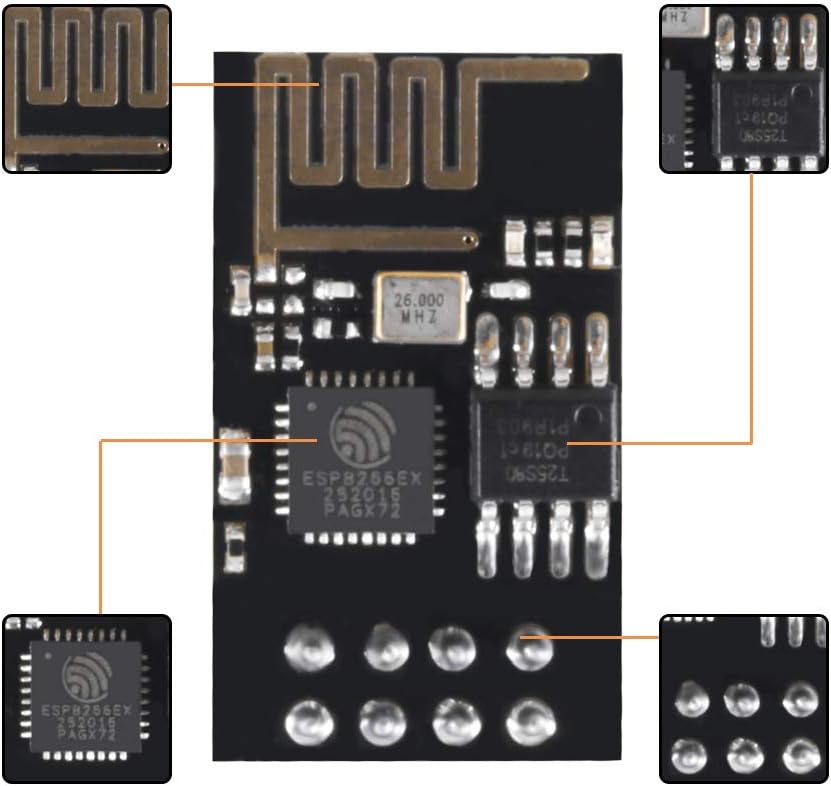
פיגורע 2: שפּיץ view of the ESP-01 module highlighting key components and pin locations.
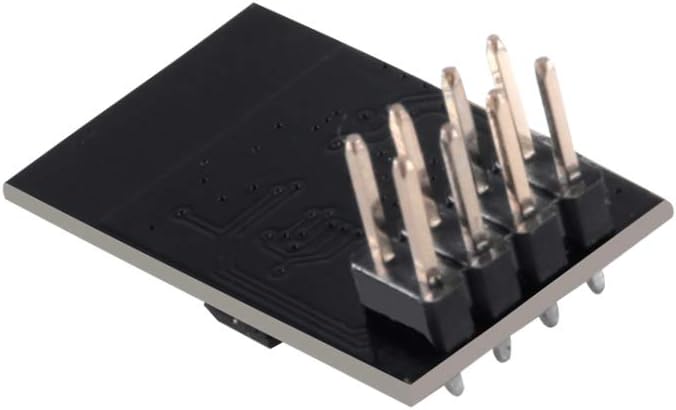
פיגורע 3: דנאָ view of the ESP-01 module showing the pin arrangement.
Common pins include VCC (3.3V), GND (Ground), TX (Transmit), RX (Receive), CH_PD (Chip Enable), RST (Reset), GPIO0, and GPIO2. For initial programming or communication, connect TX to RX and RX to TX of your serial adapter (e.g., USB-to-TTL converter) and ensure CH_PD is pulled high (to 3.3V) for normal operation.
פירמוואַרע פלאַשינג
To program the ESP-01 module, you will typically need a dedicated USB-to-ESP-01 programmer or a compatible serial adapter. Ensure GPIO0 is pulled low (to GND) during power-up to enter flash mode. After flashing, remove the GPIO0-to-GND connection and reset the module for normal operation.
אַפּערייטינג
The ESP-01 module can operate in various Wi-Fi modes and is controlled via AT commands or custom firmware.
Wi-Fi מאָדעס
- סטאנציע (STA) מאָדע: The module connects to an existing Wi-Fi network (e.g., your home router).
- אַקסעס פונט (אַפּ) מאָדע: The module creates its own Wi-Fi network, allowing other devices to connect to it.
- AP+STA Mode: The module acts as both an Access Point and a Station simultaneously.
AT קאַמאַנדז
When running the default AT firmware, the module responds to a set of AT commands sent over the serial interface. These commands allow you to configure Wi-Fi settings, establish TCP/UDP connections, and control GPIOs. The default serial baud rate is 115200 bps.
מנהג פירמוואַרע
For more advanced applications, you can flash custom firmware (e.g., using the Arduino IDE with ESP8266 core or NodeMCU firmware) to directly control the module's functionality without relying on AT commands.
וישאַלט
To ensure the longevity and optimal performance of your ESP8266 ESP-01 module, observe the following maintenance practices:
- שעפּן מיט זאָרג: Electronic components are sensitive. Avoid dropping the module or subjecting it to physical stress.
- סטאַטיק אָפּזאָגן: Always handle the module in an anti-static environment to prevent damage from electrostatic discharge (ESD).
- ינווייראַנמענאַל טנאָים: Keep the module in a dry environment, away from moisture, extreme temperatures, and corrosive substances.
- מאַכט צושטעלן: Always use a regulated 3.3V power supply. Incorrect voltage is a common cause of module failure.
- רייניקונג: If necessary, gently clean the module with a soft, dry brush or compressed air to remove dust. Avoid using liquids.
טראָובלעשאָאָטינג
If you encounter issues with your ESP8266 ESP-01 module, consider the following troubleshooting steps:
- מאָדולע ניט פּאַוערינג אויף:
- Verify the power supply is exactly 3.3V DC.
- Check all power connections (VCC, GND) for proper contact.
- Ensure the CH_PD (Chip Enable) pin is connected to 3.3V.
- Cannot Communicate via Serial:
- Confirm TX and RX lines are correctly cross-connected (module TX to adapter RX, module RX to adapter TX).
- Set your serial monitor's baud rate to 115200 bps.
- Ensure your serial adapter is also operating at 3.3V logic levels.
- Firmware Flashing Fails:
- Ensure GPIO0 is pulled to GND during power-up to enter flash mode.
- Check for bent or damaged pins on the module or programmer.
- Verify the correct drivers are installed for your USB-to-serial adapter.
- Wi-Fi קאַנעקטיוויטי ישוז:
- Ensure the module's antenna is not obstructed by metal or other materials.
- Check Wi-Fi credentials (SSID, password) if operating in STA mode.
- Confirm the module is within range of the Wi-Fi access point.
ספּעסאַפאַקיישאַנז
Detailed technical specifications for the AITRIP ESP8266 ESP-01 module:
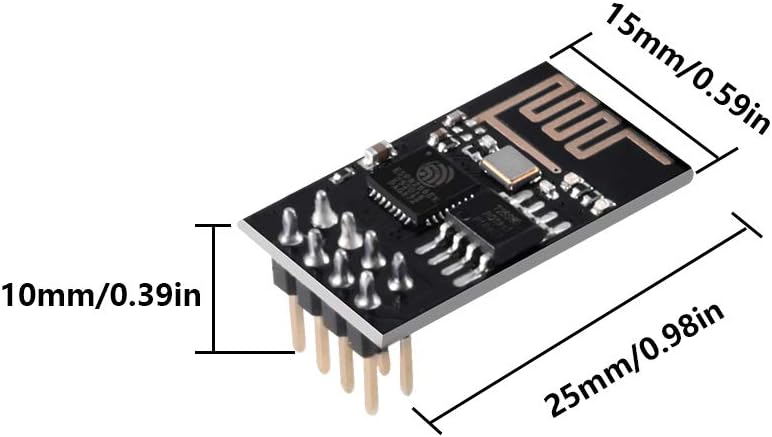
Figure 4: Dimensions of the ESP-01 module.
| שטריך | באַשרייַבונג |
|---|---|
| מאָדעל | ESP-01 |
| סאָרט | AITRIP |
| פּראַסעסער סאָרט | עספּרעסיף |
| אָפּערייטינג סיסטעם | AT firmware (embedded RTOS) |
| באַראַן | LPDDR3 |
| פלאַש זכּרון גרייס | 1 MB (8Mbit) |
| ווירעלעסס טיפּ | 802.11ב/ג/ען |
| קאַנעקטיוויטי טעכנאָלאָגיע | WLAN, Wi-Fi |
| אַרייַנשרייַב מאַכט | DC 3.0-3.6V (Nominal 3.3V) |
| I/O Voltage טאָלעראַנץ | 3.6 וו מאַקס |
| Serial/UART Baud Rate | 115200 בפּס |
| Regular Operation Current Draw | ~70מאַ |
| פּונקט וואָג | 0.634 אונסעס |
| פּעקל דימענשאַנז | 4.33 X 2.4 X 0.63 אינטשעס |
וואָראַנטי אינפֿאָרמאַציע
This product is covered by a standard manufacturer's warranty against defects in materials and workmanship. The warranty period typically begins from the date of purchase. Please retain your proof of purchase for any warranty claims. For specific details regarding warranty terms and conditions, please refer to the seller's policy or contact AITRIP customer support.
שטיצן
For technical assistance, troubleshooting guidance, or further inquiries regarding your AITRIP ESP8266 ESP-01 module, please contact our customer support team. You may find additional resources, tutorials, and community forums online dedicated to ESP8266 development, which can provide valuable information and project ideas.
אָנליין רעסורסן: זוכן פֿאַר 'ESP8266 ESP-01 tutorials' or 'NodeMCU ESP-01 programming' for extensive community support.