
הקדמה
The EOTECH 558.A65 Holographic Weapon Sight is designed for rapid target acquisition and precision aiming. This sight is compatible with all Gen I-III night vision devices and features an adjustable, locking, quick-detach mount for versatile application. This manual provides essential information for the proper setup, operation, and maintenance of your 558.A65 sight.
פּראָדוקט איבערview
Familiarize yourself with the key components of the EOTECH 558.A65 Holographic Weapon Sight.
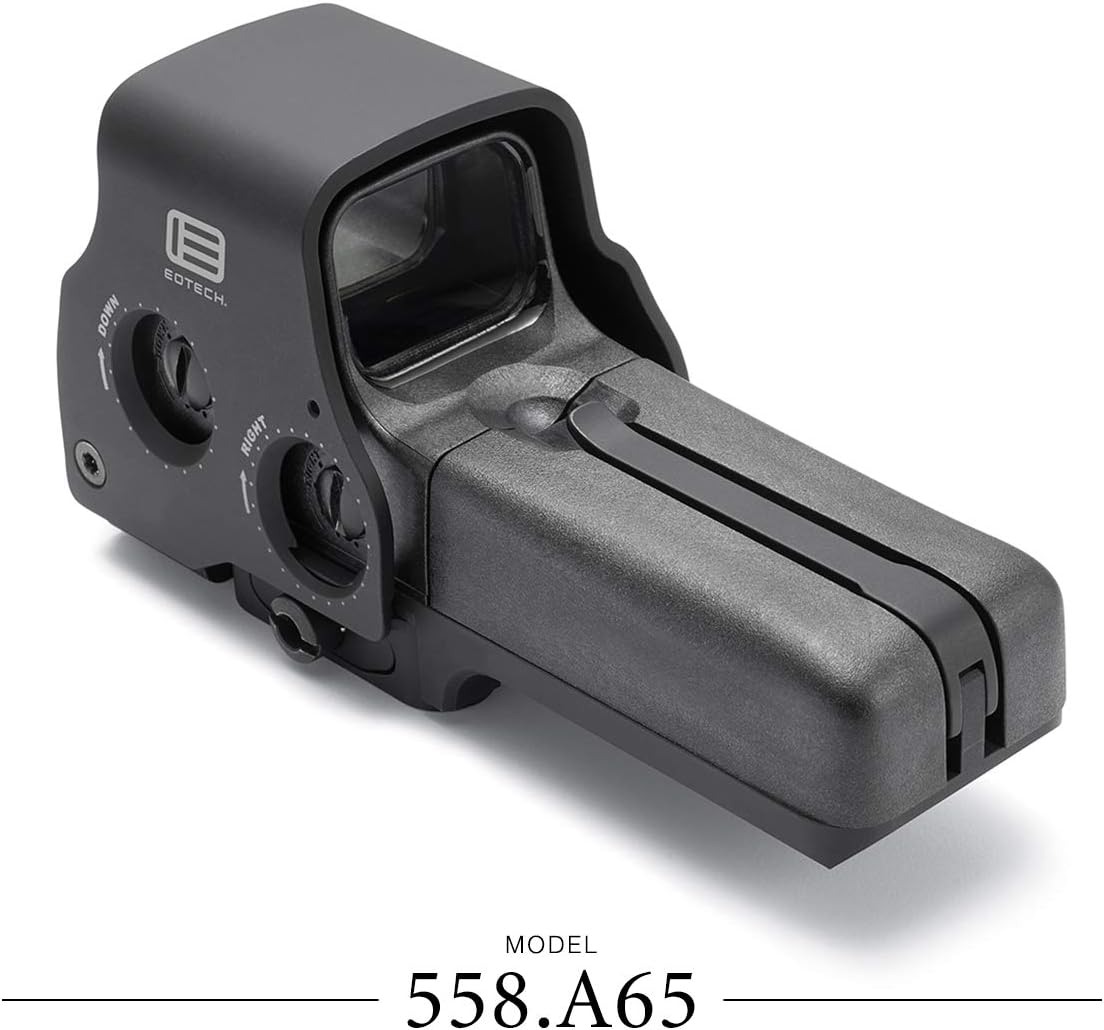
פיגורע 1: זייַט view of the EOTECH 558.A65 sight, highlighting the battery cap latch, aluminum hood, removable battery compartment, and quick detach lever.
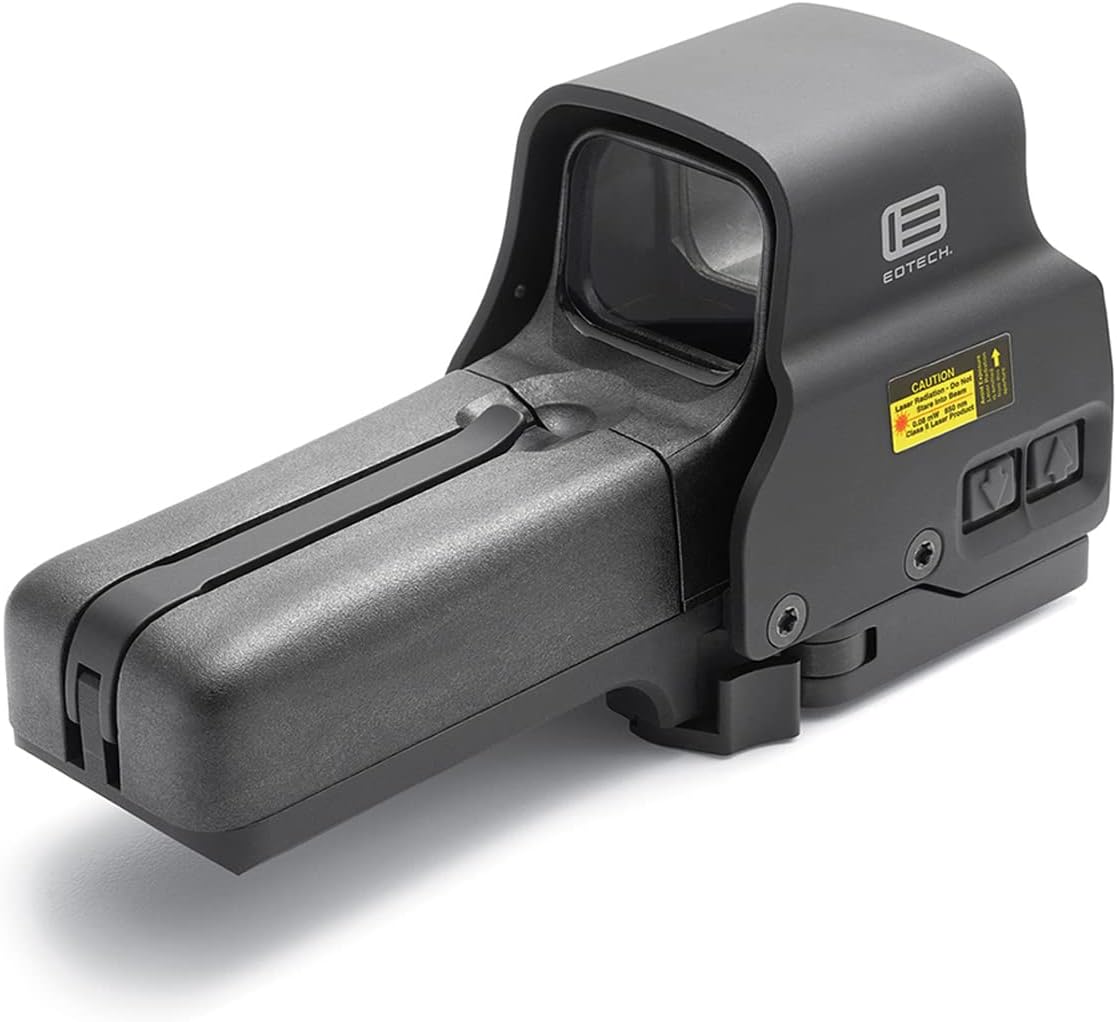
פיגורע 2: Top-down view of the EOTECH 558.A65 sight, showing the windage and elevation adjustment dials.
סעטאַפּ
1. באַטאַרייע ייַנמאָנטירונג
- Locate the battery compartment on the side of the sight.
- Unlatch the battery cap latch and open the removable battery compartment.
- Insert two (2) AA batteries, ensuring correct polarity. The sight supports both lithium and alkaline AA batteries.
- נאָענט די באַטאַרייע אָפּטייל און באַוואָרענען די לאַטש.
2. אויפשטעלן דעם וויזיר
The 558.A65 features a quick-detach mount compatible with both 1" Weaver and MIL-STD-1913 (Picatinny) rails.
- Ensure the quick-detach lever is in the open position.
- Align the sight's base with the rail on your firearm.
- Press the sight firmly onto the rail and close the quick-detach lever until it locks securely.
- Verify that the sight is firmly attached and does not wobble. Adjust the tension of the quick-detach lever if necessary.
אַפּערייטינג ינסטראַקשאַנז
1. מאַכט אויף / אויסגעלאשן
- To power on, press either the UP or אַראָפּ ברייטקייט אַדזשאַסטמענט קנעפּל.
- To power off, press both the UP און אַראָפּ buttons simultaneously. The sight will also automatically power off after 8 hours if the last button pressed was UP, or after 4 hours if the last button pressed was אַראָפּ.
2. ברייטנאַס אַדדזשוסטמענט
The sight offers 30 brightness settings, including 10 settings specifically for night vision compatibility. The side-button operation is ideal for use with a magnifier.
- דרוק די UP button to increase reticle brightness.
- דרוק די אַראָפּ button to decrease reticle brightness.
3. נאַכט זעאונג מאָדע
The 558.A65 is fully compatible with Gen I-III night vision devices.
- To activate night vision mode, press the NV button. The reticle brightness will automatically adjust to the lowest night vision setting.
- ניצן די UP און אַראָפּ buttons to cycle through the 10 night vision brightness settings.
- To exit night vision mode, press the NV button again. The sight will return to its previous daylight brightness setting.
4. Reticle Pattern
The sight features a 68 MOA ring with a 1 MOA dot reticle, designed for fast target acquisition and precise aiming.

פיגורע 3: The 68 MOA ring and 1 MOA dot reticle pattern.
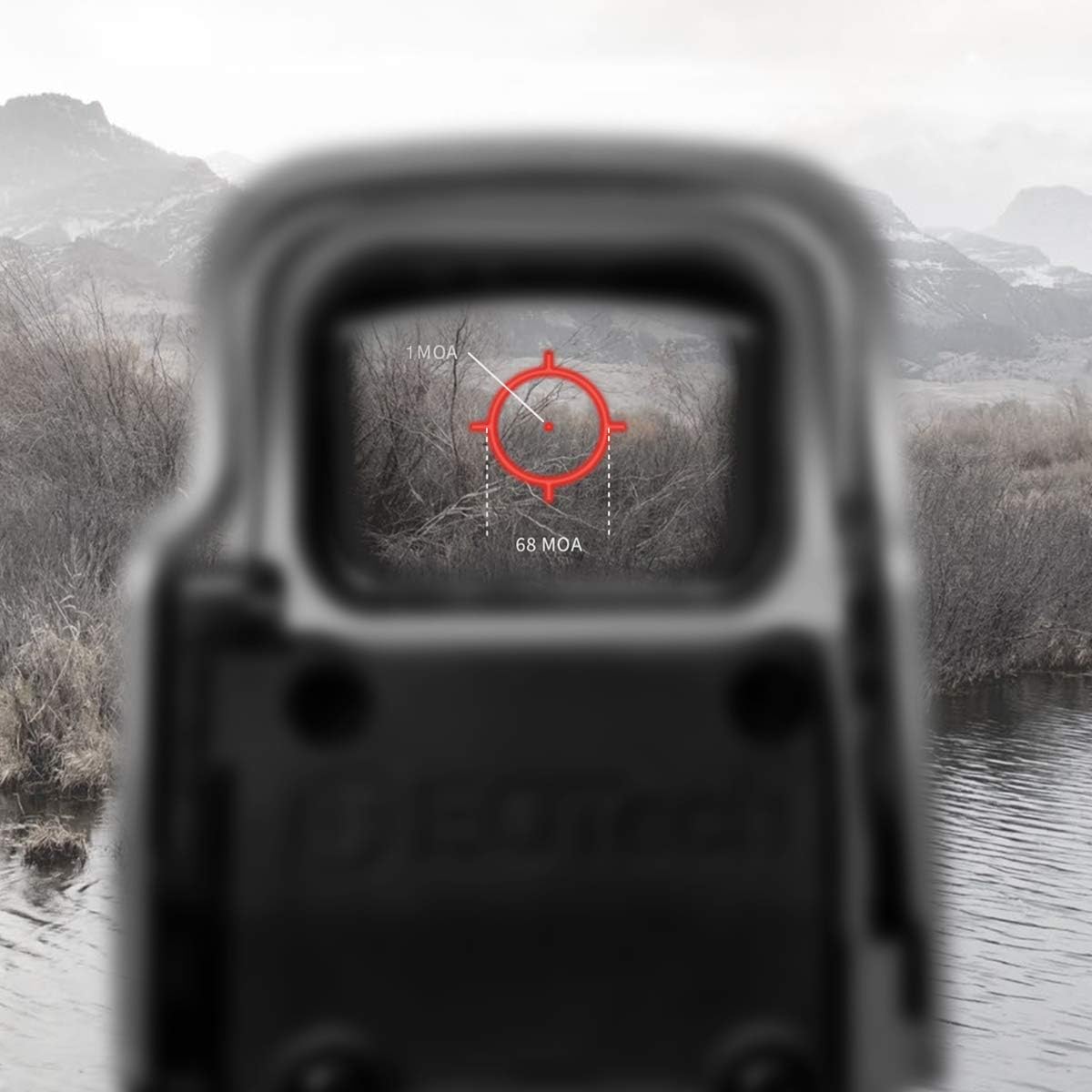
פיגורע 4: The reticle as seen through the sight, demonstrating its appearance in an operational environment.
5. Zeroing the Sight (Windage and Elevation)
To achieve optimal accuracy, the sight must be zeroed to your firearm. This process adjusts the point of impact to match your point of aim.
- Mount the sight securely on your firearm.
- Using a stable shooting rest, fire a group of shots at a target at your desired zeroing distance.
- Observe the point of impact relative to your point of aim.
- Use a flat-head screwdriver or a coin to adjust the windage (left/right) and elevation (up/down) adjustment dials located on the side and top of the sight.
- ווענדן די UP arrow on the elevation dial moves the point of impact up.
- ווענדן די אַראָפּ arrow on the elevation dial moves the point of impact down.
- ווענדן די רעכט arrow on the windage dial moves the point of impact right.
- ווענדן די לינקס arrow on the windage dial moves the point of impact left.
- Make small adjustments and fire additional groups until the point of impact consistently matches your point of aim.
וישאַלט
1. רייניקונג
- Use a soft, clean cloth to wipe down the exterior of the sight.
- For lenses, use a lens cleaning pen or a soft lens cloth with a small amount of lens cleaning solution. Avoid abrasive materials or harsh chemicals.
- Ensure no debris enters the battery compartment.
2. באַטערי פאַרבייַט
Replace batteries when the reticle begins to dim or flash, indicating low power. Battery life is approximately 2500 continuous hours with lithium batteries or 2200 continuous hours with alkaline batteries at nominal setting 12.
- פֿאָלגט די באַטעריע אינסטאַלאַציע טריט וואָס זענען אויסגעשריבן אין דער סעטאַפּ סעקציע.
- Always use fresh, high-quality AA batteries.
טראָובלעשאָאָטינג
- Reticle is dim or not visible:
- קאָנטראָלירן די באַטאַרייע מדרגה און פאַרבייַטן אויב נייטיק.
- Increase brightness using the UP קנעפּל.
- Ensure the sight is not in night vision mode during daylight use.
- Reticle appears blurry or distorted:
- This can sometimes be caused by astigmatism in the user's eye. Try lowering the brightness setting; a lower brightness can sometimes make the reticle appear clearer for individuals with slight astigmatism.
- Ensure the sight's lenses are clean.
- Sight does not power on:
- Verify batteries are correctly installed with proper polarity.
- פאַרבייַטן באַטעריז מיט פריש אָנעס.
- פאַרזיכערן די באַטאַרייע קאָנטאַקטן זענען ריין און פריי פון קעראָוזשאַן.
- Sight is loose on the rail:
- Ensure the quick-detach lever is fully closed and locked.
- Adjust the tension of the quick-detach lever if it feels loose even when locked.
ספּעסאַפאַקיישאַנז
The following table outlines the key specifications for the EOTECH 558.A65 Holographic Weapon Sight.
| שטריך | באַשרייַבונג |
|---|---|
| דימענשאַנז | 5.6" L x 2.2" W x 2.9" H (Product Description) / 7.5" L x 6.65" W x 3.6" H (Specifications) Note: Discrepancy in source data. Refer to manufacturer's official product page for precise dimensions. |
| וואָג | 13.8 oz (Product Description) / 1.25 Pounds (Specifications) Note: Discrepancy in source data. 1.25 lbs = 20 oz. Refer to manufacturer's official product page for precise weight. |
| וואַסער קעגנשטעל | 33 פט (10 עם) |
| קאָליר | שוואַרץ |
| בארג | Quick Detach fits both 1" Weaver and MIL-STD-1913 Rail |
| ברייטנאַס סעטטינגס | 30 total (10 for night vision) |
| מאַכט מקור | 2 רענטגענ אַאַ באַטעריז |
| באַטערי לעבן | Up to 2500 continuous hours (lithium) or 2200 continuous hours (alkaline) at nominal setting 12 |
| רעטיקלע | 68 MOA ring with 1 MOA dot |
| נאַכט זעאונג קאַמפּאַטאַבאַל | Yes (Gen I-III) |
| מאַטעריאַל | אַלומינום |
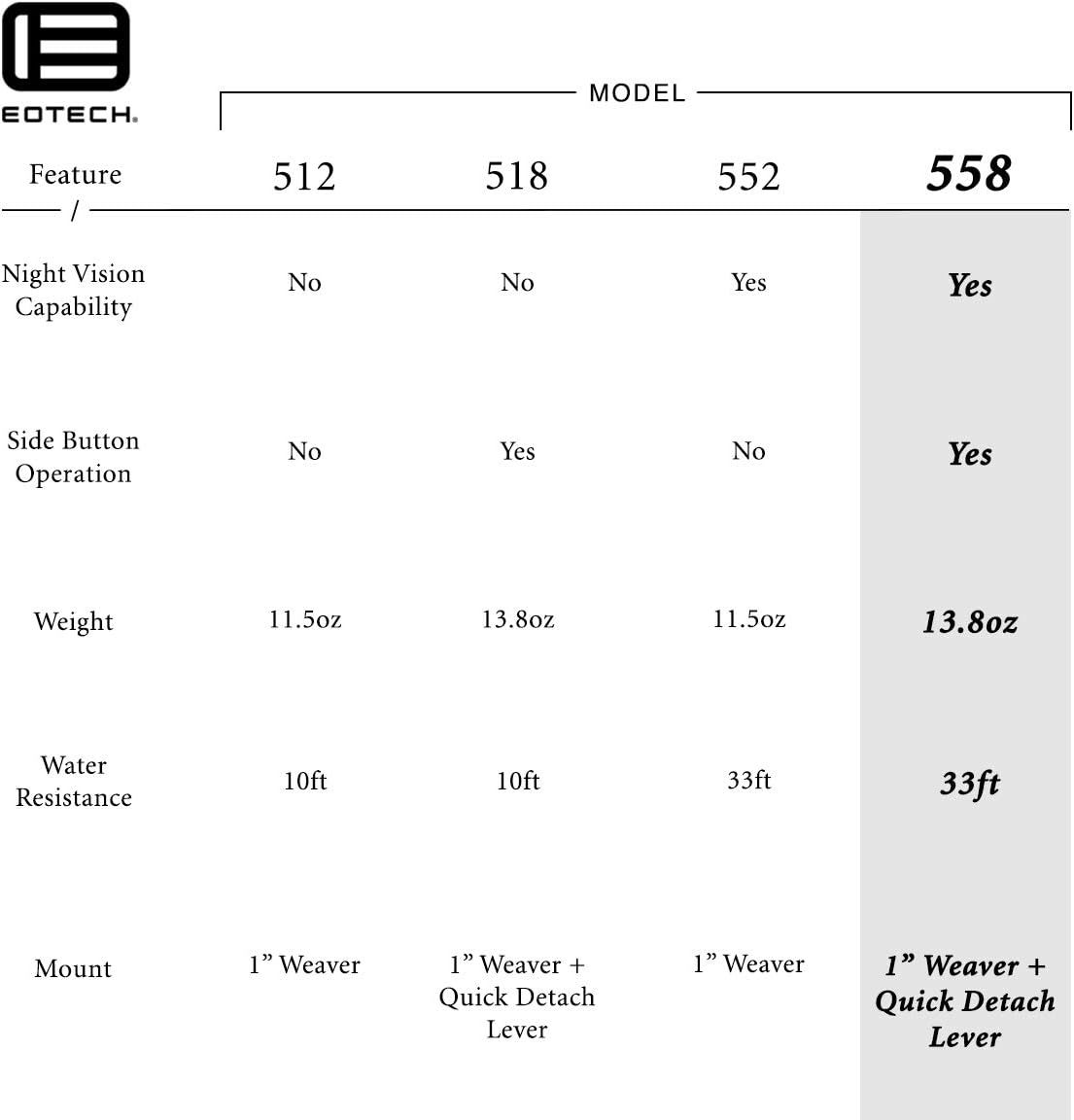
פיגורע 5: Feature comparison table for various EOTECH HWS models, with the 558.A65 features highlighted.
וואָראַנטי
The EOTECH 558.A65 Holographic Weapon Sight comes with the EOTECH HWS Prestige Warranty, which is a 10-year limited warranty. For full details regarding warranty coverage, terms, and conditions, please refer to the official EOTECH manufacturer's webזייטל אדער קאנטאקט זייער קאסטומער שטיצע גלייך.
שטיצן
For further assistance, technical support, or service inquiries, please contact EOTECH customer support. Refer to the official EOTECH webזייטל פֿאַר די מערסט אַקטועלע קאָנטאַקט אינפֿאָרמאַציע און שטיצע רעסורסן.
- פאַבריקאַנט: EOTech
- Webפּלאַץ: www.eotechinc.com (עקסample, actual link not provided in JSON)


