
הקדמה
This manual provides comprehensive instructions for the installation, operation, and maintenance of your PHYSEN Infrared Motion Detector Wireless Home Security Alarm System. Please read this manual carefully before use to ensure proper functionality and safety.
פּראָדוקט איבערview
קאַמפּאָונאַנץ
The PHYSEN Wireless Home Security Alarm System typically includes the following components:
- 1 x Infrared Motion Detector
- 1 x פּלאַג-אין ופנעמער (קלינגל אַפּאַראַט)
- Mounting Hardware (Screws, Wall Plugs)

Image: The PHYSEN Infrared Motion Detector (right) and its accompanying Plug-in Receiver (left). The detector emits an infrared beam to sense movement, while the receiver provides audible alerts.
שליסל פֿעיִקייטן
- ווירעלעסס אָפּעראַציע: Provides flexible placement with a wireless transmission range of up to 150 meters (492 feet).
- Wide Detection Area: The infrared motion detector covers an area of 4-5 meters (13-16 feet) with a 110° angle.
- Adjustable Volume & Ringtones: The receiver offers 5 volume levels (0-110 dB) and 58 selectable melodies.
- עטלעכע מאַכט אָפּציעס: The receiver plugs directly into an AC outlet. The motion detector can be powered by 2 AAA batteries (not included) or a USB Type-C cable (not included). Note: USB power does not charge batteries.
- צוויי אַפּערייטינג מאָדעס: Motion detection can be set to trigger every 1-2 seconds or 5-8 seconds (default).
- LED ינדיקאַטאָרס: The receiver features an LED chime, and the sensors have indicators for low power (red) and alarm detection (blue).
- יקספּאַנדאַבאַל סיסטעם: Easily add more sensors or receivers to monitor additional areas.

Image: This illustration highlights the system's features, including 5 adjustable volume levels (0-110dB), 58 ringtones, LED display, 150M wireless range, and detailed detection angles for the sensor (60° vertical, 120° horizontal, 360° rotation, 90° swivel/tilt).
סעטאַפּ
1. אנשטעלן דעם ריסיווער
- Plug the receiver unit directly into a standard AC power outlet.
- Ensure the outlet is easily accessible and not controlled by a switch that might accidentally turn off power to the receiver.
2. Powering the Motion Detector
The motion detector can be powered by batteries or a USB cable:
- באַטאַרייע מאַכט: Insert 2 x AAA alkaline batteries (not included) into the battery compartment of the motion detector. Ensure correct polarity.
- USB Power: Connect a USB Type-C cable (not included) to the motion detector and a compatible USB power source. Note: Using USB power will not charge installed batteries.
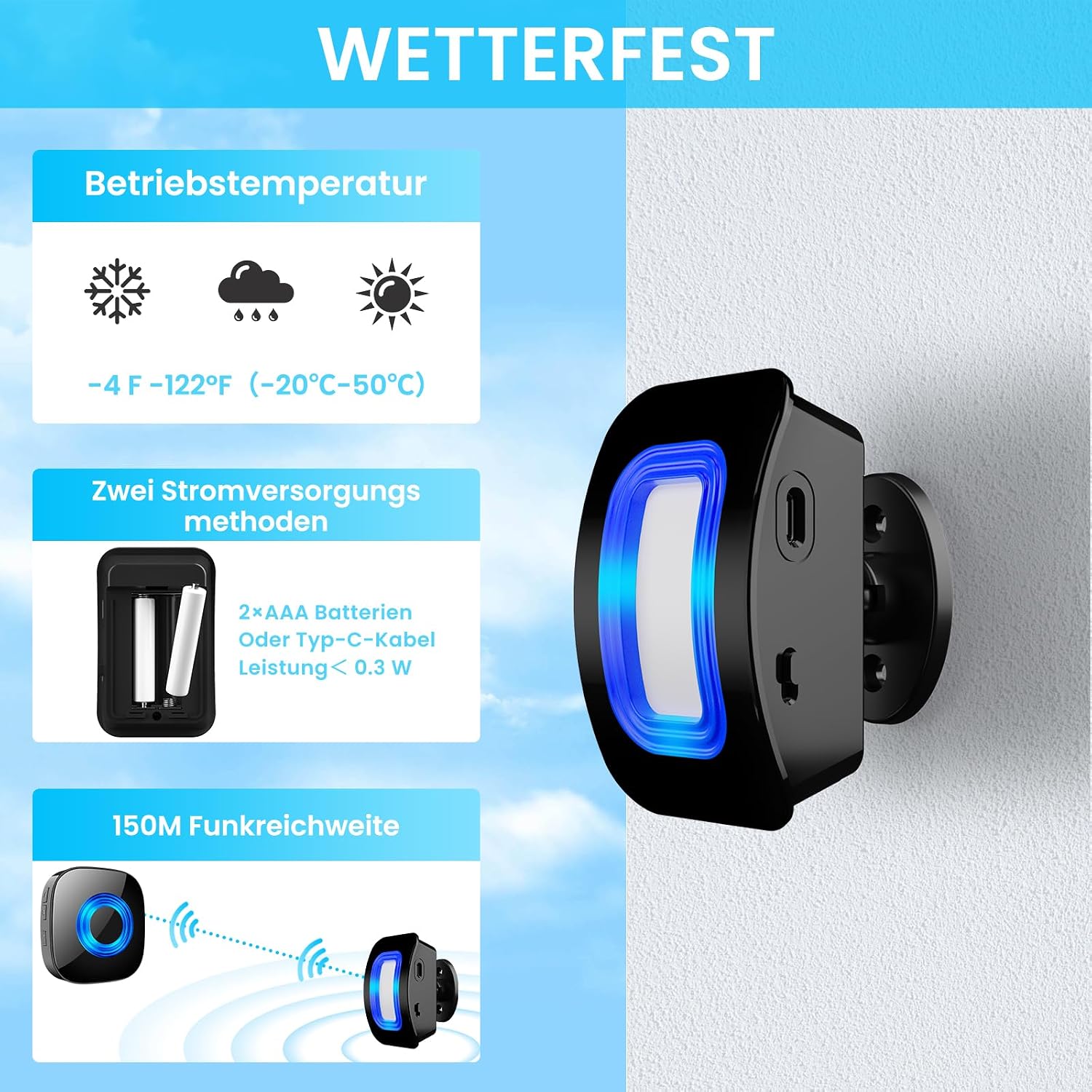
Image: This graphic illustrates the two power supply methods for the motion detector: 2x AAA batteries or a Type-C USB cable. It also shows the operating temperature range of -20°C to 50°C, indicating its suitability for various environments.
3. Mounting the Motion Detector
The motion detector is designed for wall mounting. Follow these steps for installation:
- Choose a suitable location for the motion detector. It is recommended to install it on the inner roof of a doorway or entrance, ensuring the detection area is vertical behind the door. Note: The motion sensor is not waterproof and should be protected from direct weather exposure.
- Mark the desired drilling points on the wall using the motion detector bracket as a template.
- בויער האָלעס אין די אנגעצייכנט פונקטן.
- אַרייַנשטעלן וואַנט פּלאַגז אין די דרילד האָלעס.
- Secure the motion detector bracket to the wall using the provided screws.
- Attach the round part of the bracket to the mounted bracket.
- Insert the motion detector onto the bracket and adjust its angle to align with the desired detection area. The sensor allows for 360° rotation and 90° swivel/tilt.
Image: This image illustrates the adjustable mounting options for the motion detector, showing its ability to rotate 360 degrees and tilt 90 degrees, allowing for precise aiming of the detection beam.
אָפּעראַציע
1. יקערדיק פאַנגקשאַנאַליטי
Once both the motion detector and receiver are powered on and within range, the system is ready for operation. When the infrared motion detector senses movement within its 4-5 meter (13-16 feet) range and 110° angle, it will send a signal to the receiver.
Upon receiving a signal, the receiver will:
- Play the selected ringtone.
- Illuminate its LED indicator.

Image: This visual demonstrates the system's primary function: when someone enters the detection area, the receiver automatically rings, ensuring you are alerted to visitors or deliveries.
2. Adjusting Volume and Ringtones
The receiver unit features buttons to adjust the volume and change the ringtone:
- באַנד קאָנטראָל: Press the volume button on the receiver to cycle through 5 adjustable volume levels, ranging from 0 dB (mute) to 110 dB.
- רינגטאָנע סעלעקציע: Press the melody button on the receiver to cycle through 58 available ringtones. Select the desired melody for your alerts.

Image: This diagram illustrates the wireless transmission range of 150 meters and the motion detection range of 4-5 meters. It also visually represents the 5 adjustable volume levels of the receiver, from mute to 110dB.
3. Setting Operating Modes (Detection Frequency)
The motion sensor offers two detection frequency modes:
- שנעל מאָדע: Detects movement every 1-2 seconds.
- נאָרמאַל מאָדע (פעליקייַט): Detects movement every 5-8 seconds.
Refer to the specific instructions provided with your product packaging for how to switch between these modes, as this may involve a button press sequence on the detector.
4. אויסברייטערן אייער סיסטעם
Additional PHYSEN motion detectors or receivers can be paired with your existing system to cover more areas or provide alerts in multiple locations. Follow the pairing instructions provided with the additional units to integrate them into your system.
וישאַלט
1. רייניקונג
- Wipe the surfaces of the motion detector and receiver with a soft, dry cloth.
- Do not use abrasive cleaners, solvents, or strong chemicals, as these can damage the plastic components.
2. באַטערי פאַרבייַט
- When the motion detector's low power indicator (red LED) illuminates, it is time to replace the AAA batteries.
- Open the battery compartment, remove the old batteries, and insert new AAA alkaline batteries, ensuring correct polarity.
- אַוועקוואַרפן אַלטע באַטעריעס לויט די לאָקאַלע רעגולאַציעס.
3. ינווייראַנמענאַל קאַנסידעריישאַנז
- The motion detector is not waterproof. Ensure it is installed in a sheltered location, protected from rain and direct moisture.
- The operating temperature range is -20°C to 50°C (-4°F to 122°F). Avoid exposing the device to temperatures outside this range.
טראָובלעשאָאָטינג
| פּראָבלעם | מעגלעך סיבה | לייזונג |
|---|---|---|
| Receiver does not chime when motion is detected. |
|
|
| פאַלשע אַלאַרמען. |
|
|
| קורצע דעטעקציע ראַנגע. |
|
|
ספּעסאַפאַקיישאַנז
| שטריך | דעטאַל |
|---|---|
| מאָדעל נומער | YBHW-EU |
| סאָרט | PHYSEN |
| מאַכט מקור (ריסיווער) | AC Plug-in (Wall Mounted) |
| Power Source (Motion Detector) | 2 x AAA Alkaline Batteries (not included) or USB Type-C Cable (not included) |
| וואָסtage | 5 וואטס |
| ווירעלעסס טראַנסמיסיע קייט | אַרויף צו 150 מעטער (492 פֿיס) |
| באַוועגונג דעטעקשאַן ראַנגע | 4-5 מעטער (13-16 פֿיס) |
| באַוועגונג דעטעקשאַן ווינקל | 110° |
| אַדזשאַסטאַבאַל באַנד לעוועלס | 5 (0 dB to 110 dB) |
| רינגטאָנעס | 58 ניגונים |
| אַפּערייטינג טעמפּעראַטור | -20°C צו 50°C (-4°F צו 122°F) |
| פּראָדוקט דימענסיעס (פּאַקעט) | 13.8 X 9.2 X 8.4 סענטימעטער (5.4 X 3.6 X 3.3 אינטשעס) |
| פּונקט וואָג | 240 גראַמז (0.53 לבס) |
| מאַונטינג טיפּ | וואנט בארג |
וואָראַנטי און שטיצן
For warranty information and customer support, please refer to the documentation included with your product packaging or visit the official PHYSEN brand store on Amazon:
PHYSEN is committed to providing quality products and customer satisfaction. If you encounter any issues or have questions regarding your device, please contact their support team through the brand store or the contact information provided in your product's original documentation.