
Brinno TLC2020
Brinno Empower TLC2020 Time Lapse Camera with ATH1000 Waterproof Case Instruction Manual
Your guide to setting up, operating, and maintaining your Brinno TLC2020 Time Lapse Camera.
1. הקדמה
This manual provides essential information for the proper use and care of your Brinno Empower TLC2020 Time Lapse Camera and ATH1000 Waterproof Case. Please read these instructions carefully before operating the device to ensure optimal performance and longevity.
The Brinno TLC2020 is designed for capturing high-quality time-lapse, step video, and stop motion footage, particularly for long-term outdoor projects, thanks to its extended battery life and durable waterproof housing.
2. פּראָדוקט איבערview
2.1. פּעקל אינהאַלט
- Brinno TLC2020 צייט לאַפּס קאַמעראַ
- Brinno ATH1000 Waterproof Case
- AA באַטעריעס (4x)
- באַניצער מאַנואַל (דעם דאָקומענט)
2.2. שליסל פֿעיִקייטן
- הויך-רעזאָלוציע כאַפּן: 1080P HDR video recording.
- ברייט פעלד פון View: 118° lens for comprehensive scene capture.
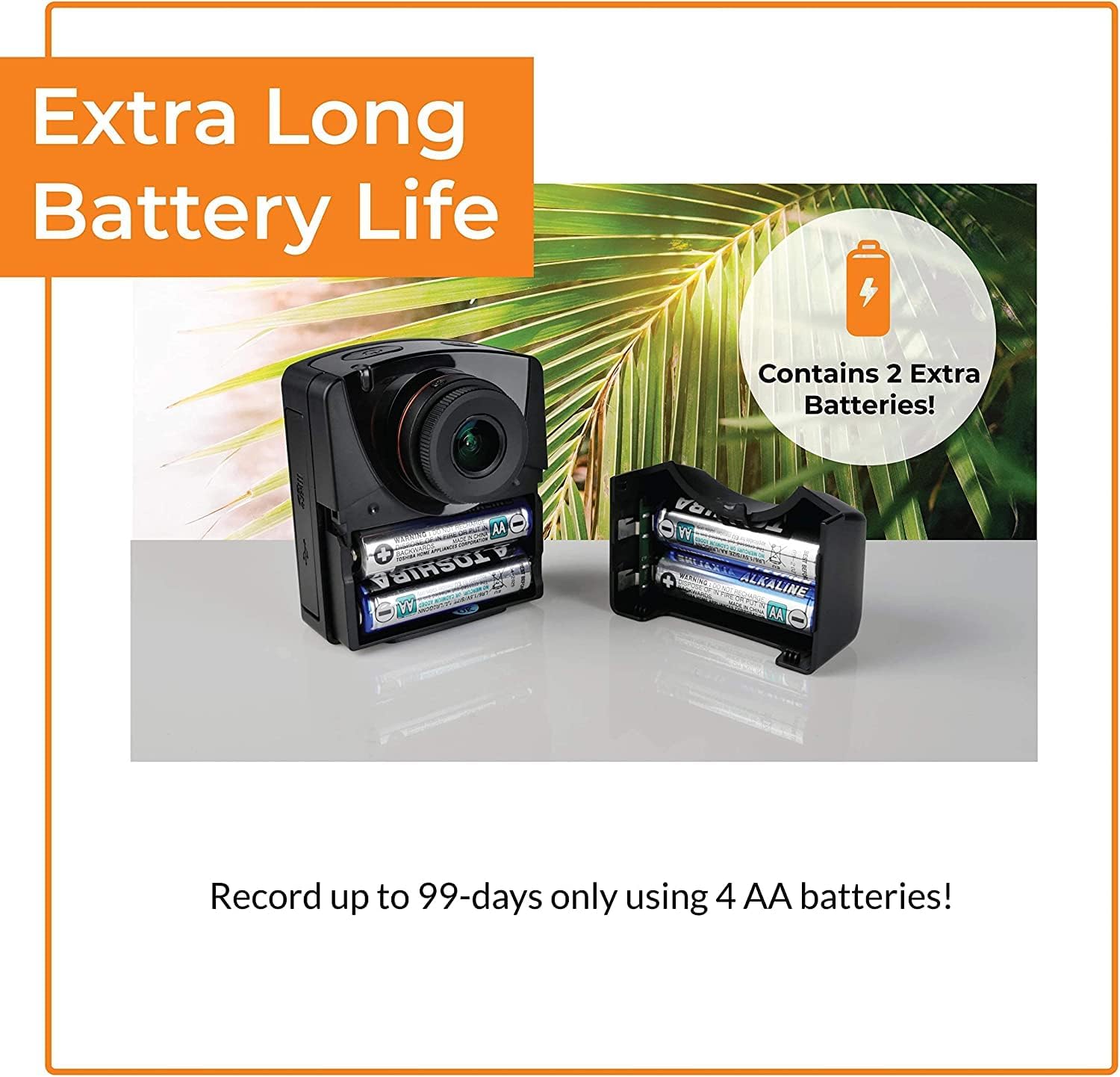
- עקסטענדעד באַטאַרייע לעבן: Up to 99 days of recording with 4 AA batteries (5-minute interval).
- ווערסאַטאַל כאַפּן מאָדעס: Time-lapse, Step Video, and Stop Motion.
- Durable Protection: ATH1000 Waterproof Case for outdoor use.
- פלעקסיבלע סקעדזשולינג: Daily timer and scheduling features to conserve battery.
- סטאָרידזש: שטיצט מיקראָ SD קאַרדס ביז 128 גיגאבייט.
- פּאָרטאַטיוו פּלאַן: Compact and easy to deploy.
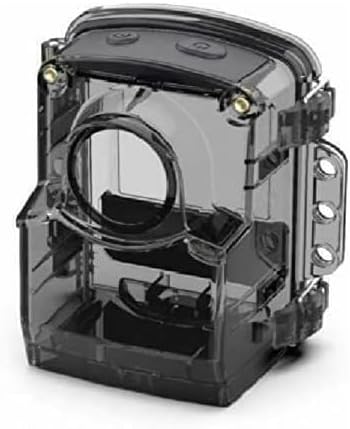
2.3. Camera and Case Components


3. סעטאַפּ
3.1. באַטאַרייע ייַנמאָנטירונג
- Open the battery compartment cover on the side of the TLC2020 camera.
- אַרײַנשטעלן פֿיר (4) AA באַטעריעס, און זיכער מאַכן אַז די פּאָלאַריטעט (+/-) איז ריכטיק.
- פאַרמאַכן די באַטאַרייע אָפּטייל דעקן סיקיורלי.

3.2. מיקראָSD קאַרטל אינסטאַלאַציע
- Locate the MicroSD card slot, typically near the battery compartment.
- Insert a MicroSD card (up to 128GB supported) into the slot until it clicks into place.
- צו אַרויסנעמען, דריק לײַכט די קאַרטל ביז זי שפּרינגט אַרויס.

3.3. ATH1000 Waterproof Case Assembly
- Open the latches on the ATH1000 waterproof case.
- Carefully place the TLC2020 camera inside the case, ensuring it fits snugly.
- Close the latches firmly to seal the case. Verify the seal is complete before exposing to water.
3.4. ערשטע איינשטראָם און סעטטינגס
Press the power button to turn on the camera. The 2-inch screen will display the menu. Use the navigation buttons to set the date, time, and desired capture mode. Refer to the on-screen prompts for guidance.
4. אַפּערייטינג ינסטרוקטיאָנס
4.1. Capture Modes
The TLC2020 offers three distinct capture modes:
- צייט שטרעקע: Captures a sequence of photos at set intervals, automatically compiling them into a video. Ideal for monitoring construction projects, plant growth, or environmental changes.
- Step Video: Records short video clips at selected intervals. The camera combines these clips into a continuous video, suitable for dynamic storytelling or capturing movement.
- Stop Motion: Allows manual capture of multiple photos, one frame at a time. The camera then combines these into an animated video, perfect for creative projects.


4.2. Flexible Scheduling
Utilize the camera's daily timer and scheduling feature to select specific days and hours for recording. This extends battery life by preventing unnecessary recording during inactive periods.

4.3. Video Output and Sharing
Once recording is complete, the camera automatically processes the footage into an MP4 video file. דאס file is instantly available on the MicroSD card for transfer to a computer or other device for sharing.
5. וישאַלט
5.1. באַטערי קער
- Always use fresh, high-quality AA batteries.
- אַרויסנעמען באַטעריעס אויב די קאַמעראַ וועט נישט ווערן גענוצט פֿאַר אַ לענגערע צייט צו פאַרמייַדן ליקאַדזש.
- Monitor battery levels regularly, especially during long-term projects.
5.2. Waterproof Case and Lens Care
- Regularly inspect the ATH1000 case for cracks or damage to maintain its waterproof integrity.
- Clean the case and camera lens with a soft, lint-free cloth. For stubborn dirt, use a mild cleaning solution and ensure no residue remains.
- Avoid abrasive materials that could scratch the lens or case.
5.3. סטאָרידזש
Store the camera and case in a cool, dry place away from direct sunlight and extreme temperatures when not in use.
6. טראָובלעשאָאָטינג
6.1. Camera Not Powering On
- ענשור אַז באַטעריז זענען ריכטיק ינסערטאַד און גאָר באפוילן.
- Try replacing with new batteries.
- באַשטעטיקן אַז דער מאַכט קנעפּל איז פעסט געדריקט.
6.2. קורצע באַטעריע לעבן
- Utilize the flexible scheduling feature to record only during necessary periods.
- Ensure you are using high-quality alkaline or rechargeable AA batteries.
- Extreme cold temperatures can reduce battery performance.
6.3. Condensation Inside Waterproof Case
- Condensation can occur with significant temperature changes and high humidity.
- Place desiccant packets (silica gel) inside the case with the camera to absorb moisture.
- Ensure the camera and case are completely dry before sealing for outdoor use.
6.4. Recording Issues
- Check if the MicroSD card is properly inserted and has sufficient free space.
- Ensure the MicroSD card is formatted correctly (FAT32 or exFAT).
- Verify that the recording schedule and interval settings are configured as desired.
7. ספּעסאַפאַקיישאַנז
| שטריך | באַשרייַבונג |
|---|---|
| סאָרט | בריננאָ |
| מאָדעל נומער | TLC2020 |
| פּונקט וואָג | 1.34 פונט |
| פּראָדוקט דימענשאַנז | 1.5 X 4.5 X 4.5 אינטשעס |
| באַטעריז | 4 אַאַ באַטעריז פארלאנגט |
| קאָליר | שוואַרץ |
| פאָטאָ סענסאָר טעכנאָלאָגיע | קמאָס |
| ווידעא קאַפּטורע רעסאָלוטיאָן | 1080 פּ |
| מאַקסימום פאָקאַל לענג | 19 מילאַמיטערז |
| מאַקסימום עפענונג | 2 f |
| פלאַש זכּרון טיפּ | מיקראָ סד (אַרויף צו 128 גיגאבייט) |
| ווידעא קאַפּטורע פֿאָרמאַט | mp4 |
| שטיצט אַודיאָ פֿאָרמאַט | אַאַק |
| פאַרשטעלן גרייס | 2 אינטשעס |
| קאַנעקטיוויטי טעכנאָלאָגיע | וסב |
8. וואָראַנטי און שטיצן
Brinno is committed to providing reliable products. For detailed warranty information, please refer to the official Brinno website or the warranty card included with your purchase. For technical support, product inquiries, or service, please visit the Brinno support page or contact their customer service directly.
You can find more information and support resources on the official Brinno webפּלאַץ: www.brinno.com
Ask a question about this manual
Ask about setup, troubleshooting, compatibility, parts, safety, or missing instructions. Manuals+ will review the question and use this page’s manual context to help answer it.